Growing List of Updates That Fail When Running Windows Update

BKantor

New member
Local time
1:49 AM
Messages
11
Hello,

I am looking for some help with Windows Update. I have 11 updates that fail every time I try to run them. Every month when Microsoft releases new updates, I will typically have at least one new update that fails and adds to my growing list of failures. I am on a Dell XPS8500 running Windows 7 Professional 64 bit SP1 on an Intel core i7-3770 @ 3.4GHZ processor.

I receive the Windows Update error 80073701 when the updates fail. I have attached a copy of the error along with the Windows Update history showing the 11 failed updates.

I followed the directions on this site and ran the SURT and SFC /Scannow, but afterwards, the updates still failed. The SFC scan completed without finding any integrity violations. As the CBS log was too large to upload to this forum site, I put it up on Dropbox. The link to the files is:


https://www.dropbox.com/sh/d3c1fo8jcbodbz0/AAD0D4Uo1OEfGuASK0hHNvDAa?dl=0

Any help with this issue would be most appreciated. Thanks!

Bruce


Attachments

My Computer My Computer

At a glance

Windows 7 Professional 64 bit SP1intel core i7-3770 @ 3.4GHZ32 GB
Computer type
PC/Desktop
Computer Manufacturer/Model Number
Dell xps8500
OS
Windows 7 Professional 64 bit SP1
CPU
intel core i7-3770 @ 3.4GHZ
Memory
32 GB
Antivirus
Norton
Browser
IE 11
Ouch! - you have over 200 missing Winning Component Keys!
One or two I can deal with - but this number is beyond a manual fix.
I'm afraid that a repair install is going to be your best option unless you have a Restore point that goes back to before the problem started.
 

My Computer My Computer

At a glance

Win 7 x64 Home Premium (and x86 VirtualBox VM...i3 370M/i7 6500U8GB - finally :)/8GBit's an i3, dude!/dual Intel&nVidia
Computer type
Laptop
Computer Manufacturer/Model Number
Asus K52F or Lenovo B51-80
OS
Win 7 x64 Home Premium (and x86 VirtualBox VM)/Win10
CPU
i3 370M/i7 6500U
Motherboard
Asus/Lenovo
Memory
8GB - finally :)/8GB
Graphics Card(s)
it's an i3, dude!/dual Intel&nVidia
Sound Card
onboard
Monitor(s) Displays
15.6" built-in
Screen Resolution
1366x768/1920x1080
Hard Drives
750GB Seagate internal
Sundry external drives attached to other computers on the local network
1TB SSD on the Lenovo
PSU
n/a
Internet Speed
as much as I can get - usually on a dongle/phone, so <1MB/s
Antivirus
MSE/Defender
Browser
IE11/12/Edge/Chrome/FF(if I must)
Noel,

Are there directions on this site on how to do a Repair Install? I did a search and there 59,000 entries matching the phrase! If you can point me in the right direction, I would appreciate it.

With a repair install, will I have to reinstall all of my individual software programs or will the repair leave most of them alone.

Bruce
 

My Computer My Computer

At a glance

Windows 7 Professional 64 bit SP1intel core i7-3770 @ 3.4GHZ32 GB
Computer type
PC/Desktop
Computer Manufacturer/Model Number
Dell xps8500
OS
Windows 7 Professional 64 bit SP1
CPU
intel core i7-3770 @ 3.4GHZ
Memory
32 GB
Antivirus
Norton
Browser
IE 11

My Computer My Computer

At a glance

Windows 10 Pro. 64/ version 1709 Windows 7 Pr...Intel i7-6800K @ 4.3Corsair Platinum 16 gig @2400EVGA GTX 1070 OC
Computer type
PC/Desktop
Computer Manufacturer/Model Number
Home made Desktop
OS
Windows 10 Pro. 64/ version 1709 Windows 7 Pro/64
CPU
Intel i7-6800K @ 4.3
Motherboard
ASUS X-99 Deluxe II
Memory
Corsair Platinum 16 gig @2400
Graphics Card(s)
EVGA GTX 1070 OC
Monitor(s) Displays
Asus 27" LED LCD/VE278Q
Screen Resolution
1920-1080 or 1280-720 HDMI
Hard Drives
INTEL SSD 730-240 Gb Sata 3.0/
PSU
EVGA Platium 1200W
Case
Phanteks Luxe Tempered Glass 8 fans/ one radiator
Cooling
XSPC/ Water Cooled CPU
Keyboard
Das 4 Professional
Mouse
Logitech M705/MX Anywhere 2-S
Internet Speed
100 mbits
Antivirus
Microsoft Security Essentials/ Malwarebytes Premium 3.0/ SAS
Browser
I.E. 11 default/Firefox/ ISP Time Warner Cable/Spectrum
Other Info
LG BluRay Burner/
Sound system-KLipsch-THX/
Icy Dock ssd Hot Swap bays.
Thanks for the link to the document on how to do a Repair Install. I reviewed this (as well as other documents on the web) and it seems like a fairly easy task. However, I'm confused about the media that I need to use for the Repair Install and want to be sure I understand EVERYTHING before proceeding.

I have a Dell machine with Windows Professional SP1 on it. Dell did not provide an installation disk with this machine-- only the ability to create a recovery disk, which I did a while ago. I realize I cannot use this recovery DVD for the repair install. The Windows Seven forum repair instructions note that I need to use the latest official "Windows 7 with SP1 ISO" file and provides links to the site where I can obtain this ISO file. However, the links supplied in the document take me to sites where they indicate that, per Microsoft, those ISO files are no longer available. If the ISO file is no longer available, it sounds like I would need to borrow a retail Windows 7 (SP1) installation disk from someone and use that for the Repair Install (or go out and buy a new copy of Windows 7- an large, unwanted expense). Is this correct?

Assuming it is possible to install from a borrowed Windows 7 Installation disk and assuming I can find someone to borrow one from, after I do the repair, can I use my existing machine's Windows product key. From what I have read online (and I know some articles cannot be trusted), this should NOT be an issue as the OEM Windows 7 product key is permanently associated with the particular machine. I don't know if it makes a difference (some articles seemed to think it would), but the product key on my machine does not have the letters "OEM" on it. So can I register and activate the repaired installation with my existing product key?

Regarding the product key, for kicks, I used one of those product key retrieval programs (ProduKey) and the key it returned for Windows 7 is different from the one on the sticker on my machine. The only Windows installation ever done on this machine was the original one by Dell so I have no idea why they don't match. Should the different numbers concern me or should I just assume the sticker on the machine is correct.

Lastly, having never done this before, I realize I will need to make various adjustments after the repair (the forum instructions point some of those out). However, will I need to reinstall all my software programs or should my expectation be that most of them will still work fine?

Sorry for the length of this post, but I really need to understand this thoroughly before proceeding.

Thanks in advance for your help!

Bruce
 

My Computer My Computer

At a glance

Windows 7 Professional 64 bit SP1intel core i7-3770 @ 3.4GHZ32 GB
Computer type
PC/Desktop
Computer Manufacturer/Model Number
Dell xps8500
OS
Windows 7 Professional 64 bit SP1
CPU
intel core i7-3770 @ 3.4GHZ
Memory
32 GB
Antivirus
Norton
Browser
IE 11
First things first.
Do you have a Microsoft COA sticker on your computer?
Or have you written the key down somewhere so you can use it.
The key that came with the computer is a must or you will have to buy one.
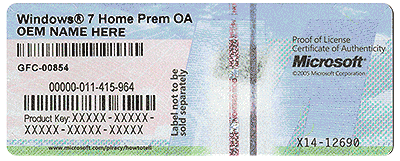
It will have the needed key on it. It looks something like this.
Do Not post the key.

COA-Certificate-of-Authenticity.gif
 

My Computer My Computer

At a glance

Windows 10 Pro. 64/ version 1709 Windows 7 Pr...Intel i7-6800K @ 4.3Corsair Platinum 16 gig @2400EVGA GTX 1070 OC
Computer type
PC/Desktop
Computer Manufacturer/Model Number
Home made Desktop
OS
Windows 10 Pro. 64/ version 1709 Windows 7 Pro/64
CPU
Intel i7-6800K @ 4.3
Motherboard
ASUS X-99 Deluxe II
Memory
Corsair Platinum 16 gig @2400
Graphics Card(s)
EVGA GTX 1070 OC
Monitor(s) Displays
Asus 27" LED LCD/VE278Q
Screen Resolution
1920-1080 or 1280-720 HDMI
Hard Drives
INTEL SSD 730-240 Gb Sata 3.0/
PSU
EVGA Platium 1200W
Case
Phanteks Luxe Tempered Glass 8 fans/ one radiator
Cooling
XSPC/ Water Cooled CPU
Keyboard
Das 4 Professional
Mouse
Logitech M705/MX Anywhere 2-S
Internet Speed
100 mbits
Antivirus
Microsoft Security Essentials/ Malwarebytes Premium 3.0/ SAS
Browser
I.E. 11 default/Firefox/ ISP Time Warner Cable/Spectrum
Other Info
LG BluRay Burner/
Sound system-KLipsch-THX/
Icy Dock ssd Hot Swap bays.
The key you got from Produkey is the factory key they use when mass installing, the one on the COA sticker is the correct one to use. It is your specific key.

From this link,

http://www.sevenforums.com/tutorials/3413-repair-install.html

In the blue box at the top,

   Note
Do a Repair installation if:
  • A System Restore did not help fix your Windows 7.
  • There is no other easier option left that can fix your Windows 7.
  • You DO NOT want to do a Clean reinstall of Windows 7.
  • You DO want to preserve your user accounts, data, programs, and system drivers.


Yes, it will preserve your programs.
 

My Computer My Computer

At a glance

Win 10 Pro x64Intel I5-2500K @3.3GHz16GB G.Skill Ripjaws X (4x4GB)EVGA GeForce 750 Ti SC 2GB
Computer type
PC/Desktop
Computer Manufacturer/Model Number
Self Built
OS
Win 10 Pro x64
CPU
Intel I5-2500K @3.3GHz
Motherboard
Asrock P67 Extreme4
Memory
16GB G.Skill Ripjaws X (4x4GB)
Graphics Card(s)
EVGA GeForce 750 Ti SC 2GB
Sound Card
ASUS Xonar DG 5.1 Channels 24-bit 96KHz PCI Interface Sound
Monitor(s) Displays
auria eq2367
Screen Resolution
1920 x 1080
Hard Drives
250GB Samsung 850 EVO SSD
1TB WD Blue
1TB Hitachi
PSU
SeaSonic X 650W 80 Plus Gold
Case
Corsair Obsidian 750D
Cooling
Corsair H60, Three 140mm case fans
Keyboard
Logitech Wireless Keyboard K520
Mouse
Logitech Wireless Mouse M310
Internet Speed
Wave Broadband ~ 100 dn 5 up
Antivirus
Windows Defender, Malwarebytes Premium
Browser
Edge, IE11, Chrome
Other Info
Laptop specs: HP g7-1365dx /
CPU: AMD A6-3420M APU with Radeon(tm) HD Graphics /
RAM: Crucial 8Gb (2x4Gb) /
SSD: Crucial M4-CT128M4SSD2 ATA Device/ FW 000F /
GFX: AMD Radeon HD 6520G /
OS: Windows 10 Pro x64
Hopefully my last post on the issue!!!

Thanks for your input Laybackbear & Derekimo.

Yes, I have a COA that looks like one of the pictures in your post.I also have located an OEM Retail Installation disk from a friend for Windows Pro SP1 64 bit (the exact same edition I currently have installed on my machine).I see a lot of differences on various online repair install instruction documents, so if someone could please confirm the following points for me, I would really appreciate it.

1) I CAN use someone else’s OEM retail installation disk for the repair install (provided it is the identical edition to my currently installed edition—which it is)

2) After upgrading with my friend's installation disk, the product key on the COA sticker on my Dell computer will allow me to activate the newly repaired installation.

In addition to confirming the above, one last question—I plan to create a restore point prior to the repair install.Should the repair install go badly, can I restore to the state of the machine prior to the repair install using that restore point.Or, does the repair install wipe out the possibility of using a previously set restore point.

I would love to do the repair install in the next couple of days so if someone “in the know” could confirm my understanding of things, I would be very grateful.


Thanks so much!

Bruce
 

My Computer My Computer

At a glance

Windows 7 Professional 64 bit SP1intel core i7-3770 @ 3.4GHZ32 GB
Computer type
PC/Desktop
Computer Manufacturer/Model Number
Dell xps8500
OS
Windows 7 Professional 64 bit SP1
CPU
intel core i7-3770 @ 3.4GHZ
Memory
32 GB
Antivirus
Norton
Browser
IE 11
You're welcome Bruce,

1.) Yes.

2.) Yes.

If I were you I wouldn't count on a restore point for this operation, a system image would be wiser in my opinion if you needed to revert back for some unforeseen reason.
 

My Computer My Computer

At a glance

Win 10 Pro x64Intel I5-2500K @3.3GHz16GB G.Skill Ripjaws X (4x4GB)EVGA GeForce 750 Ti SC 2GB
Computer type
PC/Desktop
Computer Manufacturer/Model Number
Self Built
OS
Win 10 Pro x64
CPU
Intel I5-2500K @3.3GHz
Motherboard
Asrock P67 Extreme4
Memory
16GB G.Skill Ripjaws X (4x4GB)
Graphics Card(s)
EVGA GeForce 750 Ti SC 2GB
Sound Card
ASUS Xonar DG 5.1 Channels 24-bit 96KHz PCI Interface Sound
Monitor(s) Displays
auria eq2367
Screen Resolution
1920 x 1080
Hard Drives
250GB Samsung 850 EVO SSD
1TB WD Blue
1TB Hitachi
PSU
SeaSonic X 650W 80 Plus Gold
Case
Corsair Obsidian 750D
Cooling
Corsair H60, Three 140mm case fans
Keyboard
Logitech Wireless Keyboard K520
Mouse
Logitech Wireless Mouse M310
Internet Speed
Wave Broadband ~ 100 dn 5 up
Antivirus
Windows Defender, Malwarebytes Premium
Browser
Edge, IE11, Chrome
Other Info
Laptop specs: HP g7-1365dx /
CPU: AMD A6-3420M APU with Radeon(tm) HD Graphics /
RAM: Crucial 8Gb (2x4Gb) /
SSD: Crucial M4-CT128M4SSD2 ATA Device/ FW 000F /
GFX: AMD Radeon HD 6520G /
OS: Windows 10 Pro x64
1. You can use any OEM disk that matches your sticker with the key.

2. Yes your key should allow you to activate your system.

3. I don't know the answer about your restore point.

------------
 

My Computer My Computer

At a glance

Windows 10 Pro. 64/ version 1709 Windows 7 Pr...Intel i7-6800K @ 4.3Corsair Platinum 16 gig @2400EVGA GTX 1070 OC
Computer type
PC/Desktop
Computer Manufacturer/Model Number
Home made Desktop
OS
Windows 10 Pro. 64/ version 1709 Windows 7 Pro/64
CPU
Intel i7-6800K @ 4.3
Motherboard
ASUS X-99 Deluxe II
Memory
Corsair Platinum 16 gig @2400
Graphics Card(s)
EVGA GTX 1070 OC
Monitor(s) Displays
Asus 27" LED LCD/VE278Q
Screen Resolution
1920-1080 or 1280-720 HDMI
Hard Drives
INTEL SSD 730-240 Gb Sata 3.0/
PSU
EVGA Platium 1200W
Case
Phanteks Luxe Tempered Glass 8 fans/ one radiator
Cooling
XSPC/ Water Cooled CPU
Keyboard
Das 4 Professional
Mouse
Logitech M705/MX Anywhere 2-S
Internet Speed
100 mbits
Antivirus
Microsoft Security Essentials/ Malwarebytes Premium 3.0/ SAS
Browser
I.E. 11 default/Firefox/ ISP Time Warner Cable/Spectrum
Other Info
LG BluRay Burner/
Sound system-KLipsch-THX/
Icy Dock ssd Hot Swap bays.
HOOORAY!! The Repair Install Worked!!

AWESOMENESS!!!!

Thank you NoelDP, Layback Bear & DerekIMO for all your help!

Your input helped me do a Windows Repair Install successfully. After the repair install, not only are my Windows Update issues gone, but a host of other minor problems are also corrected. So far I have not found any negative issues associated with the repair (although I'm sure I will eventually find some). The repair was quite time consuming (a couple hours to back up system images, a couple hours to do the install and a few hours to do the 239 Windows Updates post repair), but well worth the angst!!!

Thanks again for all your help!

BaK
 

My Computer My Computer

At a glance

Windows 7 Professional 64 bit SP1intel core i7-3770 @ 3.4GHZ32 GB
Computer type
PC/Desktop
Computer Manufacturer/Model Number
Dell xps8500
OS
Windows 7 Professional 64 bit SP1
CPU
intel core i7-3770 @ 3.4GHZ
Memory
32 GB
Antivirus
Norton
Browser
IE 11
You are very welcome BKantor.

Happy computing.
 

My Computer My Computer

At a glance

Windows 10 Pro. 64/ version 1709 Windows 7 Pr...Intel i7-6800K @ 4.3Corsair Platinum 16 gig @2400EVGA GTX 1070 OC
Computer type
PC/Desktop
Computer Manufacturer/Model Number
Home made Desktop
OS
Windows 10 Pro. 64/ version 1709 Windows 7 Pro/64
CPU
Intel i7-6800K @ 4.3
Motherboard
ASUS X-99 Deluxe II
Memory
Corsair Platinum 16 gig @2400
Graphics Card(s)
EVGA GTX 1070 OC
Monitor(s) Displays
Asus 27" LED LCD/VE278Q
Screen Resolution
1920-1080 or 1280-720 HDMI
Hard Drives
INTEL SSD 730-240 Gb Sata 3.0/
PSU
EVGA Platium 1200W
Case
Phanteks Luxe Tempered Glass 8 fans/ one radiator
Cooling
XSPC/ Water Cooled CPU
Keyboard
Das 4 Professional
Mouse
Logitech M705/MX Anywhere 2-S
Internet Speed
100 mbits
Antivirus
Microsoft Security Essentials/ Malwarebytes Premium 3.0/ SAS
Browser
I.E. 11 default/Firefox/ ISP Time Warner Cable/Spectrum
Other Info
LG BluRay Burner/
Sound system-KLipsch-THX/
Icy Dock ssd Hot Swap bays.
Glad to hear it worked!
Good luck.
 

My Computer My Computer

At a glance

Win 7 x64 Home Premium (and x86 VirtualBox VM...i3 370M/i7 6500U8GB - finally :)/8GBit's an i3, dude!/dual Intel&nVidia
Computer type
Laptop
Computer Manufacturer/Model Number
Asus K52F or Lenovo B51-80
OS
Win 7 x64 Home Premium (and x86 VirtualBox VM)/Win10
CPU
i3 370M/i7 6500U
Motherboard
Asus/Lenovo
Memory
8GB - finally :)/8GB
Graphics Card(s)
it's an i3, dude!/dual Intel&nVidia
Sound Card
onboard
Monitor(s) Displays
15.6" built-in
Screen Resolution
1366x768/1920x1080
Hard Drives
750GB Seagate internal
Sundry external drives attached to other computers on the local network
1TB SSD on the Lenovo
PSU
n/a
Internet Speed
as much as I can get - usually on a dongle/phone, so <1MB/s
Antivirus
MSE/Defender
Browser
IE11/12/Edge/Chrome/FF(if I must)
Back
Top