
Gtx 295

Zingfharn

New member
Local time
6:50 PM
Messages
4
I tried to search for an answer to this one, but, well, you can't search for 3 letter words. Grrrrr.

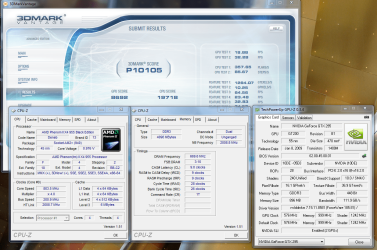
Anyway, without further ado, please check the attachment
To summarise:
3d Mark Vantage P10105.
CPU: 19718
GPU: 8692

System:
Phenom II X4 955 Black Edition, overclocked to 3.8
4Gb DDR3
Gainware GTX 295 (currently standard), 185.81 drivers (more on this later)
Gigabyte GA-MA790XT-UD4P board.
Windows 7 (7100)
650W Corsair PSU


Does this look right? It seems really really slow.
There are a few things that concern me, and I also have some questions.
Can anyone help, please?


"Disable PPU" is NOT enabled when I run the benchmark.

Now, some questions.
1) Does the GPU 3dmark score seem low? I'm looking around and can't see many numbers quoted. The closest I found was a 12k overall, with very similar set up (but no overclocked CPU).

2) I'm running the Windows Vista 64bit 1.85.81 beta drivers on Windows 7 64bit. I've also tried the latest (1.85.85) in both Windows 7 64 and Vista 64 varieties. This setup is the best (marginally - the others came in around 9900).

3) Am I doing something massively wrong?
It seems like I'm only getting the benefit of one card.

I went into the nVidia Control Panel, and selected 'Enable Multi GPU mode', so that should be set.

Look at the CPU-Z images.
It says 'Socket AM2+ (940)', but the memory is DD3. The board says it supports AM3, so why would it say that? I'd consider that the problem, but the CPU score (19k) seems ok to me. Is that right, or is that low too?


Any suggestions are incredibly welcome - this may in fact be a great result, but I have no idea.

Thanks in advan for any help
 

Attachments
  • benchandzs.png
    benchandzs.png
    222 KB · Views: 229

My Computer

OS
Windows 7 64
CPU
AMD Phenom II X4 955 (Black Edition)@3.2 (trying to get 3.8)
Motherboard
Gigabyte MA790XT-UD4P
Memory
Corsair XMS3 DHX 4GB (2x2GB) DDR3 1600C9DHX
Graphics Card(s)
Gainward GTX 295
Hard Drives
500GB seagate + 250 gig western digital.
PSU
650W Corsair TX
It does look very low and your standard clocks on that card are not that great either, plus it looks like PhysX is disabled.

Here are some results from my GTX260 for comparison.

3284d1232469065-post-your-overclock-2009-01-21_022722.jpg
 

My Computer

Computer Manufacturer/Model Number
Home Brew
OS
Windows 7 Ultimate Vista Ultimate x64
CPU
Core 2 Duo E8500 3.16Ghz @ 3.8Ghz
Motherboard
eVGA 750i FTW
Memory
2x2Gigs Patriot PC2-6400 LL
Graphics Card(s)
Inno3D GeForce GTX260 216 SP
Monitor(s) Displays
ASUS VW222U 22" 2ms Response time
Screen Resolution
1680x1050
Hard Drives
SATA 150GB
SATA II 250GB
USB IDE 750GB Ext.
PSU
HYTEC 600W & Thermaltake 650W Toughpower Power Exp
Case
Thermaltake Armor LCS (Liquid Cooling System)
Cooling
Liquid Cooling System
Keyboard
Logitech G15 Gaming Keyboard
Mouse
Logitech G9 Gaming Mouse
thank you!
It turns out that CPU-Z is broken for AM3 sockets - displays the wrong data.
So, the clock speed is fine (every other tools shows 3.8GHz).

The GPU benchmark is still really low, though.
Any ideas about that?
 

My Computer

OS
Windows 7 64
CPU
AMD Phenom II X4 955 (Black Edition)@3.2 (trying to get 3.8)
Motherboard
Gigabyte MA790XT-UD4P
Memory
Corsair XMS3 DHX 4GB (2x2GB) DDR3 1600C9DHX
Graphics Card(s)
Gainward GTX 295
Hard Drives
500GB seagate + 250 gig western digital.
PSU
650W Corsair TX
you could try the 185.85 drivers.......


i would of also looked at the PSU not being up to the task, but those Corsair units are superb..??, how many peripherals are you running..??


:)SK
 

My Computer

Computer Manufacturer/Model Number
myself
OS
SEVEN x64
CPU
Q9450 @ 3.6GHZ 1.34v
Motherboard
ASUS P5K PREMIUM P35
Memory
8GB 1066 buffalo firestix @ 1152mhz CL5
Graphics Card(s)
Sapphire HD 5970 + GTX260 (physX)
Sound Card
Creative X-FI Xtreme Gamer
Monitor(s) Displays
SAMSUNG 20'' & SAMSUNG 23'' (dual screens)
Screen Resolution
2048x1152 & 1680x1050
Hard Drives
1x seagate 160gb IDE & 1x seagate 160gb SATA
PSU
XCILIO 850w (78A)
Case
CM590 1x 120x38mm & 2x92x38mm / 4x 120x25mm
Cooling
AC7 PRO @ 92x38mm blower, Lamptron military bus bay controll
Keyboard
LOGITECH E110
Mouse
logitech NX5
Internet Speed
2MB
Other Info
its a continual ''work in progress''....
thank you!
It turns out that CPU-Z is broken for AM3 sockets, - displays the wrong data.
So, the clock speed is fine (every other tools shows 3.8GHz).

The GPU benchmark is still really low, though.
Any ideas about that?

CPU-Z works fine on AM3 (see picture below showing my 955 AM3), the 800Mhz looks like Cool-n-Quiet is active (or you did not update your BIOS to support the 955 (in which case your CPU is really running at 800Mhz) Most other tools (including the properties page of W7) just report the BIOS settings, CPU-Z reads the real speed.

You should also check the power plan selected in W7, if it's on power save your CPU will run at 800Mhz as well.

Here is my screen from a simular setup Phenom 955 @ 3730 Mhz (I prefer this setting as it allows me to tune my 8Gb DDR3 memory to the max) GA-MA790FXT-UD5P motherboard, GTX275 graphics card (watercooled and overclocked but even so a GTX275 should not be faster than an GTX295)

What are your WEI numbers like?
 

Attachments

  • bench-gtx275.png
    bench-gtx275.png
    388.8 KB · Views: 186
Last edited:

My Computer

OS
W7 RC 7100 64 Bit
CPU
Phenom 955 @ 3730Mhz
Motherboard
Gigabyte GA-MA-790FXT-UD5P
Memory
8Gb OCZ DDR3 @ 1333 7-6-6-24 1T
Graphics Card(s)
GTX275
Sound Card
Onboard
Monitor(s) Displays
Benq 22"
Screen Resolution
1680X1050
Hard Drives
OCZ 60Gb Vertex SSD
Samsung F1 1Tb
WD 750Gb
Seagate 1.5Tb
PSU
OCZ 520W
Case
Custom made, Plexiglass
Cooling
Water
Keyboard
Saitek Eclipse III
Mouse
MX1000
Internet Speed
18Mb/s
you could try the 185.85 drivers.......


i would of also looked at the PSU not being up to the task, but those Corsair units are superb..??, how many peripherals are you running..??


:)SK

I doubt that it would be the PSU, if it was it should crash not slow down. I'm using a 520W (Ocz) PSU with the same CPU but a overclocked GTX 275, 3 HD's, waterpump, 6 Fans, Bluray burner and 8Gb of memory without any problem
 

My Computer

OS
W7 RC 7100 64 Bit
CPU
Phenom 955 @ 3730Mhz
Motherboard
Gigabyte GA-MA-790FXT-UD5P
Memory
8Gb OCZ DDR3 @ 1333 7-6-6-24 1T
Graphics Card(s)
GTX275
Sound Card
Onboard
Monitor(s) Displays
Benq 22"
Screen Resolution
1680X1050
Hard Drives
OCZ 60Gb Vertex SSD
Samsung F1 1Tb
WD 750Gb
Seagate 1.5Tb
PSU
OCZ 520W
Case
Custom made, Plexiglass
Cooling
Water
Keyboard
Saitek Eclipse III
Mouse
MX1000
Internet Speed
18Mb/s
So, I'm out of town right now, and can't check the exact details. I'll update asap.

I was running cool'n'quiet in the first grab, but switched it off for the second (where it still shows 800 mhz, with dmi showing 3.8G).

Skunks: I tried 1.85.81 Vista 64 bit, and 1.85.85 Vista and Windows 7 64 bit. There's virtually no difference (like, 8990 to 8980).
Peripherals: 2 hard drives (1 western digital, 1 seagate), 1 cd/dvd drive, 1 gtx 295, 2x2gb ram, 1 mobo, a pci wifi card (yeah, yeah, I know) and, erm, that's about it.

RJ: I haven't updated my BIOS at all, but bought the computer from a company which had pre-overclocked the card. I hope as part of this service, they ensured the BIOS was up to date. But, I will check upon my return. What do I need to do to update the BIOS? Just download from Gigabyte, and flash it?

WEI numbers are, if memory serves, 6.3 for graphics. They did strike me as somewhat low for the CPU, but I put that down to the phenom.
Again, I'll check as soon as I can (sunday), and post a grab.

Thanks, again, to you both for replying.
 

My Computer

OS
Windows 7 64
CPU
AMD Phenom II X4 955 (Black Edition)@3.2 (trying to get 3.8)
Motherboard
Gigabyte MA790XT-UD4P
Memory
Corsair XMS3 DHX 4GB (2x2GB) DDR3 1600C9DHX
Graphics Card(s)
Gainward GTX 295
Hard Drives
500GB seagate + 250 gig western digital.
PSU
650W Corsair TX
D'oh.
It was the BIOS.
Here's the complete solution for anyone lurking with the same problem.

Read this: Tweaktown: How to update bios on a gigabyte motherboard
I downloaded the latest bios from here:
GIGABYTE - Support&Download - Motherboard - BIOS - GA-MA790XT-UD4P (rev. 1.0)
At the time, F4G was the latest, and the only one which supported the 955.
Interestingly, gigabyte-usa.com did NOT have the latest drivers. Had to go back to source.

My stupid USB card wasn't recognised, so I went into disk management (control panel -> administrative tools -> create and manage partitions), and shrunk the hard drive by 100 meg. Then I created a new partition with the new bit of disk.
I copied the bios file over to that, and rebooted, and qflash could see it.
If you have no idea what that means, go and read the link above. It's very VERY important. Then come back.

Anyway, rebooted and it came up fine. CPU-Z correctly reports 3200.

Now, my problem is that I'm a numpty, and didn't write down the previous overclocked settings. The company I had bought it from had overclocked it in advance (but not updated the BIOS, so the whole thing was worthless anything).
I tried to kick it up to x19 multiplier and it wouldn't boot, so I've got a long night of learning about overclocking ahead of me.
Bah.
RJ, I just noticed you have a very similar card (I have the ud4p), and I also have DD3 memory, so if you can share your bios settings, it might save me some time.
If I work it beforehand, I'll post mine.

Anyway, thank you all once again for all the incredible help, and hopefully my misery will help others.
 
Last edited:

My Computer

OS
Windows 7 64
CPU
AMD Phenom II X4 955 (Black Edition)@3.2 (trying to get 3.8)
Motherboard
Gigabyte MA790XT-UD4P
Memory
Corsair XMS3 DHX 4GB (2x2GB) DDR3 1600C9DHX
Graphics Card(s)
Gainward GTX 295
Hard Drives
500GB seagate + 250 gig western digital.
PSU
650W Corsair TX
Back
Top