Solved GTX 970 overheat

Cris1

A Random
Member
VIP
Local time
4:28 PM
Messages
167
Location
Somewhere your not.
My Zotac GTX 970 AMP Extreme Edition is overheating going over 60°C in the main menu of the game. I determined its temp by Zotac Firestorm. The game that I run is Dying Light, I have 2 fans one at the back and one at the bottom. If I ignore the temp my case would get hot I have examined the video card and the fans if there was any chunks of dust, there was none. Help!
 

My Computer My Computer

Computer type
PC/Desktop
Computer Manufacturer/Model Number
Intel , Gigabyte , NVIDIA
OS
Microsoft Windows 7 Home Premium 64bit
CPU
i7-2600 3.40GHz 3.70 GHz
Motherboard
Gigabyte Technology Co. LTD. Z68AP-D3
Memory
8.00 GB
Graphics Card(s)
GTX 970 Zotac Extreme Core Editon
Sound Card
(1) NVIDIA High Definition Audio (2) NVIDIA High Definitio
Monitor(s) Displays
SHARP AQUOS (Single Monitor)
Screen Resolution
1920x1080
Hard Drives
Western Digital 1TB, SAMSUNG 850 EVO 120GB
PSU
Seasonic X-650 GOLD
Case
Cooler Master K350
Cooling
Silverstone TD03-LITE
Keyboard
Steelseries Gaming Keyboard
Mouse
Logitech G502 Proteous Core
Internet Speed
10MBPS
Antivirus
Malwarebytes Anti-Malware
Browser
Google Chrome
Cris1,
As far as I understand normal GPU temps are always higher than the cpu and only a real concern if above 80c when highly stressed. You may want to add another intake fan or exhaust fan if you have open spots? Or you can look to add higher performance fans to get more air flow.
 

My Computer My Computer

Computer type
PC/Desktop
Computer Manufacturer/Model Number
A blend of brains, brawn and dumb luck.
OS
Windows 7 Ultimate 64
CPU
i7 3770k OC'd 4.6 @ 1.17v, also FX 8120 & i5 miniITX
Motherboard
MSI P67A-GD80 b3
Memory
32 gb G.Skill Sniper DDR3 10-12-12-31 @ 2133
Graphics Card(s)
XFX Radeon 7870 2GB DDR5
Sound Card
Sound Blaster Z Series Card
Monitor(s) Displays
(2) LG LED 23" 1920 x 1080 2ms Monitors via mini d-port
Screen Resolution
1680 X 1050 p
Hard Drives
Samsung 256 gb 830 SSD sata III
(1) 1 tb WD Black
(2) 1 tb Hitachi deskmates/sata II
(2) 1 tb WD green/sata II
(2) 3 tb Seagate Barracuda
(1) 120 gb OCZ Vertex SS
(1) Drobo 5N w/5 Seagate 3tb
PSU
EVGA modular 1000G2 80% gold rating & APC 1200 RS
Case
CoolerMaster Storm Styker
Cooling
7 case fans 140mm & 120mm, NZXT Kraken X60
Keyboard
(2) Logitech Illuminated Keyboards (1) usb (1) wireless
Mouse
Logitech G700 & T-BC21 - nano nx for the laptop
Internet Speed
Basic 120mbps down
Antivirus
Trend Micro Titanium Max Security & Malwarebytes Premium
Browser
Chrome and IE 10
Other Info
5 Noctua case fans + 3 Noctua in p/p on NZXT cooler
Integrated hot swap drive bays for 2.5" Drives
(2) Lite-on dvd/cd/Blu Ray optical 22X
Integrated fan controller and led on/off
HP Officejet Pro 8630 all-n-one
Hot-swappable 3.5" hard drive bay
Netgear Nighthawk router
Asus USB 3 & sata 6 PCIe card
Vantec IDE to sata adptr./Ultra sata adptr
Lenovo L420 i5 lappy with m sata
Drobo 5N advanced NAS
Well there's 2 more fan spots at the front specifically the grill. Can you suggest any budget fans that improves airflow?
 

My Computer My Computer

Computer type
PC/Desktop
Computer Manufacturer/Model Number
Intel , Gigabyte , NVIDIA
OS
Microsoft Windows 7 Home Premium 64bit
CPU
i7-2600 3.40GHz 3.70 GHz
Motherboard
Gigabyte Technology Co. LTD. Z68AP-D3
Memory
8.00 GB
Graphics Card(s)
GTX 970 Zotac Extreme Core Editon
Sound Card
(1) NVIDIA High Definition Audio (2) NVIDIA High Definitio
Monitor(s) Displays
SHARP AQUOS (Single Monitor)
Screen Resolution
1920x1080
Hard Drives
Western Digital 1TB, SAMSUNG 850 EVO 120GB
PSU
Seasonic X-650 GOLD
Case
Cooler Master K350
Cooling
Silverstone TD03-LITE
Keyboard
Steelseries Gaming Keyboard
Mouse
Logitech G502 Proteous Core
Internet Speed
10MBPS
Antivirus
Malwarebytes Anti-Malware
Browser
Google Chrome
I'm a Noctua man but budget they're not. Look for Corsair, Cougar or Bitfenix.
 

My Computer My Computer

Computer type
PC/Desktop
Computer Manufacturer/Model Number
A blend of brains, brawn and dumb luck.
OS
Windows 7 Ultimate 64
CPU
i7 3770k OC'd 4.6 @ 1.17v, also FX 8120 & i5 miniITX
Motherboard
MSI P67A-GD80 b3
Memory
32 gb G.Skill Sniper DDR3 10-12-12-31 @ 2133
Graphics Card(s)
XFX Radeon 7870 2GB DDR5
Sound Card
Sound Blaster Z Series Card
Monitor(s) Displays
(2) LG LED 23" 1920 x 1080 2ms Monitors via mini d-port
Screen Resolution
1680 X 1050 p
Hard Drives
Samsung 256 gb 830 SSD sata III
(1) 1 tb WD Black
(2) 1 tb Hitachi deskmates/sata II
(2) 1 tb WD green/sata II
(2) 3 tb Seagate Barracuda
(1) 120 gb OCZ Vertex SS
(1) Drobo 5N w/5 Seagate 3tb
PSU
EVGA modular 1000G2 80% gold rating & APC 1200 RS
Case
CoolerMaster Storm Styker
Cooling
7 case fans 140mm & 120mm, NZXT Kraken X60
Keyboard
(2) Logitech Illuminated Keyboards (1) usb (1) wireless
Mouse
Logitech G700 & T-BC21 - nano nx for the laptop
Internet Speed
Basic 120mbps down
Antivirus
Trend Micro Titanium Max Security & Malwarebytes Premium
Browser
Chrome and IE 10
Other Info
5 Noctua case fans + 3 Noctua in p/p on NZXT cooler
Integrated hot swap drive bays for 2.5" Drives
(2) Lite-on dvd/cd/Blu Ray optical 22X
Integrated fan controller and led on/off
HP Officejet Pro 8630 all-n-one
Hot-swappable 3.5" hard drive bay
Netgear Nighthawk router
Asus USB 3 & sata 6 PCIe card
Vantec IDE to sata adptr./Ultra sata adptr
Lenovo L420 i5 lappy with m sata
Drobo 5N advanced NAS
I launched the game again and it reached over 68°C this is the actual game itself not in the main menu, is there something wrong?
 

My Computer My Computer

Computer type
PC/Desktop
Computer Manufacturer/Model Number
Intel , Gigabyte , NVIDIA
OS
Microsoft Windows 7 Home Premium 64bit
CPU
i7-2600 3.40GHz 3.70 GHz
Motherboard
Gigabyte Technology Co. LTD. Z68AP-D3
Memory
8.00 GB
Graphics Card(s)
GTX 970 Zotac Extreme Core Editon
Sound Card
(1) NVIDIA High Definition Audio (2) NVIDIA High Definitio
Monitor(s) Displays
SHARP AQUOS (Single Monitor)
Screen Resolution
1920x1080
Hard Drives
Western Digital 1TB, SAMSUNG 850 EVO 120GB
PSU
Seasonic X-650 GOLD
Case
Cooler Master K350
Cooling
Silverstone TD03-LITE
Keyboard
Steelseries Gaming Keyboard
Mouse
Logitech G502 Proteous Core
Internet Speed
10MBPS
Antivirus
Malwarebytes Anti-Malware
Browser
Google Chrome
Maybe because the menu has graphical scenes which causes the card to work like during gameplay.
 

My Computer My Computer

Computer type
PC/Desktop
Computer Manufacturer/Model Number
ASUS X550ZE
OS
Windows 7 Home Premium 64-BIT
CPU
AMD A8 7200P
Motherboard
N/A
Memory
8GB 1600mhz
Graphics Card(s)
Radeon R5 (APU) + Radeon R5 M230 2GB Dual Graphics
Sound Card
Realtek ALC269 with SonicMaster
Monitor(s) Displays
Laptop Display
Screen Resolution
1920 x 1080 @60hz
Hard Drives
WDC WD50 00LPVX-80V0TT0 (500GB)
PSU
Laptop Charger
Mouse
ARMAGGEDON TEXTRON SCORPION 7
Internet Speed
100 mbps DOWN / 50 mbps UP
Antivirus
Windows Defender
Browser
Mozzila FireFox, Valve Steam in-game internet browser
Maybe, but my settings are in the profile of "Balanced" which means 50% Performance and 50% Quality. This still puts my card temp to 60C+
 

My Computer My Computer

Computer type
PC/Desktop
Computer Manufacturer/Model Number
Intel , Gigabyte , NVIDIA
OS
Microsoft Windows 7 Home Premium 64bit
CPU
i7-2600 3.40GHz 3.70 GHz
Motherboard
Gigabyte Technology Co. LTD. Z68AP-D3
Memory
8.00 GB
Graphics Card(s)
GTX 970 Zotac Extreme Core Editon
Sound Card
(1) NVIDIA High Definition Audio (2) NVIDIA High Definitio
Monitor(s) Displays
SHARP AQUOS (Single Monitor)
Screen Resolution
1920x1080
Hard Drives
Western Digital 1TB, SAMSUNG 850 EVO 120GB
PSU
Seasonic X-650 GOLD
Case
Cooler Master K350
Cooling
Silverstone TD03-LITE
Keyboard
Steelseries Gaming Keyboard
Mouse
Logitech G502 Proteous Core
Internet Speed
10MBPS
Antivirus
Malwarebytes Anti-Malware
Browser
Google Chrome
Are you turning your GPU fans up before you even start gaming ?

I always do.

Adding more fans will get rid of the heat, but your card is still gonna get hot no matter what, that`s normal. The GPU does a lot of work during gaming.

That`s one of the reasons I got away from those types of cards. I don`t want heat from my video cards getting pulled up and through my CPU radiator, that makes no sense to me at all.

Some of todays GPU fans don`t even start to spin until the card hits 60, 60 is nothing to worry about.

Add as many fans as you can to the case, I recommend Corsair LED SP`s

Corsair has destroyed their site, but here is the link.

Air Series SP140 LED Green High Static Pressure 140mm Fan
 

My Computer My Computer

Computer type
PC/Desktop
Computer Manufacturer/Model Number
Skylake Special #666
OS
Windows 10 Pro x64
CPU
Intel Core i7 6700K
Motherboard
Asus Sabertooth Z170 Mark 1
Memory
GSkill TridentZ RGB 16GB 3600 16-16-16-36
Graphics Card(s)
EVGA GTX 980 Ti SC x2
Sound Card
Realtek High Definition
Monitor(s) Displays
AOC G2460PG
Screen Resolution
1920 x 1080 144Hz
Hard Drives
Samsung 860 Pro 256GB, Seagate Barracuda 4TB x2
PSU
EVGA 1000 P2, EVGA White Custom Braided Cables
Case
Corsair Vengeance C70 Gunmetal Black
Cooling
Corsair H100i v2, Corsair ML120 x2, Thermal Grizzly Kryonaut
Keyboard
Logitech G910 Orion Spectrum
Mouse
Logitech G700s
Internet Speed
Verizon Fios Quantum Gateway 75/75
Antivirus
Windows Defender, Malwarebytes Free 3.8.3
Browser
Chrome
Other Info
Corsair SP120 x4, LG Blu-ray Drive, Durabrand HT-395 100 Watt Dolby Digital Amp, Corsair H2100 Wireless 7.1 Headset
Do you have any recommended fan curves? I heard that fan curves help alot when gaming.
 

My Computer My Computer

Computer type
PC/Desktop
Computer Manufacturer/Model Number
Intel , Gigabyte , NVIDIA
OS
Microsoft Windows 7 Home Premium 64bit
CPU
i7-2600 3.40GHz 3.70 GHz
Motherboard
Gigabyte Technology Co. LTD. Z68AP-D3
Memory
8.00 GB
Graphics Card(s)
GTX 970 Zotac Extreme Core Editon
Sound Card
(1) NVIDIA High Definition Audio (2) NVIDIA High Definitio
Monitor(s) Displays
SHARP AQUOS (Single Monitor)
Screen Resolution
1920x1080
Hard Drives
Western Digital 1TB, SAMSUNG 850 EVO 120GB
PSU
Seasonic X-650 GOLD
Case
Cooler Master K350
Cooling
Silverstone TD03-LITE
Keyboard
Steelseries Gaming Keyboard
Mouse
Logitech G502 Proteous Core
Internet Speed
10MBPS
Antivirus
Malwarebytes Anti-Malware
Browser
Google Chrome
I don`t use fan curves, I just raise my GPU fan speed to 60/70/80 %

Precision X will do it on it`s own, but I don`t let it.
 

My Computer My Computer

Computer type
PC/Desktop
Computer Manufacturer/Model Number
Skylake Special #666
OS
Windows 10 Pro x64
CPU
Intel Core i7 6700K
Motherboard
Asus Sabertooth Z170 Mark 1
Memory
GSkill TridentZ RGB 16GB 3600 16-16-16-36
Graphics Card(s)
EVGA GTX 980 Ti SC x2
Sound Card
Realtek High Definition
Monitor(s) Displays
AOC G2460PG
Screen Resolution
1920 x 1080 144Hz
Hard Drives
Samsung 860 Pro 256GB, Seagate Barracuda 4TB x2
PSU
EVGA 1000 P2, EVGA White Custom Braided Cables
Case
Corsair Vengeance C70 Gunmetal Black
Cooling
Corsair H100i v2, Corsair ML120 x2, Thermal Grizzly Kryonaut
Keyboard
Logitech G910 Orion Spectrum
Mouse
Logitech G700s
Internet Speed
Verizon Fios Quantum Gateway 75/75
Antivirus
Windows Defender, Malwarebytes Free 3.8.3
Browser
Chrome
Other Info
Corsair SP120 x4, LG Blu-ray Drive, Durabrand HT-395 100 Watt Dolby Digital Amp, Corsair H2100 Wireless 7.1 Headset
What percent should I turn my fan speed up to when the temp hits 60C above. Is it safe to turn the fan speed up to 100% when gaming?
 

My Computer My Computer

Computer type
PC/Desktop
Computer Manufacturer/Model Number
Intel , Gigabyte , NVIDIA
OS
Microsoft Windows 7 Home Premium 64bit
CPU
i7-2600 3.40GHz 3.70 GHz
Motherboard
Gigabyte Technology Co. LTD. Z68AP-D3
Memory
8.00 GB
Graphics Card(s)
GTX 970 Zotac Extreme Core Editon
Sound Card
(1) NVIDIA High Definition Audio (2) NVIDIA High Definitio
Monitor(s) Displays
SHARP AQUOS (Single Monitor)
Screen Resolution
1920x1080
Hard Drives
Western Digital 1TB, SAMSUNG 850 EVO 120GB
PSU
Seasonic X-650 GOLD
Case
Cooler Master K350
Cooling
Silverstone TD03-LITE
Keyboard
Steelseries Gaming Keyboard
Mouse
Logitech G502 Proteous Core
Internet Speed
10MBPS
Antivirus
Malwarebytes Anti-Malware
Browser
Google Chrome
What percent should I turn my fan speed up to when the temp hits 60C above. Is it safe to turn the fan speed up to 100% when gaming?

If you use a tool like MSI Afterburner, EVGA Precision X and most of the other tools, you can set a fan profile that will increase the fan speed as the temp increases. Are you sure you have sufficient air flow in your case? Intake fans to bring in cool air will help a lot. The fans on your card use the air inside your case to keep itself cool. If that is hot air, it can't cool very well.
 

My Computers My Computers

System One System Two

  • Computer type
    PC/Desktop
    Computer Manufacturer/Model Number
    ALWAYS UNDER CONSTRUCTION
    OS
    Windows 11 Pro
    CPU
    Ryzen 9 5900X
    Motherboard
    Asus X570 Crosshair Viii Hero
    Memory
    32GB G Skill DDR4-3600
    Graphics Card(s)
    EVGA RTX 3080 FTW 3 Ultra
    Sound Card
    On Board/Sennheiser PC37X Headset
    Monitor(s) Displays
    3 X Asus 27"
    Screen Resolution
    2560x1440
    Hard Drives
    2 X 1 TB NVME drives
    PSU
    EVGA 850
    Case
    Phanteks Eclipse P400A
    Cooling
    EVGA 280 AIO
    Keyboard
    Logitech G510s/ Logitech G13
    Mouse
    Logitech G502
    Internet Speed
    24/1
    Antivirus
    ESET/MBAM Pro/SAS Pro
    Browser
    Chrome/ Firefox/ Edge
  • Computer type
    Laptop
    System Manufacturer/Model Number
    Dell 16 Plus
    OS
    Windows 11 Pro
    CPU
    Intel Ultra 9 288V
    Memory
    32 GB LPDDR5X 8533
    Monitor(s) Displays
    16" Mini-LED HDR600 Touch 90 Hz
    Screen Resolution
    2560X1600
    Hard Drives
    1 TB NVME
Thanks for the help guys! Will make use of the tips you guys gave me, thanks!
 

My Computer My Computer

Computer type
PC/Desktop
Computer Manufacturer/Model Number
Intel , Gigabyte , NVIDIA
OS
Microsoft Windows 7 Home Premium 64bit
CPU
i7-2600 3.40GHz 3.70 GHz
Motherboard
Gigabyte Technology Co. LTD. Z68AP-D3
Memory
8.00 GB
Graphics Card(s)
GTX 970 Zotac Extreme Core Editon
Sound Card
(1) NVIDIA High Definition Audio (2) NVIDIA High Definitio
Monitor(s) Displays
SHARP AQUOS (Single Monitor)
Screen Resolution
1920x1080
Hard Drives
Western Digital 1TB, SAMSUNG 850 EVO 120GB
PSU
Seasonic X-650 GOLD
Case
Cooler Master K350
Cooling
Silverstone TD03-LITE
Keyboard
Steelseries Gaming Keyboard
Mouse
Logitech G502 Proteous Core
Internet Speed
10MBPS
Antivirus
Malwarebytes Anti-Malware
Browser
Google Chrome
Zotac Firestorm should do whatever you want.
 

My Computer My Computer

Computer type
PC/Desktop
Computer Manufacturer/Model Number
Skylake Special #666
OS
Windows 10 Pro x64
CPU
Intel Core i7 6700K
Motherboard
Asus Sabertooth Z170 Mark 1
Memory
GSkill TridentZ RGB 16GB 3600 16-16-16-36
Graphics Card(s)
EVGA GTX 980 Ti SC x2
Sound Card
Realtek High Definition
Monitor(s) Displays
AOC G2460PG
Screen Resolution
1920 x 1080 144Hz
Hard Drives
Samsung 860 Pro 256GB, Seagate Barracuda 4TB x2
PSU
EVGA 1000 P2, EVGA White Custom Braided Cables
Case
Corsair Vengeance C70 Gunmetal Black
Cooling
Corsair H100i v2, Corsair ML120 x2, Thermal Grizzly Kryonaut
Keyboard
Logitech G910 Orion Spectrum
Mouse
Logitech G700s
Internet Speed
Verizon Fios Quantum Gateway 75/75
Antivirus
Windows Defender, Malwarebytes Free 3.8.3
Browser
Chrome
Other Info
Corsair SP120 x4, LG Blu-ray Drive, Durabrand HT-395 100 Watt Dolby Digital Amp, Corsair H2100 Wireless 7.1 Headset
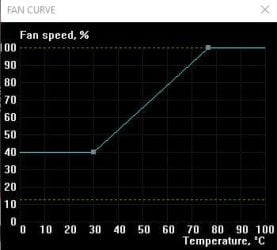
Everyone has gave you great advice, more airflow helps. Your temps in the 60's are fine. As long as you stay below 79 while gaming you are safe. The GPU is actually safe for higher temps but it is best to keep them down. Here is an example of a fan curve for you
 

Attachments

  • zotac fan curve.PNG
    zotac fan curve.PNG
    84.8 KB · Views: 0

My Computer My Computer

Computer type
PC/Desktop
Computer Manufacturer/Model Number
Dude Build
OS
Windows 10 Pro X64
CPU
Intel(R) Core(TM) i5-3570K CPU OC@ 4.5GHZ Turbo
Motherboard
MSI Z77A-G45 Gaming
Memory
8.00 GB DDR3 1600Mhz
Graphics Card(s)
MSI Gaming X GTX 1070
Sound Card
Realtek High Definition
Monitor(s) Displays
Dell S23O9W, HP L1710
Screen Resolution
DELL-1920 x 1080 HP-1280 x1024
Hard Drives
Crucial m4 256 SSD, WD 7200RPM 500GB WD 1TB
PSU
Seasonic X650 GOLD
Case
Zalman Z12
Cooling
Antec Kuhler 920
Keyboard
Logitech
Mouse
MSI DS100 Interceptor
Internet Speed
50 down and 5 up
Antivirus
MSE
Browser
Chrome, IE 11
Other Info
Logitech X-620 Speakers
Here's my fan curve, except there are no curves in mine.;)

x.JPG
 

My Computers My Computers

System One System Two

  • Computer type
    PC/Desktop
    Computer Manufacturer/Model Number
    ALWAYS UNDER CONSTRUCTION
    OS
    Windows 11 Pro
    CPU
    Ryzen 9 5900X
    Motherboard
    Asus X570 Crosshair Viii Hero
    Memory
    32GB G Skill DDR4-3600
    Graphics Card(s)
    EVGA RTX 3080 FTW 3 Ultra
    Sound Card
    On Board/Sennheiser PC37X Headset
    Monitor(s) Displays
    3 X Asus 27"
    Screen Resolution
    2560x1440
    Hard Drives
    2 X 1 TB NVME drives
    PSU
    EVGA 850
    Case
    Phanteks Eclipse P400A
    Cooling
    EVGA 280 AIO
    Keyboard
    Logitech G510s/ Logitech G13
    Mouse
    Logitech G502
    Internet Speed
    24/1
    Antivirus
    ESET/MBAM Pro/SAS Pro
    Browser
    Chrome/ Firefox/ Edge
  • Computer type
    Laptop
    System Manufacturer/Model Number
    Dell 16 Plus
    OS
    Windows 11 Pro
    CPU
    Intel Ultra 9 288V
    Memory
    32 GB LPDDR5X 8533
    Monitor(s) Displays
    16" Mini-LED HDR600 Touch 90 Hz
    Screen Resolution
    2560X1600
    Hard Drives
    1 TB NVME
Download evga 16x it allows you to set cooling to aggressive I have a Titan and I have it holding 63c instead of 90c lol
 

My Computer My Computer

Computer type
Laptop
Computer Manufacturer/Model Number
dell
OS
7 and linux
CPU
dual core
Hard Drives
250 gig
Antivirus
none
Browser
firefox
Back
Top