Guide to trimming W7 down as much as possible?

QuadAllegory

New member
Local time
10:20 PM
Messages
12
I was wondering if there is some sort of guide that tells you how to trim down and remove many unneeded features to make 7 even lighter.

I'm getting ready to install 7048 and just hate that windows auto installs tons of features I don't need or use.

It would be cool if in the installation it asked you if you wanted any of the following features disabled or if you want express install.
 

My Computer My Computer

At a glance

7
OS
7
The installation won't ask you much, and there's not really much to remove. A fresh install(at least w/ my specs) is faster then XP Pro.
 

My Computer My Computer

At a glance

Windows 7 x64 7229Intel Core 2 Duo CPU T64004 GBMobile Intel 45 Chipset
Computer Manufacturer/Model Number
Dell Laptop Studio 1537
OS
Windows 7 x64 7229
CPU
Intel Core 2 Duo CPU T6400
Memory
4 GB
Graphics Card(s)
Mobile Intel 45 Chipset
There are a few guides around for Vista. Most of the hints/tips will also work with 7. I wrote quite a large one myself, but have found, working through it, that many of the "stripping" suggestions certainly do not show an improvement in performance. I am leaving it for now, until the OS matures. I think MS are geting it (almost) right, this time.
 

My Computer My Computer

At a glance

Vista and now 7 in 32 and 64 bit.
Computer Manufacturer/Model Number
Three desktops and one laptop with good specs..
OS
Vista and now 7 in 32 and 64 bit.
I don't see why anybody would want to strip it down at all. :huh: It's already light enough as it is and works great.
 

My Computer My Computer

At a glance

Windows 7 Ultimate x64 SP1Core i7 920 (D0) @ 4Ghz, *26c idle *65c full ...12GB DDR3 Corsair Dominator -CMD12GX3M6A1600C...Zotac Geforce GTX 770
Computer type
PC/Desktop
Computer Manufacturer/Model Number
Airbot 2.0
OS
Windows 7 Ultimate x64 SP1
CPU
Core i7 920 (D0) @ 4Ghz, *26c idle *65c full load on air
Motherboard
Asus P6X58D Premium - Sata 6Gb/s - USB 3.0
Memory
12GB DDR3 Corsair Dominator -CMD12GX3M6A1600C8 at 1600MHz
Graphics Card(s)
Zotac Geforce GTX 770
Sound Card
ASUS Xonar D2X
Monitor(s) Displays
1 LG 24" Flatron W2453V-PF 1 Samsung 24" P2450H both 2ms RT
Screen Resolution
1920x1080@60hz
Hard Drives
1 Samsung 250GB 840 Evo SSD
1 OCZ Vertex2 180GB SSD
1 TB Samsung Spinpoint F1 7200RPM 32MB cache
2 500GB WD Caviar Blacks 7200RPM 32MB cache (WD5001AALS)

Pioneer DVD Burner DVR-S18M
PSU
Corsair HX1000W
Case
Cooler Master HAF 932
Cooling
Case Fans *3 230mm, *1 140mm/CPU - *Tuniq Tower 120 Extreme
Keyboard
Logitech Wireless MK700
Mouse
Logitech Wireless MK700
Internet Speed
DL 15 Mbps UL 0.98 Mbps
Antivirus
None
Browser
Firefox Nightly
Other Info
Processor-7.7 *RAM- 7.9 *Graphics-7.9 *Gaming Graphics- 7.9 *SSD- 7.8 W.E.I final score= 7.7
*Phone- LG Nexus 5
I don't see why anybody would want to strip it down at all.
If you have a Netbook with only 4 Gb SSD card, then it's interesting to have a small installation.


I have tried "vLite". This program is basically for Vista but also works with Windows 7. With this program you can create a new boot DVD without some modules. I have removed:
  1. All foreign language support
  2. Internet Information Server (IIS)
  3. Windows Media Center
  4. and some other smaller parts
With such a boot DVD the installation of Windows 7 shrinks to 2,5 Gb. And this is very interesting for Netbooks with only 4 Gb SSD card.
 

My Computer My Computer

At a glance

Windows XP and 7
OS
Windows XP and 7

My Computer My Computer

At a glance

Windows 7 Ultimate x64 SP1Core i7 920 (D0) @ 4Ghz, *26c idle *65c full ...12GB DDR3 Corsair Dominator -CMD12GX3M6A1600C...Zotac Geforce GTX 770
Computer type
PC/Desktop
Computer Manufacturer/Model Number
Airbot 2.0
OS
Windows 7 Ultimate x64 SP1
CPU
Core i7 920 (D0) @ 4Ghz, *26c idle *65c full load on air
Motherboard
Asus P6X58D Premium - Sata 6Gb/s - USB 3.0
Memory
12GB DDR3 Corsair Dominator -CMD12GX3M6A1600C8 at 1600MHz
Graphics Card(s)
Zotac Geforce GTX 770
Sound Card
ASUS Xonar D2X
Monitor(s) Displays
1 LG 24" Flatron W2453V-PF 1 Samsung 24" P2450H both 2ms RT
Screen Resolution
1920x1080@60hz
Hard Drives
1 Samsung 250GB 840 Evo SSD
1 OCZ Vertex2 180GB SSD
1 TB Samsung Spinpoint F1 7200RPM 32MB cache
2 500GB WD Caviar Blacks 7200RPM 32MB cache (WD5001AALS)

Pioneer DVD Burner DVR-S18M
PSU
Corsair HX1000W
Case
Cooler Master HAF 932
Cooling
Case Fans *3 230mm, *1 140mm/CPU - *Tuniq Tower 120 Extreme
Keyboard
Logitech Wireless MK700
Mouse
Logitech Wireless MK700
Internet Speed
DL 15 Mbps UL 0.98 Mbps
Antivirus
None
Browser
Firefox Nightly
Other Info
Processor-7.7 *RAM- 7.9 *Graphics-7.9 *Gaming Graphics- 7.9 *SSD- 7.8 W.E.I final score= 7.7
*Phone- LG Nexus 5
Although you cold use vLite (this is used to "strip down bloatware in Vista) I don't think this is a useful exercise at the current time -- remember this is a BETA which is effectively the "Ultimate" version.
When W7 hits retail there will be a number of different versions with different features in them so your "trick" probably will be of no use at this time.

However if you still want to try then use vLite to "slipstream" your W7 iso.
vLite - Windows Vista configuration tool

OK I know it's vist but it works for W7 as well -- be careful what you remove - if you remove some core features your system probably won't boot.

I've installed the x-32 version on a small 1GB netbook which came with XP.
Even with the lowly "Atom processor" the netbook ran the full build of 7022 (x-32) absolutely OK so I don't think messing around deleting stuff is worth the effort (unless you are trying to boot on an 8GB usb stick).

Cheers
jimbo
 

My Computer My Computer

At a glance

Linux CENTOS 7 / various Windows OS'es and se...Intel i7 Intel i58GB, 16GBOn Motherboard
Computer type
PC/Desktop
Computer Manufacturer/Model Number
Custom built, several laptops HP/ASUS
OS
Linux CENTOS 7 / various Windows OS'es and servers
CPU
Intel i7 Intel i5
Memory
8GB, 16GB
Graphics Card(s)
On Motherboard
Sound Card
Realtek HD audio
Monitor(s) Displays
Apple Cinema display, Samsung LCD
Screen Resolution
1920 X 1080
Hard Drives
4 X 1TB SATA
Mouse
Toshiba wireless laser
Internet Speed
> 20MB up
remember this is a BETA which is effectively the "Ultimate" version.

When W7 hits retail there will be a number of different versions with different features in them so your "trick" probably will be of no use at this time.
But Vista DVD includes also all versions (Start, Basic, Premium and Ultimate). With vLite you can shrink every version - step by step. I think this should work also with Windows 7 final.

be careful what you remove - if you remove some core features your system probably won't boot.
No problem. Shrink it with "vLite" and burn it to a rewritable DVD. If you find problems (e.g. not booting) burn another DVD.

I've installed the x-32 version on a small 1GB netbook
You mean 1 GB RAM ? That's no problem - runs fine. Problem could be with 4 GB SSD card (hard disk replacement).
 

My Computer My Computer

At a glance

Windows XP and 7
OS
Windows XP and 7
I'm curious to know how far people have slimmed W7.

Here's a working Last Session.ini for 7048 x64 I'd like to share. I'm currently testing it on build 7057 x64 and all seems well so far...

EDIT: I've discovered that the Last Session.ini below does not work with build 7057 x64....it will install but breaks the context menu. I'm working on a new version and i'll post it here if/when i get it working.

Code:
; vLite preset file
;
;#Environment:
; vLite v1.2
; Framework 2.0.50727.42
; Microsoft Windows NT 5.2.3790 Service Pack 2 64-bit
;
;#Target:
; Windows 7 ULTIMATE 64-bit 
; Version 6.1 English (United States)
;
[Compatibility]
ACDSee / XnView
DriveimageXML
DVD Treasury
Halo 2
Hauppauge WinTV
KMPlayer
Logitech Setpoint
MediaPortal
Perfect World Client
Zoom Player
Aero Glass
File and printer sharing (Server)
Internet Information Services (IIS)
Recommended
Scanners and Cameras
Windows Update

[CustomHide]

[Components]
;# Accessories #
Games-Inbox Games
Games-Premium Inbox Games
Welcome Center
;# Hardware Support #
Floppy Disk Support
;# Languages #
Japanese
Korean
Simplified Chinese
Traditional Chinese
;# Multimedia #
Media Center
Music and Video samples
Sample Pictures
;# Network #
Windows Mail
;# Services #
Error Reporting
Offline Files
Windows Search
;# System #
Help
Parental Controls
Run a legacy CPL elevated
Security Center
Software Quality Management (SQM)
User Account Control (UAC)
Windows Defender
Windows Easy Transfer

[Options]
DEP (Data Execution Prevention) = Disabled (AlwaysOff)
User Account Control (UAC) = Disabled
AntiSpyware Realtime Protection = Disabled
AutoPlay = Disabled
Paging Executive = Enabled
Power scheme = Balanced
Power button = Default
Sleep button = Default
Control Panel - Classic View = Enabled
Show hidden files and folders = Yes
Show protected operating system files = Yes
Show extensions for known file types = Yes
IE Phishing Filter = Default
IE Phishing Verification Ballon Tips = Default

[Services]

[Protection]

[Drivers]

[Unattended]
SpecRegional
AcceptEULA
SkipNewUser
SkipProductKey
SkipAutoActivation

[Hotfixes]

[LanguagePacks]
 
Last edited:

My Computer My Computer

At a glance

XP 64
OS
XP 64
Thanks!

I'm curious to know how far people have slimmed W7.

Here's a working Last Session.ini for 7048 x64 I'd like to share. I'm currently testing it on build 7057 x64 and all seems well so far...

Thanks for sharing this Hegel...keep us posted on your progress. :D

I'm also anxious to cut down the footprint of Win 7 to facilitate install on some real lightweight laptops and a few old computers.
 

My Computer My Computer

At a glance

Windows 7 x86 and x64 - RTME6700 (core 2 duo ^3.25GHz) & Pentium M 750 (...4GB and 1.5GBATI 4850 & ATI X300
Computer Manufacturer/Model Number
ASUS p5w-dh deluxe & IBM Thinkpad T43
OS
Windows 7 x86 and x64 - RTM
CPU
E6700 (core 2 duo ^3.25GHz) & Pentium M 750 (1.86GHz)
Motherboard
P5W-DH Deluxe & Thinkpad T43
Memory
4GB and 1.5GB
Graphics Card(s)
ATI 4850 & ATI X300
Well this is what i've discovered so far....

I've tried keeping the changes to a minimum (using build 7057 x64). On one occasion i removed 'Help', on another occasion I removed a language.

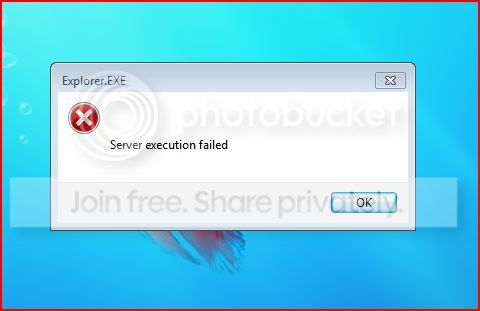
For both examples, installation went ok but when I right-click on the Desktop to access 'screen resolution' or 'personalize', I get this:

Capture-1.jpg


Assuming that vLite had messed with explorer.exe, I tried replacing it in install.wim after vlite has done its thing. I did this for the copy in both the Windows folder and SysWOW64...so they should be untouched. No luck, however.

I don't know enough to understand what's going on here...

I tried asking for help on the vLite forum but, because they consider 7057 to be warez, no discussion is allowed.

Any ideas?
 

My Computer My Computer

At a glance

XP 64
OS
XP 64
Why not try vLighting build 7000 (this IS allowed on the vlite forum) and then "modelling" this for your 7057 build.

There won't be a HUGE amount of difference in the core functionality.

Another possibility is to simply try to "Upgrade" your vlited version of build 7000. I'm not sure if the "Upgrade" would add the removed features back again.

BTW I think you are better off using build 7048 -- it sems snappier (both 32 and 64 bit versions) than 7057.

Note however IE has changed across the builds. The current release level is IE 8 included in build 7057. This would also imply that explorer.exe itself has changed as well so maybe "modding" a 7000 build and upgrading might be the best solution and the manually removing any features you don't want that have been added.


Cheers
jimbo
 

My Computer My Computer

At a glance

Linux CENTOS 7 / various Windows OS'es and se...Intel i7 Intel i58GB, 16GBOn Motherboard
Computer type
PC/Desktop
Computer Manufacturer/Model Number
Custom built, several laptops HP/ASUS
OS
Linux CENTOS 7 / various Windows OS'es and servers
CPU
Intel i7 Intel i5
Memory
8GB, 16GB
Graphics Card(s)
On Motherboard
Sound Card
Realtek HD audio
Monitor(s) Displays
Apple Cinema display, Samsung LCD
Screen Resolution
1920 X 1080
Hard Drives
4 X 1TB SATA
Mouse
Toshiba wireless laser
Internet Speed
> 20MB up
Why not try vLighting build 7000 (this IS allowed on the vlite forum) and then "modelling" this for your 7057 build.

....

Another possibility is to simply try to "Upgrade" your vlited version of build 7000. I'm not sure if the "Upgrade" would add the removed features back again.

....

This would also imply that explorer.exe itself has changed as well


Thanks for your suggestions Jimbo....but there have been no problems in slimming down build 7000 or 7048 - I have managed to cut the ISO down to about 2GB for both these OS's.

Yes, I think you're right....explorer.exe has changed in this build.

I've considered trying to upgrade from my current vLited 7048 but I thinking that if vLite doesn't work for 7057, we'll have no chance slimming down the final product :(
 

My Computer My Computer

At a glance

XP 64
OS
XP 64
After playing around with this for a while, I'm pretty sure vlite cannot be used on build 7057 x64. However, it does work on x86.
 

My Computer My Computer

At a glance

XP 64
OS
XP 64
Back
Top