Possible connection to my PC. Tried as much as I know.

peader99

New member
Local time
2:17 AM
Messages
5
I was on last night and had skype running inbackground and malwarebyes notified me out of nowhere..

10i5khx.jpg


Then I turned off all connections to internet liek browser etc.. restarted to do a netstat.. it showed established on 1 only..to foreign address and ip address:server. Also mouse started being bit unusual.

I ran malwarebytes.. all ok except 2 cookies.
I ran CCleaner all ok
I ran AVG Pro... all ok
I ran Kaspersky rootkit killer.. all ok

I can run dds.scr and give logs if that's what ye do on here.

When I ran netstat this morning, the established connection now does not show from last night,

there are some established but to my ip i think? example connection 127.0.0.1:65400 a port on my PC.. I'm not sure I can screenshot if needed.. also there are a few time_waits..

I've also started using firefox and not IE explorer.. but i tried uninstall IE and it won;t show up in ccleaner to uninstall or in remove programs.

let me know if you look at logs.. .. any help would be great...
 

My Computer My Computer

At a glance

windows 7 pro 64
Computer type
PC/Desktop
OS
windows 7 pro 64
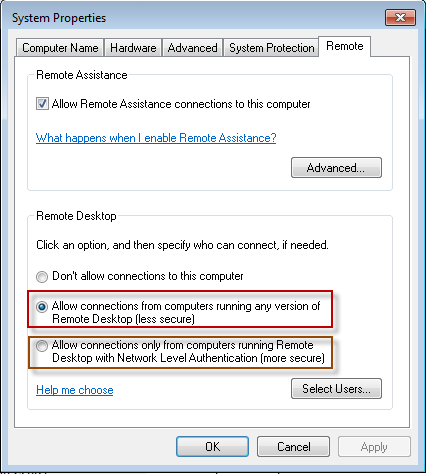
From the sounds of it; it sounds like someone(hacker maybe?) was trying to access your system remotely(well obviously). I would turn of all "remote" connections that allow other people to access your pc remotely; as that is a big security loophole in windows unfortunately; and I dont believe microsoft has ever found a way to completely secure remote connections. So if you ever have to use it; once yer done; disable the connections. I dont recall exactly where it is right now; but there is a check box in the system control panel somewhere that will allow you to disable remote connections.
 

My Computer My Computer

At a glance

Windows 7 ultimate 64-bitIntel I7 2600K 3.4ghzCorsair 16gb ddr3 1600mhzNvidia Geforce gt 430
Computer type
PC/Desktop
Computer Manufacturer/Model Number
custom built
OS
Windows 7 ultimate 64-bit
CPU
Intel I7 2600K 3.4ghz
Motherboard
Asus Evo P8P67
Memory
Corsair 16gb ddr3 1600mhz
Graphics Card(s)
Nvidia Geforce gt 430
Sound Card
Sound Blaster Titanium x-fi pci express
Monitor(s) Displays
Dell E198WFP
Hard Drives
1 western digital 2TB drive.
PSU
Antec 1200 watt
Case
Inwin Dragon Rider
Cooling
6 case supplied cooling fans
Keyboard
logitech mk700
Mouse
logitech m705
Internet Speed
25-50mbps download; 10mbps upload(i think)
Antivirus
avg free 2014
Browser
mozilla firefox
Other Info
Also have a pretty bad speaker setup which is a klipsch promedia 5.1 surround speaker setup with huge subwoofer and lg blu ray player/writer. Also a hp officejet pro 8600 plus wireless all in one and a logitech s7500 webcam.
Hi there.

If you are on a HOME connection with a Router then a hugely valuable piece of infortmation is to look at the router logs. Usually acessible via 192.168.0.1 or 192.168.1.1 and you get the routers control panel.

I think also Virgin UK customers can get at this sort of stuff too. Check the documentation to get access to the routers / tivo / cable box's control panel.

The router should be able to STOP anything incoming before it even GETS to your PC.

I'm not sure though if you are on a CABLE connection whether you can get the same sort of info. -- Sometimes the older slower stuff provides more assistance than the One-click setup of all modern gear.

The other thing is to ensure your INCOMING firewall blocks all ports other than those you specifically need.

Cheers
jimbo
 

My Computer My Computer

At a glance

Linux CENTOS 7 / various Windows OS'es and se...Intel i7 Intel i58GB, 16GBOn Motherboard
Computer type
PC/Desktop
Computer Manufacturer/Model Number
Custom built, several laptops HP/ASUS
OS
Linux CENTOS 7 / various Windows OS'es and servers
CPU
Intel i7 Intel i5
Memory
8GB, 16GB
Graphics Card(s)
On Motherboard
Sound Card
Realtek HD audio
Monitor(s) Displays
Apple Cinema display, Samsung LCD
Screen Resolution
1920 X 1080
Hard Drives
4 X 1TB SATA
Mouse
Toshiba wireless laser
Internet Speed
> 20MB up
Ok, @ matts6887 I went to remote desktop and done opposite to what is in settings here...
remote-desktop-settings.png


@jimbo45

Based in Ireland.. but I'm logged in to router now.
Logs show all from januuarty 1st a lot of info, the next date is may 7th with lots of info which was this morning when it happened?

I'm unsure what logs mean.. its listed from 4:58 this morning up until 5minutes ago, here are the 1st logs since january 1st...

45 May 7 04:58:09 INFO set time to 2014/5/7/ 4:58:9 46 May 7 04:58:12 INFO Internet up, PPPoE LLC, 8/35, IP=(EDITED OUT IP COS DNO IF SHOULD POST IT)
47 May 7 04:58:16 INFO Periodic inform fail 48 May 7 04:58:22 INFO Periodic inform success 49 May 7 04:58:54 INFO received INFORM 50 May 7 05:09:01 INFO received INFORM 51 May 7 05:13:35 INFO received INFORM 52 May 7 05:15:16 INFO received REQUEST 53 May 7 05:15:16 INFO sending ACK to 192.168.1.1

If the connection was established last night on netstat then possibly he has access and will connect later, these logs go up from 53 to 356 so far? Is this normal?
 

My Computer My Computer

At a glance

windows 7 pro 64
Computer type
PC/Desktop
OS
windows 7 pro 64
Here's what I get Googling the IP shown, but may not be correct.
89.28.98.167 | IPLocationTools.com

I pinged 89.28.98.167 and I got the same MBAM warning too but I didn't see it in time to note what app it was from. A second ping did nothing.
 

My Computer My Computer

At a glance

Windows 7 Ultimate X64 SP1Intel i5-2550K, Differing ~4.4-4.8GHz No buil...16GB G.Skill Sniper 1866MHz @ 2133MHz 2x8GBASUS GTX650TIB-DC2OC-2GD5, (650TI Boost)
Computer type
PC/Desktop
Computer Manufacturer/Model Number
Home Built Desktop By DataTech
OS
Windows 7 Ultimate X64 SP1
CPU
Intel i5-2550K, Differing ~4.4-4.8GHz No built in GPU
Motherboard
ASUS P8Z68-V PRO/GEN3
Memory
16GB G.Skill Sniper 1866MHz @ 2133MHz 2x8GB
Graphics Card(s)
ASUS GTX650TIB-DC2OC-2GD5, (650TI Boost)
Sound Card
Onboard Realtek 5-1
Monitor(s) Displays
Samsung P2570HD
Screen Resolution
1920x1080
Hard Drives
Samsung 840 Pro 256GB SSD for OS, 500GB Seagate Constellation (Enterprise drive) for Data
PSU
Corsair HX650W
Case
Inwin Dragon Rider
Cooling
Hyper 212 EVO w/two Noctua fans, push-pull, @1300 RPM
Keyboard
E-Z Eyes, bright yellow keys with large characters
Mouse
steelseries SENSEI Laser Pro Gaming
Internet Speed
48-51Mbs Mbs down, 11 Mbs up Xfinity Cable
Antivirus
Norton Internet Security 2013
Browser
IE 10, Opera, Pale Moon if needed
Other Info
4 case fans, LG BluRay-RE, ASUS DVD-RW, Mr. Fusion power supply, 1.21 gigawatts.

My Computer My Computer

At a glance

Win 10 Pro x64Intel I5-2500K @3.3GHz16GB G.Skill Ripjaws X (4x4GB)EVGA GeForce 750 Ti SC 2GB
Computer type
PC/Desktop
Computer Manufacturer/Model Number
Self Built
OS
Win 10 Pro x64
CPU
Intel I5-2500K @3.3GHz
Motherboard
Asrock P67 Extreme4
Memory
16GB G.Skill Ripjaws X (4x4GB)
Graphics Card(s)
EVGA GeForce 750 Ti SC 2GB
Sound Card
ASUS Xonar DG 5.1 Channels 24-bit 96KHz PCI Interface Sound
Monitor(s) Displays
auria eq2367
Screen Resolution
1920 x 1080
Hard Drives
250GB Samsung 850 EVO SSD
1TB WD Blue
1TB Hitachi
PSU
SeaSonic X 650W 80 Plus Gold
Case
Corsair Obsidian 750D
Cooling
Corsair H60, Three 140mm case fans
Keyboard
Logitech Wireless Keyboard K520
Mouse
Logitech Wireless Mouse M310
Internet Speed
Wave Broadband ~ 100 dn 5 up
Antivirus
Windows Defender, Malwarebytes Premium
Browser
Edge, IE11, Chrome
Other Info
Laptop specs: HP g7-1365dx /
CPU: AMD A6-3420M APU with Radeon(tm) HD Graphics /
RAM: Crucial 8Gb (2x4Gb) /
SSD: Crucial M4-CT128M4SSD2 ATA Device/ FW 000F /
GFX: AMD Radeon HD 6520G /
OS: Windows 10 Pro x64
Skype is a Peer-to-Peer (P2P) application. This means that it connects to a wide variety of IP addresses dynamically in order to establish a connection from one point to another.
Because of this, Skype may sometimes connect to IP addresses that are also known for hosting malicious content such as malware. For this reason, Malwarebytes Anti-Malware may block such connections, though this should not affect your usage of Skype or the quality of communication through Skype itself.


In MBAM 2.0


Clicking the Add Process button allows you to exclude a process which would otherwise be blocked from accessing an internet address. Please note that this option is only functional on Windows Vista Service Pack 2, Windows 7, and Windows 8.x. This is typically of value to users who need to access filesharing and/or peer-to-peer applications. On occasion, IP addresses used by these applications may be blacklisted, so that Malwarebytes Website Protection blocks access to the website as a whole. Excluding the IP address makes the user more vulnerable, as would exclusion of the domain (if the website uses a domain name). Excluding the process — providing that the process is not an internet browser — would allow the P2P application to function without increasing risk.
 

My Computer My Computer

At a glance

Windows 8.1 x64
Computer type
PC/Desktop
OS
Windows 8.1 x64

My Computer My Computer

At a glance

Windows 7 Ultimate 32bit SP1Intel(R) Core(TM)2 Quad CPU @ 2.40GHz, 2400 MHz4 GBATI Radeon HD 2600 Pro
Computer type
PC/Desktop
Computer Manufacturer/Model Number
Bruce ... somewhere in his 40's
OS
Windows 7 Ultimate 32bit SP1
CPU
Intel(R) Core(TM)2 Quad CPU @ 2.40GHz, 2400 MHz
Motherboard
INTEL/D975XBX2
Memory
4 GB
Graphics Card(s)
ATI Radeon HD 2600 Pro
Monitor(s) Displays
Samsung SyncMaster 914v
Screen Resolution
1280 x 1024
Hard Drives
2/500GB each ... ST3500630AS ATA Device.
One is not connected
PSU
Rocketfish 700 W
Case
G.Skill Gigabyte Chassis
Keyboard
Standard PS/2 Keyboard
Mouse
Microsoft PS/2 Mouse
Internet Speed
DSL
Antivirus
Avira Internet Security
Browser
IE 11
Other Info
ATI HDMI Audio
Back
Top