Solved H80i water cooling - Temperature issues

yeah I know im using corsair link already... what im trying to work out is why the bios is displaying n/a n/a n/a and all the mobo tools are reading n/a 0c

I have several programs that are reading a rough cpu temp of 25...but were reading that when the cpu temp still displayed and said 45... on the mobo utility.... now mobo utility is broken....

so to clarify

TRYING TO FIX BIOS AND MOTHERBOARD UTILITIES NOT DISPLAYING TEMPERATURE DATA

Has it occurred to do a Bios Update perhaps ?
 

My Computer My Computer

Computer type
PC/Desktop
Computer Manufacturer/Model Number
CoreI7-6700K MrFingerIII Special Builds
OS
Windows 10 Home Premium 64bit sp1
CPU
Intel I7-6700K @ 4.6 Ghz 1.344 volts everyday OC
Motherboard
Asrock Fatality K6 Z170 Socket 1151
Memory
32GB G-Skill TridentZ 3200mhz 16-18-18-38 DDR4
Graphics Card(s)
Sli Gigabyte Windforce GTX 980 G1
Sound Card
AC97 Creative Rage Tactic 3D Headphones Bluetooth
Monitor(s) Displays
27" Asus ROG Swift PG278Q G-Sync 48" Vizio Smart HD TV
Screen Resolution
2560x1440p 27"- 48" Currently Gaming at 2560x1440p Res 2K
Hard Drives
250GB Samsung Evo840SSD Seagate baracuda 500 GB WD Mybook 500Gb 1TB Seagate Barracuda
PSU
HX1050w Corsair Silver 80plus certified crosfire/sli
Case
Enthod Pro Full Tower
Cooling
Corsair H110i GT 280 mm High Performance WaterBlock
Keyboard
Logitech wireless keyboard
Mouse
Logitech wireless mouse
Internet Speed
Cox Cable 100+ mb
Antivirus
WebRoot Spysweeper with Antivirus
Browser
IE-10, Chrome, Opera
Other Info
My Other Rig is a AMD FX8320E @4.6Ghz 16GB Ballistic Sport Ram
Mobo Asrock Fatality 990FX 120GB OCZ SSD 1TB Seagate Barracuda Corsair H75 Cooling PSU Corsair CX750
GPU GTX Gigabyte 970G1
I actually had to update the bios to even get the computer to work as it was revision 1.00 out of the box and my cpu required 1.30 so all and any issues occurred on latest bios version after I used an old cpu to update the bios and then installed my proper cpu. < that itself was amusing to work out. motherboard wouldn't display anything other then 0x5a error code.

so....bios is fully up to date and it occurred a few days after the update
 

My Computer My Computer

Computer type
PC/Desktop
Computer Manufacturer/Model Number
Self Assembled
OS
Windows 7 ultimate 64 bit
CPU
AMD FX 8120
Motherboard
Asrock 990fx extreme 4
Memory
32 GB ddr3 corsair 1600mhz ram
Graphics Card(s)
Nvidia geforce 660ti
Monitor(s) Displays
24" Wide acer gd245hq + ipex 19"
Screen Resolution
2560*1440 + 1280*1024
Hard Drives
Kingston 120gb ssd 450mb read/write
4X2TB hdds Seagate/Western Digital
PSU
m850w cooler master
Case
600t Corsair
Cooling
h80i water cooler
Mouse
g9x logitech mouse
Antivirus
Zonealarm Extreme Security Suite
Browser
Google Chrome
when was th release date of the new bios? they may be working on another update....
 

My Computer My Computer

Computer type
PC/Desktop
Computer Manufacturer/Model Number
Weekend Warrior Rig
OS
Windows 10 Pro
CPU
Intel i7-3770K 4.4GHz
Motherboard
ASUS P8Z77-V Pro
Memory
8GB G.SKILL Ripjaws 1866 MHz
Graphics Card(s)
EVGA GTX 980 Classified
Monitor(s) Displays
Asus VH238H 23" 2ms
Screen Resolution
1920x1080
Hard Drives
Intel 330 120GB SSD /
WD Blue 1TB /
WD Black 500GB
PSU
Corsair CX750M
Case
NZXT H440
Cooling
Corsair H80i- CPU / Corsair H90- GPU
Keyboard
Logitech K360 LE
Mouse
Logitech G500
Antivirus
Avast
Browser
Chrome
Other Info
1200W 2.1 Surround Sound Audio
2.30 10/16/2013 Instant Flash 2.72MB
 

My Computer My Computer

Computer type
PC/Desktop
Computer Manufacturer/Model Number
Self Assembled
OS
Windows 7 ultimate 64 bit
CPU
AMD FX 8120
Motherboard
Asrock 990fx extreme 4
Memory
32 GB ddr3 corsair 1600mhz ram
Graphics Card(s)
Nvidia geforce 660ti
Monitor(s) Displays
24" Wide acer gd245hq + ipex 19"
Screen Resolution
2560*1440 + 1280*1024
Hard Drives
Kingston 120gb ssd 450mb read/write
4X2TB hdds Seagate/Western Digital
PSU
m850w cooler master
Case
600t Corsair
Cooling
h80i water cooler
Mouse
g9x logitech mouse
Antivirus
Zonealarm Extreme Security Suite
Browser
Google Chrome

My Computer My Computer

Computer type
PC/Desktop
Computer Manufacturer/Model Number
Weekend Warrior Rig
OS
Windows 10 Pro
CPU
Intel i7-3770K 4.4GHz
Motherboard
ASUS P8Z77-V Pro
Memory
8GB G.SKILL Ripjaws 1866 MHz
Graphics Card(s)
EVGA GTX 980 Classified
Monitor(s) Displays
Asus VH238H 23" 2ms
Screen Resolution
1920x1080
Hard Drives
Intel 330 120GB SSD /
WD Blue 1TB /
WD Black 500GB
PSU
Corsair CX750M
Case
NZXT H440
Cooling
Corsair H80i- CPU / Corsair H90- GPU
Keyboard
Logitech K360 LE
Mouse
Logitech G500
Antivirus
Avast
Browser
Chrome
Other Info
1200W 2.1 Surround Sound Audio
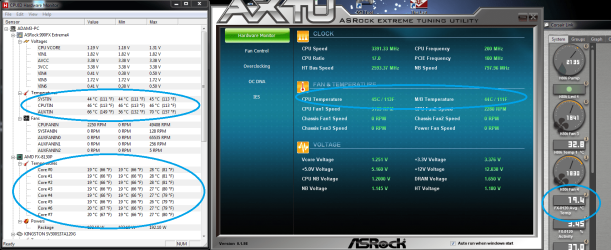
heh........after another bios reset its returned to, mobo utilities = 45c on cpu
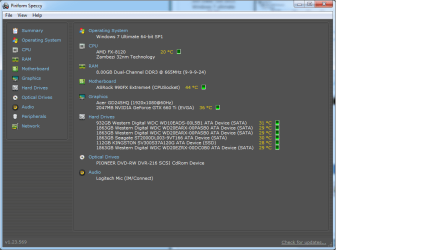
corsair link =19c speccy = 19c, cpu id = 19c on fx8120 and 40c on cpu? lol...
 

Attachments

  • heh.png
    heh.png
    206.6 KB · Views: 1

My Computer My Computer

Computer type
PC/Desktop
Computer Manufacturer/Model Number
Self Assembled
OS
Windows 7 ultimate 64 bit
CPU
AMD FX 8120
Motherboard
Asrock 990fx extreme 4
Memory
32 GB ddr3 corsair 1600mhz ram
Graphics Card(s)
Nvidia geforce 660ti
Monitor(s) Displays
24" Wide acer gd245hq + ipex 19"
Screen Resolution
2560*1440 + 1280*1024
Hard Drives
Kingston 120gb ssd 450mb read/write
4X2TB hdds Seagate/Western Digital
PSU
m850w cooler master
Case
600t Corsair
Cooling
h80i water cooler
Mouse
g9x logitech mouse
Antivirus
Zonealarm Extreme Security Suite
Browser
Google Chrome
additional pic...
 

Attachments

  • heh 2.png
    heh 2.png
    29.5 KB · Views: 1

My Computer My Computer

Computer type
PC/Desktop
Computer Manufacturer/Model Number
Self Assembled
OS
Windows 7 ultimate 64 bit
CPU
AMD FX 8120
Motherboard
Asrock 990fx extreme 4
Memory
32 GB ddr3 corsair 1600mhz ram
Graphics Card(s)
Nvidia geforce 660ti
Monitor(s) Displays
24" Wide acer gd245hq + ipex 19"
Screen Resolution
2560*1440 + 1280*1024
Hard Drives
Kingston 120gb ssd 450mb read/write
4X2TB hdds Seagate/Western Digital
PSU
m850w cooler master
Case
600t Corsair
Cooling
h80i water cooler
Mouse
g9x logitech mouse
Antivirus
Zonealarm Extreme Security Suite
Browser
Google Chrome
heh........after another bios reset its returned to, mobo utilities = 45c on cpu
corsair link =19c speccy = 19c, cpu id = 19c on fx8120 and 40c on cpu? lol...

the mobo utilities one sounds correct. I would go with that one. theres no way a cpu can run at 19c without some sort of crazy cooling
 

My Computer My Computer

Computer type
PC/Desktop
Computer Manufacturer/Model Number
Weekend Warrior Rig
OS
Windows 10 Pro
CPU
Intel i7-3770K 4.4GHz
Motherboard
ASUS P8Z77-V Pro
Memory
8GB G.SKILL Ripjaws 1866 MHz
Graphics Card(s)
EVGA GTX 980 Classified
Monitor(s) Displays
Asus VH238H 23" 2ms
Screen Resolution
1920x1080
Hard Drives
Intel 330 120GB SSD /
WD Blue 1TB /
WD Black 500GB
PSU
Corsair CX750M
Case
NZXT H440
Cooling
Corsair H80i- CPU / Corsair H90- GPU
Keyboard
Logitech K360 LE
Mouse
Logitech G500
Antivirus
Avast
Browser
Chrome
Other Info
1200W 2.1 Surround Sound Audio
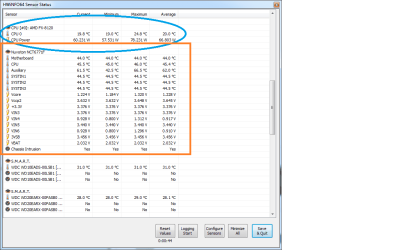
tried another program mentioned on this thread, it also spits out 2 different temps for my cpu.... I mean if my pc stays at 45c even under load with the water cooling then im happy. but its bizzare to see multiple and varying temp readings for one device >.>

-side note- thoughts on what the 'auxillary' sensor is reading? seems hot
 

Attachments

  • heh 3.png
    heh 3.png
    22.2 KB · Views: 1

My Computer My Computer

Computer type
PC/Desktop
Computer Manufacturer/Model Number
Self Assembled
OS
Windows 7 ultimate 64 bit
CPU
AMD FX 8120
Motherboard
Asrock 990fx extreme 4
Memory
32 GB ddr3 corsair 1600mhz ram
Graphics Card(s)
Nvidia geforce 660ti
Monitor(s) Displays
24" Wide acer gd245hq + ipex 19"
Screen Resolution
2560*1440 + 1280*1024
Hard Drives
Kingston 120gb ssd 450mb read/write
4X2TB hdds Seagate/Western Digital
PSU
m850w cooler master
Case
600t Corsair
Cooling
h80i water cooler
Mouse
g9x logitech mouse
Antivirus
Zonealarm Extreme Security Suite
Browser
Google Chrome
tried another program mentioned on this thread, it also spits out 2 different temps for my cpu.... I mean if my pc stays at 45c even under load with the water cooling then im happy. but its bizzare to see multiple and varying temp readings for one device >.>


mine does the same. like I said, AMD is just like that. the ONLY reliable source is the mobo utility. idk y lol. just keep an eye on it. you should see temps about 30C idle and 50C max load.
 

My Computer My Computer

Computer type
PC/Desktop
Computer Manufacturer/Model Number
Weekend Warrior Rig
OS
Windows 10 Pro
CPU
Intel i7-3770K 4.4GHz
Motherboard
ASUS P8Z77-V Pro
Memory
8GB G.SKILL Ripjaws 1866 MHz
Graphics Card(s)
EVGA GTX 980 Classified
Monitor(s) Displays
Asus VH238H 23" 2ms
Screen Resolution
1920x1080
Hard Drives
Intel 330 120GB SSD /
WD Blue 1TB /
WD Black 500GB
PSU
Corsair CX750M
Case
NZXT H440
Cooling
Corsair H80i- CPU / Corsair H90- GPU
Keyboard
Logitech K360 LE
Mouse
Logitech G500
Antivirus
Avast
Browser
Chrome
Other Info
1200W 2.1 Surround Sound Audio
ALL of these are at idle
 

My Computer My Computer

Computer type
PC/Desktop
Computer Manufacturer/Model Number
Self Assembled
OS
Windows 7 ultimate 64 bit
CPU
AMD FX 8120
Motherboard
Asrock 990fx extreme 4
Memory
32 GB ddr3 corsair 1600mhz ram
Graphics Card(s)
Nvidia geforce 660ti
Monitor(s) Displays
24" Wide acer gd245hq + ipex 19"
Screen Resolution
2560*1440 + 1280*1024
Hard Drives
Kingston 120gb ssd 450mb read/write
4X2TB hdds Seagate/Western Digital
PSU
m850w cooler master
Case
600t Corsair
Cooling
h80i water cooler
Mouse
g9x logitech mouse
Antivirus
Zonealarm Extreme Security Suite
Browser
Google Chrome
well... ran a benchmark on my cpu to push it hard and the logs recorded max of 50c or 27c depending on which sensor im looking at... so I spose ill just have to keep an eye on it
 

My Computer My Computer

Computer type
PC/Desktop
Computer Manufacturer/Model Number
Self Assembled
OS
Windows 7 ultimate 64 bit
CPU
AMD FX 8120
Motherboard
Asrock 990fx extreme 4
Memory
32 GB ddr3 corsair 1600mhz ram
Graphics Card(s)
Nvidia geforce 660ti
Monitor(s) Displays
24" Wide acer gd245hq + ipex 19"
Screen Resolution
2560*1440 + 1280*1024
Hard Drives
Kingston 120gb ssd 450mb read/write
4X2TB hdds Seagate/Western Digital
PSU
m850w cooler master
Case
600t Corsair
Cooling
h80i water cooler
Mouse
g9x logitech mouse
Antivirus
Zonealarm Extreme Security Suite
Browser
Google Chrome
well... ran a benchmark on my cpu to push it hard and the logs recorded max of 50c or 27c depending on which sensor im looking at... so I spose ill just have to keep an eye on it


go with the 50C one. 50c sounds perfect!

have you OCed at all ot changed voltages?
 

My Computer My Computer

Computer type
PC/Desktop
Computer Manufacturer/Model Number
Weekend Warrior Rig
OS
Windows 10 Pro
CPU
Intel i7-3770K 4.4GHz
Motherboard
ASUS P8Z77-V Pro
Memory
8GB G.SKILL Ripjaws 1866 MHz
Graphics Card(s)
EVGA GTX 980 Classified
Monitor(s) Displays
Asus VH238H 23" 2ms
Screen Resolution
1920x1080
Hard Drives
Intel 330 120GB SSD /
WD Blue 1TB /
WD Black 500GB
PSU
Corsair CX750M
Case
NZXT H440
Cooling
Corsair H80i- CPU / Corsair H90- GPU
Keyboard
Logitech K360 LE
Mouse
Logitech G500
Antivirus
Avast
Browser
Chrome
Other Info
1200W 2.1 Surround Sound Audio
no overclocking, just w/e motherboard set factory default/bios default. only voltage I checked was for my RAM as a friend used the exact same module types in his computer and his bios set them to 1.50 when they needed 1.650 and it bluescreened the heck out of his pc
 

My Computer My Computer

Computer type
PC/Desktop
Computer Manufacturer/Model Number
Self Assembled
OS
Windows 7 ultimate 64 bit
CPU
AMD FX 8120
Motherboard
Asrock 990fx extreme 4
Memory
32 GB ddr3 corsair 1600mhz ram
Graphics Card(s)
Nvidia geforce 660ti
Monitor(s) Displays
24" Wide acer gd245hq + ipex 19"
Screen Resolution
2560*1440 + 1280*1024
Hard Drives
Kingston 120gb ssd 450mb read/write
4X2TB hdds Seagate/Western Digital
PSU
m850w cooler master
Case
600t Corsair
Cooling
h80i water cooler
Mouse
g9x logitech mouse
Antivirus
Zonealarm Extreme Security Suite
Browser
Google Chrome
Back
Top