Solved Had IE8 now Win Update tried to Install IE11 and doesn't work.

Go ahead and download the Macrium iso you want, mine and whs's are the same, different hosts is all. Using the iso will remove the choice for what to install, it's all in the iso.

This will get you a bootable CD/DVD. If you have a USB flash you can use it too, let us know.

http://www.sevenforums.com/tutorials/548-burn-disc-image-iso-img-file.html

If you mess up with Macrium your data won't be erased unless you have chosen to erase a partition. The image may not work, but you data will remain as it is.
 
Last edited:

My Computer My Computer

At a glance

Windows 7 Ultimate X64 SP1Intel i5-2550K, Differing ~4.4-4.8GHz No buil...16GB G.Skill Sniper 1866MHz @ 2133MHz 2x8GBASUS GTX650TIB-DC2OC-2GD5, (650TI Boost)
Computer type
PC/Desktop
Computer Manufacturer/Model Number
Home Built Desktop By DataTech
OS
Windows 7 Ultimate X64 SP1
CPU
Intel i5-2550K, Differing ~4.4-4.8GHz No built in GPU
Motherboard
ASUS P8Z68-V PRO/GEN3
Memory
16GB G.Skill Sniper 1866MHz @ 2133MHz 2x8GB
Graphics Card(s)
ASUS GTX650TIB-DC2OC-2GD5, (650TI Boost)
Sound Card
Onboard Realtek 5-1
Monitor(s) Displays
Samsung P2570HD
Screen Resolution
1920x1080
Hard Drives
Samsung 840 Pro 256GB SSD for OS, 500GB Seagate Constellation (Enterprise drive) for Data
PSU
Corsair HX650W
Case
Inwin Dragon Rider
Cooling
Hyper 212 EVO w/two Noctua fans, push-pull, @1300 RPM
Keyboard
E-Z Eyes, bright yellow keys with large characters
Mouse
steelseries SENSEI Laser Pro Gaming
Internet Speed
48-51Mbs Mbs down, 11 Mbs up Xfinity Cable
Antivirus
Norton Internet Security 2013
Browser
IE 10, Opera, Pale Moon if needed
Other Info
4 case fans, LG BluRay-RE, ASUS DVD-RW, Mr. Fusion power supply, 1.21 gigawatts.

Attachments

  • 2014-03-18_1651.png
    2014-03-18_1651.png
    59.9 KB · Views: 0

My Computer My Computer

At a glance

Vista, Windows7, Mint Mate, Zorin, Windows 8from 1.6GHz Duo to i7
Computer Manufacturer/Model Number
HP, Dell, Gateway, Toshiba - 4 laptops and 2 desktops
OS
Vista, Windows7, Mint Mate, Zorin, Windows 8
CPU
from 1.6GHz Duo to i7
Monitor(s) Displays
2x HP w2207
Hard Drives
5x HDD, 7x SSD, 12x Externals
Keyboard
with trackball - no mices
Mouse
Trackball mice
Internet Speed
DSL 6000
Hi whs and Britton30,
Thank you for your help & input.
Finally got ImngBurn working, re-installed it and some joy now. :)
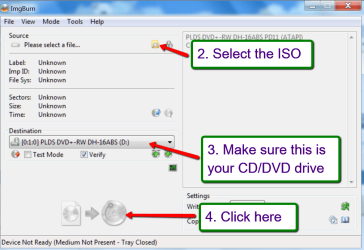
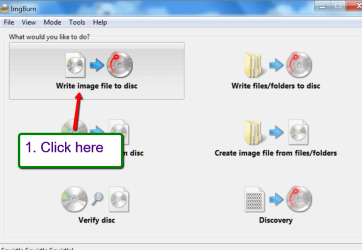
Downloaded your .iso whs and thanks for the screen shot on what to do.
Also, thanks Britton30 for more info on what this .iso does for dummies like me. Haven't done this before, so hope you will hang with me.
And, wondering, do you think I need to create a new partition to store the final image of the drive or would just making a new folder in the data drive be OK?
Thanks for all your help!
Cheers!
 

My Computer My Computer

At a glance

Windows 7 Ultimate 64bit & Windows XP Pro (Du...AMD Phenom II x4 965 3.40GHz8.00 GBAMD Radeon HD 6670
Computer type
PC/Desktop
Computer Manufacturer/Model Number
custom build
OS
Windows 7 Ultimate 64bit & Windows XP Pro (Dual Boot)
CPU
AMD Phenom II x4 965 3.40GHz
Motherboard
ECS A885GM-A2
Memory
8.00 GB
Graphics Card(s)
AMD Radeon HD 6670
Monitor(s) Displays
HP L2445w
Screen Resolution
1920 x 1200
Hard Drives
Samsung SSD 840 series SATA 120GB-Win 7 &
WD 1Tb Caviar Black 7200 rpm-XP Pro
PSU
Cooler Master Elite Power 460 Watt ATX Power Supply
Case
Thermaltake V3 Black Edition ATX Mid Tower
Cooling
Cooler Master Hyper 212 EVO Universal CPU Cooler
Keyboard
Logitech
Internet Speed
30 Mg download-10 Mg upload
Antivirus
Bitdefender & Malwarebytes Pro
Browser
IE 11-because I like a SLOW browser!
A new folder is OK. But it must be on a different physical drive - else it won't help you. If you put the image on the same physical drive as the partition you are imaging, the image goes down when the drive goes down. Best is to place the image an an external drive that is disconnected when not in use.
 

My Computer My Computer

At a glance

Vista, Windows7, Mint Mate, Zorin, Windows 8from 1.6GHz Duo to i7
Computer Manufacturer/Model Number
HP, Dell, Gateway, Toshiba - 4 laptops and 2 desktops
OS
Vista, Windows7, Mint Mate, Zorin, Windows 8
CPU
from 1.6GHz Duo to i7
Monitor(s) Displays
2x HP w2207
Hard Drives
5x HDD, 7x SSD, 12x Externals
Keyboard
with trackball - no mices
Mouse
Trackball mice
Internet Speed
DSL 6000
To reiterate WHS, yes keep images on other physical drives than the one you imaged. I use 2 external drives to store images of my OS and Data drives. One is USB and the other eSATA. If you can, use an eSATA enclosure, they are much faster than USB.
 

My Computer My Computer

At a glance

Windows 7 Ultimate X64 SP1Intel i5-2550K, Differing ~4.4-4.8GHz No buil...16GB G.Skill Sniper 1866MHz @ 2133MHz 2x8GBASUS GTX650TIB-DC2OC-2GD5, (650TI Boost)
Computer type
PC/Desktop
Computer Manufacturer/Model Number
Home Built Desktop By DataTech
OS
Windows 7 Ultimate X64 SP1
CPU
Intel i5-2550K, Differing ~4.4-4.8GHz No built in GPU
Motherboard
ASUS P8Z68-V PRO/GEN3
Memory
16GB G.Skill Sniper 1866MHz @ 2133MHz 2x8GB
Graphics Card(s)
ASUS GTX650TIB-DC2OC-2GD5, (650TI Boost)
Sound Card
Onboard Realtek 5-1
Monitor(s) Displays
Samsung P2570HD
Screen Resolution
1920x1080
Hard Drives
Samsung 840 Pro 256GB SSD for OS, 500GB Seagate Constellation (Enterprise drive) for Data
PSU
Corsair HX650W
Case
Inwin Dragon Rider
Cooling
Hyper 212 EVO w/two Noctua fans, push-pull, @1300 RPM
Keyboard
E-Z Eyes, bright yellow keys with large characters
Mouse
steelseries SENSEI Laser Pro Gaming
Internet Speed
48-51Mbs Mbs down, 11 Mbs up Xfinity Cable
Antivirus
Norton Internet Security 2013
Browser
IE 10, Opera, Pale Moon if needed
Other Info
4 case fans, LG BluRay-RE, ASUS DVD-RW, Mr. Fusion power supply, 1.21 gigawatts.
Thanks Guys,
I'm wondering how much space would be needed or recommended for say three images,
One present,
And two to swap out after loading new programs.... or what is the norm ?
Cheers.
 

My Computer My Computer

At a glance

Win-7-Pro64bit 7-H-Prem-64biti7-5930K 2nd i9-9940x both water blocked VRM'...Trident-z 3200C14 2nd Trident-z 3600C16EVGA 1080ti ftw3 2nd Titan Xp both water blocked
Computer type
PC/Desktop
Computer Manufacturer/Model Number
Custom assembled by me :}
OS
Win-7-Pro64bit 7-H-Prem-64bit
CPU
i7-5930K 2nd i9-9940x both water blocked VRM's too
Motherboard
ASUS SABERTOOTH X99 2nd ASUS x299 Apex
Memory
Trident-z 3200C14 2nd Trident-z 3600C16
Graphics Card(s)
EVGA 1080ti ftw3 2nd Titan Xp both water blocked
Sound Card
Built-in Realtek
Monitor(s) Displays
1-AOC G2460PG 24"G-Sync 144Hz/ 2nd 1-ASUS VG248QE 24" 144Hz
Screen Resolution
1920 x 1080 144Hz
Hard Drives
2-Samsung M.2 Evo & Evo Plus
2-Samsung 850 EVO 500GB SSD's/ 3-2.5 W.D. Black 1tb-&3-1tb/3-3.5 WD Black 1tb hdd's
PSU
EVGA SuperNOVA 1000-P2 2nd 1200-P2
Case
2-Corsair Obsidian Series 450D Black ATX Mid Tower
Cooling
Custom water loops
Keyboard
Logitech G710+/ 2nd Logitech G910
Mouse
2-RedDragon M901 Perdition 16400 dpi Gaming mouse = wired
Internet Speed
Comcast Ping 19ms 89.31mbps download speed 6.12mbps upload
Antivirus
Malwarebytes Pro/ Superantispyware Pro
Browser
FireFox & Pale moon
Other Info
2nd ASUS X299 Apex/Intel i9-9940x with Custom water loop/7H-Prem-x64/Corsair 450D case/Ram Trident-z 3600C16 4x8gb / Samsung970Evo plus 500gb SSD/Dual ssd EZ swap evo/PSU EVGA SuperNova 1200w-P2 80+Platinum/GPU Titan Xp /8-ML-140 on push-pull on 2-280GTX rads
For each image, figure about 65% of the size of the data in the partitions you image. The size of the partition itself is irrelevant.

Example: If you have 100GB of data in a 500GB partition, your image will be appr. 65GBs. That would mean for 3 images you would need appr. 200GBs. Those are all rounded figures which may vary a bit.

I always keep a bunch of images, but that may be only me. I have 2TBs of space on 3 disks for images of the system and the seperate data partitions. I also keep copies of my 6 virtual systems there.
 

My Computer My Computer

At a glance

Vista, Windows7, Mint Mate, Zorin, Windows 8from 1.6GHz Duo to i7
Computer Manufacturer/Model Number
HP, Dell, Gateway, Toshiba - 4 laptops and 2 desktops
OS
Vista, Windows7, Mint Mate, Zorin, Windows 8
CPU
from 1.6GHz Duo to i7
Monitor(s) Displays
2x HP w2207
Hard Drives
5x HDD, 7x SSD, 12x Externals
Keyboard
with trackball - no mices
Mouse
Trackball mice
Internet Speed
DSL 6000
Hi eveyone,
I hope you all know, I'm just a newbie, so need some hand-holding through this process. Have downloaded whs' iso and saved & run, but, what do i do with it now? there are a bunch of files & folders in there? as per Britton30 using the iso will remove the choice for what to install, it's all on the iso. so what an am I to remove on the dowwnload? I can't figerure it out. If anyone has a fix, plase post...
 

My Computer My Computer

At a glance

Windows 7 Ultimate 64bit & Windows XP Pro (Du...AMD Phenom II x4 965 3.40GHz8.00 GBAMD Radeon HD 6670
Computer type
PC/Desktop
Computer Manufacturer/Model Number
custom build
OS
Windows 7 Ultimate 64bit & Windows XP Pro (Dual Boot)
CPU
AMD Phenom II x4 965 3.40GHz
Motherboard
ECS A885GM-A2
Memory
8.00 GB
Graphics Card(s)
AMD Radeon HD 6670
Monitor(s) Displays
HP L2445w
Screen Resolution
1920 x 1200
Hard Drives
Samsung SSD 840 series SATA 120GB-Win 7 &
WD 1Tb Caviar Black 7200 rpm-XP Pro
PSU
Cooler Master Elite Power 460 Watt ATX Power Supply
Case
Thermaltake V3 Black Edition ATX Mid Tower
Cooling
Cooler Master Hyper 212 EVO Universal CPU Cooler
Keyboard
Logitech
Internet Speed
30 Mg download-10 Mg upload
Antivirus
Bitdefender & Malwarebytes Pro
Browser
IE 11-because I like a SLOW browser!
You have to burn the iso to a CD. Best is to use ImgBurn. You can make images with the CD if you boot the PC with the CD. But it's main purpose is for recovery. The images one normally makes with the installed free Macrium.
 

My Computer My Computer

At a glance

Vista, Windows7, Mint Mate, Zorin, Windows 8from 1.6GHz Duo to i7
Computer Manufacturer/Model Number
HP, Dell, Gateway, Toshiba - 4 laptops and 2 desktops
OS
Vista, Windows7, Mint Mate, Zorin, Windows 8
CPU
from 1.6GHz Duo to i7
Monitor(s) Displays
2x HP w2207
Hard Drives
5x HDD, 7x SSD, 12x Externals
Keyboard
with trackball - no mices
Mouse
Trackball mice
Internet Speed
DSL 6000
yes, I have done that whs. so what now? I'm just a dummie here.
 

My Computer My Computer

At a glance

Windows 7 Ultimate 64bit & Windows XP Pro (Du...AMD Phenom II x4 965 3.40GHz8.00 GBAMD Radeon HD 6670
Computer type
PC/Desktop
Computer Manufacturer/Model Number
custom build
OS
Windows 7 Ultimate 64bit & Windows XP Pro (Dual Boot)
CPU
AMD Phenom II x4 965 3.40GHz
Motherboard
ECS A885GM-A2
Memory
8.00 GB
Graphics Card(s)
AMD Radeon HD 6670
Monitor(s) Displays
HP L2445w
Screen Resolution
1920 x 1200
Hard Drives
Samsung SSD 840 series SATA 120GB-Win 7 &
WD 1Tb Caviar Black 7200 rpm-XP Pro
PSU
Cooler Master Elite Power 460 Watt ATX Power Supply
Case
Thermaltake V3 Black Edition ATX Mid Tower
Cooling
Cooler Master Hyper 212 EVO Universal CPU Cooler
Keyboard
Logitech
Internet Speed
30 Mg download-10 Mg upload
Antivirus
Bitdefender & Malwarebytes Pro
Browser
IE 11-because I like a SLOW browser!
Did you install free Macrium on your system.
 

My Computer My Computer

At a glance

Vista, Windows7, Mint Mate, Zorin, Windows 8from 1.6GHz Duo to i7
Computer Manufacturer/Model Number
HP, Dell, Gateway, Toshiba - 4 laptops and 2 desktops
OS
Vista, Windows7, Mint Mate, Zorin, Windows 8
CPU
from 1.6GHz Duo to i7
Monitor(s) Displays
2x HP w2207
Hard Drives
5x HDD, 7x SSD, 12x Externals
Keyboard
with trackball - no mices
Mouse
Trackball mice
Internet Speed
DSL 6000
Hi WHS, yes I have Macrium installed, do I need to do anything further with your iso I burned to CD?
Thanks again for your help. :)
 

My Computer My Computer

At a glance

Windows 7 Ultimate 64bit & Windows XP Pro (Du...AMD Phenom II x4 965 3.40GHz8.00 GBAMD Radeon HD 6670
Computer type
PC/Desktop
Computer Manufacturer/Model Number
custom build
OS
Windows 7 Ultimate 64bit & Windows XP Pro (Dual Boot)
CPU
AMD Phenom II x4 965 3.40GHz
Motherboard
ECS A885GM-A2
Memory
8.00 GB
Graphics Card(s)
AMD Radeon HD 6670
Monitor(s) Displays
HP L2445w
Screen Resolution
1920 x 1200
Hard Drives
Samsung SSD 840 series SATA 120GB-Win 7 &
WD 1Tb Caviar Black 7200 rpm-XP Pro
PSU
Cooler Master Elite Power 460 Watt ATX Power Supply
Case
Thermaltake V3 Black Edition ATX Mid Tower
Cooling
Cooler Master Hyper 212 EVO Universal CPU Cooler
Keyboard
Logitech
Internet Speed
30 Mg download-10 Mg upload
Antivirus
Bitdefender & Malwarebytes Pro
Browser
IE 11-because I like a SLOW browser!
I suggest you test the CD. I always use a little 2GB test partition with some random data which I image and restore to test whether the CD works. In your case it would also help you to understand how the recovery works. You don't want to start learning that when panic strikes.

And make a couple of images to 2 seperate disks. Learn from my mishap ==> http://www.sevenforums.com/general-discussion/325760-partition-vanished.html
 

My Computer My Computer

At a glance

Vista, Windows7, Mint Mate, Zorin, Windows 8from 1.6GHz Duo to i7
Computer Manufacturer/Model Number
HP, Dell, Gateway, Toshiba - 4 laptops and 2 desktops
OS
Vista, Windows7, Mint Mate, Zorin, Windows 8
CPU
from 1.6GHz Duo to i7
Monitor(s) Displays
2x HP w2207
Hard Drives
5x HDD, 7x SSD, 12x Externals
Keyboard
with trackball - no mices
Mouse
Trackball mice
Internet Speed
DSL 6000
Hi WHS,
Yes the CD boots OK.
Going to attach an external USB connected drive an practice with the software.
I know what you mean about trying to learn in the midst of panic! Been there myself a time or two.
Will check back later to let you know or if I have anymore questiond.
Cheers!
 

My Computer My Computer

At a glance

Windows 7 Ultimate 64bit & Windows XP Pro (Du...AMD Phenom II x4 965 3.40GHz8.00 GBAMD Radeon HD 6670
Computer type
PC/Desktop
Computer Manufacturer/Model Number
custom build
OS
Windows 7 Ultimate 64bit & Windows XP Pro (Dual Boot)
CPU
AMD Phenom II x4 965 3.40GHz
Motherboard
ECS A885GM-A2
Memory
8.00 GB
Graphics Card(s)
AMD Radeon HD 6670
Monitor(s) Displays
HP L2445w
Screen Resolution
1920 x 1200
Hard Drives
Samsung SSD 840 series SATA 120GB-Win 7 &
WD 1Tb Caviar Black 7200 rpm-XP Pro
PSU
Cooler Master Elite Power 460 Watt ATX Power Supply
Case
Thermaltake V3 Black Edition ATX Mid Tower
Cooling
Cooler Master Hyper 212 EVO Universal CPU Cooler
Keyboard
Logitech
Internet Speed
30 Mg download-10 Mg upload
Antivirus
Bitdefender & Malwarebytes Pro
Browser
IE 11-because I like a SLOW browser!

My Computer My Computer

At a glance

Vista, Windows7, Mint Mate, Zorin, Windows 8from 1.6GHz Duo to i7
Computer Manufacturer/Model Number
HP, Dell, Gateway, Toshiba - 4 laptops and 2 desktops
OS
Vista, Windows7, Mint Mate, Zorin, Windows 8
CPU
from 1.6GHz Duo to i7
Monitor(s) Displays
2x HP w2207
Hard Drives
5x HDD, 7x SSD, 12x Externals
Keyboard
with trackball - no mices
Mouse
Trackball mice
Internet Speed
DSL 6000
Hi WHS,
was going to try your advice and test the CD and get familiar with the recovery process, but it seems that the Image backup for files & folders option is not available in the free version.
The CD does seem to boot ok, but I am hesitant to try a restore of an image when the system appears to be working great now that you all gave such good help getting it straightened out. Thanks to everyone here, for helping me fix all the earlier problems. :D

Cheers!
 

My Computer My Computer

At a glance

Windows 7 Ultimate 64bit & Windows XP Pro (Du...AMD Phenom II x4 965 3.40GHz8.00 GBAMD Radeon HD 6670
Computer type
PC/Desktop
Computer Manufacturer/Model Number
custom build
OS
Windows 7 Ultimate 64bit & Windows XP Pro (Dual Boot)
CPU
AMD Phenom II x4 965 3.40GHz
Motherboard
ECS A885GM-A2
Memory
8.00 GB
Graphics Card(s)
AMD Radeon HD 6670
Monitor(s) Displays
HP L2445w
Screen Resolution
1920 x 1200
Hard Drives
Samsung SSD 840 series SATA 120GB-Win 7 &
WD 1Tb Caviar Black 7200 rpm-XP Pro
PSU
Cooler Master Elite Power 460 Watt ATX Power Supply
Case
Thermaltake V3 Black Edition ATX Mid Tower
Cooling
Cooler Master Hyper 212 EVO Universal CPU Cooler
Keyboard
Logitech
Internet Speed
30 Mg download-10 Mg upload
Antivirus
Bitdefender & Malwarebytes Pro
Browser
IE 11-because I like a SLOW browser!
Hi Frogpond,
Your very welcome,
You can try ie11 or not it really isn't all that much of a big deal yet,
If Microsoft issues a ie12 I would go for ie11 ;)
It's best to stay one version back,
The latest version usually have more irritating bugs/ quirks... than previous versions
Come back anytime,
Cheers.
 

My Computer My Computer

At a glance

Win-7-Pro64bit 7-H-Prem-64biti7-5930K 2nd i9-9940x both water blocked VRM'...Trident-z 3200C14 2nd Trident-z 3600C16EVGA 1080ti ftw3 2nd Titan Xp both water blocked
Computer type
PC/Desktop
Computer Manufacturer/Model Number
Custom assembled by me :}
OS
Win-7-Pro64bit 7-H-Prem-64bit
CPU
i7-5930K 2nd i9-9940x both water blocked VRM's too
Motherboard
ASUS SABERTOOTH X99 2nd ASUS x299 Apex
Memory
Trident-z 3200C14 2nd Trident-z 3600C16
Graphics Card(s)
EVGA 1080ti ftw3 2nd Titan Xp both water blocked
Sound Card
Built-in Realtek
Monitor(s) Displays
1-AOC G2460PG 24"G-Sync 144Hz/ 2nd 1-ASUS VG248QE 24" 144Hz
Screen Resolution
1920 x 1080 144Hz
Hard Drives
2-Samsung M.2 Evo & Evo Plus
2-Samsung 850 EVO 500GB SSD's/ 3-2.5 W.D. Black 1tb-&3-1tb/3-3.5 WD Black 1tb hdd's
PSU
EVGA SuperNOVA 1000-P2 2nd 1200-P2
Case
2-Corsair Obsidian Series 450D Black ATX Mid Tower
Cooling
Custom water loops
Keyboard
Logitech G710+/ 2nd Logitech G910
Mouse
2-RedDragon M901 Perdition 16400 dpi Gaming mouse = wired
Internet Speed
Comcast Ping 19ms 89.31mbps download speed 6.12mbps upload
Antivirus
Malwarebytes Pro/ Superantispyware Pro
Browser
FireFox & Pale moon
Other Info
2nd ASUS X299 Apex/Intel i9-9940x with Custom water loop/7H-Prem-x64/Corsair 450D case/Ram Trident-z 3600C16 4x8gb / Samsung970Evo plus 500gb SSD/Dual ssd EZ swap evo/PSU EVGA SuperNova 1200w-P2 80+Platinum/GPU Titan Xp /8-ML-140 on push-pull on 2-280GTX rads
Hi WHS,
was going to try your advice and test the CD and get familiar with the recovery process, but it seems that the Image backup for files & folders option is not available in the free version.
The CD does seem to boot ok, but I am hesitant to try a restore of an image when the system appears to be working great now that you all gave such good help getting it straightened out. Thanks to everyone here, for helping me fix all the earlier problems. :D

Cheers!
That is correct. You cannot backup individual files and folders with the free version. For a recovery test, you don't use your system partition. Make a small 1 or 2GB partition, populate it with some random data and test the imaging and recovery on that.
 

My Computer My Computer

At a glance

Vista, Windows7, Mint Mate, Zorin, Windows 8from 1.6GHz Duo to i7
Computer Manufacturer/Model Number
HP, Dell, Gateway, Toshiba - 4 laptops and 2 desktops
OS
Vista, Windows7, Mint Mate, Zorin, Windows 8
CPU
from 1.6GHz Duo to i7
Monitor(s) Displays
2x HP w2207
Hard Drives
5x HDD, 7x SSD, 12x Externals
Keyboard
with trackball - no mices
Mouse
Trackball mice
Internet Speed
DSL 6000
Hi WHS,
Thanks for your reply to my last post. Would really like to do the test. Just wondering which partition I should create the small 1-2 GB partition to do it. Sorry if I seem a little dense. Here is a screenshot of my hard drives and partitions as they exist now in Macrium. Any suggestions are appreciated. Thank you! :)
 

Attachments

  • Macrium Drives-Partitions_.jpg
    Macrium Drives-Partitions_.jpg
    139.7 KB · Views: 3

My Computer My Computer

At a glance

Windows 7 Ultimate 64bit & Windows XP Pro (Du...AMD Phenom II x4 965 3.40GHz8.00 GBAMD Radeon HD 6670
Computer type
PC/Desktop
Computer Manufacturer/Model Number
custom build
OS
Windows 7 Ultimate 64bit & Windows XP Pro (Dual Boot)
CPU
AMD Phenom II x4 965 3.40GHz
Motherboard
ECS A885GM-A2
Memory
8.00 GB
Graphics Card(s)
AMD Radeon HD 6670
Monitor(s) Displays
HP L2445w
Screen Resolution
1920 x 1200
Hard Drives
Samsung SSD 840 series SATA 120GB-Win 7 &
WD 1Tb Caviar Black 7200 rpm-XP Pro
PSU
Cooler Master Elite Power 460 Watt ATX Power Supply
Case
Thermaltake V3 Black Edition ATX Mid Tower
Cooling
Cooler Master Hyper 212 EVO Universal CPU Cooler
Keyboard
Logitech
Internet Speed
30 Mg download-10 Mg upload
Antivirus
Bitdefender & Malwarebytes Pro
Browser
IE 11-because I like a SLOW browser!
Just shrink 2GB e.g. from Data (E) and create a new partition from the 2GB of unallocated space (all in Disk Management).

Then copy a few files into there (pictures are good). Then make an image of that 2GB partition. Delete a couple of the pics from the 2GB partition (after you imaged it) and restore the partition. If the pictures are back, you kmow it worked - and you have learned something. ;)
 

My Computer My Computer

At a glance

Vista, Windows7, Mint Mate, Zorin, Windows 8from 1.6GHz Duo to i7
Computer Manufacturer/Model Number
HP, Dell, Gateway, Toshiba - 4 laptops and 2 desktops
OS
Vista, Windows7, Mint Mate, Zorin, Windows 8
CPU
from 1.6GHz Duo to i7
Monitor(s) Displays
2x HP w2207
Hard Drives
5x HDD, 7x SSD, 12x Externals
Keyboard
with trackball - no mices
Mouse
Trackball mice
Internet Speed
DSL 6000
Back
Top