Solved Half of desktop icons mysteriously disappeared

jetsetter883

New member
Local time
4:11 PM
Messages
11
Hi guys,
I searched long and hard on Google for a solution to this and while there are several instances of this happening I am not sure if any of the solutions pertain to my situation.

I purchased a new computer recently and the other day decided to migrate some of my old data to the new system via a USB enclosure housing my old hard drive. I was moving files all over the place and when I was finally finished copying the files over I went back to my desktop to be greeted with about half of the icons I had from two hours earlier. I am pretty tech savvy so I don't think I did this by accident.

Now it's worth mentioning that the missing desktop files are still present in the Desktop folder in Windows Explorer, but have somehow become absent on the desktop itself. Another factor to consider is that I was doing these file migrations late Sunday night. I have read that Windows 7 has some sort of option enabled by default that purges "unused" icons every Monday at 1AM. Could this have been what happened? It's a brand new PC! How does Windows know I wasn't going to use those shortcuts?!

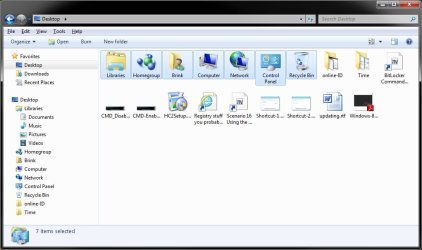
Anyway, please see the following screenshots of the Desktop folders. The first one shows the icons that were on my Desktop before the half disappeared. And the second screenshot corresponds with how the Desktop looks now. And I am actually not sure why there are two Desktop folder instances.. pretty sure I only created the one user that it forced me to during setup. Anyway, sorry for this being long but I'd really appreciate some insight on how to remedy this and how to prevent it from happening again!

2mwz0oi.jpg


1ju6qd.jpg
 

My Computer My Computer

At a glance

Wndows 7 Home Premium 64 bit
OS
Wndows 7 Home Premium 64 bit
Hello Jetsetter, and welcome to Seven Forums.

That new feature is System Maintenance Troubleshooter. You could try turning it off, but I don't think that is your issue.
Are you talking about the same 7 icons I have highlighted in my common Desktop folder below are the ones that are missing for you? If so, then those "Desktop Icons" will not show on your desktop unless you have them turned on. Even when turned off, they will always show in the common Desktop folder (your 1st screenshot's location) and never in your C:\Users\(user-name)\Desktop folder (your 2nd screenshot's location).
Hope this helps,
Shawn
 

My Computer My Computer

At a glance

64-bit Windows 11 Pro for WorkstationsIntel i7-8700K OC'd to 5 GHz64 GB (4x16GB) G.SKILL TridentZ RGB DDR4 3600...ASUS ROG-STRIX-GTX1080TI-O11G-GAMING
Computer type
PC/Desktop
Computer Manufacturer/Model Number
Self built custom
OS
64-bit Windows 11 Pro for Workstations
CPU
Intel i7-8700K OC'd to 5 GHz
Motherboard
ASUS ROG Maximus XI Formula Z390
Memory
64 GB (4x16GB) G.SKILL TridentZ RGB DDR4 3600 MHz
Graphics Card(s)
ASUS ROG-STRIX-GTX1080TI-O11G-GAMING
Sound Card
Integrated
Monitor(s) Displays
2 x Samsung Odyssey G7 27"
Screen Resolution
2560x1440
Hard Drives
1TB Samsung 990 PRO M.2,
4TB Samsung 990 PRO PRO M.2,
TerraMaster F8 SSD Plus NAS
PSU
Seasonic Prime Titanium 850W
Case
Thermaltake Core P3
Cooling
Corsair Hydro H115i
Keyboard
Logitech wireless K800
Mouse
Logitech MX Master 4
Internet Speed
2 Gb/s Download and 100 Mb/s Upload
Antivirus
Malwarebyte Anti-Malware Premium
Browser
Google Chrome
Other Info
Logitech Z625 speaker system,
Logitech BRIO 4K Pro webcam,
HP Color LaserJet Pro MFP M477fdn,
APC SMART-UPS RT 1000 XL - SURT1000XLI,
Galaxy S23 Plus phone
Hi Shawn,

Yes, the missing icons all appear to be Windows icons such as the ones you highlighted. Any idea how these could have disappeared? They must have been turned on at some point as they were showing on the desktop for about a week before disappearing. Can't imagine how I might have inadvertently turned them off?

Also, please tell me what is the difference between the Common desktop folder and the User desktop folder? It's almost as if I started out with the Common desktop, did my file migrations, and afterward ended up with the 'User' desktop! And like I said as far as I know the only User is myself (Windows forced me to create this User during Setup).
 

My Computer My Computer

At a glance

Wndows 7 Home Premium 64 bit
OS
Wndows 7 Home Premium 64 bit
Did that get them back for you?

It just depends on which one you have selected in the Windows Explorer navigation pane. These two locations in the navigation pane both lead to the same C:\Users\(user-name) folder, but the one under Favorites just happens to show the default "Desktop Icons" that only appear on your desktop when turned on. This is normal though.

Desktop locations:

C:\Users\(user-name)\Desktop = shows only on that user's desktop

C:\Users\Public\Desktop (hidden) = shows on all user's desktops


C:\Users\Default\Desktop (hidden) = shows on newly created user's desktops
 

My Computer My Computer

At a glance

64-bit Windows 11 Pro for WorkstationsIntel i7-8700K OC'd to 5 GHz64 GB (4x16GB) G.SKILL TridentZ RGB DDR4 3600...ASUS ROG-STRIX-GTX1080TI-O11G-GAMING
Computer type
PC/Desktop
Computer Manufacturer/Model Number
Self built custom
OS
64-bit Windows 11 Pro for Workstations
CPU
Intel i7-8700K OC'd to 5 GHz
Motherboard
ASUS ROG Maximus XI Formula Z390
Memory
64 GB (4x16GB) G.SKILL TridentZ RGB DDR4 3600 MHz
Graphics Card(s)
ASUS ROG-STRIX-GTX1080TI-O11G-GAMING
Sound Card
Integrated
Monitor(s) Displays
2 x Samsung Odyssey G7 27"
Screen Resolution
2560x1440
Hard Drives
1TB Samsung 990 PRO M.2,
4TB Samsung 990 PRO PRO M.2,
TerraMaster F8 SSD Plus NAS
PSU
Seasonic Prime Titanium 850W
Case
Thermaltake Core P3
Cooling
Corsair Hydro H115i
Keyboard
Logitech wireless K800
Mouse
Logitech MX Master 4
Internet Speed
2 Gb/s Download and 100 Mb/s Upload
Antivirus
Malwarebyte Anti-Malware Premium
Browser
Google Chrome
Other Info
Logitech Z625 speaker system,
Logitech BRIO 4K Pro webcam,
HP Color LaserJet Pro MFP M477fdn,
APC SMART-UPS RT 1000 XL - SURT1000XLI,
Galaxy S23 Plus phone
Hi Shawn, I am a bit confused on the solution for restoring these icons. I read and re-read your message but I am not sure what action to take? These icons were turned on when I originally booted up the system but somehow got turned off. If the solution is simply to re-enable them, do you know how they could have just magically turned off? Just want to make sure this won't be a continuous problem. I made a few registry tweaks during initial Win 7 setup but none that I imagine would affect the desktop. Perhaps I was wrong though!
 

My Computer My Computer

At a glance

Wndows 7 Home Premium 64 bit
OS
Wndows 7 Home Premium 64 bit

My Computer My Computer

At a glance

64-bit Windows 11 Pro for WorkstationsIntel i7-8700K OC'd to 5 GHz64 GB (4x16GB) G.SKILL TridentZ RGB DDR4 3600...ASUS ROG-STRIX-GTX1080TI-O11G-GAMING
Computer type
PC/Desktop
Computer Manufacturer/Model Number
Self built custom
OS
64-bit Windows 11 Pro for Workstations
CPU
Intel i7-8700K OC'd to 5 GHz
Motherboard
ASUS ROG Maximus XI Formula Z390
Memory
64 GB (4x16GB) G.SKILL TridentZ RGB DDR4 3600 MHz
Graphics Card(s)
ASUS ROG-STRIX-GTX1080TI-O11G-GAMING
Sound Card
Integrated
Monitor(s) Displays
2 x Samsung Odyssey G7 27"
Screen Resolution
2560x1440
Hard Drives
1TB Samsung 990 PRO M.2,
4TB Samsung 990 PRO PRO M.2,
TerraMaster F8 SSD Plus NAS
PSU
Seasonic Prime Titanium 850W
Case
Thermaltake Core P3
Cooling
Corsair Hydro H115i
Keyboard
Logitech wireless K800
Mouse
Logitech MX Master 4
Internet Speed
2 Gb/s Download and 100 Mb/s Upload
Antivirus
Malwarebyte Anti-Malware Premium
Browser
Google Chrome
Other Info
Logitech Z625 speaker system,
Logitech BRIO 4K Pro webcam,
HP Color LaserJet Pro MFP M477fdn,
APC SMART-UPS RT 1000 XL - SURT1000XLI,
Galaxy S23 Plus phone
Thanks, Brink. I got them back with that tweak. For some reason the Recycle Bin never got removed but all the others did.

Just out of curiosity.. any idea how these icons might've vanished? Especially since they were all there originally?
 

My Computer My Computer

At a glance

Wndows 7 Home Premium 64 bit
OS
Wndows 7 Home Premium 64 bit
You're most welcome. I'm happy to hear that they are back.

If you installed some sort of all-in-one tweaking type program recently, then it may have had an option that turned them off in it.
 

My Computer My Computer

At a glance

64-bit Windows 11 Pro for WorkstationsIntel i7-8700K OC'd to 5 GHz64 GB (4x16GB) G.SKILL TridentZ RGB DDR4 3600...ASUS ROG-STRIX-GTX1080TI-O11G-GAMING
Computer type
PC/Desktop
Computer Manufacturer/Model Number
Self built custom
OS
64-bit Windows 11 Pro for Workstations
CPU
Intel i7-8700K OC'd to 5 GHz
Motherboard
ASUS ROG Maximus XI Formula Z390
Memory
64 GB (4x16GB) G.SKILL TridentZ RGB DDR4 3600 MHz
Graphics Card(s)
ASUS ROG-STRIX-GTX1080TI-O11G-GAMING
Sound Card
Integrated
Monitor(s) Displays
2 x Samsung Odyssey G7 27"
Screen Resolution
2560x1440
Hard Drives
1TB Samsung 990 PRO M.2,
4TB Samsung 990 PRO PRO M.2,
TerraMaster F8 SSD Plus NAS
PSU
Seasonic Prime Titanium 850W
Case
Thermaltake Core P3
Cooling
Corsair Hydro H115i
Keyboard
Logitech wireless K800
Mouse
Logitech MX Master 4
Internet Speed
2 Gb/s Download and 100 Mb/s Upload
Antivirus
Malwarebyte Anti-Malware Premium
Browser
Google Chrome
Other Info
Logitech Z625 speaker system,
Logitech BRIO 4K Pro webcam,
HP Color LaserJet Pro MFP M477fdn,
APC SMART-UPS RT 1000 XL - SURT1000XLI,
Galaxy S23 Plus phone
Haha nah, the tweaking was all me :o

Don't mean to veer off track or change the subject of this thread here but any idea why when I drag something down to the taskbar it wants to 'Pin to Windows Explorer'? How about if i want to pin to taskbar and not Windows Explorer? It has somehow decided to monopolize my taskbar. As you can see, several items have become pinned to it in my attempts to pin these items as seperate.

1giw61.jpg


(the modified Windows Explorer icon was one of my tweaks, for the record)
 

My Computer My Computer

At a glance

Wndows 7 Home Premium 64 bit
OS
Wndows 7 Home Premium 64 bit
LOL. No problem.

By default, you can only pin programs to the taskbar. When you drag items to be pinned to the taskbar, if it's not a program, then it gets pinned inside the jump list of the program the item is opened with instead. If that program is not already pinned to the taskbar, then it will be pinned.

If you like, you could enable Quick Launch to be on the taskbar so that you could add whatever you like in Quick Launch to also be on the taskbar. :)

http://www.sevenforums.com/tutorials/888-quick-launch-enable-disable.html

Quick Launch - Add to "Send to" Context Menu in Windows 8 - Windows 8 Forums
 

My Computer My Computer

At a glance

64-bit Windows 11 Pro for WorkstationsIntel i7-8700K OC'd to 5 GHz64 GB (4x16GB) G.SKILL TridentZ RGB DDR4 3600...ASUS ROG-STRIX-GTX1080TI-O11G-GAMING
Computer type
PC/Desktop
Computer Manufacturer/Model Number
Self built custom
OS
64-bit Windows 11 Pro for Workstations
CPU
Intel i7-8700K OC'd to 5 GHz
Motherboard
ASUS ROG Maximus XI Formula Z390
Memory
64 GB (4x16GB) G.SKILL TridentZ RGB DDR4 3600 MHz
Graphics Card(s)
ASUS ROG-STRIX-GTX1080TI-O11G-GAMING
Sound Card
Integrated
Monitor(s) Displays
2 x Samsung Odyssey G7 27"
Screen Resolution
2560x1440
Hard Drives
1TB Samsung 990 PRO M.2,
4TB Samsung 990 PRO PRO M.2,
TerraMaster F8 SSD Plus NAS
PSU
Seasonic Prime Titanium 850W
Case
Thermaltake Core P3
Cooling
Corsair Hydro H115i
Keyboard
Logitech wireless K800
Mouse
Logitech MX Master 4
Internet Speed
2 Gb/s Download and 100 Mb/s Upload
Antivirus
Malwarebyte Anti-Malware Premium
Browser
Google Chrome
Other Info
Logitech Z625 speaker system,
Logitech BRIO 4K Pro webcam,
HP Color LaserJet Pro MFP M477fdn,
APC SMART-UPS RT 1000 XL - SURT1000XLI,
Galaxy S23 Plus phone
Thanks so much Brink, you've been an excellent help :)
 

My Computer My Computer

At a glance

Wndows 7 Home Premium 64 bit
OS
Wndows 7 Home Premium 64 bit
You're most welcome. Anytime. :)
 

My Computer My Computer

At a glance

64-bit Windows 11 Pro for WorkstationsIntel i7-8700K OC'd to 5 GHz64 GB (4x16GB) G.SKILL TridentZ RGB DDR4 3600...ASUS ROG-STRIX-GTX1080TI-O11G-GAMING
Computer type
PC/Desktop
Computer Manufacturer/Model Number
Self built custom
OS
64-bit Windows 11 Pro for Workstations
CPU
Intel i7-8700K OC'd to 5 GHz
Motherboard
ASUS ROG Maximus XI Formula Z390
Memory
64 GB (4x16GB) G.SKILL TridentZ RGB DDR4 3600 MHz
Graphics Card(s)
ASUS ROG-STRIX-GTX1080TI-O11G-GAMING
Sound Card
Integrated
Monitor(s) Displays
2 x Samsung Odyssey G7 27"
Screen Resolution
2560x1440
Hard Drives
1TB Samsung 990 PRO M.2,
4TB Samsung 990 PRO PRO M.2,
TerraMaster F8 SSD Plus NAS
PSU
Seasonic Prime Titanium 850W
Case
Thermaltake Core P3
Cooling
Corsair Hydro H115i
Keyboard
Logitech wireless K800
Mouse
Logitech MX Master 4
Internet Speed
2 Gb/s Download and 100 Mb/s Upload
Antivirus
Malwarebyte Anti-Malware Premium
Browser
Google Chrome
Other Info
Logitech Z625 speaker system,
Logitech BRIO 4K Pro webcam,
HP Color LaserJet Pro MFP M477fdn,
APC SMART-UPS RT 1000 XL - SURT1000XLI,
Galaxy S23 Plus phone
Back
Top