Half of ram hardware reserved?

HueMats

New member
Local time
12:17 PM
Messages
12
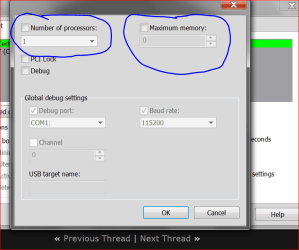
Hey, I recently noticed that only half of my ram is usable and the other half is "hardware reserved". I tried fixing this by:
clearing cmos
msconfig boot options
updating bios
reseating the ram and changing places

however none of them work, does anyone here know how to fix this?
 

Attachments

  • ss+(2015-04-13+at+07.23.03).png
    ss+(2015-04-13+at+07.23.03).png
    17 KB · Views: 1
  • ss+(2015-04-13+at+07.25.05).png
    ss+(2015-04-13+at+07.25.05).png
    21.3 KB · Views: 1

My Computer My Computer

At a glance

Windows 7 Ultimate x64AMD FX(tm)-8320 Eight-Core ProcessorCorsair XMS3 Vengeance DDR3 PC12800/1600MHz C...AMD Radeon HD 7800 Series
Computer type
PC/Desktop
Computer Manufacturer/Model Number
custom build
OS
Windows 7 Ultimate x64
CPU
AMD FX(tm)-8320 Eight-Core Processor
Motherboard
ASRock 970 Extreme4
Memory
Corsair XMS3 Vengeance DDR3 PC12800/1600MHz CL9 2x4GB
Graphics Card(s)
AMD Radeon HD 7800 Series
Antivirus
None
Browser
Google Chrome

My Computer My Computer

At a glance

Windows 10 Pro. 64/ version 1709 Windows 7 Pr...Intel i7-6800K @ 4.3Corsair Platinum 16 gig @2400EVGA GTX 1070 OC
Computer type
PC/Desktop
Computer Manufacturer/Model Number
Home made Desktop
OS
Windows 10 Pro. 64/ version 1709 Windows 7 Pro/64
CPU
Intel i7-6800K @ 4.3
Motherboard
ASUS X-99 Deluxe II
Memory
Corsair Platinum 16 gig @2400
Graphics Card(s)
EVGA GTX 1070 OC
Monitor(s) Displays
Asus 27" LED LCD/VE278Q
Screen Resolution
1920-1080 or 1280-720 HDMI
Hard Drives
INTEL SSD 730-240 Gb Sata 3.0/
PSU
EVGA Platium 1200W
Case
Phanteks Luxe Tempered Glass 8 fans/ one radiator
Cooling
XSPC/ Water Cooled CPU
Keyboard
Das 4 Professional
Mouse
Logitech M705/MX Anywhere 2-S
Internet Speed
100 mbits
Antivirus
Microsoft Security Essentials/ Malwarebytes Premium 3.0/ SAS
Browser
I.E. 11 default/Firefox/ ISP Time Warner Cable/Spectrum
Other Info
LG BluRay Burner/
Sound system-KLipsch-THX/
Icy Dock ssd Hot Swap bays.
Aight, I filled some system specs, is there anything more that I have to fill?
 

My Computer My Computer

At a glance

Windows 7 Ultimate x64AMD FX(tm)-8320 Eight-Core ProcessorCorsair XMS3 Vengeance DDR3 PC12800/1600MHz C...AMD Radeon HD 7800 Series
Computer type
PC/Desktop
Computer Manufacturer/Model Number
custom build
OS
Windows 7 Ultimate x64
CPU
AMD FX(tm)-8320 Eight-Core Processor
Motherboard
ASRock 970 Extreme4
Memory
Corsair XMS3 Vengeance DDR3 PC12800/1600MHz CL9 2x4GB
Graphics Card(s)
AMD Radeon HD 7800 Series
Antivirus
None
Browser
Google Chrome

My Computer My Computer

At a glance

Windows 7 Ultimate x64AMD FX(tm)-8320 Eight-Core ProcessorCorsair XMS3 Vengeance DDR3 PC12800/1600MHz C...AMD Radeon HD 7800 Series
Computer type
PC/Desktop
Computer Manufacturer/Model Number
custom build
OS
Windows 7 Ultimate x64
CPU
AMD FX(tm)-8320 Eight-Core Processor
Motherboard
ASRock 970 Extreme4
Memory
Corsair XMS3 Vengeance DDR3 PC12800/1600MHz CL9 2x4GB
Graphics Card(s)
AMD Radeon HD 7800 Series
Antivirus
None
Browser
Google Chrome
First question is how did they get checked. Default is NO check marks.

Make sure you reboot.

Do you have the motherboard manual?
If you do; check and make sure the ram is install exactly like the manual states.

Don't forget to reboot to reset set Resource Monitor.
 

My Computer My Computer

At a glance

Windows 10 Pro. 64/ version 1709 Windows 7 Pr...Intel i7-6800K @ 4.3Corsair Platinum 16 gig @2400EVGA GTX 1070 OC
Computer type
PC/Desktop
Computer Manufacturer/Model Number
Home made Desktop
OS
Windows 10 Pro. 64/ version 1709 Windows 7 Pro/64
CPU
Intel i7-6800K @ 4.3
Motherboard
ASUS X-99 Deluxe II
Memory
Corsair Platinum 16 gig @2400
Graphics Card(s)
EVGA GTX 1070 OC
Monitor(s) Displays
Asus 27" LED LCD/VE278Q
Screen Resolution
1920-1080 or 1280-720 HDMI
Hard Drives
INTEL SSD 730-240 Gb Sata 3.0/
PSU
EVGA Platium 1200W
Case
Phanteks Luxe Tempered Glass 8 fans/ one radiator
Cooling
XSPC/ Water Cooled CPU
Keyboard
Das 4 Professional
Mouse
Logitech M705/MX Anywhere 2-S
Internet Speed
100 mbits
Antivirus
Microsoft Security Essentials/ Malwarebytes Premium 3.0/ SAS
Browser
I.E. 11 default/Firefox/ ISP Time Warner Cable/Spectrum
Other Info
LG BluRay Burner/
Sound system-KLipsch-THX/
Icy Dock ssd Hot Swap bays.
First question is how did they get checked. Default is NO check marks.

Make sure you reboot.

Do you have the motherboard manual?
If you do; check and make sure the ram is install exactly like the manual states.

Don't forget to reboot to reset set Resource Monitor.

I did reboot my computer after I unchecked them.

I checked it when I was following this guide: http://www.sevenforums.com/tutorials/66482-memory-set-maximum-amount-used-windows.html however it did not work.

Unfortunately I do not have the motherboard manual.
 

My Computer My Computer

At a glance

Windows 7 Ultimate x64AMD FX(tm)-8320 Eight-Core ProcessorCorsair XMS3 Vengeance DDR3 PC12800/1600MHz C...AMD Radeon HD 7800 Series
Computer type
PC/Desktop
Computer Manufacturer/Model Number
custom build
OS
Windows 7 Ultimate x64
CPU
AMD FX(tm)-8320 Eight-Core Processor
Motherboard
ASRock 970 Extreme4
Memory
Corsair XMS3 Vengeance DDR3 PC12800/1600MHz CL9 2x4GB
Graphics Card(s)
AMD Radeon HD 7800 Series
Antivirus
None
Browser
Google Chrome
You seemed to miss this in the tutorial.

Windows uses all of your installed RAM memory by default.

Your motherboard should of come with a manual. If need be go online and find the manual.
A motherboard manual is a absolute must.
 

My Computer My Computer

At a glance

Windows 10 Pro. 64/ version 1709 Windows 7 Pr...Intel i7-6800K @ 4.3Corsair Platinum 16 gig @2400EVGA GTX 1070 OC
Computer type
PC/Desktop
Computer Manufacturer/Model Number
Home made Desktop
OS
Windows 10 Pro. 64/ version 1709 Windows 7 Pro/64
CPU
Intel i7-6800K @ 4.3
Motherboard
ASUS X-99 Deluxe II
Memory
Corsair Platinum 16 gig @2400
Graphics Card(s)
EVGA GTX 1070 OC
Monitor(s) Displays
Asus 27" LED LCD/VE278Q
Screen Resolution
1920-1080 or 1280-720 HDMI
Hard Drives
INTEL SSD 730-240 Gb Sata 3.0/
PSU
EVGA Platium 1200W
Case
Phanteks Luxe Tempered Glass 8 fans/ one radiator
Cooling
XSPC/ Water Cooled CPU
Keyboard
Das 4 Professional
Mouse
Logitech M705/MX Anywhere 2-S
Internet Speed
100 mbits
Antivirus
Microsoft Security Essentials/ Malwarebytes Premium 3.0/ SAS
Browser
I.E. 11 default/Firefox/ ISP Time Warner Cable/Spectrum
Other Info
LG BluRay Burner/
Sound system-KLipsch-THX/
Icy Dock ssd Hot Swap bays.
You seemed to miss this in the tutorial.

Windows uses all of your installed RAM memory by default.

Your motherboard should of come with a manual. If need be go online and find the manual.
A motherboard manual is a absolute must.

ftp://europe.asrock.com/manual/qig/970 Extreme4_multiQIG.pdf

I read the online manual and I have installed just like the manual says. It should be dual channel memory however on CPU-Z it says single, could this be whats wrong?
 

My Computer My Computer

At a glance

Windows 7 Ultimate x64AMD FX(tm)-8320 Eight-Core ProcessorCorsair XMS3 Vengeance DDR3 PC12800/1600MHz C...AMD Radeon HD 7800 Series
Computer type
PC/Desktop
Computer Manufacturer/Model Number
custom build
OS
Windows 7 Ultimate x64
CPU
AMD FX(tm)-8320 Eight-Core Processor
Motherboard
ASRock 970 Extreme4
Memory
Corsair XMS3 Vengeance DDR3 PC12800/1600MHz CL9 2x4GB
Graphics Card(s)
AMD Radeon HD 7800 Series
Antivirus
None
Browser
Google Chrome
What color slot do you have your 2 memory modules (sticks) installed in?

Set your bios to default. Don't use XMP.
Make sure your Dram volts are set to what it states on the side of the module.
I would start with the White Slots and make sure they are pushed all the way in and the clips snap over the modules ends.

urations
DDR3_A1 DDR3_A2 DDR3_B1 DDR3_B2
(Blue Slot) (White Slot) (Blue Slot) (White Slot)
(1) Populated - Populated -
(2) - Populated - Populated
(3)* Populated Populated Populated Popula

If that doesn't solve your problem I would try doing this tutorial to check the memory. Must do 8 consecutive passes or until bad memory is found.

http://www.sevenforums.com/tutorials/105647-ram-test-memtest86.html
 

My Computer My Computer

At a glance

Windows 10 Pro. 64/ version 1709 Windows 7 Pr...Intel i7-6800K @ 4.3Corsair Platinum 16 gig @2400EVGA GTX 1070 OC
Computer type
PC/Desktop
Computer Manufacturer/Model Number
Home made Desktop
OS
Windows 10 Pro. 64/ version 1709 Windows 7 Pro/64
CPU
Intel i7-6800K @ 4.3
Motherboard
ASUS X-99 Deluxe II
Memory
Corsair Platinum 16 gig @2400
Graphics Card(s)
EVGA GTX 1070 OC
Monitor(s) Displays
Asus 27" LED LCD/VE278Q
Screen Resolution
1920-1080 or 1280-720 HDMI
Hard Drives
INTEL SSD 730-240 Gb Sata 3.0/
PSU
EVGA Platium 1200W
Case
Phanteks Luxe Tempered Glass 8 fans/ one radiator
Cooling
XSPC/ Water Cooled CPU
Keyboard
Das 4 Professional
Mouse
Logitech M705/MX Anywhere 2-S
Internet Speed
100 mbits
Antivirus
Microsoft Security Essentials/ Malwarebytes Premium 3.0/ SAS
Browser
I.E. 11 default/Firefox/ ISP Time Warner Cable/Spectrum
Other Info
LG BluRay Burner/
Sound system-KLipsch-THX/
Icy Dock ssd Hot Swap bays.
What color slot do you have your 2 memory modules (sticks) installed in?

Set your bios to default. Don't use XMP.
Make sure your Dram volts are set to what it states on the side of the module.
I would start with the White Slots and make sure they are pushed all the way in and the clips snap over the modules ends.

urations
DDR3_A1 DDR3_A2 DDR3_B1 DDR3_B2
(Blue Slot) (White Slot) (Blue Slot) (White Slot)
(1) Populated - Populated -
(2) - Populated - Populated
(3)* Populated Populated Populated Popula

If that doesn't solve your problem I would try doing this tutorial to check the memory. Must do 8 consecutive passes or until bad memory is found.

http://www.sevenforums.com/tutorials/105647-ram-test-memtest86.html

Aight, they're in the blue ones at the moment. Thanks for your help man :)
 
Last edited:

My Computer My Computer

At a glance

Windows 7 Ultimate x64AMD FX(tm)-8320 Eight-Core ProcessorCorsair XMS3 Vengeance DDR3 PC12800/1600MHz C...AMD Radeon HD 7800 Series
Computer type
PC/Desktop
Computer Manufacturer/Model Number
custom build
OS
Windows 7 Ultimate x64
CPU
AMD FX(tm)-8320 Eight-Core Processor
Motherboard
ASRock 970 Extreme4
Memory
Corsair XMS3 Vengeance DDR3 PC12800/1600MHz CL9 2x4GB
Graphics Card(s)
AMD Radeon HD 7800 Series
Antivirus
None
Browser
Google Chrome
What color slot do you have your 2 memory modules (sticks) installed in?

Set your bios to default. Don't use XMP.
Make sure your Dram volts are set to what it states on the side of the module.
I would start with the White Slots and make sure they are pushed all the way in and the clips snap over the modules ends.

urations
DDR3_A1 DDR3_A2 DDR3_B1 DDR3_B2
(Blue Slot) (White Slot) (Blue Slot) (White Slot)
(1) Populated - Populated -
(2) - Populated - Populated
(3)* Populated Populated Populated Popula

If that doesn't solve your problem I would try doing this tutorial to check the memory. Must do 8 consecutive passes or until bad memory is found.

http://www.sevenforums.com/tutorials/105647-ram-test-memtest86.html

OK, so the problem was solved but then 20 minutes later, the computer randomly turned off and the problem was back...
 
Last edited:

My Computer My Computer

At a glance

Windows 7 Ultimate x64AMD FX(tm)-8320 Eight-Core ProcessorCorsair XMS3 Vengeance DDR3 PC12800/1600MHz C...AMD Radeon HD 7800 Series
Computer type
PC/Desktop
Computer Manufacturer/Model Number
custom build
OS
Windows 7 Ultimate x64
CPU
AMD FX(tm)-8320 Eight-Core Processor
Motherboard
ASRock 970 Extreme4
Memory
Corsair XMS3 Vengeance DDR3 PC12800/1600MHz CL9 2x4GB
Graphics Card(s)
AMD Radeon HD 7800 Series
Antivirus
None
Browser
Google Chrome
Your OS controls this, along with the motherboard.

It might not be fixable :(

Try to figure out why the PC shut off.
 

My Computer My Computer

At a glance

Windows 10 Pro x64Intel Core i7 6700KGSkill TridentZ RGB 16GB 3600 16-16-16-36EVGA GTX 980 Ti SC x2
Computer type
PC/Desktop
Computer Manufacturer/Model Number
Skylake Special #666
OS
Windows 10 Pro x64
CPU
Intel Core i7 6700K
Motherboard
Asus Sabertooth Z170 Mark 1
Memory
GSkill TridentZ RGB 16GB 3600 16-16-16-36
Graphics Card(s)
EVGA GTX 980 Ti SC x2
Sound Card
Realtek High Definition
Monitor(s) Displays
AOC G2460PG
Screen Resolution
1920 x 1080 144Hz
Hard Drives
Samsung 860 Pro 256GB, Seagate Barracuda 4TB x2
PSU
EVGA 1000 P2, EVGA White Custom Braided Cables
Case
Corsair Vengeance C70 Gunmetal Black
Cooling
Corsair H100i v2, Corsair ML120 x2, Thermal Grizzly Kryonaut
Keyboard
Logitech G910 Orion Spectrum
Mouse
Logitech G700s
Internet Speed
Verizon Fios Quantum Gateway 75/75
Antivirus
Windows Defender, Malwarebytes Free 3.8.3
Browser
Chrome
Other Info
Corsair SP120 x4, LG Blu-ray Drive, Durabrand HT-395 100 Watt Dolby Digital Amp, Corsair H2100 Wireless 7.1 Headset
Back
Top