
I am trying to install Halo 2 on my Windows Seven DELL XPS(M1530)
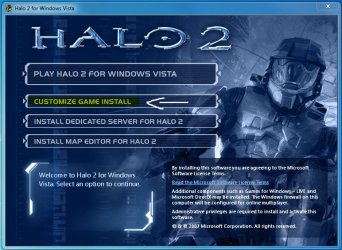
When I open the program on the disk, the window pops up and I select, Play Halo 2 for Windows Vista. This option says(Halo 2 will install while you play)When I select that a new window pops up saying something about updates would be installed when I log into live, and on the bottom right hand side it says play. I clicked PLAY and a windows pops open saying "preparing installation for Halo 2" or something closley related to that. Then the game opens and goes to the main screen of Halo 2. On the bottom right side, it says "copying x%" and when it gets to about 48% a window pops up in the game saying "Sorry" and two options beneath it. That is all I can make out before my computer instantly shuts down as if I pulled the battery out(even though I didn't). Then after restarting the computer I started the process over. Then it picked up where it left off at 48%. Then when it got to 68% the same thing happened and it shut down again. This whole thing has happened to me a couple of times. Eventually I get everything copied(so I think) but when I try to open Halo 2, nothing opens, no errors pop up, and the game does not appear in task manager. It's as if I never even started the program. As a note, when I had vista on this computer, when I would play a game, right in the middle of the game, my computer would shut down instantly, like when I try to install it now. I am thinking it is a hardware problem if anything. I do NOT think it is a compadability issue because other people seem to play Halo 2 on Windows 7 fine even without compadability mode(which I have tried with no luck). If anyone can offer me a solution it would be greatly appreciated .
.
Edit: if you didn't see my reply, here is all the information I get in the event viewer right after I launch Halo 2, with no luck.
Log Name: Application
Source: Application Error
Date: 8/16/2010 6:00:11 PM
Event ID: 1000
Task Category: (100)
Level: Error
Keywords: Classic
User: N/A
Computer: LPTZACH
Description:
Faulting application name: halo2.exe, version: 1.0.0.11081, time stamp: 0x46368037
Faulting module name: halo2.exe, version: 1.0.0.11081, time stamp: 0x46368037
Exception code: 0xc0000005
Fault offset: 0x00dfd01a
Faulting process id: 0xf88
Faulting application start time: 0x01cb3d8e65843000
Faulting application path: C:\Program Files\Microsoft Games\Halo 2\halo2.exe
Faulting module path: C:\Program Files\Microsoft Games\Halo 2\halo2.exe
Report Id: a350d621-a981-11df-bd51-0015c584836c
Event Xml:
<Event xmlns="http://schemas.microsoft.com/win/2004/08/events/event">
<System>
<Provider Name="Application Error" />
<EventID Qualifiers="0">1000</EventID>
<Level>2</Level>
<Task>100</Task>
<Keywords>0x80000000000000</Keywords>
<TimeCreated SystemTime="2010-08-16T22:00:11.000000000Z" />
<EventRecordID>8489</EventRecordID>
<Channel>Application</Channel>
<Computer>LPTZACH</Computer>
<Security />
</System>
<EventData>
<Data>halo2.exe</Data>
<Data>1.0.0.11081</Data>
<Data>46368037</Data>
<Data>halo2.exe</Data>
<Data>1.0.0.11081</Data>
<Data>46368037</Data>
<Data>c0000005</Data>
<Data>00dfd01a</Data>
<Data>f88</Data>
<Data>01cb3d8e65843000</Data>
<Data>C:\Program Files\Microsoft Games\Halo 2\halo2.exe</Data>
<Data>C:\Program Files\Microsoft Games\Halo 2\halo2.exe</Data>
<Data>a350d621-a981-11df-bd51-0015c584836c</Data>
</EventData>
</Event>
And also, here is what I get in the Windows Error reporting:
Log Name: Application
Source: Windows Error Reporting
Date: 8/16/2010 6:10:47 PM
Event ID: 1001
Task Category: None
Level: Information
Keywords: Classic
User: N/A
Computer: LPTZACH
Description:
Fault bucket 434398409, type 1
Event Name: APPCRASH
Response: Not available
Cab Id: 0
Problem signature:
P1: halo2.exe
P2: 1.0.0.11081
P3: 46368037
P4: halo2.exe
P5: 1.0.0.11081
P6: 46368037
P7: c0000005
P8: 00dfd014
P9:
P10:
Attached files:
C:\Users\Zach\AppData\Local\Temp\WERBE10.tmp.WERInternalMetadata.xml
These files may be available here:
C:\Users\Zach\AppData\Local\Microsoft\Windows\WER\ReportArchive\AppCrash_halo2.exe_729c8f99d42bdd894bcd773180e37522b4ba54_103f2f1b
Analysis symbol:
Rechecking for solution: 0
Report Id: 0d34af68-a983-11df-bd51-0015c584836c
Report Status: 0
Event Xml:
<Event xmlns="http://schemas.microsoft.com/win/2004/08/events/event">
<System>
<Provider Name="Windows Error Reporting" />
<EventID Qualifiers="0">1001</EventID>
<Level>4</Level>
<Task>0</Task>
<Keywords>0x80000000000000</Keywords>
<TimeCreated SystemTime="2010-08-16T22:10:47.000000000Z" />
<EventRecordID>8514</EventRecordID>
<Channel>Application</Channel>
<Computer>LPTZACH</Computer>
<Security />
</System>
<EventData>
<Data>434398409</Data>
<Data>1</Data>
<Data>APPCRASH</Data>
<Data>Not available</Data>
<Data>0</Data>
<Data>halo2.exe</Data>
<Data>1.0.0.11081</Data>
<Data>46368037</Data>
<Data>halo2.exe</Data>
<Data>1.0.0.11081</Data>
<Data>46368037</Data>
<Data>c0000005</Data>
<Data>00dfd014</Data>
<Data>
</Data>
<Data>
</Data>
<Data>
C:\Users\Zach\AppData\Local\Temp\WERBE10.tmp.WERInternalMetadata.xml</Data>
<Data>C:\Users\Zach\AppData\Local\Microsoft\Windows\WER\ReportArchive\AppCrash_halo2.exe_729c8f99d42bdd894bcd773180e37522b4ba54_103f2f1b</Data>
<Data>
</Data>
<Data>0</Data>
<Data>0d34af68-a983-11df-bd51-0015c584836c</Data>
<Data>0</Data>
</EventData>
</Event>
When I open the program on the disk, the window pops up and I select, Play Halo 2 for Windows Vista. This option says(Halo 2 will install while you play)When I select that a new window pops up saying something about updates would be installed when I log into live, and on the bottom right hand side it says play. I clicked PLAY and a windows pops open saying "preparing installation for Halo 2" or something closley related to that. Then the game opens and goes to the main screen of Halo 2. On the bottom right side, it says "copying x%" and when it gets to about 48% a window pops up in the game saying "Sorry" and two options beneath it. That is all I can make out before my computer instantly shuts down as if I pulled the battery out(even though I didn't). Then after restarting the computer I started the process over. Then it picked up where it left off at 48%. Then when it got to 68% the same thing happened and it shut down again. This whole thing has happened to me a couple of times. Eventually I get everything copied(so I think) but when I try to open Halo 2, nothing opens, no errors pop up, and the game does not appear in task manager. It's as if I never even started the program. As a note, when I had vista on this computer, when I would play a game, right in the middle of the game, my computer would shut down instantly, like when I try to install it now. I am thinking it is a hardware problem if anything. I do NOT think it is a compadability issue because other people seem to play Halo 2 on Windows 7 fine even without compadability mode(which I have tried with no luck). If anyone can offer me a solution it would be greatly appreciated
.Edit: if you didn't see my reply, here is all the information I get in the event viewer right after I launch Halo 2, with no luck.
Log Name: Application
Source: Application Error
Date: 8/16/2010 6:00:11 PM
Event ID: 1000
Task Category: (100)
Level: Error
Keywords: Classic
User: N/A
Computer: LPTZACH
Description:
Faulting application name: halo2.exe, version: 1.0.0.11081, time stamp: 0x46368037
Faulting module name: halo2.exe, version: 1.0.0.11081, time stamp: 0x46368037
Exception code: 0xc0000005
Fault offset: 0x00dfd01a
Faulting process id: 0xf88
Faulting application start time: 0x01cb3d8e65843000
Faulting application path: C:\Program Files\Microsoft Games\Halo 2\halo2.exe
Faulting module path: C:\Program Files\Microsoft Games\Halo 2\halo2.exe
Report Id: a350d621-a981-11df-bd51-0015c584836c
Event Xml:
<Event xmlns="http://schemas.microsoft.com/win/2004/08/events/event">
<System>
<Provider Name="Application Error" />
<EventID Qualifiers="0">1000</EventID>
<Level>2</Level>
<Task>100</Task>
<Keywords>0x80000000000000</Keywords>
<TimeCreated SystemTime="2010-08-16T22:00:11.000000000Z" />
<EventRecordID>8489</EventRecordID>
<Channel>Application</Channel>
<Computer>LPTZACH</Computer>
<Security />
</System>
<EventData>
<Data>halo2.exe</Data>
<Data>1.0.0.11081</Data>
<Data>46368037</Data>
<Data>halo2.exe</Data>
<Data>1.0.0.11081</Data>
<Data>46368037</Data>
<Data>c0000005</Data>
<Data>00dfd01a</Data>
<Data>f88</Data>
<Data>01cb3d8e65843000</Data>
<Data>C:\Program Files\Microsoft Games\Halo 2\halo2.exe</Data>
<Data>C:\Program Files\Microsoft Games\Halo 2\halo2.exe</Data>
<Data>a350d621-a981-11df-bd51-0015c584836c</Data>
</EventData>
</Event>
And also, here is what I get in the Windows Error reporting:
Log Name: Application
Source: Windows Error Reporting
Date: 8/16/2010 6:10:47 PM
Event ID: 1001
Task Category: None
Level: Information
Keywords: Classic
User: N/A
Computer: LPTZACH
Description:
Fault bucket 434398409, type 1
Event Name: APPCRASH
Response: Not available
Cab Id: 0
Problem signature:
P1: halo2.exe
P2: 1.0.0.11081
P3: 46368037
P4: halo2.exe
P5: 1.0.0.11081
P6: 46368037
P7: c0000005
P8: 00dfd014
P9:
P10:
Attached files:
C:\Users\Zach\AppData\Local\Temp\WERBE10.tmp.WERInternalMetadata.xml
These files may be available here:
C:\Users\Zach\AppData\Local\Microsoft\Windows\WER\ReportArchive\AppCrash_halo2.exe_729c8f99d42bdd894bcd773180e37522b4ba54_103f2f1b
Analysis symbol:
Rechecking for solution: 0
Report Id: 0d34af68-a983-11df-bd51-0015c584836c
Report Status: 0
Event Xml:
<Event xmlns="http://schemas.microsoft.com/win/2004/08/events/event">
<System>
<Provider Name="Windows Error Reporting" />
<EventID Qualifiers="0">1001</EventID>
<Level>4</Level>
<Task>0</Task>
<Keywords>0x80000000000000</Keywords>
<TimeCreated SystemTime="2010-08-16T22:10:47.000000000Z" />
<EventRecordID>8514</EventRecordID>
<Channel>Application</Channel>
<Computer>LPTZACH</Computer>
<Security />
</System>
<EventData>
<Data>434398409</Data>
<Data>1</Data>
<Data>APPCRASH</Data>
<Data>Not available</Data>
<Data>0</Data>
<Data>halo2.exe</Data>
<Data>1.0.0.11081</Data>
<Data>46368037</Data>
<Data>halo2.exe</Data>
<Data>1.0.0.11081</Data>
<Data>46368037</Data>
<Data>c0000005</Data>
<Data>00dfd014</Data>
<Data>
</Data>
<Data>
</Data>
<Data>
C:\Users\Zach\AppData\Local\Temp\WERBE10.tmp.WERInternalMetadata.xml</Data>
<Data>C:\Users\Zach\AppData\Local\Microsoft\Windows\WER\ReportArchive\AppCrash_halo2.exe_729c8f99d42bdd894bcd773180e37522b4ba54_103f2f1b</Data>
<Data>
</Data>
<Data>0</Data>
<Data>0d34af68-a983-11df-bd51-0015c584836c</Data>
<Data>0</Data>
</EventData>
</Event>
Last edited:
My Computer
At a glance
Windows 7, Windows Vista
- Computer Manufacturer/Model Number
- Lenovo Thinkpad Edge
- OS
- Windows 7, Windows Vista

 But let us know when you're ready!!


