Hard disk drive recovery c full - help!

niccih

New member
Local time
7:57 AM
Messages
16
I had to re-install my 'operating system' windows 7 dvd today and as my laptop was completely cleaned up presumed I also had to reinstall my 'drivers and utilities' disc which also came with my laptop. When I inserted the drivers disc there was no instant start up asking me to download to my laptop as there had been with my operating system disc and as there were so many files I had no idea which if any i had to download. So, I went onto the Dell support website and downloaded all drivers recommended for my inspiron 1545 laptop (14 downloads in total). Anyway, as you have probably guessed I have no idea about these things, so do not understand why i was even doing this, i am clueless. So now, (presuming this is the cause), my c recovery hard disk drive is full (3.80MB full of 14.6GB) and i am unable to download anything. Problem is i have no idea what I can keep or delete and i was unable to compress the files or create more c drive disc space through system restore - configure (as advised by another user).

Can anyone please help??? Remember I am a dummy so please explain in plain english!! Thanks in advance:confused:
 

My Computer My Computer

At a glance

WINDOWS 7 64-bit
Computer Manufacturer/Model Number
DELL Inspiron 1545
OS
WINDOWS 7 64-bit
Hello niccih and welcome to Seven Forums. First, I'd like for you to double check some info. You state, "...my c recovery hard disk drive is full (3.80MB full of 14.6GB)..." On most Dell computers the internal hard drive is divided into 3 partitions. One is the recovery partition. This is around 12 - 15GB and contains the exact image of how your computer left the factory. Another partition is usually called Healthy (or perhaps something else that makes no sense) and is 100MB. This is the boot loader partition that lets you start (boot) the computer whenever you hit the power button. And the last partition is called C: NTFS which contains everything else you've put on the hard drive like photos, files, programs, etc.

Did you mean to say your recovery partition is using 3.8GB out of an available 14.6GB? It takes (approximately) 1000MB to equal 1GB. If you only have 3.80MB being used out of 14.6GB there's no way your partition can be full, let alone the entire hard drive. Can you post a snip or screen shot of your disk information? From the start menu type in "disk management" (without the quotes) and then click on create and format hard disk partitions.

You also said you used your 7 dvd to reinstall your operating system and your laptop was completely cleaned. That sounds like you might have erased everything on the hard drive (including the recovery partition.) If that's the case then you should have only 2 partitions: the 100MB boot loader and the C: NTFS. If you wiped the entire hard drive clean then you probably wouldn't have any system restore points left either.
 

My Computer My Computer

At a glance

Win 7 Pro 64-bitIntel i5 2.4 Ghz8GB DDR3Intel HD 3000
Computer type
Laptop
Computer Manufacturer/Model Number
Sony Vaio VPCEB47GM Laptop
OS
Win 7 Pro 64-bit
CPU
Intel i5 2.4 Ghz
Memory
8GB DDR3
Graphics Card(s)
Intel HD 3000
Sound Card
IDT High Definition
Monitor(s) Displays
15.6 WGXA Anti-Glare LED
Screen Resolution
1280x800
Hard Drives
640Gb 7200rpm
Antivirus
MSE
Browser
Opera (primary) with IE9 backup
Yeah, as marsmimar says, there is little we can advise without a picture of your Disk Management.

To take a snip, go to Start > All Programs > you find the snipping tool. Right click on that and Pin to taskbar. Then you can start it from the taskbar once you have your Disk Management page. Once the snipping tool is started, put the cursor on the left top corner, hold the left clicker down and drag the cursor to the right bottom corner, there you release it. Then go to File (top left) and Save as... Make sure you select a folder where you can find it again.

From there click on the paper clip in the Reply window here to attach it to your post. Once you selected the snip, make sure you click on Upload - wait for a few seconds for the upload to complete. You have to post a few words first (ar least 3) before clicking on the paper clip - somehow posting only a picture does not function.
 

My Computer My Computer

At a glance

Vista, Windows7, Mint Mate, Zorin, Windows 8from 1.6GHz Duo to i7
Computer Manufacturer/Model Number
HP, Dell, Gateway, Toshiba - 4 laptops and 2 desktops
OS
Vista, Windows7, Mint Mate, Zorin, Windows 8
CPU
from 1.6GHz Duo to i7
Monitor(s) Displays
2x HP w2207
Hard Drives
5x HDD, 7x SSD, 12x Externals
Keyboard
with trackball - no mices
Mouse
Trackball mice
Internet Speed
DSL 6000
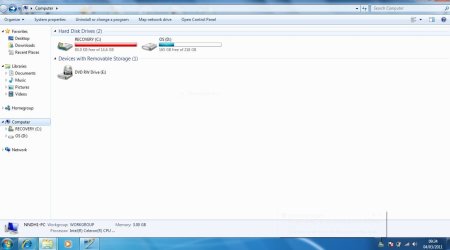
Hi, Firstly thank you so much for replying to me and trying to help. I have attached a snip of my computer showing space available. Just to let you know I also keep getting a message saying i am low on disc space. Any picture I try to save off the internet or anything i try to download is not possible, again due to insufficient space. Could you please advise further??
 

Attachments

  • SNIP 4.3.2011 09.35.JPG
    SNIP 4.3.2011 09.35.JPG
    56.1 KB · Views: 800

My Computer My Computer

At a glance

WINDOWS 7 64-bit
Computer Manufacturer/Model Number
DELL Inspiron 1545
OS
WINDOWS 7 64-bit
The immediate problem that I see is somehow your recovery partition is named (C: ) while the OS partition is named (D: ). By design, whenever you try to add a program, download a file, photo, etc it looks for the C: partition. I suspect the Recovery (C: ) partition now contains more than just the recovery data. If you try to do a simple renaming of the partitions your computer might not even boot. Hopefully WHS or one of our equally skilled members will respond on how best to proceed without losing valuable data from the recovery partition. Sorry for not being more helpful.
 

My Computer My Computer

At a glance

Win 7 Pro 64-bitIntel i5 2.4 Ghz8GB DDR3Intel HD 3000
Computer type
Laptop
Computer Manufacturer/Model Number
Sony Vaio VPCEB47GM Laptop
OS
Win 7 Pro 64-bit
CPU
Intel i5 2.4 Ghz
Memory
8GB DDR3
Graphics Card(s)
Intel HD 3000
Sound Card
IDT High Definition
Monitor(s) Displays
15.6 WGXA Anti-Glare LED
Screen Resolution
1280x800
Hard Drives
640Gb 7200rpm
Antivirus
MSE
Browser
Opera (primary) with IE9 backup
This is indeed a very unusual setup. I wonder how it got there. The main problem is that D ended up to be the active partition (as you can see by the little flag in front of the disk icon).

I wish you had given us a snip of Disk Management (and not Computer) as we requested. That would tell us more things.

This is going to be a difficult and very involved repair job and I hate to proceed without also looking into your Disk Management. Please post that too.

The steps involved will most likely be:

1. To download and burn a bootable CD of Partition Wizard (PW) - for that you need to use another computer
2. To inactivate your D partition with PW and activate C
3. To rename C and D with PW
4. To repair the bootmgr on on your new C (which is now D) with your installation disk
4a. If you have no installation disk, we have to first get you a repair disk
5. To analyse the data which is on your current C (recovery partition) and move everything that does not belong there off.
 

My Computer My Computer

At a glance

Vista, Windows7, Mint Mate, Zorin, Windows 8from 1.6GHz Duo to i7
Computer Manufacturer/Model Number
HP, Dell, Gateway, Toshiba - 4 laptops and 2 desktops
OS
Vista, Windows7, Mint Mate, Zorin, Windows 8
CPU
from 1.6GHz Duo to i7
Monitor(s) Displays
2x HP w2207
Hard Drives
5x HDD, 7x SSD, 12x Externals
Keyboard
with trackball - no mices
Mouse
Trackball mice
Internet Speed
DSL 6000
Thanks again for your help everyone. Apologies I did not upload the right info, I'm trying to watch my baby at the same time and keep getting interrupted.

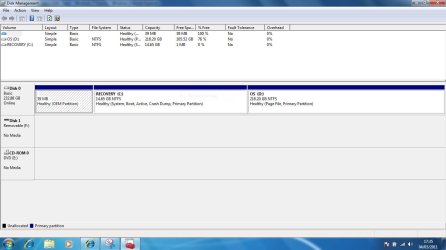
I have now uploaded the correct info (I hope), and hopefully someone can perhaps advise further. Please let me know if you require any further information of course.I will not proceed with anything else at this stage until I have feedback from my disk management. Thanks again:)
 

Attachments

  • DISK MANAGEMENT.JPG
    DISK MANAGEMENT.JPG
    78.6 KB · Views: 475

My Computer My Computer

At a glance

WINDOWS 7 64-bit
Computer Manufacturer/Model Number
DELL Inspiron 1545
OS
WINDOWS 7 64-bit
I had to re-install my 'operating system' windows 7 dvd today and as my laptop was completely cleaned up presumed I also had to reinstall my 'drivers and utilities' disc which also came with my laptop. When I inserted the drivers disc there was no instant start up asking me to download to my laptop as there had been with my operating system disc and as there were so many files I had no idea which if any i had to download. So, I went onto the Dell support website and downloaded all drivers recommended for my inspiron 1545 laptop (14 downloads in total). Anyway, as you have probably guessed I have no idea about these things, so do not understand why i was even doing this, i am clueless. So now, (presuming this is the cause), my c recovery hard disk drive is full (3.80MB full of 14.6GB) and i am unable to download anything. Problem is i have no idea what I can keep or delete and i was unable to compress the files or create more c drive disc space through system restore - configure (as advised by another user).

Can anyone please help??? Remember I am a dummy so please explain in plain english!! Thanks in advance:confused:
Welcome to SevenForums, Looks like when you reinstalled you installed in the wrong partition. Might be wise to try another reinstall. Have a look at this tutorial for some help doing that. Good luck to you. :D
http://www.sevenforums.com/tutorials/1649-clean-install-windows-7-a.html
 

My Computer My Computer

At a glance

Windows 7 Ulti. x64AMD Phenom 8450 triple-core 2.10 ghz4GBATI Radion HD 3200
Computer Manufacturer/Model Number
Gateway GT5692
OS
Windows 7 Ulti. x64
CPU
AMD Phenom 8450 triple-core 2.10 ghz
Memory
4GB
Graphics Card(s)
ATI Radion HD 3200
Monitor(s) Displays
Gateway FPD1775W
Screen Resolution
1280x720
Hard Drives
465.6613 Gibibytes
Another possible reason for the huge drain on C: would be shadow copies & system restore points.

Try the following...

1, Click Start > All Programs > Accessories > System Tools and right-click Disk Cleanup and select Run as Administrator
2, Select C: drive for clean
3, In the More Options tab click Clean Up in the System Restore and Shadow Copies section

This should now free up a considerable amount of space on C:

Also, check to see if you have a Program Files folder on C:. As you've installed the OS on D: it should be prompting to install apps to D: by default.


OS
 

My Computer My Computer

At a glance

Windows 7 Ultimate x64AMD Sempron Dual Core3GBNVIDIA GeForce 6150SE nForce 430
Computer Manufacturer/Model Number
Compaq Desktop
OS
Windows 7 Ultimate x64
CPU
AMD Sempron Dual Core
Memory
3GB
Graphics Card(s)
NVIDIA GeForce 6150SE nForce 430
Screen Resolution
1024x768
Hard Drives
150GB Sata
Hi, I tried a system restore for drive c as suggested by user OS but unfortunately it did not do anything. I have looked and noticed there are 2 program files in drive c and another 2 program files in drive d, is this normal? Both have a 'program files' & 'program files(x86)'. For some reason i am unable to attach any thing to this thread or i'd attach snips of the contents of drives c & d as i thought it might shed some light.Any thoughts?Many thanks
 

My Computer My Computer

At a glance

WINDOWS 7 64-bit
Computer Manufacturer/Model Number
DELL Inspiron 1545
OS
WINDOWS 7 64-bit
In any case, you system is very much mucked up. You have this little dangling no name partition which does nothing, then you have the bootmgr in the recovery partition where it does not belong, your progam file (and 2 are normal for a 64bit system) replicated in C and D. - a real mess to say the least.

We could, of course, fix it. But that would take a lot of hops as I have already outlined above and there is room for error at every step. And you need access to another system in order to download the required program. If you have the installation disk, it would be the easiest to reinstall the system properly (of course after you saved your own data to an external drive). And if you do not have an installation disk, you could ask Dell to send you one. They usually do that for a S&H charge.

So let us know which way you prefer to proceed. And given that you apparently have to watch a kid, we would need to proceed in small steps because every step will require your full attention.
 

My Computer My Computer

At a glance

Vista, Windows7, Mint Mate, Zorin, Windows 8from 1.6GHz Duo to i7
Computer Manufacturer/Model Number
HP, Dell, Gateway, Toshiba - 4 laptops and 2 desktops
OS
Vista, Windows7, Mint Mate, Zorin, Windows 8
CPU
from 1.6GHz Duo to i7
Monitor(s) Displays
2x HP w2207
Hard Drives
5x HDD, 7x SSD, 12x Externals
Keyboard
with trackball - no mices
Mouse
Trackball mice
Internet Speed
DSL 6000
Hi,
I'm not sure how it is in such a mess as I thought all I had done was reinstall the operating system, netgear to connect me to the internet and microsoft works 9 and the recommended drivers from dell support, obviously i have gone very wrong somewhere...

Anyway, I do have the dell operating disc, and dell drivers and utilities disc, as well as microsoft works 9 and netgear so hopefully i can get my laptop back to a useable state again? I don't have another laptop but could perhaps borrow one although i think from what you are saying it's not necessary if i'm looking to just reinstall. I do have an external hard drive where i have already stored my photos & music etc. I think maybe I would need guidance on installing my drivers and utilities disc as like i said in my original email there was no prompt what to install if anything so i was very stumped at that point, whereas my operating system i just followed the instructions.

If you have the time and patience to help me it would be really appreciated. How much time roughly do you think i need to set aside?

I do also have a blackberry where I can access this website so can follow online instructionsthrough there if i am unable to access through my laptop at all times throughout the process.

thanks again for your time.
 

My Computer My Computer

At a glance

WINDOWS 7 64-bit
Computer Manufacturer/Model Number
DELL Inspiron 1545
OS
WINDOWS 7 64-bit
Hi again, niccih. I think a clean install will be the best way to go. Basically that means you'll wipe everything off the hard drive (including any recovery data) and start with a clean slate. Once Windows 7 is operating the way it should with all drivers, Win 7 updates, etc reinstalled, I'd suggest making a system image of the entire internal hard drive and store the image on an external hard drive. You could use the built-in Win 7 imaging tool or a 3rd party like Macrium Reflect free. Once you have all your personalizing done like installing additional programs, etc I'd make a second system image. That way you'll have two separate images to fall back on should something happen down the road. As you continue to use the machine and add/delete things, I'd make additional system images on an as-needed basis ... maybe once a month.

In the meantime (until WHS gets back to you) you might want to read these tutorials on how to do a clean install and how to make a system image using the Win 7 tool. Hope this helps some.

http://www.sevenforums.com/tutorials/1649-clean-install-windows-7-a.html

http://www.sevenforums.com/tutorials/663-backup-complete-computer-create-image-backup.html
 

My Computer My Computer

At a glance

Win 7 Pro 64-bitIntel i5 2.4 Ghz8GB DDR3Intel HD 3000
Computer type
Laptop
Computer Manufacturer/Model Number
Sony Vaio VPCEB47GM Laptop
OS
Win 7 Pro 64-bit
CPU
Intel i5 2.4 Ghz
Memory
8GB DDR3
Graphics Card(s)
Intel HD 3000
Sound Card
IDT High Definition
Monitor(s) Displays
15.6 WGXA Anti-Glare LED
Screen Resolution
1280x800
Hard Drives
640Gb 7200rpm
Antivirus
MSE
Browser
Opera (primary) with IE9 backup
Hi marsmimar,Thanks for your reply. I have had a look through as suggested and I think I can follow that (although I guess until i try I won't know for certain), do you think I should just make a start or hang on until i hear back from WHS? My little boy is asleep so hopefully I might have an hour free (or two if i'm lucky).Just to clarify, when you say system image, is this the system information page which contains 'Hardware Resources', 'Components' and 'Software Environment'?
 

My Computer My Computer

At a glance

WINDOWS 7 64-bit
Computer Manufacturer/Model Number
DELL Inspiron 1545
OS
WINDOWS 7 64-bit
Hi marsmimar,Thanks for your reply. I have had a look through as suggested and I think I can follow that (although I guess until i try I won't know for certain), do you think I should just make a start or hang on until i hear back from WHS? My little boy is asleep so hopefully I might have an hour free (or two if i'm lucky).Just to clarify, when you say system image, is this the system information page which contains 'Hardware Resources', 'Components' and 'Software Environment'?

If you're feeling adventurous :) I'd give the clean install a shot. You're probably going to see several partitions listed during the installation process. You need to delete ALL of the old partitions before trying to install the clean version of Windows 7; otherwise the new install will probably get reinstalled on the Recovery C: partition again and you'll be no better off than you are now.

A system image is a "snapshot" of your entire hard drive. It includes the operating system, all of your files, photos, documents, music, videos, personal settings, all program updates, etc. It will include everything that's on your internal hard drive at the moment the system image is created. It's not the system information page.

When you create a sysem image for the first time it will also prompt you to create a system repair disk. (You'll need a blank CD-R or -RW disk.) This repair disk will let you start your computer even if you can't start Windows 7 because it's completely damaged or corrupt. The repair disk will let you choose from several options, one of which is to restore your system from a previously made system image. You'd plug in your external hard drive (the one that has the saved system image), start your computer from the repair disk, select the option to restore from a saved system image, select "yes" a couple of times and then sit back for 30 -45 minutes while your machine is restored.
 

My Computer My Computer

At a glance

Win 7 Pro 64-bitIntel i5 2.4 Ghz8GB DDR3Intel HD 3000
Computer type
Laptop
Computer Manufacturer/Model Number
Sony Vaio VPCEB47GM Laptop
OS
Win 7 Pro 64-bit
CPU
Intel i5 2.4 Ghz
Memory
8GB DDR3
Graphics Card(s)
Intel HD 3000
Sound Card
IDT High Definition
Monitor(s) Displays
15.6 WGXA Anti-Glare LED
Screen Resolution
1280x800
Hard Drives
640Gb 7200rpm
Antivirus
MSE
Browser
Opera (primary) with IE9 backup
Thanks marsmimar.Hmmm, I'm not sure if i might be getting out of my depth, like i said at the start i am clueless. I'm always up for trying but would need such monitored guidance. I don't even know how to delete the old partitions - this is probably where i went wrong last time as i just presumed everything would be wiped as i installed windows 7 again. Just out of curiosity do you know how much it might cost to have sorted? i'm not giving up, it's just i don't get much spare time but neither do i have a great deal of money for these type of hiccups. I'm just concerned i may make things worse if possible! Plus I'm worried that i may get abandoned half way through if people run out of time/patience with me...
 

My Computer My Computer

At a glance

WINDOWS 7 64-bit
Computer Manufacturer/Model Number
DELL Inspiron 1545
OS
WINDOWS 7 64-bit
If I may just stick my nose into this one. I have great faith in all the contributors to this thread but I have to say I have seen WHS lead newbies through this type of problem before with great patience and care. If he is willing to go it alone with you I would take that route, he will not abandon you at any time, just look at some of his other posts! He has the patience of Job and more! If you diligently follow his advice you will succeed. Don't ever worry about asking him for a little more explanation to anything you don't understand, he will far prefer that to you guessing.
 

My Computer My Computer

At a glance

Microsoft Windows 7 Home Premium 64-bit 7601 ...Intel(R) Core(TM) i7-3770 CPU @ 3.40GHz8.00 GBIntel(R) HD Graphics 4000
Computer type
PC/Desktop
OS
Microsoft Windows 7 Home Premium 64-bit 7601 Multiprocessor Free Service Pack 1
CPU
Intel(R) Core(TM) i7-3770 CPU @ 3.40GHz
Motherboard
ASUSTeK COMPUTER INC. P8H77-M
Memory
8.00 GB
Graphics Card(s)
Intel(R) HD Graphics 4000
Sound Card
On Board
Monitor(s) Displays
Dell 24"
Screen Resolution
1920 x 1080
Hard Drives
(1) INTEL SSDSC2CT180A3 ATA Device (2) ST500DM002-1BD142 ATA Device (3) WDC WD3200AAKS-75L9A0 ATA Device (4) Generic- Compact Flash USB Device (5) Generic- MS/MS-Pro USB Device (6) Generic- SD/MMC USB Device (7) Generic- SM/xD-Picture USB
PSU
500w Corsair
Case
Cooler Master
Cooling
3 Fans
Keyboard
Logitech MK300
Mouse
Logitech WOM
Internet Speed
75Mb
Antivirus
Norton 360
Browser
Firefox, Opera, IE
Thanks marsmimar.Hmmm, I'm not sure if i might be getting out of my depth, like i said at the start i am clueless. I'm always up for trying but would need such monitored guidance. I don't even know how to delete the old partitions - this is probably where i went wrong last time as i just presumed everything would be wiped as i installed windows 7 again. Just out of curiosity do you know how much it might cost to have sorted? i'm not giving up, it's just i don't get much spare time but neither do i have a great deal of money for these type of hiccups. I'm just concerned i may make things worse if possible! Plus I'm worried that i may get abandoned half way through if people run out of time/patience with me...

Last part first. The folks here are very patient and won't give up on someone who has a genuine desire to make things right on their computer. If you go to a computer repair shop to have them wipe the hard drive and reinstall 7 it will probably cost a fairly good amount. The shops where I live would charge around $150. Couple of possible alternatives - public libraries usually host adult computer classes. Same with high schools. Your computer might be used as a teaching tool to show others how to reformat (erase) the hard drive and reinstall 7.

Personally, I think you have what it takes to do this. I say that because if I can do it, anyone can do it! :) Not only that, it's a great learning experience and confidence builder.
 

My Computer My Computer

At a glance

Win 7 Pro 64-bitIntel i5 2.4 Ghz8GB DDR3Intel HD 3000
Computer type
Laptop
Computer Manufacturer/Model Number
Sony Vaio VPCEB47GM Laptop
OS
Win 7 Pro 64-bit
CPU
Intel i5 2.4 Ghz
Memory
8GB DDR3
Graphics Card(s)
Intel HD 3000
Sound Card
IDT High Definition
Monitor(s) Displays
15.6 WGXA Anti-Glare LED
Screen Resolution
1280x800
Hard Drives
640Gb 7200rpm
Antivirus
MSE
Browser
Opera (primary) with IE9 backup
As cheesy as it sounds, it's so nice to know there are such helpful and supportive people out there! thanks!Well i'm more than happy to give it a go. If someone perhaps could instruct me on the best place to start, step by step, including deleting old partitions, backing anything up that needs backing up etc etc. before I reinstall windows. Obviously just when you have time :-)
 

My Computer My Computer

At a glance

WINDOWS 7 64-bit
Computer Manufacturer/Model Number
DELL Inspiron 1545
OS
WINDOWS 7 64-bit
Without seeing what you have installed on your computer I don't think it's possible to tell you exactly what you need to back up. Photos, documents, music, tax returns, etc (anything you'd have a hard time replacing) should be backed up. If your external hard drive has enough space you could create separate folders for photos, documents, etc and then copy them from the internal hard drive. If you have any programs installed that require a disk and/or license number, registration number, etc you'd want to have those things available.

Off the top of my head one of the most important things I'd suggest you find out is if your computer can boot from your Windows 7 installation disk when you first turn on your machine. Many times the BIOS has to be accessed to make the CD/DVD drive the first boot choice. On some Dell computers you'll see a prompt in one of the corners of the screen to use "F12 to enter setup", or "F2 to enter BIOS", or some other cryptic prompt. Next time you start your machine look for that prompt (it stays on the screen for a very short time) and remember what it says. That will give us a starting point to make sure the CD/DVD drive is the first boot device.

You might also want to get a paper and pencil to write down everything that's on your start menu > all programs as well as all of the programs listed in control panel > progams and features. This can be useful as a double check that once Windows 7 in reinstalled you can also make sure everything else is reinstalled. One word of caution is necessary. When a computer is delivered from the factory there are a lot of programs installed by the manufacturer that you might have found useful in the past. Sometimes those programs cannot be copied because they need a special manufacturer's license for re-activation. Other than that, I think you'd be good to go.
 

My Computer My Computer

At a glance

Win 7 Pro 64-bitIntel i5 2.4 Ghz8GB DDR3Intel HD 3000
Computer type
Laptop
Computer Manufacturer/Model Number
Sony Vaio VPCEB47GM Laptop
OS
Win 7 Pro 64-bit
CPU
Intel i5 2.4 Ghz
Memory
8GB DDR3
Graphics Card(s)
Intel HD 3000
Sound Card
IDT High Definition
Monitor(s) Displays
15.6 WGXA Anti-Glare LED
Screen Resolution
1280x800
Hard Drives
640Gb 7200rpm
Antivirus
MSE
Browser
Opera (primary) with IE9 backup
Back
Top