Hard Disk is not showing in Windows

hsshah

New member
Local time
10:16 AM
Messages
4
Hello Everyone,

I have this 500GB hard disk which had a few games on it and it was working fine at first but then it became too slow. I tried to format the disk but it won't let me format it. And then the disk just vanished from the My PC. It shows in the Devices and Printers and in the Disk Management and also in the Minitool Partition Wizard Free. The screenshots below show the details. Please if anyone could help me it is urgent. I do not need the data I just need the disk working. So any method would do.

User Media - TinyPic - Free Image Hosting, Photo Sharing & Video Hosting

User Media - TinyPic - Free Image Hosting, Photo Sharing & Video Hosting

Thank you everyone for your time.
 
Last edited:

My Computer My Computer

Computer type
Laptop
Computer Manufacturer/Model Number
HP
OS
Windows 7 Professional x64
CPU
Intel Core i5
Memory
8GB
Graphics Card(s)
shared
Hard Drives
1Tb
Antivirus
Symantic
Browser
Chrome
Hello hsshah!

Which is the make and model of the drive?

You could change the cable and try reformatting the drive through diskpart:

1. Open the Start Menu, type diskpart, press Enter
2. Type list disk, press Enter
3. Type select disk X (where X is the number the certain drive), press Enter
4. Type clean, press Enter
5. Type create partition primary, press Enter
6. Type format quick fs=ntfs, press Enter
7. Type assign letter=X (X=the letter you'd choose and is not in use), press Enter
8. Type exit, press Enter

These steps should erase all data, file system and partitions from the drive, create it as one entire partition with a new file system of NTFS and a letter of your choosing.

Hope it helps! :)

CK_WD
 
Last edited:

My Computer My Computer

Computer type
PC/Desktop
OS
Windows 7 Home Premium x64
Hello CKWD,

First of all thanks for your response.

The hard disk is a WD My Passport Ultra of 500GB.

I tried the steps stated by you. At first it was looking good but then i got this error. Please have a look at the link below and let me know how could i resolve this error and get my hard disk back.

User Media - TinyPic - Free Image Hosting, Photo Sharing & Video Hosting

Thanks.
 

My Computer My Computer

Computer type
Laptop
Computer Manufacturer/Model Number
HP
OS
Windows 7 Professional x64
CPU
Intel Core i5
Memory
8GB
Graphics Card(s)
shared
Hard Drives
1Tb
Antivirus
Symantic
Browser
Chrome

My Computer My Computer

Computer type
PC/Desktop
Computer Manufacturer/Model Number
Home made Desktop
OS
Windows 10 Pro. 64/ version 1709 Windows 7 Pro/64
CPU
Intel i7-6800K @ 4.3
Motherboard
ASUS X-99 Deluxe II
Memory
Corsair Platinum 16 gig @2400
Graphics Card(s)
EVGA GTX 1070 OC
Monitor(s) Displays
Asus 27" LED LCD/VE278Q
Screen Resolution
1920-1080 or 1280-720 HDMI
Hard Drives
INTEL SSD 730-240 Gb Sata 3.0/
PSU
EVGA Platium 1200W
Case
Phanteks Luxe Tempered Glass 8 fans/ one radiator
Cooling
XSPC/ Water Cooled CPU
Keyboard
Das 4 Professional
Mouse
Logitech M705/MX Anywhere 2-S
Internet Speed
100 mbits
Antivirus
Microsoft Security Essentials/ Malwarebytes Premium 3.0/ SAS
Browser
I.E. 11 default/Firefox/ ISP Time Warner Cable/Spectrum
Other Info
LG BluRay Burner/
Sound system-KLipsch-THX/
Icy Dock ssd Hot Swap bays.
The error he has received is “DiskPart has encountered an error: The media is write protected. See the System Event Log for more information.“.

Hsshah, I would suggest you running the diskpart again but this time run “attributes disk clear readonly” before typing in “clean”.

CK_WD
 
Last edited:

My Computer My Computer

Computer type
PC/Desktop
OS
Windows 7 Home Premium x64
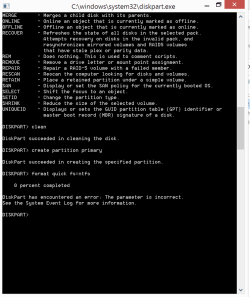
Thanks CKWD. Hit another dead end. Another error. Picture is attached for your reference. Kindly if you could help further.
 

Attachments

  • DiskPart Error2.PNG
    DiskPart Error2.PNG
    17.3 KB · Views: 1

My Computer My Computer

Computer type
Laptop
Computer Manufacturer/Model Number
HP
OS
Windows 7 Professional x64
CPU
Intel Core i5
Memory
8GB
Graphics Card(s)
shared
Hard Drives
1Tb
Antivirus
Symantic
Browser
Chrome
I can't see anywhere where you have typed “attributes disk clear readonly”. You should've typed it before typing “clean”. I see a list of commands, meaning you've made a mistake somewhere, thus it appears.

The steps should be:

1. Open the Start Menu, type diskpart, press Enter
2. Type list disk, press Enter
3. Type select disk X (where X is the number the certain drive), press Enter
4. Type attributes disk clear readonly
5. Type clean, press Enter
6. Type create partition primary, press Enter
7. Type format quick fs=ntfs, press Enter
8. Type assign letter=X (X=the letter you'd choose and is not in use), press Enter
9. Type exit, press Enter

Read carefully through what diskpart responds, if there's an error, post it here. Make sure you are typing what I've written!

This should work, I've just tried it on a 2TB WD drive and the commands are genuine. ;)

Still, change the cable with a new one and use USB 3.0 before typing the commands.

Best of luck! :)

CK_WD
 

My Computer My Computer

Computer type
PC/Desktop
OS
Windows 7 Home Premium x64
Back
Top