Solved hard disk MBR and NTFS on NAS turn into GPT and Raw

Toni73

New member
Local time
4:09 AM
Messages
21
Hello,
My Hard disk turn into GPT and Raw after put in my NAS (Network-Attached Storage).


It started after I put my disk of 1T (MBR – NTFS, win7) with information on a NAS (Buffalo LinkStation 441D) that I bought and try to install it without success. Suddenly it became Basic GPT and Raw at same time. I imagine that the NAS work in linux and when I try to install the disk it start the process and became incomplete. Now I have a disk in Basic GPT with 5 Raw partitions with the possibility of copy just one single partition in Minitool Partition Wizard, but it gives an error when I try to copy it.

I would like to revert the situation but I don’t know how to start since I can’t even copy the partition to another disk.
Here some Print Screen images to understand better.

All my information from the last 10 years is there. Can someone help me or point me to a direction.


Best regards,
 

Attachments
  • 1Gestao Discos Win7 1 1T.png
    1Gestao Discos Win7 1 1T.png
    51.9 KB · Views: 34
  • 2Minitool 1 1T.png
    2Minitool 1 1T.png
    424.6 KB · Views: 36
  • 3Error Copy Disc 1 1T.png
    3Error Copy Disc 1 1T.png
    12.3 KB · Views: 38
  • 4Failed Copy Disc 1 1T.png
    4Failed Copy Disc 1 1T.png
    7.7 KB · Views: 39
  • 5After making Failed Copy Disc 1 1T.png
    5After making Failed Copy Disc 1 1T.png
    400.9 KB · Views: 2
  • 6Error TestDisk.png
    6Error TestDisk.png
    13.2 KB · Views: 38

My Computer My Computer

At a glance

Windows 7 Ultimate x64
Computer type
PC/Desktop
OS
Windows 7 Ultimate x64

My Computers My Computers

  • At a glance

    Windows 7 HP 64i5 6600K - 800MHz to 4200MHz4+4G GSkill DDR4 3000IG - Intel 530
    Computer type
    PC/Desktop
    Computer Manufacturer/Model Number
    custom build
    OS
    Windows 7 HP 64
    CPU
    i5 6600K - 800MHz to 4200MHz
    Motherboard
    GA-Z170-HD3P
    Memory
    4+4G GSkill DDR4 3000
    Graphics Card(s)
    IG - Intel 530
    Monitor(s) Displays
    Samsung 226BW
    Screen Resolution
    1680x1050
    Hard Drives
    (1) -1 SM951 – 128GB M.2 AHCI PCIe SSD drive for Windows 7 and Lubuntu
    (2) -1 WD SATA 3 - 1T for Data
    (3) -1 WD SATA 3 - 1T for backup
    PSU
    Thermaltake 450W TR2 gold
    Keyboard
    Old and good Chicony mechanical keyboard
    Mouse
    Logitech mX performance - 9 buttons (had to disable some)
    Internet Speed
    500Mb/s
    Browser
    Firefox 64
    Other Info
    TinyWall firewall
  • At a glance

    Windows 7 Proi7-4500U 800MHz to 3.0GHz(4+4)G DDR3 1600IG intel 4400 + NVIDIA GeForce GT 745M
    Computer type
    Laptop
    System Manufacturer/Model Number
    Asus Q550LF
    OS
    Windows 7 Pro
    CPU
    i7-4500U 800MHz to 3.0GHz
    Motherboard
    Asus Q550LF
    Memory
    (4+4)G DDR3 1600
    Graphics Card(s)
    IG intel 4400 + NVIDIA GeForce GT 745M
    Sound Card
    Realtek
    Monitor(s) Displays
    LG Display LP156WF4-SPH1
    Screen Resolution
    1920 x 1080
    Hard Drives
    BX500 120G SSD for Windows and programs +
    1T HDD for data
    Internet Speed
    500 Mb/s
    Browser
    Firefox
    Other Info
    TinyWall firewall
Obrigado. Um abraço de Portugal.
 
Last edited:

My Computer My Computer

At a glance

Windows 7 Ultimate x64
Computer type
PC/Desktop
OS
Windows 7 Ultimate x64
I can't seem to send a message to Jumanji. I don't find the email link or send a message trough PM
 

My Computer My Computer

At a glance

Windows 7 Ultimate x64
Computer type
PC/Desktop
OS
Windows 7 Ultimate x64
Bem-vindo meu amigo, achoque jumanji e ele vai estar lá. :) Jumanji estará de volta em uma hora adter Café.
 

My Computer My Computer

At a glance

Windows 7 Home Premium 32 bit
OS
Windows 7 Home Premium 32 bit
Hello again,
It seems to be that I install a NAS system inside the partition windows with documents, and went wrong during install.


I used another disk that I had to simulate the some trouble. I pass it in Minitool partition wizard - recover partition, and now I have the previous GPT partitions on the disk and also a Ext2 that was found and another of the same lost and a few lost partitions in NTFS mode with small amount. I suppose that belongs to previous formats of the disk. I'm not sure. I don´t have the print screen just now but I will include it in this post later.
 

My Computer My Computer

At a glance

Windows 7 Ultimate x64
Computer type
PC/Desktop
OS
Windows 7 Ultimate x64
Hmm... honestly I do not know Portuguese and much less about NAS. Notwithstanding, I have to learn quite a bit from you to first understand how it all happened.

1. You bought the Buffalo NAS with a 4TB HDD inside. Did it come formatted or did you format it? If you formatted it how did you format it? ( I see that you haven't put any data into it yet)

2. Can you format a HDD inside with the NAS without connecting it to your PC?

3. You inserted the 1 TB HDD into the NAS bay. Where and how was it connected before?

Now please do this.

1. Plug out the NAS from your Desktop and keep it aside.

2. Also remove all other devices from the USB ports. Nothing plugged into the USB ports except any USB Mouse and Keyboard.

3. Directly connect your 1TB HDD to the motherboard on your Desktop. Also let me know how many partitions you had in that 1TB HDD.

4.Disconnect all other secondary drives on your Desktop. You should have only the system drive and this 1TB HDD.

Post a screenshot of Windows Disk Management. Also post the screenshot of Partition Wizard - the very first screen that appears as soon as you launch Partition Wizard.
 

My Computer My Computer

At a glance

Windows 7 Home Premium 32 bit
OS
Windows 7 Home Premium 32 bit
I am not taking cognisance of your post #6 because I do not understand it.

Go through my post #7 and do accordingly.
 

My Computer My Computer

At a glance

Windows 7 Home Premium 32 bit
OS
Windows 7 Home Premium 32 bit
Jumanji, thanks for reply.

1. You bought the Buffalo NAS with a 4TB HDD inside. Did it come formatted or did you format it?
-This NAS doesn´t came with Hard Drives. So I put my owns inside. The truth is that I put all my Drives (3) inside and all information is gone. All the disks became GPT. I didn't know that the disks should've been empty. I follow the instructions in the quick setup guide at - Buffalo download page.


If you formatted it how did you format it? ( I see that you haven't put any data into it yet)

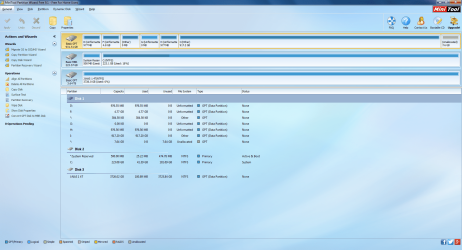
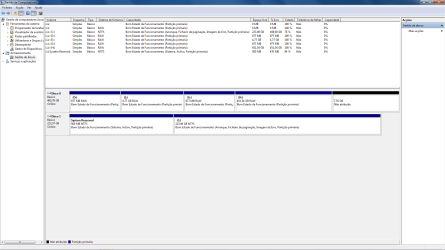
-The first picture is from the Windows Disk Management
395217d1484076370-hard-disk-mbr-ntfs-nas-turn-into-gpt-raw-1gestao-discos-win7-1-1t.png


The problem is in Disco 0. Disco 1 is the system, and the Disco 3 I rename it to NAS 1 4T, is a drive that I bought to make backup of disco 0.

2. Can you format a HDD inside with the NAS without connecting it to your PC?

-YES (instructions setup guide).

3. You inserted the 1 TB HDD into the NAS bay. Where and how was it connected before?

-It was connected in a windows 7 desktop PC.

Now please do this.

For now I'm not in the desktop PC, but what you ask is already in the pictures above.

1. Plug out the NAS from your Desktop and keep it aside.
-It's not the NAS it's Disco 3. I couldn't connect the NAS because it install in a incorrect way because was with documents inside.

2. Also remove all other devices from the USB ports. Nothing plugged into the USB ports except any USB Mouse and Keyboard.
-NOT IN PC right now.

3. Directly connect your 1TB HDD to the motherboard on your Desktop. Also let me know how many partitions you had in that 1TB HDD.
-Since I had 3 drives and two of them are exactly the same I can´t tell you if i had in this one that is plugged one single partition or two.

4.Disconnect all other secondary drives on your Desktop. You should have only the system drive and this 1TB HDD.
-NOT IN PC right now.

Post a screenshot of Windows Disk Management.
Windows Disk Management - picture above.

Also post the screenshot of Partition Wizard - the very first screen that appears as soon as you launch Partition Wizard.
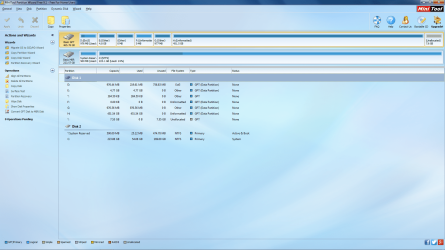
-Yellow partition highlighted is Disco 0 in Windows Disk Management screenshot.

395218d1484076370-hard-disk-mbr-ntfs-nas-turn-into-gpt-raw-2minitool-1-1t.png


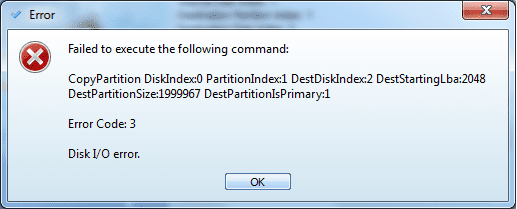
Also like I said I made a simulation with other disk and it became the some as disco 0 in this screenshot. With a bunch of different partitions. Partition I: in Minitool screenshot is the single one that became highlighted to copy, but without success as you can see in next screenshot.
395219d1484076370-hard-disk-mbr-ntfs-nas-turn-into-gpt-raw-3error-copy-disc-1-1t.png


395220d1484076370-hard-disk-mbr-ntfs-nas-turn-into-gpt-raw-4failed-copy-disc-1-1t.png


For now on I will use the simulation disk as test to repair and keep the others aside.

Apreciate any help.
 

My Computer My Computer

At a glance

Windows 7 Ultimate x64
Computer type
PC/Desktop
OS
Windows 7 Ultimate x64
From what I have read about this Buffalo NAS, it appears to me that you should only put two or four identical drives (Total capacity 16TB) with no data and set it up. While setting up it may format the drives and make it ready to populate all your data which you may want to serve/backup. If you put drives with data and try to set it up it may erase all data in it. And this is what seems to have happened in your case. This is from what I have read on Amazon user reviews. Amazon.com: Customer Reviews: Buffalo LinkStation 441 0 TB 4-Bay NAS for Home/Home Office (LS441DE).

So what do you want to do now?

I can only check each drive (where it has been erased by the NAS) on your Desktop( System drive + One drive that has been erased by your NAS) and see whether any data is recoverable.

Please don't ask me to refer to your old screenshots. I always start from scratch to avoid all confusion. Provide fresh screenshots as per the procedure outlined in my post #7

Upload screenshots to SevenForum servers.
 
Last edited:

My Computer My Computer

At a glance

Windows 7 Home Premium 32 bit
OS
Windows 7 Home Premium 32 bit
Ok Jumanji. Later on I will post you new screenshots with the system drive and the simulation drive in the computer.

Do you have to have access to my PC Desktop remotely? Tell me because in that case I have to be at my place to accomplished that.

Since we have 5:30h difference it has to be for tomorrow. Today when I arrive my place I will send you the new screenshots.

Thanks for the help.
 

My Computer My Computer

At a glance

Windows 7 Ultimate x64
Computer type
PC/Desktop
OS
Windows 7 Ultimate x64
I do not want to access others' computers.. Take your time. No need to be in a hurry. I keep peeping in every now and then and will catch you even if it is delayed by a day.. Whatever damage has happened has already happened. We will see to that that no further damage is inflicted.

First choose one drive which holds the important data which you may want to recover. I may also tell you that it is going to be a long process where I have to investigate your drive by all possible means. May or may not succeed depending upon the extent of damage done. If the NAS had done only a quick format, there is every possibility of retrieving most if not all data.
 

My Computer My Computer

At a glance

Windows 7 Home Premium 32 bit
OS
Windows 7 Home Premium 32 bit
Hi Jumanji, I have contact the Buffalo team and here is the answers from them:

- The diskless enclosure will format the drive to place its firmware on it.
- Once it has formatted the drive seeing the data can only be done with data recovery.

What do you think?
 

My Computer My Computer

At a glance

Windows 7 Ultimate x64
Computer type
PC/Desktop
OS
Windows 7 Ultimate x64

My Computer My Computer

At a glance

Windows 10 Pro. 64/ version 1709 Windows 7 Pr...Intel i7-6800K @ 4.3Corsair Platinum 16 gig @2400EVGA GTX 1070 OC
Computer type
PC/Desktop
Computer Manufacturer/Model Number
Home made Desktop
OS
Windows 10 Pro. 64/ version 1709 Windows 7 Pro/64
CPU
Intel i7-6800K @ 4.3
Motherboard
ASUS X-99 Deluxe II
Memory
Corsair Platinum 16 gig @2400
Graphics Card(s)
EVGA GTX 1070 OC
Monitor(s) Displays
Asus 27" LED LCD/VE278Q
Screen Resolution
1920-1080 or 1280-720 HDMI
Hard Drives
INTEL SSD 730-240 Gb Sata 3.0/
PSU
EVGA Platium 1200W
Case
Phanteks Luxe Tempered Glass 8 fans/ one radiator
Cooling
XSPC/ Water Cooled CPU
Keyboard
Das 4 Professional
Mouse
Logitech M705/MX Anywhere 2-S
Internet Speed
100 mbits
Antivirus
Microsoft Security Essentials/ Malwarebytes Premium 3.0/ SAS
Browser
I.E. 11 default/Firefox/ ISP Time Warner Cable/Spectrum
Other Info
LG BluRay Burner/
Sound system-KLipsch-THX/
Icy Dock ssd Hot Swap bays.
Resume:

I have put 3 drives that I had one after the other in the NAS (Buffalo LinkStation 441D). The thing was that since my PC Desktop was down (Motherboard issues) I suppose at the time that was something wrong with the drive that each time I put in the NAS, so, only after I realize the mistake that I did.

I also suppose I've made another mistake, that was insisting one second time the proceed of including the drives in the NAS, installing more than once the firmware in my Drives. I'm not sure of this.

For the purpose of retrieving the data inside the drives without inflict more damage, I wiped completed another drive (4th) that I had (Hitachi 500Gb) in the PC desktop for use in this simulation, put some data in it and put again in the NAS.


Here are some screenshots:


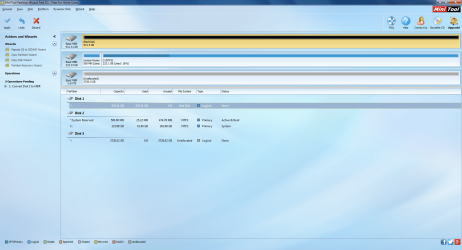
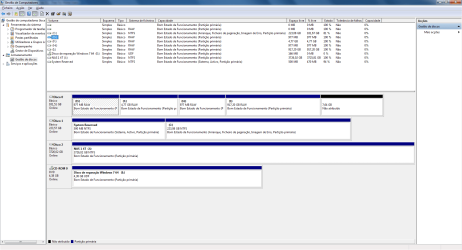
Windows Disk Management

Drive Hitachi Simulation Windows Disk Management.png


Partition Wizard

Drive Hitachi Simulation Minitool.png
 
Last edited:

My Computer My Computer

At a glance

Windows 7 Ultimate x64
Computer type
PC/Desktop
OS
Windows 7 Ultimate x64
Hi Toni,

My instruction was very clear. Please connect one drive that holds your important data to be recovered.

Instead you have put some simulation drive, which earlier must have had some data, you wiped it on your PC ( I do not know what exactly you did for that wiping, how you formatted it quick format/ full format, and how much data you put into it, put it into the NAS to play mischief on it. This drive has already been manipulated by you and for all I know does not contain any data that you really want to recover.

What do you want me to do with it?

Why are you not connecting the unmanipulated ( unmanipulated in any way by you but damage inflicted by your NAS only) actual drives which you want to recover?

.
 

My Computer My Computer

At a glance

Windows 7 Home Premium 32 bit
OS
Windows 7 Home Premium 32 bit
Ok Jumangi. I'm very nervous because of all my data.

I will follow your instructions.
Sorry and I hope you wait for another time to try to solve my problem. It will be tonight at Portugal time.

Much appreciate.
 

My Computer My Computer

At a glance

Windows 7 Ultimate x64
Computer type
PC/Desktop
OS
Windows 7 Ultimate x64
Then you better seek Professional Data Recovery Service.. In fact when you contacted Buffalo Support who advised data recovery, you must have asked them on how to recover the data. They might tell you if there is a specific procedure/application if they are aware.

I don't mind if you want to experiment different data recovery software on this experimental drive. In fact I learnt everything by experimenting. I have one trial drive exclusively for such experiments and it had been zeroed a hundred times. :)

If I had to experiment, I shall start with a fully wiped drive ( writing all zeros to all sectors - low level formatting), then formatting it, ( after writing zeros to all sectors a Quick format will do ) put data on it and carry on the experiment.
 

My Computer My Computer

At a glance

Windows 7 Home Premium 32 bit
OS
Windows 7 Home Premium 32 bit
In bufffalo they told me that they work with drivesavers.com to recover information.

In the case of this experimental drive I wiped to zeros in all the sectors using minitool partition wizard in my windows PC and then i put 30Gb on it and insert in the NAS and follow the same procedure to install the drive in the NAS and the drive became with the same symptoms that my others drives.

That's why I thought that should've work as the actually drives with the lost data.

According to your procedures to make the test is missing the quick format.


What do you think?
 

My Computer My Computer

At a glance

Windows 7 Ultimate x64
Computer type
PC/Desktop
OS
Windows 7 Ultimate x64
I am not sure how PW does the wipe. I only use a specifically designed tool for that. HDD LLF Low Level Format Tool HDDGURU: HDD LLF Low Level Format Tool. To write zeros to all sectors on a 750GB HDD it takes about 8 hours on my PC. Once you do a lowlevel format , you will be asked to initialise the disk (MBR/GPT - choose MBR for Disks upto 2TB unless you had deliberately initialised your real drives to GPT), then create a new volume and then format it. You can do that and then write the data on it. Then put it into your NAS and allow it to muck it up. Do your data recovery experiment.

Run Partition Recovery Wizard in PW on that drive and do a Full Scan. When you get Partitions found Window listing all the partitions found, double click on the largest partition shown and check whether it shows your files. Unless I see the list, I can't say whether your disk can be restored to its original state. I shall use this only as a first step.

So do this and then post the screenshot of the Partitions Found window.After posting the screenshot just cancel and close PW. ( Do not choose wrong partitions and ask it to write the Partition Table. You will be mucking it up further)

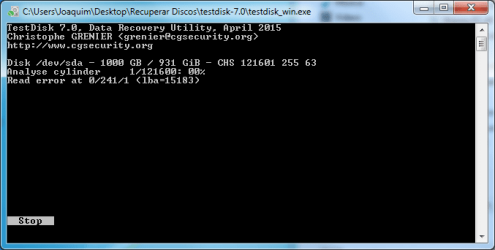
If this does not work or even if it shows the files, I will try TestDisk to check whether it lists the files to copy those.But TestDisk is not for beginners. You will need to be guided.

On the whole it is going to be a long process of trying various tools judiciously.Requires a lot of patience and perseverance. If you do not want to undergo all these trials, the best will be to contact the Service Agency referred by Buffalo. They would have done this already on similarly mucked up drives by Buffalo NAS . You can obtain a quote from them on telephone and do that if that suits you.
 

My Computer My Computer

At a glance

Windows 7 Home Premium 32 bit
OS
Windows 7 Home Premium 32 bit
Back
Top