

Hello;
I had a discussion here a few weeks ago about performance and potential bottle necks from the hard drive. I've still had a number of times when I've had my system Hang / Pause, and I believe it was just waiting for the hard drive to catch up. I left the performance monitor open and managed a couple screen shots shortly after the time the computer paused / hung.
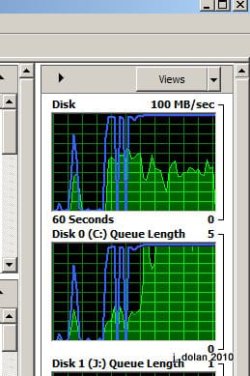

I'm not sure what the difference is between the green line and the blue line on the graph. But my graphs frequently look something like that when my system is hanging.
I am running stuff in the background that is accessing the drive (backup's, coping photos / videos, etc.)
Can you tell me what the blue vs green means on the graph? I see on the screen where it says Disk I/O by the Green and Highest Active Time by the blue, but don't know what they mean by highest active time.
Does this look like I am maxing out my drives ability and that is what is slowing down my computer?
I just got an e-mail from Cnet that talked about the SSD drives:
Windows 7 and SSDs: just how fast are they? | ZDNet
Jamie
I had a discussion here a few weeks ago about performance and potential bottle necks from the hard drive. I've still had a number of times when I've had my system Hang / Pause, and I believe it was just waiting for the hard drive to catch up. I left the performance monitor open and managed a couple screen shots shortly after the time the computer paused / hung.
I'm not sure what the difference is between the green line and the blue line on the graph. But my graphs frequently look something like that when my system is hanging.
I am running stuff in the background that is accessing the drive (backup's, coping photos / videos, etc.)
Can you tell me what the blue vs green means on the graph? I see on the screen where it says Disk I/O by the Green and Highest Active Time by the blue, but don't know what they mean by highest active time.
Does this look like I am maxing out my drives ability and that is what is slowing down my computer?
I just got an e-mail from Cnet that talked about the SSD drives:
Windows 7 and SSDs: just how fast are they? | ZDNet
Jamie
My Computer
At a glance
windows 8 64i7-382032GBGTX 650
- Computer type
- PC/Desktop
- Computer Manufacturer/Model Number
- Custom Build by CPU Solutions
- OS
- windows 8 64
- CPU
- i7-3820
- Motherboard
- Intel® Desktop Board DX79TO
- Memory
- 32GB
- Graphics Card(s)
- GTX 650
- Sound Card
- Built in
- Monitor(s) Displays
- 24" and 27" Asus; with a 24" LG
- Screen Resolution
- 1900X1080
- Hard Drives
- 240 Intel Cherryville internal. 8 ext drives on my other computer accessed over the network.
- PSU
- 700 watt
- Case
- CoolerMaster
- Keyboard
- Logitech Wireless
- Mouse
- Logitech M505
- Internet Speed
- 24Mbps down - 3Mbps up
- Browser
- Chrome
- Other Info
- Also have a Vaio VPCCW17FX Laptop. & Dell Studio XPS 8100 with 16GB of Ram running W8.


