Solved Hard Drive Clicks on Shutdown

pButler

New member
Local time
5:25 AM
Messages
4
I understand normal Hard drive noises. Indeed, I am an engineer retired from the hard drive business.

I heard abnormal clicks coming from my 1.0TB Hitachi drive during shutdown / restart. It started recently. Multiple click-click click-click about 5 repetitions before the CPU resets / power goes off. Fingers crossed I waited until after Christmas because of lack of space to open up my computer.

Copied entire old drive to new Seagate 1.5TB 7200 RPM drive. SAME PROBLEM! I setup the older drive for handy storage of grandkids pictures. Problem still around.

Now restarts show S.M.A.R.T. errors on both drives. Ctrl-Alt-Del or hard reset button restarts BIOS and Windows comes up normally.

The click-click might be parking. Does something in Windows tell hard drives to park? And tell them to park multiple times? I would suspect that drive controlled (as opposed to power fail) head parking would not click

Does Windows use the BIOS for shutting down hard drives?

I can guarantee the noise is not from my sound card. Speakers are not plugged in. It’s not fan related. Fans continue to run for restart. They stop on shutdown when power goes off. Noise does not come from CD drives.
 

My Computer My Computer

At a glance

64-bit Professinoal3x2Gig
Computer Manufacturer/Model Number
Separate MB / case / hard drives & OS
OS
64-bit Professinoal
Memory
3x2Gig
Hard Drives
New seagate 1.5TB 7200RPM
1 yo Hitachi 1.0 TB 7200
same thing happens to me sometimes except it is cd rom clicks at startup but nothing bad happens.

usually hard drives have auto park so i dont think its a windows error or anything like that.
maybe you can check your controllers?
 

My Computer My Computer

At a glance

windows xp 32 bit
OS
windows xp 32 bit
It is possible that you may have a virus. There are some out there that will cause the HD to act up and make noise.

Have you scanned both drives with an AV program yet?
 

My Computer My Computer

At a glance

Windows 7 Professional X64 Build 7600.16385 (...Intel Core 2 Duo E8400 Wolfdale 3.0GHz 6MB L2...Mushkin Enhanced Blackline PC8500 DDR2 6 GB (...XFX Radeon HD 5770 1 GB DDR5
Computer Manufacturer/Model Number
Custom Build by Nibiru2008 Computer Shop
OS
Windows 7 Professional X64 Build 7600.16385 (win7_rtm.090713-1255)
CPU
Intel Core 2 Duo E8400 Wolfdale 3.0GHz 6MB L2 Cache
Motherboard
Gigabyte GA-EP45-UD3R F12 BIOS
Memory
Mushkin Enhanced Blackline PC8500 DDR2 6 GB (2x2GB & 2x1GB)
Graphics Card(s)
XFX Radeon HD 5770 1 GB DDR5
Sound Card
Onboard Realtek Azalia HD Audio
Monitor(s) Displays
ViewSonic VX2250wm 22" Widescreen LED Backlight LCD
Screen Resolution
1920 X 1080p HD
Hard Drives
OCZ Vertex 2 60GB SSD, Samsung F3 HD502HJ 500GB, Samsung F1 HD502IJ 500GB, Samsung HD102SJ 1TB, Western Digital WD500AAKS 500GB
PSU
Bgears B-Tarantula 550 watt with Pigtail Modular Cabling
Case
Lian Li PC-7F Black Anodized All Aluminum bottom PSU mount
Cooling
Xigmatek Nepartak S983 3-Pipe HDT CPU Cooler & 92mm PWM Fan
Keyboard
KeyTronic Lifetime Series Model: LT Designer Black Full Size
Mouse
Logitech Wireless Trackman Wheel
Internet Speed
30 Mbps Down 2 Mbps Up Turbo RoadRunner
Other Info
G DATA Internet Security
My Hitachi does the same. Lots of racket and clicking. But it never failed - knock on wood.
 

My Computer My Computer

At a glance

Vista, Windows7, Mint Mate, Zorin, Windows 8from 1.6GHz Duo to i7
Computer Manufacturer/Model Number
HP, Dell, Gateway, Toshiba - 4 laptops and 2 desktops
OS
Vista, Windows7, Mint Mate, Zorin, Windows 8
CPU
from 1.6GHz Duo to i7
Monitor(s) Displays
2x HP w2207
Hard Drives
5x HDD, 7x SSD, 12x Externals
Keyboard
with trackball - no mices
Mouse
Trackball mice
Internet Speed
DSL 6000
Welcome to Seven Forums.
If your really concerned you can run sea tools diagnostic on your drive.
Here's the link | Seagate
Good luck Fabe
 

My Computer My Computer

At a glance

Windows 7 ultimate 64 bit / XP Home sp3intel Core 2 Duo E8400 3.0ghz8 gigs 1066 OCZ Fata1tyEVGA GTX 580 Call of Duty Black Ops Edition
Computer Manufacturer/Model Number
Self Built
OS
Windows 7 ultimate 64 bit / XP Home sp3
CPU
intel Core 2 Duo E8400 3.0ghz
Motherboard
Asus P5ND bios 1401
Memory
8 gigs 1066 OCZ Fata1ty
Graphics Card(s)
EVGA GTX 580 Call of Duty Black Ops Edition
Sound Card
Creative Soundblaster Audigy 2zs
Monitor(s) Displays
Asus 24in LCD's 2MS X2
Screen Resolution
1920x1080p @60Hz
Hard Drives
WD Caviar 500 Black/ WD Caviar 200 Blue
PSU
OCZ 700W GameXtreme
Case
NZXT Apollo
Cooling
Corsair H50 CPU/120mm x3 /60mm x2 /Corsair Dominator Ram
Keyboard
Logitech Bluetooth Wireless MX5000
Mouse
Logitech Bluetooth Wireless MX1000
Internet Speed
Download 19.83 Upload 0.97
Other Info
Logitech Z2300 Speakers/ Bose Noise Cancelling Headphones/Avermedia PCI-e Hybrid TV Bravo/Epson NX415 all in one/ 4 Port Powered USB Hub/ LG 10x Bluray Burner /TSST Corp DVDRW External
I’m using Kaspersky AV + Windows Defender. (Why does it update 5-6 times a week?) I.e. it’s unlikely a virus.

Modern drives had better have auto-park. I actually wrote microcontroller code that captured spindown profiles after drive power failure. This tested the tiny corner of the PCB that parked the heads up after power failure. The processor on the PCB could not do this because it stops running after the power fails.

Is there something in the ATA command set about head parking? FYI my drives are SATA.

I know that buffer flushing (both in the OS and on the drive PCB) needs doing before reset / power down. Does Win7 involve the BIOS in drive buffer flushing? Does Win7 use the BIOS for head locking? Does anybody know?
 

My Computer My Computer

At a glance

64-bit Professinoal3x2Gig
Computer Manufacturer/Model Number
Separate MB / case / hard drives & OS
OS
64-bit Professinoal
Memory
3x2Gig
Hard Drives
New seagate 1.5TB 7200RPM
1 yo Hitachi 1.0 TB 7200
I can't say I know, but I have done some Frankenstein experiments with old hard drives and it *looks* like the parking is purely mechanical utilizing the magnet. The power cuts off and then the actuator arm swings back to the park location. If you push the arm across the disk with the power disconnected the magnet just pops it back to the park location.

The buffer in a hard drive is just internal RAM, so I suspect the buffer flushing is purely electronic and not mechanical at all.

And a hard disk will start up, shut down and park, and function as expected before you get around to putting an OS on it. So I doubt the OS has anything to do with parking.
 

My Computer My Computer

At a glance

Windows 7 64 Bit Home Premium SP1i7-3820GSkill F3-14900CL9Q - 16GBEVGA GeForce GTX660 - Driver 352.86
Computer type
PC/Desktop
Computer Manufacturer/Model Number
Home Built - Jan 2013
OS
Windows 7 64 Bit Home Premium SP1
CPU
i7-3820
Motherboard
Asus P9X79-PRO - Bios 4608
Memory
GSkill F3-14900CL9Q - 16GB
Graphics Card(s)
EVGA GeForce GTX660 - Driver 352.86
Sound Card
On board Realtek ALC898
Monitor(s) Displays
Acer S271HL
Screen Resolution
1920 x 1080
Hard Drives
#1- Samsung 840 Pro Series
#2- Western Digital WD1002FAEX Sata3 Black
#3- Western Digital WD1002FAEX Sata3 Black
PSU
Corsair CMPSU-850TX-V2 - 850 watt (by Seasonic)
Case
Corsair Obsidian 550D
Cooling
Standard 3 120mm case fans, Cooler Master Hyper 212 EVO
Keyboard
MS KC-0405
Mouse
Intellimouse 5-button
Internet Speed
56 Mbits/Sec (on a good day)
Antivirus
Avast & Malwarebytes
Browser
Firefox
Other Info
Asus DVD - DRW-24B1ST 24X
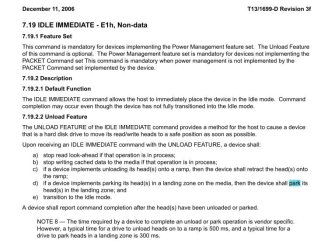
i may be wrong but i read this post: NCIX FORUMS - How to use WDidle3.exe to change autopa... - Western Digital WD20EARS Caviar Green 2T...

they use a utility to manipulate how the drive parks the head.
they boot from the utility program provided, into dos mode which then they can give commands to the utility. since it is just the utility that is able to manipulate the hard drive, i dont think that the os has anything to do with it (have you seen anything like that from the control panel? or any cmd command to park the hard drive?)

you can also try this: HDDGURU: Laptop and Desktop Hard Disk Drives, Tests, Software, Firmware, Tools, Data Recovery, HDD Repair
it is a low level diagnostic program for hard drives.


but i dont know if it applies to your hard drive, maybe your hard drive manufacturer has a similar utility to manipulate your hard drive's [firmware?]

it seems that alot of this auto parking has to do with power management and data loss.
 

Attachments

  • untitled.JPG
    untitled.JPG
    54.4 KB · Views: 75

My Computer My Computer

At a glance

windows xp 32 bit
OS
windows xp 32 bit
It is possible the Voltage/Current to be defective from the Power box and the HDD not shutting down correctly. I suggest changing it and if the HDD are in guarantee return them. SMART is enough prove they've got problems.
 

My Computer My Computer

At a glance

32 bit Windows 7
OS
32 bit Windows 7
Responding to TVeblen

>…old hard drives… push the arm across the disk with the power disconnected the magnet just pops it back to the park location.

The key here is OLD hard drives. My engineering experience is with Quantum drives several years ago. The head park involved a mechanical latch that was released on spinup by windage. Even back then heads MUST NOT land on data surfaces. Auto-park was accomplished by the actuator and motor power chip a corner of which was kept alive by a small cap.

About the drive internal buffer: you are right, its flushing is the responsibility of drive firmware. But remember, modern drives lie. They lie when they say “write complete” after write data is in drive RAM -- well before your data gets written to the disk media. And…when the OS drops power on a drive it’s essential that all deferred writes are actually performed. OS responsibility: issue a command that forces writing all unwritten data -- then drop power.

>And a hard disk will start up, shut down and park, and function as expected before you get around to putting an OS on it. So I doubt the OS has anything to do with parking.

Conclusion does not follow. Better to say “an OS does not need to do anything special for head parking.” Park commands were needed for ancient hard drives using stepper motors as they had no way to auto-park. Those days are long gone.

Again, how or does Win7 park heads? BIOS involvement? Does anyone know?
 

My Computer My Computer

At a glance

64-bit Professinoal3x2Gig
Computer Manufacturer/Model Number
Separate MB / case / hard drives & OS
OS
64-bit Professinoal
Memory
3x2Gig
Hard Drives
New seagate 1.5TB 7200RPM
1 yo Hitachi 1.0 TB 7200
you can try to try those clicking drives on another computer. if it still clicks then its probably the hard drives problem. if not, then something to do with your pc.

I think its a power management thing.
And no i dont know how it windows 7 does it.

Hard disk disappearing? answer/question it's ACPI.

im thinking that the firmware in the hard drive detects the spin down and parks the hard drive when the platters are spinning.
i may not be of much help but i tried =(.
 

My Computer My Computer

At a glance

windows xp 32 bit
OS
windows xp 32 bit
I've run into this issue some days ago.
After changing MB and reinstalling system (Windows 7 Ultimate x32) I've noticed the HDD clicks while shutting down my PC.
Then I changed several different HDDs (WD 320, WD 750, Seagate 1Tb) and it was all the same - clicking while shutdown. All HDDs were brand new.

Assuming that drives were ok, I decided to play with BIOS. And after Disabling AHCI (setting Mode to Native IDE) clicking stopped.
In my case:
if Mode = AHCI then HDD clicks
if Mode = IDE then HDD is silent


So just try to disable ACHI and see what happens.


Regarding many threads on different forums on this issue, I suppose that the problem is somewhere in system/drivers/software but it's not about drives and MBs.
 

My Computer My Computer

At a glance

Windows 7 Ultimate x32
OS
Windows 7 Ultimate x32
I've run into this issue some days ago.
After changing MB and reinstalling system (Windows 7 Ultimate x32) I've noticed the HDD clicks while shutting down my PC.
Then I changed several different HDDs (WD 320, WD 750, Seagate 1Tb) and it was all the same - clicking while shutdown. All HDDs were brand new.

Assuming that drives were ok, I decided to play with BIOS. And after Disabling AHCI (setting Mode to Native IDE) clicking stopped.
In my case:
if Mode = AHCI then HDD clicks
if Mode = IDE then HDD is silent


So just try to disable ACHI and see what happens.


Regarding many threads on different forums on this issue, I suppose that the problem is somewhere in system/drivers/software but it's not about drives and MBs.
AHCI is advanced controlling system for the SATA HDD which is made by Intel. It boosts performance of the HDD but usually not much. In your case it is caused by either the chipset of the MB which controls AHCI or the driver used to identify the HDD and control it. It is best to write to Intel about this issue with details about the MB and drivers used.
 

My Computer My Computer

At a glance

32 bit Windows 7
OS
32 bit Windows 7
AHCI is advanced controlling system for the SATA HDD which is made by Intel. It boosts performance of the HDD but usually not much. In your case it is caused by either the chipset of the MB which controls AHCI or the driver used to identify the HDD and control it. It is best to write to Intel about this issue with details about the MB and drivers used.

It's not that simple. Before the issue I had WinXP pro SP3, and that was OK. And only after reinstalling OS I noticed those clicks. And then i began to swap different drives. And finally disabled Ahci.


For now I have no time to reinstall OS back to WinXP and check AHCI there again. Maybe later.
Just decided to share my personal experience on this issue. Maybe someone finds it helpful.
 

My Computer My Computer

At a glance

Windows 7 Ultimate x32
OS
Windows 7 Ultimate x32
I am the OP. Thank you. That worked.
 

My Computer My Computer

At a glance

64-bit Professinoal3x2Gig
Computer Manufacturer/Model Number
Separate MB / case / hard drives & OS
OS
64-bit Professinoal
Memory
3x2Gig
Hard Drives
New seagate 1.5TB 7200RPM
1 yo Hitachi 1.0 TB 7200
Thanks for the feedback, interesting problem.

Could be a driver caused issue.
 

My Computer My Computer

At a glance

Windows 7 Ult x64 - SP1/ Windows 8 Pro x64Intel Core i5-3570K 4.6GHz8GB (2X4GB) DDR3 1600 Corsair Vengeance CL8 1.5vSapphire HD 7770 Vapor-X OC 1GB DDR5
Computer type
PC/Desktop
Computer Manufacturer/Model Number
76~2.0
OS
Windows 7 Ult x64 - SP1/ Windows 8 Pro x64
CPU
Intel Core i5-3570K 4.6GHz
Motherboard
Gigabyte GA-Z77X UD3H, f18
Memory
8GB (2X4GB) DDR3 1600 Corsair Vengeance CL8 1.5v
Graphics Card(s)
Sapphire HD 7770 Vapor-X OC 1GB DDR5
Sound Card
Onboard VIA VT2021
Monitor(s) Displays
22" LCD Dell
Screen Resolution
1680x1050
Hard Drives
Samsung 840Pro 128GB SSD,
Seagate Barracuda 500GB SATA2 7200rpm 32MB cache, Seagate Barracuda 1TB SATA2 7200rpm 32MB cache,
PSU
Corsair HX650W
Case
Cooler Master Storm Scout
Cooling
Corsair H80 2x12cm Noctua NF P12 , 2x14cm case fans
Keyboard
Logitech Wave
Mouse
CM Sentinel
Internet Speed
Dismal
Antivirus
Avast
Browser
Opera Next
Other Info
Haswell laptop: HP Envy 17t-j, i7-4700MQ, GeForce 740M 2GB DDR3, 17.3" Full HD 1920x1080, 16GB RAM, Samsung 840 Pro 128GB, 1TB Hitachi 7200 HDD,
Desktop: eSATA ports,
External eSATA Seagate 500GB SATA2 7200rpm,
External WD USB 500GB
Yes, curious.

If disabling AHCI corrected the issue, then the next question that comes to mind is whether the AHCI driver was the generic Intel driver supplied in W7, or if the driver installed was the one provided by the motherboard manufacturer.

I had some drive issues solved by installing the Asus AHCI driver.
 

My Computer My Computer

At a glance

Windows 7 64 Bit Home Premium SP1i7-3820GSkill F3-14900CL9Q - 16GBEVGA GeForce GTX660 - Driver 352.86
Computer type
PC/Desktop
Computer Manufacturer/Model Number
Home Built - Jan 2013
OS
Windows 7 64 Bit Home Premium SP1
CPU
i7-3820
Motherboard
Asus P9X79-PRO - Bios 4608
Memory
GSkill F3-14900CL9Q - 16GB
Graphics Card(s)
EVGA GeForce GTX660 - Driver 352.86
Sound Card
On board Realtek ALC898
Monitor(s) Displays
Acer S271HL
Screen Resolution
1920 x 1080
Hard Drives
#1- Samsung 840 Pro Series
#2- Western Digital WD1002FAEX Sata3 Black
#3- Western Digital WD1002FAEX Sata3 Black
PSU
Corsair CMPSU-850TX-V2 - 850 watt (by Seasonic)
Case
Corsair Obsidian 550D
Cooling
Standard 3 120mm case fans, Cooler Master Hyper 212 EVO
Keyboard
MS KC-0405
Mouse
Intellimouse 5-button
Internet Speed
56 Mbits/Sec (on a good day)
Antivirus
Avast & Malwarebytes
Browser
Firefox
Other Info
Asus DVD - DRW-24B1ST 24X
Back
Top