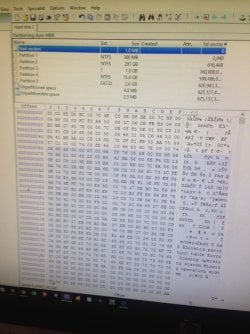
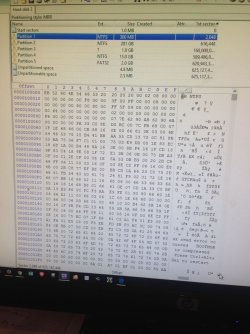
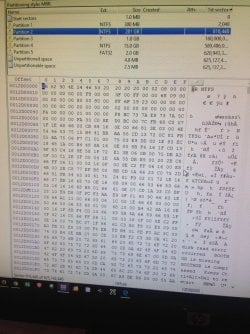
Hard Drive Error, pls help!!! see WInHex screenshots

stalematex

New member
Local time
10:24 PM
Messages
2
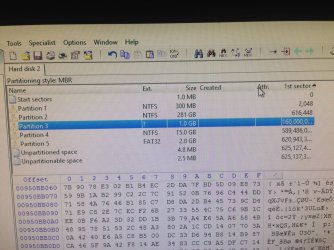
Hi pls I need someone to guide me. My laptop won't boot because of a hard drive error. The hard drive was removed and connected via USB, igt shows as unallocated and uninitialized under disk mgt and not recognized under my computer. I have tried data recovery softwares such as mini tool partition, easeus, roadkill etc most of them say cant read disk, bad sectors, or won't recognize the drive. Winhex seems to be the only one i have made little progress with, initially (and sometimes) it saw the drive as unpartitioned and unallocated but lately it is showing a partition table. I have attached screen grabs of the WinHex screenshot partition table/sectors. I know there are bad sectors ( see partition 3), and it says data redundancy cyclic error (something like that). Pls can anyone figure out what the disk status is and how and if I can recover data from it based on the winhex outputs. I have 2 chapters of my thesis in there that I didn't back up, was working on a section when the laptop won't turn on after a shutdown. My deadline is near and i am at a loss over what to do. Thank you. Hope the post makes sense. If anyone is willing to remote help me or anything or over the phone i will appreciate it.

Does it look like i can recover my data pls?


Thank you
 

Attachments
  • IMG-20170126-WA0013_1485465951424.jpg
    IMG-20170126-WA0013_1485465951424.jpg
    218.1 KB · Views: 1
  • IMG-20170126-WA0014_1485465951202.jpg
    IMG-20170126-WA0014_1485465951202.jpg
    151.2 KB · Views: 1
  • IMG-20170126-WA0015_1485465951007.jpg
    IMG-20170126-WA0015_1485465951007.jpg
    152.3 KB · Views: 1
  • IMG-20170126-WA0016_1485465950821.jpg
    IMG-20170126-WA0016_1485465950821.jpg
    187.9 KB · Views: 1
  • IMG-20170126-WA0017_1485465949500.jpg
    IMG-20170126-WA0017_1485465949500.jpg
    242.3 KB · Views: 1

My Computer My Computer

Computer type
PC/Desktop
OS
windows 7
Please take your notes and begin to retype, on another computer, the last two chapters of your Thesis Paper; ask the teacher if a small deadline extension can be made without penalty for you.
From experience, if a document or spreadsheet cannot be recovered en toto, if it only can be recovered sector by sector, cluster by cluster, you are probably not going to like the extracted results! It might mirror the experience of going to a junkyard and pulling the many pieces of a car, from all over the lot, into a garage.
 

My Computer My Computer

Computer type
PC/Desktop
Computer Manufacturer/Model Number
Antec desktop; Acer Aspire laptops
OS
Windows 7 Professional 64-bit
CPU
Desktop i5; Acers i5 & i7
Memory
desktop 16GB; 1 Acer 8GB & 1 Acer 16GB
Hard Drives
1TB split into 2 equal partitions [OS and data] usable by RJS
Internet Speed
AT&T DSL
Browser
FF, GChrome, msIE
Other Info
Windows 7 Firewall, Emsisoft AM/AV, MSE [scan-only], SpywareBlaster, Ruiware/BillP combine
Have you tried specific partition recovery software that may just do it also get test software from disk makers website see what it says
 

My Computer My Computer

Computer type
PC/Desktop
OS
win 8 32 bit
......Does it look like i can recover my data pls?,,,,,,

No. Not likely the way you had done things and doing things. You could have only mucked up your HDD further trying various things. And whoever told you that you can recover data with WinHex? Yes you can experiment but as Roland JS aptly said it is like " pulling the many pieces of a car" and trying to make a car a car.

You should have come here first when your laptop did not boot and any data recovery effort should have been done without taking the HDD out.

In most such cases, booting from Live Linux could have recovered most data. But you have made things difficult and unpredictable now.

Notwithstanding, even now I would recommend doing that and try your luck..

Put the HDD back into the laptop and try to boot from a Live Linux pen drive.

Go to post#8 in this thread Is there any way of saving a completely unrecognisable hard drive? and follow the procedure.
 

My Computer My Computer

OS
Windows 7 Home Premium 32 bit
All files of any importance should have at least one backup copy while files of particular importance (such as a thesis) should have at least 2 backup copies, preferably stored in different locations. There are many ways data can be lost and maintaining backups is the only real security for your data. Even professional data recovery cannot be relied on.

Unfortunately so very many people must learn this important lesson the hard way.
 

My Computer My Computer

Computer type
PC/Desktop
Computer Manufacturer/Model Number
HP
OS
Windows 7 Pro 64 bit
CPU
Xeon W3520
Memory
8 GB
Graphics Card(s)
Nvidia Geforce 210
Back
Top