Solved Hard Drive Help

sharkd442

New member
Local time
1:46 PM
Messages
49
i need help with a hard drive question. can some one help thanks
 

My Computer

Computer Manufacturer/Model Number
ASUS 1225B Eee-PC Netbook
OS
Windows 7 Home Premium 64-Bit
CPU
AMD E-450 APU With Radeon
Motherboard
ASUSTeK Computer Inc.
Memory
4GB Of Ram
Monitor(s) Displays
2
Hard Drives
1) 320GB Hard Drive
Cooling
Fan
Hello Shark, and welcome to Seven Forums.

What is your HDD question?
 

My Computer

Computer type
PC/Desktop
Computer Manufacturer/Model Number
Self built custom
OS
64-bit Windows 11 Pro for Workstations
CPU
Intel i7-8700K OC'd to 5 GHz
Motherboard
ASUS ROG Maximus XI Formula Z390
Memory
64 GB (4x16GB) G.SKILL TridentZ RGB DDR4 3600 MHz
Graphics Card(s)
ASUS ROG-STRIX-GTX1080TI-O11G-GAMING
Sound Card
Integrated
Monitor(s) Displays
2 x Samsung Odyssey G7 27"
Screen Resolution
2560x1440
Hard Drives
1TB Samsung 990 PRO M.2,
4TB Samsung 990 PRO PRO M.2,
TerraMaster F8 SSD Plus NAS
PSU
Seasonic Prime Titanium 850W
Case
Thermaltake Core P3
Cooling
Corsair Hydro H115i
Keyboard
Logitech wireless K800
Mouse
Logitech MX Master 4
Internet Speed
2 Gb/s Download and 100 Mb/s Upload
Antivirus
Malwarebyte Anti-Malware Premium
Browser
Google Chrome
Other Info
Logitech Z625 speaker system,
Logitech BRIO 4K Pro webcam,
HP Color LaserJet Pro MFP M477fdn,
APC SMART-UPS RT 1000 XL - SURT1000XLI,
Galaxy S23 Plus phone
Oh, LOL.
Why didn't he post the question in his first post? :D
 

My Computer

OS
N/A
are you good at hard drive questions
 

My Computer

Computer Manufacturer/Model Number
ASUS 1225B Eee-PC Netbook
OS
Windows 7 Home Premium 64-Bit
CPU
AMD E-450 APU With Radeon
Motherboard
ASUSTeK Computer Inc.
Memory
4GB Of Ram
Monitor(s) Displays
2
Hard Drives
1) 320GB Hard Drive
Cooling
Fan
Shark,

We can't help you until you actually ask a question about the hard drive, and give us some details about it.
 

My Computer

Computer type
PC/Desktop
Computer Manufacturer/Model Number
Self built custom
OS
64-bit Windows 11 Pro for Workstations
CPU
Intel i7-8700K OC'd to 5 GHz
Motherboard
ASUS ROG Maximus XI Formula Z390
Memory
64 GB (4x16GB) G.SKILL TridentZ RGB DDR4 3600 MHz
Graphics Card(s)
ASUS ROG-STRIX-GTX1080TI-O11G-GAMING
Sound Card
Integrated
Monitor(s) Displays
2 x Samsung Odyssey G7 27"
Screen Resolution
2560x1440
Hard Drives
1TB Samsung 990 PRO M.2,
4TB Samsung 990 PRO PRO M.2,
TerraMaster F8 SSD Plus NAS
PSU
Seasonic Prime Titanium 850W
Case
Thermaltake Core P3
Cooling
Corsair Hydro H115i
Keyboard
Logitech wireless K800
Mouse
Logitech MX Master 4
Internet Speed
2 Gb/s Download and 100 Mb/s Upload
Antivirus
Malwarebyte Anti-Malware Premium
Browser
Google Chrome
Other Info
Logitech Z625 speaker system,
Logitech BRIO 4K Pro webcam,
HP Color LaserJet Pro MFP M477fdn,
APC SMART-UPS RT 1000 XL - SURT1000XLI,
Galaxy S23 Plus phone
A hard disk drive (HDD) is a data storage device used for storing and retrieving digital information using rapidly rotating discs (platters) coated with magnetic material. An HDD retains its data even when powered off. Data is read in a random-access manner, meaning individual blocks of data can be stored or retrieved in any order rather than just sequentially. An HDD consists of one or more rigid ("hard") rapidly rotating discs (platters) with magnetic heads arranged on a moving actuator arm to read and write data to the surfaces.

More: Hard disk drive - Wikipedia, the free encyclopedia

Can we do anything else for you?

Kari
 

My Computer

Computer type
Laptop
Computer Manufacturer/Model Number
HP ENVY 17-1150eg
OS
Windows 10 Pro x64 EN-GB
CPU
1.6 GHz Intel Core i7-720QM Processor
Memory
6 GB
Graphics Card(s)
ATI Mobility Radeon HD 5850 Graphics
Sound Card
Beats sound system with integrated subwoofer
Monitor(s) Displays
17" laptop display, 22" LED and 32" Full HD TV through HDMI
Screen Resolution
1600*900 (1), 1920*1080 (2&3)
Hard Drives
Internal: 2 x 500 GB SATA Hard Disk Drive 7200 rpm
External: 2TB for backups, 3TB USB3 network drive for media
Cooling
As Envy runs a bit warm, I have it on a Cooler Master pad
Keyboard
Logitech diNovo Media Desktop Laser (bluetooth)
Mouse
Logitech Performance Mouse MX
Internet Speed
50/10 Mbps VDSL
Antivirus
Windows Defender 4.3.9431.0
Browser
Maxthon 3.5.2., IE11
Lol.
What is the question anyways? :D
We're all here to try to help you, and please don't doubt/question us :)
 

My Computer

OS
N/A
are you good at hard drive questions

SevenForums excels at all hardware and software related problems, including hard disks - ask away and we will see if we can help.
 

My Computer

Computer type
PC/Desktop
Computer Manufacturer/Model Number
Golden Mk. I.4
OS
Windows 10 Pro x64 ; Xubuntu x64
CPU
Intel i7 860 @ 2.80 GHz O/C'ed to 4.0GHz
Motherboard
Gigabyte P55A-UD3R Rev.1. Award BIOS F13
Memory
16GB Corsair Vengance DDR3 @ 661 MHz Dual Channel (9-9-9-24)
Graphics Card(s)
EVGA NVidia GTX 560 1024MB
Sound Card
Realtek Integrated
Monitor(s) Displays
Dual Samsung SyncMaster 2494HS
Screen Resolution
1920*1080 and 1920*1080
Hard Drives
1*Samsung 840 EVO 120GB SSD;
1*OCZ Vertex 2 60GB SSD;
2*Samsung F3 SpinPoint 1TB in RAID0;
1*Samsung F1 SpinPoint 1TB;
2*Western Digital 1TB External USB 3.0
1*Western Digital 500GB External USB 3.0
1*Seagate 500GB External USB 2.0
PSU
Thermaltake ToughPower QFan 750W
Case
Thermaltake Element S VK60001W2Z
Cooling
Corsair H60 Water Cooling, 2*230mm and 2*80mm case fans
Keyboard
Logitech G110
Mouse
Logitech MX518
Wow, it took 8 posts to tell him to ask us the question :)
I'm guessing that he's jumping between different forums and asking about which one is the best? That could be problematic when we're solving the problem :P
 

My Computer

OS
N/A
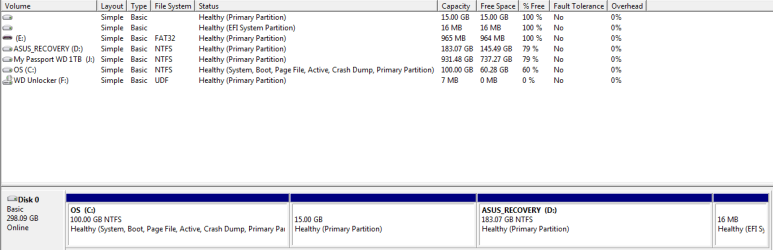
i have a ASUS Netbook and the hard drive is in 4 parts a one 100GB for the system a 15GB complet emputy cant use it, a 183GB for me , a 16MB for efi and i would like to know what the 15GB part is for???
 

My Computer

Computer Manufacturer/Model Number
ASUS 1225B Eee-PC Netbook
OS
Windows 7 Home Premium 64-Bit
CPU
AMD E-450 APU With Radeon
Motherboard
ASUSTeK Computer Inc.
Memory
4GB Of Ram
Monitor(s) Displays
2
Hard Drives
1) 320GB Hard Drive
Cooling
Fan
A hard disk drive (HDD) is a data storage device used for storing and retrieving digital information using rapidly rotating discs (platters) coated with magnetic material. An HDD retains its data even when powered off. Data is read in a random-access manner, meaning individual blocks of data can be stored or retrieved in any order rather than just sequentially. An HDD consists of one or more rigid ("hard") rapidly rotating discs (platters) with magnetic heads arranged on a moving actuator arm to read and write data to the surfaces.

More: Hard disk drive - Wikipedia, the free encyclopedia

Can we do anything else for you?

Kari

Based on the OP's question, that is a great answer. Now, just in case the OP wants to test your knowledge further, be sure to have information for SSD's.:D
 

My Computer

Computer type
PC/Desktop
Computer Manufacturer/Model Number
Custom Built
OS
Windows 7 Professional x64
CPU
Intel i5 quad processor
Motherboard
DP67BG
Memory
16 GB
Graphics Card(s)
Radeon HD 5770
Sound Card
Realtek High Definition Audio
Monitor(s) Displays
Samsung SyncMaster
Screen Resolution
1920X1080
Hard Drives
WD 2TB (SATA Internal)
WD 1TB (USB External)
PSU
Corsair GS800
Case
Tower (Generic)
Cooling
3 Internal Fans
Keyboard
MS Wireless
Mouse
MS Optical Wired
Internet Speed
54 mbps
Antivirus
Emsisoft
Browser
IE-Version 9, Palemoon-Version 24.2.0
Please post a screenshot of the Disk Manager in Computer Management.
 

My Computer

OS
N/A
i dont know how
 

My Computer

Computer Manufacturer/Model Number
ASUS 1225B Eee-PC Netbook
OS
Windows 7 Home Premium 64-Bit
CPU
AMD E-450 APU With Radeon
Motherboard
ASUSTeK Computer Inc.
Memory
4GB Of Ram
Monitor(s) Displays
2
Hard Drives
1) 320GB Hard Drive
Cooling
Fan
i dont know how

Click start > type in disk management > it'll say "create and format hard disk partitions", click that > take a screen shot of the window it takes you to. Come back to "here", your post and click the little paperclip up next to the smiley. Upload it in your next post.
 

My Computer

Computer type
Laptop
Computer Manufacturer/Model Number
MSI GE72VR Apache Pro-416
OS
Windows 10x64 Build 1709
CPU
Intel i7 7700HQ Kaby Lake
Motherboard
Micro-Star Intl. MS-179B (U3C1)
Memory
16 GB DDR4 @2400
Graphics Card(s)
Nvidia Geforce GTX 1060
Screen Resolution
1920x1080 120Hz
Hard Drives
256 GB Nvme M.2 SSD

1TB HDD@7200
Cooling
Cooler Blast 4
Keyboard
Steel Series
Antivirus
Bit Defender Free
Browser
Edge
12-14-2012 7-33-38 PM.png
 

My Computer

Computer Manufacturer/Model Number
ASUS 1225B Eee-PC Netbook
OS
Windows 7 Home Premium 64-Bit
CPU
AMD E-450 APU With Radeon
Motherboard
ASUSTeK Computer Inc.
Memory
4GB Of Ram
Monitor(s) Displays
2
Hard Drives
1) 320GB Hard Drive
Cooling
Fan
Please right-click the 15GB partition, and click "Change drive letters and paths...". Press "Add", take note of the drive letter assigned, and click "OK". Go to "My Computer" and access that drive. Take a screenshot of the contents please.
 

My Computer

OS
N/A
i cant do anything with but to delet it
 

My Computer

Computer Manufacturer/Model Number
ASUS 1225B Eee-PC Netbook
OS
Windows 7 Home Premium 64-Bit
CPU
AMD E-450 APU With Radeon
Motherboard
ASUSTeK Computer Inc.
Memory
4GB Of Ram
Monitor(s) Displays
2
Hard Drives
1) 320GB Hard Drive
Cooling
Fan
Is this the original factory preinstall, or has it been reinstalled? The EFI partition appears to be a remnant of a previous install done in EFI mode to GPT disk which has now been clean reinstalled to an MBR disk instead. Technical Note: UEFI BIOS vs. Legacy BIOS - YouTube

To be absolutely certain about the 15gb partition unhide System and Hidden files at Control Panel>Folder Options>View, then see if it will assign a letter in DIsk Mgmt or rightclick>Explore.

If this fails install Partition Wizard to try Exploring the partition, assigning a letter first if necessary.

If you haven't already, I would generate your Asus Recovery disks to see if the Recovery partition is working.
 
ok thanks i will try that
 

My Computer

Computer Manufacturer/Model Number
ASUS 1225B Eee-PC Netbook
OS
Windows 7 Home Premium 64-Bit
CPU
AMD E-450 APU With Radeon
Motherboard
ASUSTeK Computer Inc.
Memory
4GB Of Ram
Monitor(s) Displays
2
Hard Drives
1) 320GB Hard Drive
Cooling
Fan
That's a really strange setup...
 

My Computer

Computer type
PC/Desktop
Computer Manufacturer/Model Number
Apple 17" iMac MA199LL (Early 2006)
OS
Windows 8 Pro (32-bit)
CPU
1.83GHz Intel Core Duo
Memory
2GB 667MHz DDR2 SDRAM (PC2-5300) (upgrade)
Graphics Card(s)
ATI Radeon X1600 with 128MB GDDR3 memory
Monitor(s) Displays
17-inch TFT active-matrix LCD, millions of colors
Screen Resolution
1440 x 900
Hard Drives
Hitachi 320GB HDT721032SLA360 7200RPM SATA II (upgrade)
Keyboard
Microsoft Wired Keyboard 600
Mouse
Microsoft Basic Optical Mouse v2.0
Internet Speed
4 Mbps
Antivirus
Microsoft Security Essentials
Browser
Google Chrome
Other Info
WEI:
Base Score: 3.9 Processor: 4.4 Memory 4.7
Graphics: 3.9 Gaming Graphics: 4.1 Primary HD: 5.9
Back
Top