Hard drive loud

Foster426

New member
Local time
11:25 AM
Messages
33
Location
Jackson, Michigan
The hard drive on my laptop is loud. Not in a bad way, but it's noticeable. Now, I know that since I'm closer to the hard drive, that's why I can hear it so good. But, it's annoying. When I'm not listening to music, all I hear is my hard drive doing work and churning. I mean, it's a good thing that my hard drive is working, I just don't want to hear it as much. How would I quiet it down?
 

My Computer

Computer Manufacturer/Model Number
Acer Aspire Z1620 All-In-One
OS
Windows 7 Home Premium x64
CPU
Intel Celeron G530
Motherboard
N/A
Memory
2GB DDR3
Graphics Card(s)
Intel HD Graphics 1000 (GT1)
Sound Card
Realtek High Definition Audio
Monitor(s) Displays
AIO Monitor
Screen Resolution
1600 x 900
Hard Drives
500gb SATA
Hi,

It seems to be a mechanical issue with Hard Drive. I would suggest you to Back up your data as once they become noisy it is usually too late to even save the data and Hard drive can go bad anytime.

Hope this helps.
 

My Computer

OS
Windows 7 Enterprise x64
Are you sure the sound is coming from the hard-drive and not the fans?

http://www.sevenforums.com/tutorials/433-disk-check.html

This will check for bad sectors on the hard-drive, but please backup as suggested beforehand.

A SSD will run much quieter than a HDD, and gives much better performance too, however please bear in mind that a SSD is more expensive than a HDD.

Hope this helps,

Harry
 

My Computer

Computer type
Laptop
Has this always been a problem? Or is this noise something fairly recent?
 

My Computer

Computer type
PC/Desktop
Computer Manufacturer/Model Number
Custom Built
OS
Windows 7 Professional 64bit SP1
CPU
Intel Core i5-3570K @ 4.5GHz
Motherboard
Asus Sabertooth Z77
Memory
Corsair Vengeance 16GB (4x4) @1866MHz CL 9-9-9-24 1T
Graphics Card(s)
EVGA GTX 750 Ti FTW
Sound Card
Onboard Audio
Monitor(s) Displays
Dell S2309W
Screen Resolution
1920x1080
Hard Drives
Samsung 830 128GB SSD - OS
(4) Seagate 5TB HDD
(1) Seagate 2TB HDD
PSU
Seasonic X750 80+ Gold Full Modular
Case
Antec Eleven Hundred Super Mid Tower
Cooling
Intel Liquid Cooler
Keyboard
Max Nighthawk X8 Mechanical keyboard
Mouse
Mionix Naos 7000
Internet Speed
50 Mbps Down / 10 Mbps Up
Antivirus
Microsoft Security Essentials/Malwarebytes Anti-Malware
Browser
Chrome/Firefox
Other Info
Klipsch ProMedia 2.1's
Asus RT-N66R Wireless Router
I'm sure it's the hard drive. It's just making the usual read/write noises. It's not making the dangerous noises it makes when it's dying. I'm just really annoyed with hearing my hard drive work. Kbrady, I've been able to hear it since I got my laptop in April.
 

My Computer

Computer Manufacturer/Model Number
Acer Aspire Z1620 All-In-One
OS
Windows 7 Home Premium x64
CPU
Intel Celeron G530
Motherboard
N/A
Memory
2GB DDR3
Graphics Card(s)
Intel HD Graphics 1000 (GT1)
Sound Card
Realtek High Definition Audio
Monitor(s) Displays
AIO Monitor
Screen Resolution
1600 x 900
Hard Drives
500gb SATA
Have you performed a Disk Check?

What are you usually doing when the hard-drive is making noises? Have you considered a SSD?
 

My Computer

Computer type
Laptop
Quick fix: SSD

Not so quick fix: Not really sure, maybe there are some advanced power settings that affect how often the HDD is accessed, and therefore reducing the time you hear it. I'm pretty sure you can't do anything to muffle the actual sound though.........nothing that is safe that is.

As long as it has made the same sound consistently and it hasn't gotten louder, or more frequent, I don't think your drive is going bad. That being said, it won't hurt a bit to check it to make sure there isn't an underlying problem. It would be a different story if all of a sudden your HDD started playing techno.
 

My Computer

Computer type
PC/Desktop
Computer Manufacturer/Model Number
Custom Built
OS
Windows 7 Professional 64bit SP1
CPU
Intel Core i5-3570K @ 4.5GHz
Motherboard
Asus Sabertooth Z77
Memory
Corsair Vengeance 16GB (4x4) @1866MHz CL 9-9-9-24 1T
Graphics Card(s)
EVGA GTX 750 Ti FTW
Sound Card
Onboard Audio
Monitor(s) Displays
Dell S2309W
Screen Resolution
1920x1080
Hard Drives
Samsung 830 128GB SSD - OS
(4) Seagate 5TB HDD
(1) Seagate 2TB HDD
PSU
Seasonic X750 80+ Gold Full Modular
Case
Antec Eleven Hundred Super Mid Tower
Cooling
Intel Liquid Cooler
Keyboard
Max Nighthawk X8 Mechanical keyboard
Mouse
Mionix Naos 7000
Internet Speed
50 Mbps Down / 10 Mbps Up
Antivirus
Microsoft Security Essentials/Malwarebytes Anti-Malware
Browser
Chrome/Firefox
Other Info
Klipsch ProMedia 2.1's
Asus RT-N66R Wireless Router
I have done a disk check and no problems were shown.
 

My Computer

Computer Manufacturer/Model Number
Acer Aspire Z1620 All-In-One
OS
Windows 7 Home Premium x64
CPU
Intel Celeron G530
Motherboard
N/A
Memory
2GB DDR3
Graphics Card(s)
Intel HD Graphics 1000 (GT1)
Sound Card
Realtek High Definition Audio
Monitor(s) Displays
AIO Monitor
Screen Resolution
1600 x 900
Hard Drives
500gb SATA
I have done a disk check and no problems were shown.

That's good news. If you want cool and quiet, go with a SSD. They also use less power than a HDD and perform exponentially better.
 

My Computer

Computer type
PC/Desktop
Computer Manufacturer/Model Number
Custom Built
OS
Windows 7 Professional 64bit SP1
CPU
Intel Core i5-3570K @ 4.5GHz
Motherboard
Asus Sabertooth Z77
Memory
Corsair Vengeance 16GB (4x4) @1866MHz CL 9-9-9-24 1T
Graphics Card(s)
EVGA GTX 750 Ti FTW
Sound Card
Onboard Audio
Monitor(s) Displays
Dell S2309W
Screen Resolution
1920x1080
Hard Drives
Samsung 830 128GB SSD - OS
(4) Seagate 5TB HDD
(1) Seagate 2TB HDD
PSU
Seasonic X750 80+ Gold Full Modular
Case
Antec Eleven Hundred Super Mid Tower
Cooling
Intel Liquid Cooler
Keyboard
Max Nighthawk X8 Mechanical keyboard
Mouse
Mionix Naos 7000
Internet Speed
50 Mbps Down / 10 Mbps Up
Antivirus
Microsoft Security Essentials/Malwarebytes Anti-Malware
Browser
Chrome/Firefox
Other Info
Klipsch ProMedia 2.1's
Asus RT-N66R Wireless Router
Get a SSD and then install the OS onto the SSD for greater performance, although most people then purchase a fast HDD for data due to the cheap price:size ratio in comparison to SSD's.
 

My Computer

Computer type
Laptop
Western digital has test and diagnostics software available for download. Try Data Lifeguard Diagnostic for Windows from this page:
http://support.wdc.com/product/dow [...] 13&lang=en
I would feel fine if it passed this, unless the noise is very severe. Just keep everything backed up - any HDD is like a ticking bomb tied to your data.:)
 

My Computer

Computer Manufacturer/Model Number
Custom self assembled
OS
Windows 7 Ultimate x64
CPU
Intel Core i7 930
Motherboard
Gigabyte GA X58A UD7
Memory
Gskill 2x3 GB Ram
Graphics Card(s)
Sapphire ATI Radeon HD 5870
Monitor(s) Displays
LG 24MP88 24" LED Monitor
Screen Resolution
1920 X 1080
Hard Drives
Seagate barracuda 1 TB
PSU
Corsair GS 600W
Case
Cooler Master 690 II Plus
Cooling
Cooler Master Hyper 212X
Keyboard
Logitech G15 Gaming keyboard
Mouse
Logitech MX518 Gaming Mouse
Internet Speed
Broadband 50 Mbps speed [Hathway]
Other Info
Xbox 360 Wired Controller (x2)
AverMedia TV tuner Card [Internal]
Logitech HD C110 Web Camera
Netgear WGR614 Wireless-N 150 Router
Razer Goliathus Fragged Alpha Control Edition Mouse Pad
hmm, a HDD shouldn't be active the whole time unless you are doing stuff (reading/writing from it). I'd go check if there is something running in the background that is doing something with the HDD if constantly active.

This page tells you how to do that. Follow method 1 and if there is something working when it shouldn't (i.e. disk is being accessed a lot even when the PC is idle) post a screenshot.

If it's noise at the right moments, then you can try this.

Of course replacing the HDD with a SSD would be the safest way to reduce noise, albeit the more expensive.
 

My Computer

Computer type
PC/Desktop
Computer Manufacturer/Model Number
custom built
OS
Win 7 Pro 64-bit 7601
CPU
AMD Phenom 9650 QuadCore, revision DR-B3
Motherboard
ASUS M4A78
Memory
5 GB yes I run 2x 2GB and 1x 1GB, different brand, spank me.
Graphics Card(s)
NVIDIA GeForce 9800 GT 512 Mb, unknown manufacturer.
Sound Card
Crappy Realtek Integrated Audio
Monitor(s) Displays
Fujitsu Siemens P19-3P
Screen Resolution
1280 x 1024 x 32 bits @ 60 Hz Oh yeah, 4:3 rocks!
Hard Drives
(1) MAXTOR S TM3320613AS SATA Disk Device (2) STM35004 18AS SATA Disk Device (3) TOSHIBA USB 2.5"-HDD
PSU
whatever, around 450w
Case
Scavenged from old company PC, 10+ years old
Cooling
CPU fan, GPU fan, case fan, nothing fancy
Keyboard
Microsoft, PS/2, white.
Mouse
Optical, logitec.
Internet Speed
effective max speeds: 70-ish kB/s down 30-ish kB/s up
Antivirus
Avira, free edition.
Browser
Firefox with FXChrome to make it look like Google Chrome :P
Other Info
Was discarded by previous owner due to "horrible performance".
Was running Win Xp from a IDE drive. Yeah. Was a pain.
SATA II drive and Win7 and it zips away! Yay!

My Computer

Computer type
PC/Desktop
Computer Manufacturer/Model Number
Own build (new) Desk1 / Asus ROG Win 7 / Desk2 1st build
OS
Desk1 7 Home Prem / Desk2 10 Pro / Main lap Asus ROG 10 Pro 2 laptop Toshiba 7 Pro Asus P2520 7 & 10
CPU
Desk1 i5 3750K / Laptop i7 GTX 860M / Desk2 i5 2500
Motherboard
Desk1 Asus P877-V / Desk2 Gigabyte H67 UD3H / Laptop ?
Memory
Desk1 8GB (1866) / Desk2 16GB (1333) / Laptop 8Gb DDR3
Graphics Card(s)
Desk 1& 2NVidia GTX 650 & Laptops on board Intel
Sound Card
Desk 1 & 2 -XONAR DG Realtek High Def audio Laptop
Monitor(s) Displays
Desk 1 Benq HD 2450 / Desk2 Philips 24" / Laptop 17.5"
Screen Resolution
1920x1080 D1 & D2 & Laptop 1
Hard Drives
Desk1 Samsung 120GB 830 SSD
Asus ROG 256GB 850 Pro SSD
Desk2 Samsung 840 256 SSD
Toshiba 120GB EVO
PSU
Desk 1 Corsair HX 1050/ Laptop ? / Desk 2 Corsair HX 650
Case
Desk 1 Cooler HAF XM ? Toshiba laptop / Desk2 Coolermaster
Cooling
Fans on all Desk1 -2 Desk2 - all Coolermasters 5 Laptop ?
Keyboard
Desk 1 MS Sidewinder X6 Desk 2 MS Sidewinder X 4
Mouse
Desk 1&2 - Gigabyte MS 900 gamer - laptop - Logitec wireless
Internet Speed
ADSL2+
Other Info
One other Desktop (tester) and spare Toshba laptop both with SSD's
Running Kaspersky 2016 ISS on all machines config'd identically
Logitec audio stereo systems on each machine (x3)
Canon MG5250MFC
Router/modem TP-Link running WPA2SK
The only time I hear it is when I'm in a relatively quiet enviroment. I know you should be able to hear your HDD sometimes but it's just annoying.
 

My Computer

Computer Manufacturer/Model Number
Acer Aspire Z1620 All-In-One
OS
Windows 7 Home Premium x64
CPU
Intel Celeron G530
Motherboard
N/A
Memory
2GB DDR3
Graphics Card(s)
Intel HD Graphics 1000 (GT1)
Sound Card
Realtek High Definition Audio
Monitor(s) Displays
AIO Monitor
Screen Resolution
1600 x 900
Hard Drives
500gb SATA
SSD's are silent. The make as much noise as your RAM does.
 

My Computer

Computer type
PC/Desktop
Computer Manufacturer/Model Number
Custom Built
OS
Windows 7 Professional 64bit SP1
CPU
Intel Core i5-3570K @ 4.5GHz
Motherboard
Asus Sabertooth Z77
Memory
Corsair Vengeance 16GB (4x4) @1866MHz CL 9-9-9-24 1T
Graphics Card(s)
EVGA GTX 750 Ti FTW
Sound Card
Onboard Audio
Monitor(s) Displays
Dell S2309W
Screen Resolution
1920x1080
Hard Drives
Samsung 830 128GB SSD - OS
(4) Seagate 5TB HDD
(1) Seagate 2TB HDD
PSU
Seasonic X750 80+ Gold Full Modular
Case
Antec Eleven Hundred Super Mid Tower
Cooling
Intel Liquid Cooler
Keyboard
Max Nighthawk X8 Mechanical keyboard
Mouse
Mionix Naos 7000
Internet Speed
50 Mbps Down / 10 Mbps Up
Antivirus
Microsoft Security Essentials/Malwarebytes Anti-Malware
Browser
Chrome/Firefox
Other Info
Klipsch ProMedia 2.1's
Asus RT-N66R Wireless Router
Because we are unable to hear your hard drive your question is very difficult to answer. We all have different abilities with our hearing. If it's loud enough to bother you I wouldn't hesitate to get another hard drive. I wouldn't trust it no mater what the test indicate. I have been in room with 8,10,12 computers running at the same time and don't remember hearing a bunch of hard drives clanging or spinning. Todays hard drives should not make mechanical noise so loud to bother anybody.
 

My Computer

Computer type
PC/Desktop
Computer Manufacturer/Model Number
Home made Desktop
OS
Windows 10 Pro. 64/ version 1709 Windows 7 Pro/64
CPU
Intel i7-6800K @ 4.3
Motherboard
ASUS X-99 Deluxe II
Memory
Corsair Platinum 16 gig @2400
Graphics Card(s)
EVGA GTX 1070 OC
Monitor(s) Displays
Asus 27" LED LCD/VE278Q
Screen Resolution
1920-1080 or 1280-720 HDMI
Hard Drives
INTEL SSD 730-240 Gb Sata 3.0/
PSU
EVGA Platium 1200W
Case
Phanteks Luxe Tempered Glass 8 fans/ one radiator
Cooling
XSPC/ Water Cooled CPU
Keyboard
Das 4 Professional
Mouse
Logitech M705/MX Anywhere 2-S
Internet Speed
100 mbits
Antivirus
Microsoft Security Essentials/ Malwarebytes Premium 3.0/ SAS
Browser
I.E. 11 default/Firefox/ ISP Time Warner Cable/Spectrum
Other Info
LG BluRay Burner/
Sound system-KLipsch-THX/
Icy Dock ssd Hot Swap bays.
Everybody's ears are sensitive to different tones and frequencies. I hear fan noise more than the average person, while the average HDD noise barely registers. I know some people that are very "in-tune" with coil whine, even when it is in a case and a fan is spinning at 1000rpm or better right next to it. All hard drives make a noise, some are irritating and some aren't. My new Seagate Barracuda(7200.14 Power of One) hard drive makes a noise unlike any I've ever heard. When it is working it makes a squelch type noise. Squelch is the best I can describe it. It's a weird noise, but not bothersome because it very rarely makes that sound because it is a storage drive for my SSD.

Again, the SSD makes absolutely no noise.....unless you are one of the few people who have been struck by lightning or shocked real good and can "hear" electrical impulses! Another thing to consider: slower hard drives have much higher access times which means when they do have to get up and go, it's as long and drawn out as possible. Laptops that have a 5400/5900 rpm drive will have to work much longer than a new 7200rpm drive which just prolongs the noise it makes. My hard drive makes that squelch noise less than a second and it's done......none of the endless hem-hawing around the old hard drives used to do.

If you are determined to not have to listen to hard drive noise, I have to say again, get you a good SSD and use an external hard drive for data storage. I promise you won't hear a peep out of that........plus on average you can expect 30min-1 hour more battery life with an SSD.
 

My Computer

Computer type
PC/Desktop
Computer Manufacturer/Model Number
Custom Built
OS
Windows 7 Professional 64bit SP1
CPU
Intel Core i5-3570K @ 4.5GHz
Motherboard
Asus Sabertooth Z77
Memory
Corsair Vengeance 16GB (4x4) @1866MHz CL 9-9-9-24 1T
Graphics Card(s)
EVGA GTX 750 Ti FTW
Sound Card
Onboard Audio
Monitor(s) Displays
Dell S2309W
Screen Resolution
1920x1080
Hard Drives
Samsung 830 128GB SSD - OS
(4) Seagate 5TB HDD
(1) Seagate 2TB HDD
PSU
Seasonic X750 80+ Gold Full Modular
Case
Antec Eleven Hundred Super Mid Tower
Cooling
Intel Liquid Cooler
Keyboard
Max Nighthawk X8 Mechanical keyboard
Mouse
Mionix Naos 7000
Internet Speed
50 Mbps Down / 10 Mbps Up
Antivirus
Microsoft Security Essentials/Malwarebytes Anti-Malware
Browser
Chrome/Firefox
Other Info
Klipsch ProMedia 2.1's
Asus RT-N66R Wireless Router
Yep me too am sensitive to certain frequencies that Spinpoint I mentioned used to sound like someone dragging their fingernails across a blackboard not loud but very annoying.

Hum just thought KB wonder if a 2.5 HDD would be that noisy then as the externals have them eh?
 
Last edited:

My Computer

Computer type
PC/Desktop
Computer Manufacturer/Model Number
Own build (new) Desk1 / Asus ROG Win 7 / Desk2 1st build
OS
Desk1 7 Home Prem / Desk2 10 Pro / Main lap Asus ROG 10 Pro 2 laptop Toshiba 7 Pro Asus P2520 7 & 10
CPU
Desk1 i5 3750K / Laptop i7 GTX 860M / Desk2 i5 2500
Motherboard
Desk1 Asus P877-V / Desk2 Gigabyte H67 UD3H / Laptop ?
Memory
Desk1 8GB (1866) / Desk2 16GB (1333) / Laptop 8Gb DDR3
Graphics Card(s)
Desk 1& 2NVidia GTX 650 & Laptops on board Intel
Sound Card
Desk 1 & 2 -XONAR DG Realtek High Def audio Laptop
Monitor(s) Displays
Desk 1 Benq HD 2450 / Desk2 Philips 24" / Laptop 17.5"
Screen Resolution
1920x1080 D1 & D2 & Laptop 1
Hard Drives
Desk1 Samsung 120GB 830 SSD
Asus ROG 256GB 850 Pro SSD
Desk2 Samsung 840 256 SSD
Toshiba 120GB EVO
PSU
Desk 1 Corsair HX 1050/ Laptop ? / Desk 2 Corsair HX 650
Case
Desk 1 Cooler HAF XM ? Toshiba laptop / Desk2 Coolermaster
Cooling
Fans on all Desk1 -2 Desk2 - all Coolermasters 5 Laptop ?
Keyboard
Desk 1 MS Sidewinder X6 Desk 2 MS Sidewinder X 4
Mouse
Desk 1&2 - Gigabyte MS 900 gamer - laptop - Logitec wireless
Internet Speed
ADSL2+
Other Info
One other Desktop (tester) and spare Toshba laptop both with SSD's
Running Kaspersky 2016 ISS on all machines config'd identically
Logitec audio stereo systems on each machine (x3)
Canon MG5250MFC
Router/modem TP-Link running WPA2SK
In your situation, I would get a SSD for the OS and then a HDD for the data storage, as a said before by kbrady1979, the faster the HDD spins (RPM) the less time the HDD will work when reading/writing data; HDD's can go up to 10,000 RPM.
 

My Computer

Computer type
Laptop
Foster426,
As mentioned an SSD will be a truly transformational purchase and with the prices falling on them everyday you can get a 120-128GB drive for a good price then purchase an external usb drive enclosure for the stock spinner for back up and none essential software or games. In a laptop you'll notice:
Huge speed increase
Extended battery increase
No heat added by the HDD
Lowered noise as drive is silent
Increase durability and shock resistance

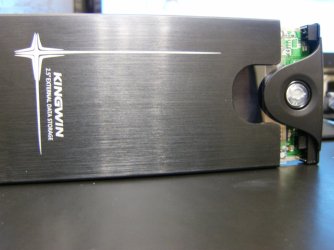
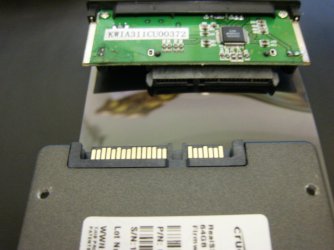
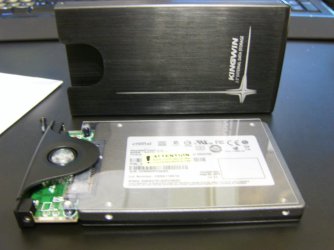
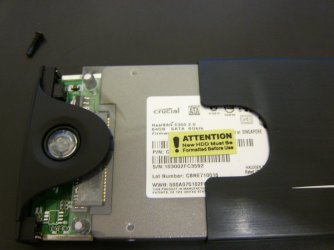
Here are some shots of my drive going into a enclosure.
HPIM1348.JPG

HPIM1351.JPG

HPIM1353.JPG

HPIM1354.JPG
 

My Computer

Computer type
PC/Desktop
Computer Manufacturer/Model Number
A blend of brains, brawn and dumb luck.
OS
Windows 7 Ultimate 64
CPU
i7 3770k OC'd 4.6 @ 1.17v, also FX 8120 & i5 miniITX
Motherboard
MSI P67A-GD80 b3
Memory
32 gb G.Skill Sniper DDR3 10-12-12-31 @ 2133
Graphics Card(s)
XFX Radeon 7870 2GB DDR5
Sound Card
Sound Blaster Z Series Card
Monitor(s) Displays
(2) LG LED 23" 1920 x 1080 2ms Monitors via mini d-port
Screen Resolution
1680 X 1050 p
Hard Drives
Samsung 256 gb 830 SSD sata III
(1) 1 tb WD Black
(2) 1 tb Hitachi deskmates/sata II
(2) 1 tb WD green/sata II
(2) 3 tb Seagate Barracuda
(1) 120 gb OCZ Vertex SS
(1) Drobo 5N w/5 Seagate 3tb
PSU
EVGA modular 1000G2 80% gold rating & APC 1200 RS
Case
CoolerMaster Storm Styker
Cooling
7 case fans 140mm & 120mm, NZXT Kraken X60
Keyboard
(2) Logitech Illuminated Keyboards (1) usb (1) wireless
Mouse
Logitech G700 & T-BC21 - nano nx for the laptop
Internet Speed
Basic 120mbps down
Antivirus
Trend Micro Titanium Max Security & Malwarebytes Premium
Browser
Chrome and IE 10
Other Info
5 Noctua case fans + 3 Noctua in p/p on NZXT cooler
Integrated hot swap drive bays for 2.5" Drives
(2) Lite-on dvd/cd/Blu Ray optical 22X
Integrated fan controller and led on/off
HP Officejet Pro 8630 all-n-one
Hot-swappable 3.5" hard drive bay
Netgear Nighthawk router
Asus USB 3 & sata 6 PCIe card
Vantec IDE to sata adptr./Ultra sata adptr
Lenovo L420 i5 lappy with m sata
Drobo 5N advanced NAS
Back
Top