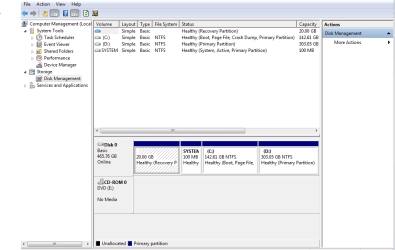
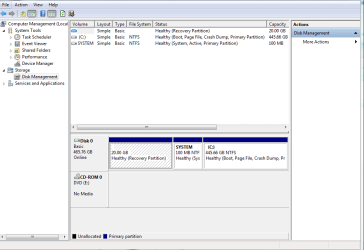
I have a Samsung R730 laptop. When i first turned on the computer i was asked to partition the hard drive. i had to select the sizes i wanted for hard drive to be split up in to c and d drive. defaults were set to 50/50 its a 500gb hd. i didn't think 50/50 was right and i assumed that all the windows and installation files would be on c drive and all personal files on d drive. so i made the c drive 150gb and the d drive 360gb. it turns out that all the files, my documents and everything, are stored on the c drive and i think the d drive is just for back up of system files. so basically my c drive is not big enough. is it possible to put some of the space back on to the c drive and what size should i make them. will doing a complete system restore through samsung recovery work? or can i change settings somehow so that files are automatically stored in d drive. what is the best thing to do because it looks like i have loads of wasted space
My Computer
- Computer Manufacturer/Model Number
- Samsung R730
- OS
- Windows 7 home premium 64 bit
- CPU
- intel core i3
- Memory
- 4gb