hard drive partioning problem

robdex1

New member
Local time
11:54 PM
Messages
3
I have a Samsung R730 laptop. When i first turned on the computer i was asked to partition the hard drive. i had to select the sizes i wanted for hard drive to be split up in to c and d drive. defaults were set to 50/50 its a 500gb hd. i didn't think 50/50 was right and i assumed that all the windows and installation files would be on c drive and all personal files on d drive. so i made the c drive 150gb and the d drive 360gb. it turns out that all the files, my documents and everything, are stored on the c drive and i think the d drive is just for back up of system files. so basically my c drive is not big enough. is it possible to put some of the space back on to the c drive and what size should i make them. will doing a complete system restore through samsung recovery work? or can i change settings somehow so that files are automatically stored in d drive. what is the best thing to do because it looks like i have loads of wasted space
 

My Computer

Computer Manufacturer/Model Number
Samsung R730
OS
Windows 7 home premium 64 bit
CPU
intel core i3
Memory
4gb
Hi there robdex1 and welcome to sevenfourms,

Yes, The C drive is where Windows and All your files are stored, while the D drive is back up files are stored. I would recommend you save all the files you need to an external drive and Do A Clean Install, on my laptop I have a 10gb d drive and would recommend the same to you. Hope this helps.
 

My Computer

Computer Manufacturer/Model Number
Sony Vaio VPCEB24FD
OS
Windows 7 Ultimate x64
CPU
Intel Core i3 350M
Motherboard
Stock Foxxcon Board with American Megatrend BIOS
Memory
4GB Kingston DDR3 1033 Laptop Ram + 6GB Readyboost
Graphics Card(s)
ATI Mobile Graphics, Intel(R) HD Graphics (Battery Power)
Sound Card
Realtek Sound Driver
Monitor(s) Displays
Generic PnP Monitor
Screen Resolution
1366 x 768
Hard Drives
500 GB Western Digital Scorpio Blue SATA Drive
1TB Western Digital My Book With Cavalier Green Drive
PSU
SONY
Case
Bright Blue Stock Case
Cooling
Panasonic Heatsink Fan & No-Name Cooling Pad
Keyboard
Backlit "Chicklet" Ketboard
Mouse
ALPS Touch Pad/Microsoft Wireless Mobile Mouse 3000
Internet Speed
Shaw Cable 25mbps down, 2.5mbps upload
Was this Samsung setup that asked you if you wanted to partition your HD? This would not include the Recovery Partition since it is loaded at the factory. It may have been asking you if you want to make a second data partition to store files, videos, etc.

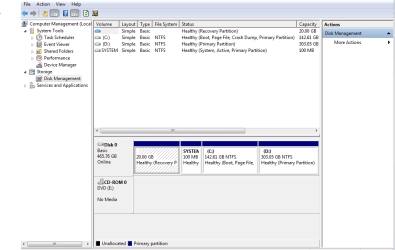
If you have no use for such a Storage partition, post back a screenshot of your maxmized Disk Management drive map with listings, using the Snipping Tool in Start Menu. Tell us what you want to do exactly and we will give you the exact steps to do it.
 
so devenprasad, will doing the clean restore to the initial status allow me to re partition the drives. will it delete the d drive and revert the entire hard drive back to a c drive? do i need to backup windows files first or will they be automatically restored. basically, when i first turned on the computer it asked me to set the partition for the c drive. i think it was to create the d drive which is for backup. my c drive is 140 gb and the d drive is 360gb so i wan to make the c drive bigger and the d drive smaller
 

Attachments

  • Capture.PNG
    Capture.PNG
    61.3 KB · Views: 64

My Computer

Computer Manufacturer/Model Number
Samsung R730
OS
Windows 7 home premium 64 bit
CPU
intel core i3
Memory
4gb
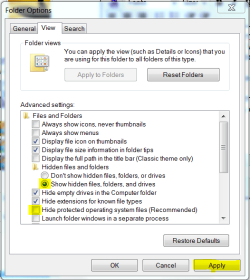
We needed a maximized Disk mgmt drive window so we can see all the columns to see how much of D drive is being used. While you're at it, in Disk Mgmt rightclick on D to Explore and see what's on the drive, after unhiding Hidden and System files in Control Panel>Folder Options>View.
Capture.PNG

If it's only your own files you can move them to C and delete D in Disk Mgmt, Extend C into the deleted space.
Partition or Volume - Delete
Partition or Volume - Extend

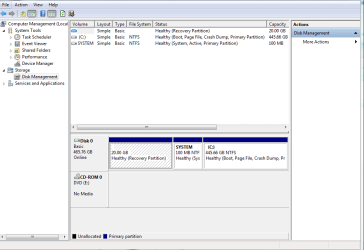
Recovery is on the first partition, System boot files are on the second partition. You only need to confirm there are no Recovery files on D, but if it asked you to create it then there should not be since Recovery is written at the factory.
 
right i didn't have any files on the D drive so i've deleted it so i now have just a drive C of about 450gb. is it possible to now create a new smaller d drive. i have tried shrinking c but i just end up with a new partition and i don't know how to make that the d drive. i think i need the d drive for the samsung automatic backup
 

Attachments

  • Capture.PNG
    Capture.PNG
    66.3 KB · Views: 28

My Computer

Computer Manufacturer/Model Number
Samsung R730
OS
Windows 7 home premium 64 bit
CPU
intel core i3
Memory
4gb
A word of advice, Windows Partition tools lack to many features, I do not recommend it, My advice is Paragon Partition Manager Free which gives you the option to resize your partitions without having to reinstall windows, or worry about windows screwing it up. to me windows partition tools are like beta software thumbs down.

Other free software that will also do this task is EASEUS Partition Master Home which offers more options but I think Paragon is faster when it comes down to resizing partitions, I use Paragon Partition Manager Personal myself.
 

My Computer

Computer Manufacturer/Model Number
Custom Machine.
OS
7 Home Premium x64 SP1
CPU
FX 4100 Black Edition 3.6GHz Quad-Core Socket AM3+
Motherboard
ASUS M5A78L-M LX PLUS (AM3R2)
Memory
Kingston HyperX blu 8GB DDR3-1333
Graphics Card(s)
ATI Radeon HD 4650 1GB DDR2 HDMI
Sound Card
Realtek ALC887 8-channel high definition audio
Monitor(s) Displays
HP 2159m 21.5-inch 1080p HDMI LCD Monitor
Screen Resolution
1920x1080
PSU
Cooler Master eXtreme Power Plus 500 Watt
Case
Thermaltake V3 Black Edition ATX Mid Tower
Cooling
CoolerMaster Hyper 212 Plus
I personally would stay away from 3rd party partitioning tools, as it seems to more problems than it is worth.
 

My Computer

OS
ME/XP/Vista/Win7
What you want to do can be done safer via Disk Mgmt.

Just shrink C by the size you want to make D, then Create new D - using the links Theog posted above.
 
I personally would stay away from 3rd party partitioning tools, as it seems to more problems than it is worth.


What you want to do can be done safer via Disk Mgmt.

Thats odd I have never had issues with Paragon or esuse, The reason I dont use windows partitioning tools is because I had problems when I used it in the past.
 

My Computer

Computer Manufacturer/Model Number
Custom Machine.
OS
7 Home Premium x64 SP1
CPU
FX 4100 Black Edition 3.6GHz Quad-Core Socket AM3+
Motherboard
ASUS M5A78L-M LX PLUS (AM3R2)
Memory
Kingston HyperX blu 8GB DDR3-1333
Graphics Card(s)
ATI Radeon HD 4650 1GB DDR2 HDMI
Sound Card
Realtek ALC887 8-channel high definition audio
Monitor(s) Displays
HP 2159m 21.5-inch 1080p HDMI LCD Monitor
Screen Resolution
1920x1080
PSU
Cooler Master eXtreme Power Plus 500 Watt
Case
Thermaltake V3 Black Edition ATX Mid Tower
Cooling
CoolerMaster Hyper 212 Plus
Win7 partitioning operations via Disk Mgmt will not fail.

Others can and will fail, except for free Partition Wizard bootable CD which has never failed in hundreds of partitioning operations here.
 
Although you are fairly restricted to what you can do with Windows Disk Management, what it can do it does well.

Whenever I install a new operating system I choose how many partitions I want along with their size during the installation of Windows, and then use Disk Management to fine-tune drive letters and suchlike.

As I see it, why bother with third-party software (free or paid for) when Windows can do the job you want?
 

My Computer

Computer Manufacturer/Model Number
HP Pavilion Elite 495UK
OS
Windows 7 Ultimate SP1 64-Bit
CPU
Intel Core i7 870 @ 2.93GHz
Motherboard
MSI 2A9C (CPU1)
Memory
8Gb Dual-Channel DDR3 @ 664MHz
Graphics Card(s)
nVidia GeForce GTX 460 1024MB dedicated RAM
Sound Card
Realtek HD Audio
Monitor(s) Displays
HP2310i
Screen Resolution
1920 x 1080
Hard Drives
1x1954GB Hitachi HDS22020ALA 330 (RAID), 1x1954GB Hitachi External for backup and storage
PSU
460W
Case
HP Elite
Cooling
Air cooled
Keyboard
Logitech K750 solar-powered keyboard
Mouse
Logitech Wireless M180 mouse
Internet Speed
2Mb
Other Info
Pure Avanti Flow Internet Radio with iPod Dock, 64Gb iPod, HP USB Speakers, Sony MDR-V500 Headphones, Sony Vaio F-Series Laptop
I see this is an endless argument which comes down more to personal preference than actual facts. I bet the people dissing Paragon and esuse never even used them before, so how can one know if one has never tried? so I Hold on to my opinion and will never use windows Crap partitioning tools regardless of what anyone here has to say. I'm actually going to switch to Kubuntu when Windows 8 "NSA" Edition, as I like to call it hits the shelves. Don't get me wrong tho, I will hold on to my Windows 7 machine for Media related purposes only.

I know you can Have up to 4 Primary Partitions, or up to 3 primary partitions and 1 Extended Partition which can hold Multiple Logical Partitions.

Below is a good method that in my opinion has advantages over just using multiple primary partitions.

1. Create your Primary Partition, this will be your C: drive which holds your OS.

2. Create an Extended Partition with the rest of your Disk. within this Extended partition you can create 1 or multiple Logical partitions. In the example below their are 3 logical Partitions inside 1 Extended partition.

Example


Hard Drive (your Brand) ..... 931.5GB
1.Primary Partition ( C: )... 120GB
2.Extnded Partition.......... 811.5GB
1. Logical Disk NTFS ( D: ) 200GB
2. Logical Disk NTFS ( E: ) 200GB
3. Logical Disk NTFS ( F: ) 411.5GB

Paragon specializes in Disk Tools and have been in business sense 1994, thats almost 18 years of experience in this department, What does windows have? their partition tools that lack the features to do many tasks Advanced users need.
 
Last edited:

My Computer

Computer Manufacturer/Model Number
Custom Machine.
OS
7 Home Premium x64 SP1
CPU
FX 4100 Black Edition 3.6GHz Quad-Core Socket AM3+
Motherboard
ASUS M5A78L-M LX PLUS (AM3R2)
Memory
Kingston HyperX blu 8GB DDR3-1333
Graphics Card(s)
ATI Radeon HD 4650 1GB DDR2 HDMI
Sound Card
Realtek ALC887 8-channel high definition audio
Monitor(s) Displays
HP 2159m 21.5-inch 1080p HDMI LCD Monitor
Screen Resolution
1920x1080
PSU
Cooler Master eXtreme Power Plus 500 Watt
Case
Thermaltake V3 Black Edition ATX Mid Tower
Cooling
CoolerMaster Hyper 212 Plus
Yes there are many functions that Disk Management cannot do such as resizing to the left which we help do here all the time using the tool which we've found works best for these outlier operations: Partition Wizard CD.

Nobody here disses Paragon as we use it here for Rescue CD operations and backup imaging. One of Paragon's senior engineers is a top Guru in this sub-forum who first alerted us to Partition Wizard's CD's failsafe functioning with Win7. Since then we've helped hundreds if not thousands of users with complicated resizing and other operations using PW CD daily, something we likely would not be willing to do with any other than a failsafe app.

The default to Disk Mgmt on operations which it can handle is simply because it will not fail, period.
 
Yes there are many functions that Disk Management...................

Yea I have to agree I never really liked Esuse either I find it to be too slow, but I have resized 2 partitions with it without any issues, I also think their backup software is too slow, I would rather use Paragon for all of my disk management needs, the reason I brought up Esuse is that it is so popular and is always brought up in advice given on the INTERNET, I haven't even read a post where someone said it failed them miserably maybe you can point me to one?

The default to Disk Mgmt on operations which it can handle is simply because it will not fail, period.

It FAILED ME wile trying to partition an external drive, so no it is not flawless, period. Paragon Partitioned my External HD just fine.
 

My Computer

Computer Manufacturer/Model Number
Custom Machine.
OS
7 Home Premium x64 SP1
CPU
FX 4100 Black Edition 3.6GHz Quad-Core Socket AM3+
Motherboard
ASUS M5A78L-M LX PLUS (AM3R2)
Memory
Kingston HyperX blu 8GB DDR3-1333
Graphics Card(s)
ATI Radeon HD 4650 1GB DDR2 HDMI
Sound Card
Realtek ALC887 8-channel high definition audio
Monitor(s) Displays
HP 2159m 21.5-inch 1080p HDMI LCD Monitor
Screen Resolution
1920x1080
PSU
Cooler Master eXtreme Power Plus 500 Watt
Case
Thermaltake V3 Black Edition ATX Mid Tower
Cooling
CoolerMaster Hyper 212 Plus
Easeus CD failed me twice in early Win7 beta with full data loss and then I was done with it.

Stick around and observe where most Win7 partitioning issues are dealt with on the web, with a 100% success rate as long as the steps and tool we provide are used.
 
Easeus CD failed me twice in early Win7 beta with full data loss and then I was done with it.

Stick around and observe where most Win7 partitioning issues are dealt with on the web, with a 100% success rate.

Yea I did notice the multiple partitioning problems posts here, Maby a Mod should create a stickie for partitioning troublshooting advice for a quick reference to a solution.

Like how to Partition and about partitioning would be a start. people always get confused and dont know where to start. and dont know the diferences of the different types of partitions.


https://secure.wikimedia.org/wikipedia/en/wiki/Disk_partitioning
 

My Computer

Computer Manufacturer/Model Number
Custom Machine.
OS
7 Home Premium x64 SP1
CPU
FX 4100 Black Edition 3.6GHz Quad-Core Socket AM3+
Motherboard
ASUS M5A78L-M LX PLUS (AM3R2)
Memory
Kingston HyperX blu 8GB DDR3-1333
Graphics Card(s)
ATI Radeon HD 4650 1GB DDR2 HDMI
Sound Card
Realtek ALC887 8-channel high definition audio
Monitor(s) Displays
HP 2159m 21.5-inch 1080p HDMI LCD Monitor
Screen Resolution
1920x1080
PSU
Cooler Master eXtreme Power Plus 500 Watt
Case
Thermaltake V3 Black Edition ATX Mid Tower
Cooling
CoolerMaster Hyper 212 Plus
Each case is slightly different with few exactly alike, requiring a Disk mgmt screenshot so we can look for unexpected issues like (for example) Dual Boot delete with System files needing to be recovered into a Logical partition, requiring conversion to Primary using PW CD.

However in order to convert if there is more than one Logical sub-partition the others need to be backed up and deleted first, or a System boot partition built instead. See how it goes?

Simple resizing is more fun, dragging the slider to the left and/or right like paint strokes.
 
Im definitely going to take your advice and add MiniTool Partition Wizard Bootable CD 6.0 to my Bootable Disks Collection and use it during my next partitioning adventure......I love the GUI and the fact that its an ALL in one partition tools Boot cd, they even included the professional version features like Convert Dinamic disk to basic disk wizard, and Merge Partitions that is only included in the professional Installer version in the Boot CD all for free!
 

My Computer

Computer Manufacturer/Model Number
Custom Machine.
OS
7 Home Premium x64 SP1
CPU
FX 4100 Black Edition 3.6GHz Quad-Core Socket AM3+
Motherboard
ASUS M5A78L-M LX PLUS (AM3R2)
Memory
Kingston HyperX blu 8GB DDR3-1333
Graphics Card(s)
ATI Radeon HD 4650 1GB DDR2 HDMI
Sound Card
Realtek ALC887 8-channel high definition audio
Monitor(s) Displays
HP 2159m 21.5-inch 1080p HDMI LCD Monitor
Screen Resolution
1920x1080
PSU
Cooler Master eXtreme Power Plus 500 Watt
Case
Thermaltake V3 Black Edition ATX Mid Tower
Cooling
CoolerMaster Hyper 212 Plus
Back
Top