
Hard Drive Partition Merging

Blender

New member
Local time
8:33 PM
Messages
3
Hi, this is my first post, so bear with me...

I have a 300 GB hard drive on my computer. 250 GB was allocated, when I first bought it, to a recovery partition but I made that a backup space. Now, I have XP on the 20 GB and Windows 7 x86 on the 50 GB partition.

I've started to run out of space (10 GB left) and was wondering if I could merge or re-size the two partitions while preserving the data on both.

The 250 GB has 150 GB left and the 50 GB has 10 GB left.

I boot from the 50 GB partition, and want to re-size the 205 GB one. Is this possible? Or will I have to wipe both and start from scratch?

Thanks!
 

My Computer

Computer Manufacturer/Model Number
HP Pavillion a6028x
OS
Windows 7 x86
CPU
AMD Athlon 64 X2 Dual Core Processor 4600+ 2.40 GHz
Memory
3.00 GB
Graphics Card(s)
NVidia
Monitor(s) Displays
1280 x 1024 MAG Innovision
Hard Drives
ST332082 0AS SCSI - 300 GB
Yes, it's possible and you don't have to start over.

As I understand you want to shrink the 250GB partition some--let's say XGB to have something to talk about--and then allocate that to the Win7 50GB partition. I assume you're booting from W7.

First, make an image of the entire drive. If you don't have something to do this you can use Win7's backup but it might be sloooooowwww. Otherwise use clonezilla from a CD; it's free but a little cryptic, google for a tutorial. But do make that image backup.

You might be able to do this right from Windows.

Go to Start->Control Panel->Admin Tools; then Computer Management
then Storage->Disk Management (left sidebar menu).

Right click on your 250GB partition and select Shrink Volume.

Then you should be able to type your X GB you want to shrink in the text input window. Assuming you can, go ahead and shrink it.

Now here's where I have to guess some, since I don't want to go ahead and do this on my machine. Either during the shrink operation, or as a separate operation, allocated the freed space to your 50GB W7 partition. If you can't post again and we'll try some free partition managers which will let you do it.
 

My Computer

OS
windows 7
So I won't lose any data on either partition?
That's what I was worried about...
 

My Computer

Computer Manufacturer/Model Number
HP Pavillion a6028x
OS
Windows 7 x86
CPU
AMD Athlon 64 X2 Dual Core Processor 4600+ 2.40 GHz
Memory
3.00 GB
Graphics Card(s)
NVidia
Monitor(s) Displays
1280 x 1024 MAG Innovision
Hard Drives
ST332082 0AS SCSI - 300 GB
No data loss. But! Please make an image of the entire drive and store on an external drive just in case. I always do this before partition changes.
 

My Computer

OS
windows 7
merging the hdd partitions in windows 7

well in lots of forums i have checked and could not find a proper answer. there are 2 cases, I will explain the both;

1. If you have installed windows 7, installed and using all your favorite programs and now you want to merge the recovery partition with the system partition and want to keep your system and settings without any change. Then follow steps;

a. get your system hdd partition (usually it is c:) completely copied to an external drive. (I used norton ghost 5.0, do not forget checking the copy options, read help section very well, see my notes at the bottom), also make a recovery cd (not windows recovery cd, norton ghost recovery disc or your own program's) resume reading and applying following instructions (go to 2, then b),
2. if you are clean installing windows 7,
when you insert windows 7 installation cd, at a stage it will ask you which part of hdd you want to install os, click advanced, you will see the partitions delete them make then unallocated, then choose the larger one and choose format. format will ask you the size which you want to format, choose the max size (i.e for a 150 gb total hdd, write 150 000 mb). Formating will automatically keep a system partition (around 200 mb) and the rest will be your c: drive... according to the setup instructions complete the rest, you are done.

the ones should go on following steps who wants to merge hdd partition after windows 7 installation,

b. okey after win 7 installation cd you have a fresh win 7 installed in your system with a complete c: drive. Now put the norton recovery disc into the cd tray (or your own copying program's recovery cd) and resart. Recovery will offer you some options, choose recover my computer, show your recovery point in the external drive (actually it is in a folder somewhere between your system hdd' copy folders). Your hdd will be copied back to your merged drive. It is done!

p.s. 1. while my experience with norton ghost 5.0 I paid attention to the copying drive-to-drive options as follow;
*check source for file system errors (check)
*check destination for file system errors (check)
*set drive active (for booting os) (check)
*disable smart sector copying (check)
*copy mbr (check)
do not forget to check these options while you copying hdd to external hdd and vice versa...
2. If your computer does not start after all and/or asks for win 7 installation cd, do it, choose repair (99% your startup section needs to be changed because of hdd change) and everything should be perfect after repair... good luck
 

My Computer

Computer Manufacturer/Model Number
sony vaio vgz-z31xn/b
OS
windows 7
CPU
Intel® Core™ 2 Duo P9600, SpeedStep adv.tech. @2.66 GHz
Motherboard
intel g45 chipset
Memory
4 gb ddr3 sdram 1033 Hz
Graphics Card(s)
NVIDIA® GeForce® 9300M GS ded. vid. mem. GDDR3 of 256 MB
Sound Card
realtek high def.audio
Monitor(s) Displays
13.1" 1600 x 900 16:9 WXGA++
Hard Drives
Toshiba 320 GB Serial ATA 5400 rpm
Download Partiton Wizard home program AND the boot disc (keep that incase you ever need it)
Free Download Partition Wizard
You'll need the above.
Now before we see the best way to do it,can you get a screen shot of your disck management in PW
Use the sniping tool and upload it here:)
 

My Computer

Computer Manufacturer/Model Number
Blue Shards 1.0
OS
Windows 7 Ultimate 64bit
CPU
AMD Phenom II 555 Black Edition Quad Core OC'd to 4.0GHz
Motherboard
ASUS M4A88T-M
Memory
G Skill RipJaw 1333MHz 4GB
Graphics Card(s)
ATI raideon 4250 HD/XFX ATI Radeon 1GB HD4650
Sound Card
Realteck HD Audio
Monitor(s) Displays
2x 22" Widescreen HD Monitors
Hard Drives
500GB Sata 7500RPM
80GB IDE
PSU
850W OCUK Modular
Case
Antec Dark Fleet DF-30
Cooling
Titan Fenrir Pro (CPU)
Keyboard
Logitech Wireless
Mouse
Logitech Wireless
Internet Speed
24Meg
Other Info
Getting soon-
2TB 7200RPM HDD
+8GB RAM
30GB SSD
HD6950/70
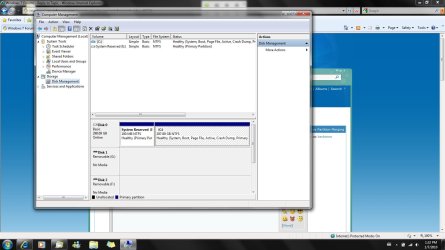
here is my hdd after I have merged it (after installing and using win 7 and all other programs)
 

Attachments

  • hdd.jpg
    hdd.jpg
    117.4 KB · Views: 441

My Computer

Computer Manufacturer/Model Number
sony vaio vgz-z31xn/b
OS
windows 7
CPU
Intel® Core™ 2 Duo P9600, SpeedStep adv.tech. @2.66 GHz
Motherboard
intel g45 chipset
Memory
4 gb ddr3 sdram 1033 Hz
Graphics Card(s)
NVIDIA® GeForce® 9300M GS ded. vid. mem. GDDR3 of 256 MB
Sound Card
realtek high def.audio
Monitor(s) Displays
13.1" 1600 x 900 16:9 WXGA++
Hard Drives
Toshiba 320 GB Serial ATA 5400 rpm
here is my hdd after I have merged it (after installing and using win 7 and all other programs)
Where did the rest of your space go?

Looks good though:)
 

My Computer

Computer Manufacturer/Model Number
Blue Shards 1.0
OS
Windows 7 Ultimate 64bit
CPU
AMD Phenom II 555 Black Edition Quad Core OC'd to 4.0GHz
Motherboard
ASUS M4A88T-M
Memory
G Skill RipJaw 1333MHz 4GB
Graphics Card(s)
ATI raideon 4250 HD/XFX ATI Radeon 1GB HD4650
Sound Card
Realteck HD Audio
Monitor(s) Displays
2x 22" Widescreen HD Monitors
Hard Drives
500GB Sata 7500RPM
80GB IDE
PSU
850W OCUK Modular
Case
Antec Dark Fleet DF-30
Cooling
Titan Fenrir Pro (CPU)
Keyboard
Logitech Wireless
Mouse
Logitech Wireless
Internet Speed
24Meg
Other Info
Getting soon-
2TB 7200RPM HDD
+8GB RAM
30GB SSD
HD6950/70
:) 300 GB total HDD
298 GB I actually use
100 MB System Reserve
so 298.09 GB I keep using
if you are asking the rest please see HDD documents, where is BIOS, Start Up, Partition and hardware I/O, HDD's own firmware etc. written. When you buy a HDD whatever it says like 500 GB, 1 TB etc. you can not see the whole quantity as "usable"... Because some software is installed to run HDD itself and adapt it to your system. You should know that :)
Anyway, before I did merging, Sony was reserved (if I am not misremember) something around 20 GB...
 

My Computer

Computer Manufacturer/Model Number
sony vaio vgz-z31xn/b
OS
windows 7
CPU
Intel® Core™ 2 Duo P9600, SpeedStep adv.tech. @2.66 GHz
Motherboard
intel g45 chipset
Memory
4 gb ddr3 sdram 1033 Hz
Graphics Card(s)
NVIDIA® GeForce® 9300M GS ded. vid. mem. GDDR3 of 256 MB
Sound Card
realtek high def.audio
Monitor(s) Displays
13.1" 1600 x 900 16:9 WXGA++
Hard Drives
Toshiba 320 GB Serial ATA 5400 rpm
:) 300 GB total HDD
298 GB I actually use
100 MB System Reserve
so 298.09 GB I keep using
if you are asking the rest please see HDD documents, where is BIOS, Start Up, Partition and hardware I/O, HDD's own firmware etc. written. When you buy a HDD whatever it says like 500 GB, 1 TB etc. you can not see the whole quantity as "usable"... Because some software is installed to run HDD itself and adapt it to your system. You should know that :)
Anyway, before I did merging, Sony was reserved (if I am not misremember) something around 20 GB...
Sorry,i read wrong,i thought it was a 350GB

But thats not whats taking the space your on about,the manufactor uses 1000MB = 1GB where as the computer counts it as 1024MB=1GB
:)
 

My Computer

Computer Manufacturer/Model Number
Blue Shards 1.0
OS
Windows 7 Ultimate 64bit
CPU
AMD Phenom II 555 Black Edition Quad Core OC'd to 4.0GHz
Motherboard
ASUS M4A88T-M
Memory
G Skill RipJaw 1333MHz 4GB
Graphics Card(s)
ATI raideon 4250 HD/XFX ATI Radeon 1GB HD4650
Sound Card
Realteck HD Audio
Monitor(s) Displays
2x 22" Widescreen HD Monitors
Hard Drives
500GB Sata 7500RPM
80GB IDE
PSU
850W OCUK Modular
Case
Antec Dark Fleet DF-30
Cooling
Titan Fenrir Pro (CPU)
Keyboard
Logitech Wireless
Mouse
Logitech Wireless
Internet Speed
24Meg
Other Info
Getting soon-
2TB 7200RPM HDD
+8GB RAM
30GB SSD
HD6950/70
Back
Top