obrienimages
New member
- Local time
- 2:57 AM
- Messages
- 9
I'm on Windows 7 64bit
I'm having trouble with an internal Western Digital Black 2TB hard Drive after I installed the following:
I purchased a PCIe card (to add additional ports to my PC) , installed it in a PCIe slot and connected it to 2 (new) SSD's I was also adding to my system. (Samsung 1TB ssd and Western Digital Blue 500GB ssd)
I also purchased and added a 7 port USB Drive card in another PCIe slot and installed its driver
Windows began running a CKDSK on 2 of my already installed internal WD internal Hard Drives. It did this repeatedly after I shut down and restarted a few times.
I removed the 7 USB card and cable from the PCIe slot in case it was causing issues.
Windows continued to do CKDSK on the 2 same Drives... and eventually changed one (G drive's name to "Local Disk"... and it is not accessible now.
Today on start up Windows ran CKDSK again on the (G drive and gave me a message "Invalid Security ID" and ran for about 15 minutes going thru all the files on that drive. At the end it is still called "Local Disk" and is inaccessible.
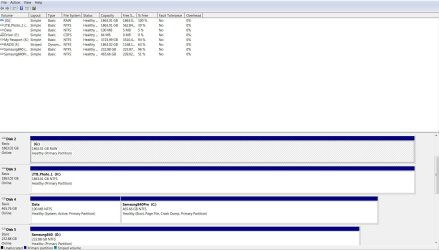
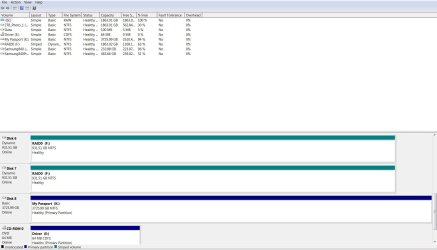
When I click on "Computer" to see a list of my drives this is the current status:
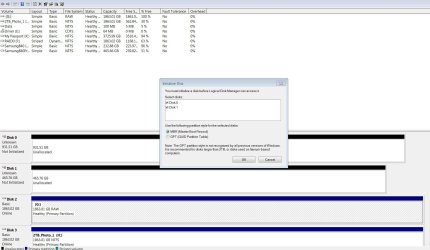
The 2 NEW SSD drives I installed are listed in Device Manager but are not listed otherwise (I assume they need a drive letter selected)
The G: drive (now called "Local Drive") is listed onscreen but is not accessable
All the other drives are visible and working)
Device Manager says all drives are operating correctly
Any ideas of what happened to cause the problems with the G: Drive (it's a Western Digital Black 2TB internal hard drive) and any suggestions on how to troubleshoot or recover whats on it?
Please note: If I disconnect the 2 NEW SSD's and remove the PCIe card and restore the machine to a Restore Point would this get me back to where I started or cause more problems?
I'm obviously not tech savvy and I appreciate your patience with my description. Any and all help appreciated
I'm having trouble with an internal Western Digital Black 2TB hard Drive after I installed the following:
I purchased a PCIe card (to add additional ports to my PC) , installed it in a PCIe slot and connected it to 2 (new) SSD's I was also adding to my system. (Samsung 1TB ssd and Western Digital Blue 500GB ssd)
I also purchased and added a 7 port USB Drive card in another PCIe slot and installed its driver
Windows began running a CKDSK on 2 of my already installed internal WD internal Hard Drives. It did this repeatedly after I shut down and restarted a few times.
I removed the 7 USB card and cable from the PCIe slot in case it was causing issues.
Windows continued to do CKDSK on the 2 same Drives... and eventually changed one (G
drive's name to "Local Disk"... and it is not accessible now. Today on start up Windows ran CKDSK again on the (G
drive and gave me a message "Invalid Security ID" and ran for about 15 minutes going thru all the files on that drive. At the end it is still called "Local Disk" and is inaccessible.When I click on "Computer" to see a list of my drives this is the current status:
The 2 NEW SSD drives I installed are listed in Device Manager but are not listed otherwise (I assume they need a drive letter selected)
The G: drive (now called "Local Drive") is listed onscreen but is not accessable
All the other drives are visible and working)
Device Manager says all drives are operating correctly
Any ideas of what happened to cause the problems with the G: Drive (it's a Western Digital Black 2TB internal hard drive) and any suggestions on how to troubleshoot or recover whats on it?
Please note: If I disconnect the 2 NEW SSD's and remove the PCIe card and restore the machine to a Restore Point would this get me back to where I started or cause more problems?
I'm obviously not tech savvy and I appreciate your patience with my description. Any and all help appreciated
My Computer
At a glance
Windows 7 x64
- Computer type
- PC/Desktop
- OS
- Windows 7 x64