Solved Hard drive sometimes found - sometimes not

RogerR

New member
Pro User
Local time
2:56 PM
Messages
607
Location
Upstate, AZ
My backup drive is a 500GB WD and has experienced no issues at all until I deleted one partition and resized the remaining one with (Partition Wizard 8). I thought it a bit odd when PW reported a 31MB unallocated space remaining, but on reboot the BIOS detected the drive and in Windows all the files on the resized partition were present.

A subsequent reboot and the drive is not found again. Nothing has physically changed inside the case. Any ideas on might be going on?
 

My Computer

Computer type
PC/Desktop
Computer Manufacturer/Model Number
Custom
OS
7 x64 Ultimate
CPU
AMD Ryzen 5
Motherboard
Gigabyte GA-AB350-Gaming
Memory
16GB DDR4
Graphics Card(s)
Radeon R7 360
Monitor(s) Displays
2 x Dell U2518D
Screen Resolution
2560x1440 2560x1440
Hard Drives
WD 500GB x2
Samsung SSD 128MB (OS)
XPG SX8200 Pro M.2 2280 1TB
PSU
Antec 500
Cooling
Hyper 212 EVO
Keyboard
Logitech cordless K800
Mouse
Logitech M510
Antivirus
Avira
Hello RogerR!

To see if I have understood, you know that the drive occasionally disappears because it sometimes doesn't show up in BIOS?
When it does, what does it show, also as mode? Is it possible to show a screen shot of Disk Management to see the partitions left and format?
Also, has anything unusual or sudden occurred, like a power surge or disconnected cable or anything of the sort?

CK_WD
 

My Computer

Computer type
PC/Desktop
OS
Windows 7 Home Premium x64
I know the drive disappears because it is not present in explorer, disk manager, or anywhere else. When present it appears as a Basic Disk. No unusual power events, in fact no issues at all with the system until I deleted the second partition. It's the backup drive and backups had been performing to that disk normally until now.
 

My Computer

Computer type
PC/Desktop
Computer Manufacturer/Model Number
Custom
OS
7 x64 Ultimate
CPU
AMD Ryzen 5
Motherboard
Gigabyte GA-AB350-Gaming
Memory
16GB DDR4
Graphics Card(s)
Radeon R7 360
Monitor(s) Displays
2 x Dell U2518D
Screen Resolution
2560x1440 2560x1440
Hard Drives
WD 500GB x2
Samsung SSD 128MB (OS)
XPG SX8200 Pro M.2 2280 1TB
PSU
Antec 500
Cooling
Hyper 212 EVO
Keyboard
Logitech cordless K800
Mouse
Logitech M510
Antivirus
Avira
It is an IDE drive and appears as a slave.
 

My Computer

Computer type
PC/Desktop
Computer Manufacturer/Model Number
Custom
OS
7 x64 Ultimate
CPU
AMD Ryzen 5
Motherboard
Gigabyte GA-AB350-Gaming
Memory
16GB DDR4
Graphics Card(s)
Radeon R7 360
Monitor(s) Displays
2 x Dell U2518D
Screen Resolution
2560x1440 2560x1440
Hard Drives
WD 500GB x2
Samsung SSD 128MB (OS)
XPG SX8200 Pro M.2 2280 1TB
PSU
Antec 500
Cooling
Hyper 212 EVO
Keyboard
Logitech cordless K800
Mouse
Logitech M510
Antivirus
Avira
That means that it doesn't show up in Disk Management also? Please, if you manage to make it seen, post a screenshot from Disk Management! Whe you see the basic drive, is it written as Unallocated or RAW?

It looks like by deleting that partition you've damaged the partition table somehow. My advice would be to move your backups from the drive to another location, then fully write zeros to the drive and reformat it.

For the drive to show up in the system, first check the cables, if one hasn't by any chance burnt out or something else, then check the settings of the drive in BIOS. Change it if you have to to AHCI.

Also, how many other drives plugged in do you have?

CK_WD
 

My Computer

Computer type
PC/Desktop
OS
Windows 7 Home Premium x64
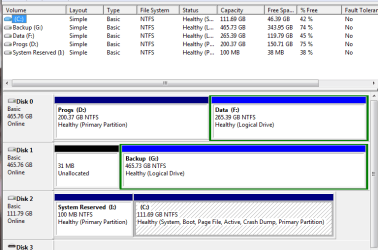
Note the 31MB unallocated despite the full size of the disk appearing as the G: drive.

Yes, it does seem like reformatting the disk is the option, PITA though it is.
 

Attachments

  • diskmgmt.png
    diskmgmt.png
    15.3 KB · Views: 1

My Computer

Computer type
PC/Desktop
Computer Manufacturer/Model Number
Custom
OS
7 x64 Ultimate
CPU
AMD Ryzen 5
Motherboard
Gigabyte GA-AB350-Gaming
Memory
16GB DDR4
Graphics Card(s)
Radeon R7 360
Monitor(s) Displays
2 x Dell U2518D
Screen Resolution
2560x1440 2560x1440
Hard Drives
WD 500GB x2
Samsung SSD 128MB (OS)
XPG SX8200 Pro M.2 2280 1TB
PSU
Antec 500
Cooling
Hyper 212 EVO
Keyboard
Logitech cordless K800
Mouse
Logitech M510
Antivirus
Avira
Yes, it is quite unpleasant, but the drive is given as healthy, has a drive letter so physically it should be fine.
The partitions just have encountered a problem; could be the partition's table, unsuccessfully resizing after deleting the other partition and etc.
The safest way is just to move your back ups where you have free space, write zeros fully, repartition and reformat the drive in NTFS and the problem should be cleared.

Best of luck! :)

CK_WD
 

My Computer

Computer type
PC/Desktop
OS
Windows 7 Home Premium x64
Follow-up question here CKWD;

The two WD drives (5000AADS and 5000AACS) are unjumpered and connected via SATA cables to separate SATA channels, but always appear as Master and Slave on Channel3. I presume this is a legacy of operating in Native IDE mode? I don't remember any more why I set it up that way, but I do have a recollection that switching to AHCI mode is a no-no if it was not that way when installing the OS.

Does this have bearing on the issue?
 

My Computer

Computer type
PC/Desktop
Computer Manufacturer/Model Number
Custom
OS
7 x64 Ultimate
CPU
AMD Ryzen 5
Motherboard
Gigabyte GA-AB350-Gaming
Memory
16GB DDR4
Graphics Card(s)
Radeon R7 360
Monitor(s) Displays
2 x Dell U2518D
Screen Resolution
2560x1440 2560x1440
Hard Drives
WD 500GB x2
Samsung SSD 128MB (OS)
XPG SX8200 Pro M.2 2280 1TB
PSU
Antec 500
Cooling
Hyper 212 EVO
Keyboard
Logitech cordless K800
Mouse
Logitech M510
Antivirus
Avira
Well, this would depend on your OS.
In the past the problems with changing IDE mode to AHCI were bluescreens that could only be fixed with either changing back the setting in BIOS or reinstalling the OS. This happened due to only the IDE storage driver being configured in Windows. At the same time the AHCI driver is missing, thus Windows can't read from the hard drive and gives out a BSOD with error code 0x0000005B.
But if you have Windows Vista or newer, you could first change the registry keys, thus enabling the AHCI driver in Windows before the changes in BIOS.
But now enabling AHCI is better, gives out better performance than IDE.

CK_WD
 

My Computer

Computer type
PC/Desktop
OS
Windows 7 Home Premium x64
I'm using W7 Ultimate and I boot from a SSD. I tried adopting AHCI (editing the msahci key in Regedit) but just got a lengthy boot time (as the BIOS detected the drives) and a hang at DMI pool data. Perhaps my 790X chipset is too old (2009) to see the benefits?

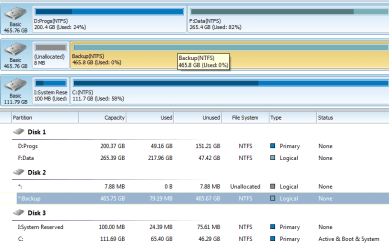
I did over-write the backup drive and reformat and it seems largely to be working normally. I do have an odd 8MB unallocated block at the start of that disk which I can't seem to do anything about, but 8megs off 465gigs isn't exactly crippling, so I am living with it.
 

Attachments

  • diskmgmt.png
    diskmgmt.png
    18.7 KB · Views: 1

My Computer

Computer type
PC/Desktop
Computer Manufacturer/Model Number
Custom
OS
7 x64 Ultimate
CPU
AMD Ryzen 5
Motherboard
Gigabyte GA-AB350-Gaming
Memory
16GB DDR4
Graphics Card(s)
Radeon R7 360
Monitor(s) Displays
2 x Dell U2518D
Screen Resolution
2560x1440 2560x1440
Hard Drives
WD 500GB x2
Samsung SSD 128MB (OS)
XPG SX8200 Pro M.2 2280 1TB
PSU
Antec 500
Cooling
Hyper 212 EVO
Keyboard
Logitech cordless K800
Mouse
Logitech M510
Antivirus
Avira
That's good that the drive's working now! You could check it's health again now, just in case.
About that ~8 MB Unallocated space.
There could be two options in which up to 7.8 MB of Unallocated space, that's not manually set up, can be detected on a hard drive. The first reason is when the Unallocated space is at the end of the disk, but this is not the case.
Your 7.8 MB of unallocated space resides at the beginning of your hard disk. Normally this means that there are no Primary partitions on the hard drive and the hard drive contains only an Extended partition. In such cases Windows reserves the minimal amount needed for creating a partition (7.8 MB) in order to be able to handle the only Extended partition properly. It isn't recommended to remove this area. Even though technically it is possible to merge it with the Extended partition, this may result in the data on it becoming inaccessible.
Disk Management can't pick up on that Unallocated space, but some other software can.
So you shouldn't be worried. :)

Cheers!

CK_WD
 

My Computer

Computer type
PC/Desktop
OS
Windows 7 Home Premium x64
Good news on the small partition.

On the health aspect, I ran a CHKDSK and received this error;
The second NTFS boot sector is unwriteable

Next question: why does my C: drive always appear last in diskmgmt - and as disk 3 of 3 - when it is set in the bios to be first?
 

My Computer

Computer type
PC/Desktop
Computer Manufacturer/Model Number
Custom
OS
7 x64 Ultimate
CPU
AMD Ryzen 5
Motherboard
Gigabyte GA-AB350-Gaming
Memory
16GB DDR4
Graphics Card(s)
Radeon R7 360
Monitor(s) Displays
2 x Dell U2518D
Screen Resolution
2560x1440 2560x1440
Hard Drives
WD 500GB x2
Samsung SSD 128MB (OS)
XPG SX8200 Pro M.2 2280 1TB
PSU
Antec 500
Cooling
Hyper 212 EVO
Keyboard
Logitech cordless K800
Mouse
Logitech M510
Antivirus
Avira
The CHKDSK error means that bad sectors have been detected on your drive. You could fix it with the chkdsk command: chkdsk X: /f, where X: is the letter of your drive. This would fix any errors on the drive, but once bad sectors occur they quickly multiply and fixes are only temporary.
Another option is to use the WD Data Lifeguard diagnostics tool to close the bad sectors:
Support Answers

About your drive C, sometimes, disk drive numbers may not be the same as the SATA channel numbers. There is no direct relationship between the BIOS order, and the order in which Windows numbers the disks. Your C drive is set in BIOS to boot first, as that's where the OS is. The disk numbers that are assigned by Windows are dependent solely on the order in which the disks are enumerated and processed by Plug and Play. Meaning that in most cases the first drive plugged in from the beginning, becomes Drive 0. This article from the Microsoft support page may also help:
https://support.microsoft.com/kb/937251

Cheers!

CK_WD
 

My Computer

Computer type
PC/Desktop
OS
Windows 7 Home Premium x64
WD Data Lifeguard repaired the errors. Fingers crossed it holds up. Thanks!
 

My Computer

Computer type
PC/Desktop
Computer Manufacturer/Model Number
Custom
OS
7 x64 Ultimate
CPU
AMD Ryzen 5
Motherboard
Gigabyte GA-AB350-Gaming
Memory
16GB DDR4
Graphics Card(s)
Radeon R7 360
Monitor(s) Displays
2 x Dell U2518D
Screen Resolution
2560x1440 2560x1440
Hard Drives
WD 500GB x2
Samsung SSD 128MB (OS)
XPG SX8200 Pro M.2 2280 1TB
PSU
Antec 500
Cooling
Hyper 212 EVO
Keyboard
Logitech cordless K800
Mouse
Logitech M510
Antivirus
Avira
Hey, I'm glad the errors are repaired, you're welcome! :)
Just remember to keep regular back ups! If you don't have enough (different) hard disk space, then you could always use an online Cloud service.

Cheers and good luck!

CK_WD
 

My Computer

Computer type
PC/Desktop
OS
Windows 7 Home Premium x64
Back
Top