hard drive space has gone missing, have tried all solutions

wammeze

New member
Local time
9:27 PM
Messages
6
Good day ladies and gentlemen!

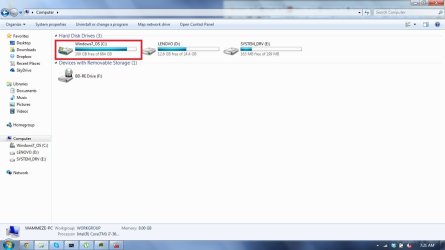
As you can probably assess from the thread title, There is a really weird problem afflicting my computers hard drive. The Hard drive with the problem is an advertised 750 GB Western Digital hard drive, with 684 available gigabytes.

The problem I am having is that a mysteriously large amount of hard drive disk space has disappeared from being available, and has left me to have only about 100 Gigabytes left (originally it had whittled down to about 100 MB before I deleted a large amount of miscellaneous files), from my estimated 500 Gigabyte's I had available to me last week, but there is still a lot of hard drive disk space un-accounted for. I've been perusing the windows 7 forum and have tried different solutions to no avail. The methods i've tried are as follows:

-Updating my BIOS, USB, Hard drive and other miscellaneous drivers
-Using Disk Cleanup
-Using Disk Defragmenter
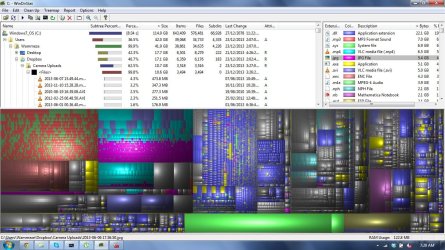
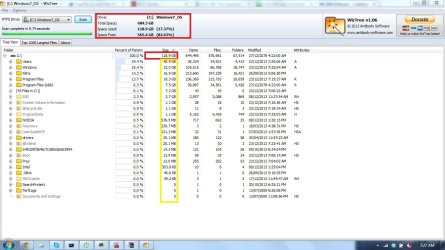
-Using WizTree, WinDirStat, and TreeSize (free) to find out what was eating my HDD Space
-Phisically taking the Hard drive out and checking out what's wrong with another computer
-Deleting many large files not necessary to function

With the help of WizTree and the other programs, i've noticed that they only can account for one fifth of my hard drive, leaving the rest to the unknown.

I've attached screenshots that may help with diagnosing my problem.

The images should be self explanatory, and I hope they can help in alleviating this issue.
I feel like i've exhausted my options shy of actually taking the rig to a computer specialist. Do you think you guys know what's going on with my hard drive?

Here's my systems specs:
Lenovo Y480
Windows 7 Home Premium 64 Bit
Intel(R) Core(TM) i7-3610QM
8.00 GB
GeForcer GT 640M LE
WDC WD7500BPVT-24HXZT3 750 GB HDD

Thank you so much if you could provide any input!

-Wammeze
 

Attachments

  • Disk Management.jpg
    Disk Management.jpg
    102.6 KB · Views: 10
  • Disk Space Screenshot.jpg
    Disk Space Screenshot.jpg
    57.3 KB · Views: 8
  • DiskPart.jpg
    DiskPart.jpg
    23.5 KB · Views: 41
  • WinDirStat Screenshot.jpg
    WinDirStat Screenshot.jpg
    195.3 KB · Views: 4
  • WizTree Screenshot.jpg
    WizTree Screenshot.jpg
    117.6 KB · Views: 5

My Computer My Computer

At a glance

Windows 7 Home Premium 64 BitIntel(R) Core(TM) i7-3610QM8.00 GBGeForce GT 640M LE
Computer type
Laptop
Computer Manufacturer/Model Number
Lenovo Y480
OS
Windows 7 Home Premium 64 Bit
CPU
Intel(R) Core(TM) i7-3610QM
Memory
8.00 GB
Graphics Card(s)
GeForce GT 640M LE
Hard Drives
WDC WD7500BPVT-24HXZT3 750 GB HDD
Antivirus
Windows Defender
Browser
Google Chrome

My Computer My Computer

At a glance

Desk1 7 Home Prem / Desk2 10 Pro / Main lap A...Desk1 i5 3750K / Laptop i7 GTX 860M / Desk2 i...Desk1 8GB (1866) / Desk2 16GB (1333) / Laptop...Desk 1& 2NVidia GTX 650 & Laptops on board Intel
Computer type
PC/Desktop
Computer Manufacturer/Model Number
Own build (new) Desk1 / Asus ROG Win 7 / Desk2 1st build
OS
Desk1 7 Home Prem / Desk2 10 Pro / Main lap Asus ROG 10 Pro 2 laptop Toshiba 7 Pro Asus P2520 7 & 10
CPU
Desk1 i5 3750K / Laptop i7 GTX 860M / Desk2 i5 2500
Motherboard
Desk1 Asus P877-V / Desk2 Gigabyte H67 UD3H / Laptop ?
Memory
Desk1 8GB (1866) / Desk2 16GB (1333) / Laptop 8Gb DDR3
Graphics Card(s)
Desk 1& 2NVidia GTX 650 & Laptops on board Intel
Sound Card
Desk 1 & 2 -XONAR DG Realtek High Def audio Laptop
Monitor(s) Displays
Desk 1 Benq HD 2450 / Desk2 Philips 24" / Laptop 17.5"
Screen Resolution
1920x1080 D1 & D2 & Laptop 1
Hard Drives
Desk1 Samsung 120GB 830 SSD
Asus ROG 256GB 850 Pro SSD
Desk2 Samsung 840 256 SSD
Toshiba 120GB EVO
PSU
Desk 1 Corsair HX 1050/ Laptop ? / Desk 2 Corsair HX 650
Case
Desk 1 Cooler HAF XM ? Toshiba laptop / Desk2 Coolermaster
Cooling
Fans on all Desk1 -2 Desk2 - all Coolermasters 5 Laptop ?
Keyboard
Desk 1 MS Sidewinder X6 Desk 2 MS Sidewinder X 4
Mouse
Desk 1&2 - Gigabyte MS 900 gamer - laptop - Logitec wireless
Internet Speed
ADSL2+
Other Info
One other Desktop (tester) and spare Toshba laptop both with SSD's
Running Kaspersky 2016 ISS on all machines config'd identically
Logitec audio stereo systems on each machine (x3)
Canon MG5250MFC
Router/modem TP-Link running WPA2SK
A screenshot from TreeSize would be VERY USEFUL to compare with WizTree.

Wiztree is very quick because it gets all its data from the MFT,
but is therefore not suitable for FAT32 format.
TreeSize is slower - I guess because it trawls through directory structures.

When I scan Partition R:\
Wiztree IMMEDIATELY shows
Total Space 742.2 GB
Space Used 736.4 GB
Space Free 5.8 GB
Then it spends less than 4 seconds scanning the MFT,
and a further 3 seconds preparing the "Tree View" which lists the folders, sizes, and numbers of files.
This is when I see a maximum total of 316,004 files in R:\

TreeSize Free takes 10 seconds building up totals,
During that time its total size for R:\ gradually creeps up to 735.9 GB.
It only sees 315,986 files

TreeSize is unable to see the folder R:\$Extend\ or the 8 files which WizTree reports
WizTree also sees and reports these 9 files, which TreeSize also ignores
the 436.8 MB file R:\$MFT
and 8 more R:\$etc files that total 100 MB

My guess is that WizTRee and WinDirStat are telling you the same thing because they both use the MFT.

If Windows Explorer properties and TreeSize agree that C:\ has about 576,000 files your problem might just be an error in the MFT entry that states the Free Space.
If Windows Explorer properties and TreeSize indicate a vastly different quantity of files then the MFT could be horribly corrupt.

IT IS POSSIBLE THE MFT IS CORRUPT,
Otherwise there would not be a backup/repair mechanism which I believe involves $MFT and MFTMirr,
and hopefully there are experts here who know the relevant procedures and magic spells.

I am not sure of the prudence of :-
attempting to detect and remove malware files if you are accessing it via a corrupt MFT;
or of attempting to investigate and maybe repair the MFT in the presence of a RootKit :confused:
That is a question to ask at any malware fighting forum.

@ICit2lol
Sorry, I do not see any reason to suspect malware, but perhaps you have seen this sort of problem before.

I would have thought the "Healthy OEM" partition to be common when a P.C. is supplied with Windows pre-installed,
and having a separate partition for a Pagefile is fairly common
(though it is a beginner's mistake to have it on the same Drive as C:\)
I am surprised that C:\ is marked as Active instead of the 200 MB partition at the start of the Disk.

Regards
Alan
 

My Computer My Computer

At a glance

Windows 7 Ultimate 64 bit SP1 x64AMD Phenom X4 95008 GBATI Radeon HD 4600 Series
Computer Manufacturer/Model Number
ASUSTeK Computer INC. M3A32-MVP DELUXE (CPU 1)
OS
Windows 7 Ultimate 64 bit SP1 x64
CPU
AMD Phenom X4 9500
Motherboard
ASUSTeK M3A32-MVP Deluxe (CPU 1)
Memory
8 GB
Graphics Card(s)
ATI Radeon HD 4600 Series
Sound Card
AMD High Definition Audio Device
Monitor(s) Displays
SyncMaster (1680x1050@60Hz)
Hard Drives
59GB OCZ-VERTEX2 ATA Device
+
977GB SAMSUNG HD103SJ ATA Device
+
625GB WDC WD6401AALS-00L3B2 ATA Device
? Possible? Fix

Hey guys, thanks for the wonderful input!
I for one feel like I know what I did to cause the hard drive to be this way. The problem began when chkdsk started randomly and when I turned on the computer, I stupidly shut the computer off midway through the process twice because it was taking far too long and I needed to get things done on a schedule.

Now that I've ran chkdsk, it's been running for at least 8 hours and I'm not too sure how much longer it's going to take, as it is on the "adding bad clusters to the bad clusters file"

Specifically it says that it is" adding 147346318 bad clusters to the bad clusters file. " is that an excessively high number for the computer to be reading? Does it mean something, and how much longer do you think it will run for?

Thank you guys once again so much for all of. Your input!

-wammeze
 

My Computer My Computer

At a glance

Windows 7 Home Premium 64 BitIntel(R) Core(TM) i7-3610QM8.00 GBGeForce GT 640M LE
Computer type
Laptop
Computer Manufacturer/Model Number
Lenovo Y480
OS
Windows 7 Home Premium 64 Bit
CPU
Intel(R) Core(TM) i7-3610QM
Memory
8.00 GB
Graphics Card(s)
GeForce GT 640M LE
Hard Drives
WDC WD7500BPVT-24HXZT3 750 GB HDD
Antivirus
Windows Defender
Browser
Google Chrome
Let chkdsk complete if at all possible. No, that many sectors being relocated isn't normal. It may be the drive is failing.
 

My Computer My Computer

At a glance

Windows 7 Ultimate X64 SP1Intel i5-2550K, Differing ~4.4-4.8GHz No buil...16GB G.Skill Sniper 1866MHz @ 2133MHz 2x8GBASUS GTX650TIB-DC2OC-2GD5, (650TI Boost)
Computer type
PC/Desktop
Computer Manufacturer/Model Number
Home Built Desktop By DataTech
OS
Windows 7 Ultimate X64 SP1
CPU
Intel i5-2550K, Differing ~4.4-4.8GHz No built in GPU
Motherboard
ASUS P8Z68-V PRO/GEN3
Memory
16GB G.Skill Sniper 1866MHz @ 2133MHz 2x8GB
Graphics Card(s)
ASUS GTX650TIB-DC2OC-2GD5, (650TI Boost)
Sound Card
Onboard Realtek 5-1
Monitor(s) Displays
Samsung P2570HD
Screen Resolution
1920x1080
Hard Drives
Samsung 840 Pro 256GB SSD for OS, 500GB Seagate Constellation (Enterprise drive) for Data
PSU
Corsair HX650W
Case
Inwin Dragon Rider
Cooling
Hyper 212 EVO w/two Noctua fans, push-pull, @1300 RPM
Keyboard
E-Z Eyes, bright yellow keys with large characters
Mouse
steelseries SENSEI Laser Pro Gaming
Internet Speed
48-51Mbs Mbs down, 11 Mbs up Xfinity Cable
Antivirus
Norton Internet Security 2013
Browser
IE 10, Opera, Pale Moon if needed
Other Info
4 case fans, LG BluRay-RE, ASUS DVD-RW, Mr. Fusion power supply, 1.21 gigawatts.
It is time to run for the hills and save all your files from that drive. It may not survive the year 2013.
 

My Computer My Computer

At a glance

Vista, Windows7, Mint Mate, Zorin, Windows 8from 1.6GHz Duo to i7
Computer Manufacturer/Model Number
HP, Dell, Gateway, Toshiba - 4 laptops and 2 desktops
OS
Vista, Windows7, Mint Mate, Zorin, Windows 8
CPU
from 1.6GHz Duo to i7
Monitor(s) Displays
2x HP w2207
Hard Drives
5x HDD, 7x SSD, 12x Externals
Keyboard
with trackball - no mices
Mouse
Trackball mice
Internet Speed
DSL 6000
Is it seriously that bad? I mean chkdsk finally finished, and now the memory available is down to 750 mb :'( I don't have the means to backup everything, as I am out of country and my extra backup hard drive is in another town :( is my hard drive slowly dying?
 

My Computer My Computer

At a glance

Windows 7 Home Premium 64 BitIntel(R) Core(TM) i7-3610QM8.00 GBGeForce GT 640M LE
Computer type
Laptop
Computer Manufacturer/Model Number
Lenovo Y480
OS
Windows 7 Home Premium 64 Bit
CPU
Intel(R) Core(TM) i7-3610QM
Memory
8.00 GB
Graphics Card(s)
GeForce GT 640M LE
Hard Drives
WDC WD7500BPVT-24HXZT3 750 GB HDD
Antivirus
Windows Defender
Browser
Google Chrome
It is really hard to tell from here. But I would not take any chances. Where are you - don't they sell external disks there?
 

My Computer My Computer

At a glance

Vista, Windows7, Mint Mate, Zorin, Windows 8from 1.6GHz Duo to i7
Computer Manufacturer/Model Number
HP, Dell, Gateway, Toshiba - 4 laptops and 2 desktops
OS
Vista, Windows7, Mint Mate, Zorin, Windows 8
CPU
from 1.6GHz Duo to i7
Monitor(s) Displays
2x HP w2207
Hard Drives
5x HDD, 7x SSD, 12x Externals
Keyboard
with trackball - no mices
Mouse
Trackball mice
Internet Speed
DSL 6000
Don't use it then, it could die in one hour or one week, no way to determine that.
 

My Computer My Computer

At a glance

Windows 7 Ultimate X64 SP1Intel i5-2550K, Differing ~4.4-4.8GHz No buil...16GB G.Skill Sniper 1866MHz @ 2133MHz 2x8GBASUS GTX650TIB-DC2OC-2GD5, (650TI Boost)
Computer type
PC/Desktop
Computer Manufacturer/Model Number
Home Built Desktop By DataTech
OS
Windows 7 Ultimate X64 SP1
CPU
Intel i5-2550K, Differing ~4.4-4.8GHz No built in GPU
Motherboard
ASUS P8Z68-V PRO/GEN3
Memory
16GB G.Skill Sniper 1866MHz @ 2133MHz 2x8GB
Graphics Card(s)
ASUS GTX650TIB-DC2OC-2GD5, (650TI Boost)
Sound Card
Onboard Realtek 5-1
Monitor(s) Displays
Samsung P2570HD
Screen Resolution
1920x1080
Hard Drives
Samsung 840 Pro 256GB SSD for OS, 500GB Seagate Constellation (Enterprise drive) for Data
PSU
Corsair HX650W
Case
Inwin Dragon Rider
Cooling
Hyper 212 EVO w/two Noctua fans, push-pull, @1300 RPM
Keyboard
E-Z Eyes, bright yellow keys with large characters
Mouse
steelseries SENSEI Laser Pro Gaming
Internet Speed
48-51Mbs Mbs down, 11 Mbs up Xfinity Cable
Antivirus
Norton Internet Security 2013
Browser
IE 10, Opera, Pale Moon if needed
Other Info
4 case fans, LG BluRay-RE, ASUS DVD-RW, Mr. Fusion power supply, 1.21 gigawatts.
Hey whs

I am based out of Canada and am currently visiting relatives in Texas. They do sell hard drives here, and I do have a one year subscription with the best buy geek squad, it's just I want to try as many things as possible on my end before I have to spend some money.

This is not the first time something has happened to this brand of hard drive that has given me issues, so i'm understandably starting to lose faith in WD.

Do you think that if I back up only the most important files onto an external drive, completely wipe the original hard drive, then put it all back onto the freshly formatted hard drive, will it alleviate this deterioration problem?

Thanks for the help, I really appreciate it!

-wammeze

PS-Attached is the tree size image you requested.
 

Attachments

  • TreeSize.jpg
    TreeSize.jpg
    63.1 KB · Views: 4

My Computer My Computer

At a glance

Windows 7 Home Premium 64 BitIntel(R) Core(TM) i7-3610QM8.00 GBGeForce GT 640M LE
Computer type
Laptop
Computer Manufacturer/Model Number
Lenovo Y480
OS
Windows 7 Home Premium 64 Bit
CPU
Intel(R) Core(TM) i7-3610QM
Memory
8.00 GB
Graphics Card(s)
GeForce GT 640M LE
Hard Drives
WDC WD7500BPVT-24HXZT3 750 GB HDD
Antivirus
Windows Defender
Browser
Google Chrome
Do you think that if I back up only the most important files onto an external drive, completely wipe the original hard drive, then put it all back onto the freshly formatted hard drive, will it alleviate this deterioration problem?

Whichever files you have to save only you can judge. But a reinstall will not fix an apparent hardware problem.

What I would do is buy a new drive at BestBuy (you'll need a new drive anyhow and they are cheaper in the US) and have the Geek Squad transfer all your system and files. They have external enclosures and can easily do that. Maybe you want to consider even a SSHD. A bit more expensive but also faster.

This is the one I use and have made performance comparisons: Newegg.com - Seagate Hybrid Drive ST1000DX001 1TB MLC/8GB 64MB Cache SATA 6.0Gb/s NCQ 3.5" Desktop SSHD

http://www.sevenforums.com/performa...rformance-comparison-hdd-ssd.html#post2631342
 

My Computer My Computer

At a glance

Vista, Windows7, Mint Mate, Zorin, Windows 8from 1.6GHz Duo to i7
Computer Manufacturer/Model Number
HP, Dell, Gateway, Toshiba - 4 laptops and 2 desktops
OS
Vista, Windows7, Mint Mate, Zorin, Windows 8
CPU
from 1.6GHz Duo to i7
Monitor(s) Displays
2x HP w2207
Hard Drives
5x HDD, 7x SSD, 12x Externals
Keyboard
with trackball - no mices
Mouse
Trackball mice
Internet Speed
DSL 6000
A screenshot from TreeSize would be VERY USEFUL to compare with WizTree.

Wiztree is very quick because it gets all its data from the MFT,
but is therefore not suitable for FAT32 format.
TreeSize is slower - I guess because it trawls through directory structures.

When I scan Partition R:\
Wiztree IMMEDIATELY shows
Total Space 742.2 GB
Space Used 736.4 GB
Space Free 5.8 GB
Then it spends less than 4 seconds scanning the MFT,
and a further 3 seconds preparing the "Tree View" which lists the folders, sizes, and numbers of files.
This is when I see a maximum total of 316,004 files in R:\

TreeSize Free takes 10 seconds building up totals,
During that time its total size for R:\ gradually creeps up to 735.9 GB.
It only sees 315,986 files

TreeSize is unable to see the folder R:\$Extend\ or the 8 files which WizTree reports
WizTree also sees and reports these 9 files, which TreeSize also ignores
the 436.8 MB file R:\$MFT
and 8 more R:\$etc files that total 100 MB

My guess is that WizTRee and WinDirStat are telling you the same thing because they both use the MFT.

If Windows Explorer properties and TreeSize agree that C:\ has about 576,000 files your problem might just be an error in the MFT entry that states the Free Space.
If Windows Explorer properties and TreeSize indicate a vastly different quantity of files then the MFT could be horribly corrupt.

IT IS POSSIBLE THE MFT IS CORRUPT,
Otherwise there would not be a backup/repair mechanism which I believe involves $MFT and MFTMirr,
and hopefully there are experts here who know the relevant procedures and magic spells.

I am not sure of the prudence of :-
attempting to detect and remove malware files if you are accessing it via a corrupt MFT;
or of attempting to investigate and maybe repair the MFT in the presence of a RootKit :confused:
That is a question to ask at any malware fighting forum.

@ICit2lol
Sorry, I do not see any reason to suspect malware, but perhaps you have seen this sort of problem before.

I would have thought the "Healthy OEM" partition to be common when a P.C. is supplied with Windows pre-installed,
and having a separate partition for a Pagefile is fairly common
(though it is a beginner's mistake to have it on the same Drive as C:\)
I am surprised that C:\ is marked as Active instead of the 200 MB partition at the start of the Disk.

Regards
Alan
No probs Alan I do them as a routine as they don't take long and eliminate stuff like that. So basically I ma juts shortening the list of possible problems:)
 

My Computer My Computer

At a glance

Desk1 7 Home Prem / Desk2 10 Pro / Main lap A...Desk1 i5 3750K / Laptop i7 GTX 860M / Desk2 i...Desk1 8GB (1866) / Desk2 16GB (1333) / Laptop...Desk 1& 2NVidia GTX 650 & Laptops on board Intel
Computer type
PC/Desktop
Computer Manufacturer/Model Number
Own build (new) Desk1 / Asus ROG Win 7 / Desk2 1st build
OS
Desk1 7 Home Prem / Desk2 10 Pro / Main lap Asus ROG 10 Pro 2 laptop Toshiba 7 Pro Asus P2520 7 & 10
CPU
Desk1 i5 3750K / Laptop i7 GTX 860M / Desk2 i5 2500
Motherboard
Desk1 Asus P877-V / Desk2 Gigabyte H67 UD3H / Laptop ?
Memory
Desk1 8GB (1866) / Desk2 16GB (1333) / Laptop 8Gb DDR3
Graphics Card(s)
Desk 1& 2NVidia GTX 650 & Laptops on board Intel
Sound Card
Desk 1 & 2 -XONAR DG Realtek High Def audio Laptop
Monitor(s) Displays
Desk 1 Benq HD 2450 / Desk2 Philips 24" / Laptop 17.5"
Screen Resolution
1920x1080 D1 & D2 & Laptop 1
Hard Drives
Desk1 Samsung 120GB 830 SSD
Asus ROG 256GB 850 Pro SSD
Desk2 Samsung 840 256 SSD
Toshiba 120GB EVO
PSU
Desk 1 Corsair HX 1050/ Laptop ? / Desk 2 Corsair HX 650
Case
Desk 1 Cooler HAF XM ? Toshiba laptop / Desk2 Coolermaster
Cooling
Fans on all Desk1 -2 Desk2 - all Coolermasters 5 Laptop ?
Keyboard
Desk 1 MS Sidewinder X6 Desk 2 MS Sidewinder X 4
Mouse
Desk 1&2 - Gigabyte MS 900 gamer - laptop - Logitec wireless
Internet Speed
ADSL2+
Other Info
One other Desktop (tester) and spare Toshba laptop both with SSD's
Running Kaspersky 2016 ISS on all machines config'd identically
Logitec audio stereo systems on each machine (x3)
Canon MG5250MFC
Router/modem TP-Link running WPA2SK
Hey whs

I am based out of Canada and am currently visiting relatives in Texas. They do sell hard drives here, and I do have a one year subscription with the best buy geek squad, it's just I want to try as many things as possible on my end before I have to spend some money.

This is not the first time something has happened to this brand of hard drive that has given me issues, so i'm understandably starting to lose faith in WD.

Do you think that if I back up only the most important files onto an external drive, completely wipe the original hard drive, then put it all back onto the freshly formatted hard drive, will it alleviate this deterioration problem?

Thanks for the help, I really appreciate it!

-wammeze

PS-Attached is the tree size image you requested.

Well; just because it isnt the first time something has happened with a western digital hd goes on yer end; does not mean its a horrible brand. In fact it happens to be one of the better brands out there for hard drives. Heck; I have a wd drive in my system right now. Just realize that at anytime; a hd can start to die no matter what the brand is. And it is quite possible that doing a fresh install may alleviate the situation. But you wont know for sure unless you try.
 

My Computer My Computer

At a glance

Windows 7 ultimate 64-bitIntel I7 2600K 3.4ghzCorsair 16gb ddr3 1600mhzNvidia Geforce gt 430
Computer type
PC/Desktop
Computer Manufacturer/Model Number
custom built
OS
Windows 7 ultimate 64-bit
CPU
Intel I7 2600K 3.4ghz
Motherboard
Asus Evo P8P67
Memory
Corsair 16gb ddr3 1600mhz
Graphics Card(s)
Nvidia Geforce gt 430
Sound Card
Sound Blaster Titanium x-fi pci express
Monitor(s) Displays
Dell E198WFP
Hard Drives
1 western digital 2TB drive.
PSU
Antec 1200 watt
Case
Inwin Dragon Rider
Cooling
6 case supplied cooling fans
Keyboard
logitech mk700
Mouse
logitech m705
Internet Speed
25-50mbps download; 10mbps upload(i think)
Antivirus
avg free 2014
Browser
mozilla firefox
Other Info
Also have a pretty bad speaker setup which is a klipsch promedia 5.1 surround speaker setup with huge subwoofer and lg blu ray player/writer. Also a hp officejet pro 8600 plus wireless all in one and a logitech s7500 webcam.
Sorry for the late reply

Hey guys, after a really long period of trying to save everything, it was all to no avail, as my hard drive completely crashed. I formatted the hard drive, and re-installed windows 7 onto my computers internal 32 GB SSD, so everything actually turned out better than before! Thanks everyone for the help!!

-wammeze
 

My Computer My Computer

At a glance

Windows 7 Home Premium 64 BitIntel(R) Core(TM) i7-3610QM8.00 GBGeForce GT 640M LE
Computer type
Laptop
Computer Manufacturer/Model Number
Lenovo Y480
OS
Windows 7 Home Premium 64 Bit
CPU
Intel(R) Core(TM) i7-3610QM
Memory
8.00 GB
Graphics Card(s)
GeForce GT 640M LE
Hard Drives
WDC WD7500BPVT-24HXZT3 750 GB HDD
Antivirus
Windows Defender
Browser
Google Chrome

My Computer My Computer

At a glance

Desk1 7 Home Prem / Desk2 10 Pro / Main lap A...Desk1 i5 3750K / Laptop i7 GTX 860M / Desk2 i...Desk1 8GB (1866) / Desk2 16GB (1333) / Laptop...Desk 1& 2NVidia GTX 650 & Laptops on board Intel
Computer type
PC/Desktop
Computer Manufacturer/Model Number
Own build (new) Desk1 / Asus ROG Win 7 / Desk2 1st build
OS
Desk1 7 Home Prem / Desk2 10 Pro / Main lap Asus ROG 10 Pro 2 laptop Toshiba 7 Pro Asus P2520 7 & 10
CPU
Desk1 i5 3750K / Laptop i7 GTX 860M / Desk2 i5 2500
Motherboard
Desk1 Asus P877-V / Desk2 Gigabyte H67 UD3H / Laptop ?
Memory
Desk1 8GB (1866) / Desk2 16GB (1333) / Laptop 8Gb DDR3
Graphics Card(s)
Desk 1& 2NVidia GTX 650 & Laptops on board Intel
Sound Card
Desk 1 & 2 -XONAR DG Realtek High Def audio Laptop
Monitor(s) Displays
Desk 1 Benq HD 2450 / Desk2 Philips 24" / Laptop 17.5"
Screen Resolution
1920x1080 D1 & D2 & Laptop 1
Hard Drives
Desk1 Samsung 120GB 830 SSD
Asus ROG 256GB 850 Pro SSD
Desk2 Samsung 840 256 SSD
Toshiba 120GB EVO
PSU
Desk 1 Corsair HX 1050/ Laptop ? / Desk 2 Corsair HX 650
Case
Desk 1 Cooler HAF XM ? Toshiba laptop / Desk2 Coolermaster
Cooling
Fans on all Desk1 -2 Desk2 - all Coolermasters 5 Laptop ?
Keyboard
Desk 1 MS Sidewinder X6 Desk 2 MS Sidewinder X 4
Mouse
Desk 1&2 - Gigabyte MS 900 gamer - laptop - Logitec wireless
Internet Speed
ADSL2+
Other Info
One other Desktop (tester) and spare Toshba laptop both with SSD's
Running Kaspersky 2016 ISS on all machines config'd identically
Logitec audio stereo systems on each machine (x3)
Canon MG5250MFC
Router/modem TP-Link running WPA2SK
Back
Top