
Good day ladies and gentlemen!
As you can probably assess from the thread title, There is a really weird problem afflicting my computers hard drive. The Hard drive with the problem is an advertised 750 GB Western Digital hard drive, with 684 available gigabytes.
The problem I am having is that a mysteriously large amount of hard drive disk space has disappeared from being available, and has left me to have only about 100 Gigabytes left (originally it had whittled down to about 100 MB before I deleted a large amount of miscellaneous files), from my estimated 500 Gigabyte's I had available to me last week, but there is still a lot of hard drive disk space un-accounted for. I've been perusing the windows 7 forum and have tried different solutions to no avail. The methods i've tried are as follows:
-Updating my BIOS, USB, Hard drive and other miscellaneous drivers
-Using Disk Cleanup
-Using Disk Defragmenter
-Using WizTree, WinDirStat, and TreeSize (free) to find out what was eating my HDD Space
-Phisically taking the Hrad drive out and checking out what's wrong with another computer
-Deleting many large files not necessary to function
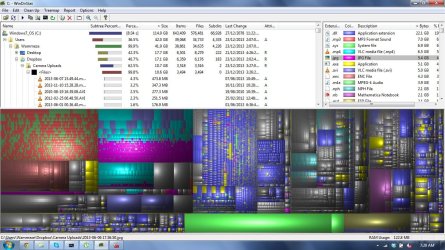
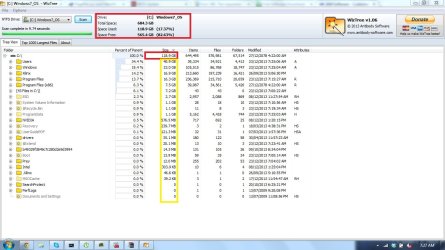
With the help of WizTree and the other programs, i've noticed that they only can account for one fifth of my hard drive, leaving the rest to the unknown.
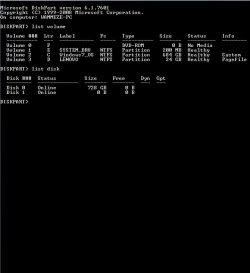
I've attached screenshots that may help with diagnosing my problem:
The images should be self explanatory, and I hope they can help in alleviating this issue.
I feel like i've exhausted my options shy of actually taking the rig to a computer specialist. Do you think you guys know what's going on with my hard drive?
Here's my systems specs:
Lenovo Y480
Windows 7 Home Premium 64 Bit
Intel(R) Core(TM) i7-3610QM
8.00 GB
GeForcer GT 640M LE
WDC WD7500BPVT-24HXZT3 750 GB HDD
Thank you so much if you could provide any input!
-Wammeze
As you can probably assess from the thread title, There is a really weird problem afflicting my computers hard drive. The Hard drive with the problem is an advertised 750 GB Western Digital hard drive, with 684 available gigabytes.
The problem I am having is that a mysteriously large amount of hard drive disk space has disappeared from being available, and has left me to have only about 100 Gigabytes left (originally it had whittled down to about 100 MB before I deleted a large amount of miscellaneous files), from my estimated 500 Gigabyte's I had available to me last week, but there is still a lot of hard drive disk space un-accounted for. I've been perusing the windows 7 forum and have tried different solutions to no avail. The methods i've tried are as follows:
-Updating my BIOS, USB, Hard drive and other miscellaneous drivers
-Using Disk Cleanup
-Using Disk Defragmenter
-Using WizTree, WinDirStat, and TreeSize (free) to find out what was eating my HDD Space
-Phisically taking the Hrad drive out and checking out what's wrong with another computer
-Deleting many large files not necessary to function
With the help of WizTree and the other programs, i've noticed that they only can account for one fifth of my hard drive, leaving the rest to the unknown.
I've attached screenshots that may help with diagnosing my problem:
The images should be self explanatory, and I hope they can help in alleviating this issue.
I feel like i've exhausted my options shy of actually taking the rig to a computer specialist. Do you think you guys know what's going on with my hard drive?
Here's my systems specs:
Lenovo Y480
Windows 7 Home Premium 64 Bit
Intel(R) Core(TM) i7-3610QM
8.00 GB
GeForcer GT 640M LE
WDC WD7500BPVT-24HXZT3 750 GB HDD
Thank you so much if you could provide any input!
-Wammeze
Attachments


Last edited:
My Computer
- Computer type
- Laptop
- Computer Manufacturer/Model Number
- Lenovo Y480
- OS
- Windows 7 Home Premium 64 Bit
- CPU
- Intel(R) Core(TM) i7-3610QM
- Memory
- 8.00 GB
- Graphics Card(s)
- GeForce GT 640M LE
- Hard Drives
- WDC WD7500BPVT-24HXZT3 750 GB HDD
- Antivirus
- Windows Defender
- Browser
- Google Chrome

