Hard drive speed testing tools

tech291083

New member
Member
Local time
5:33 PM
Messages
46
Hi Friends!

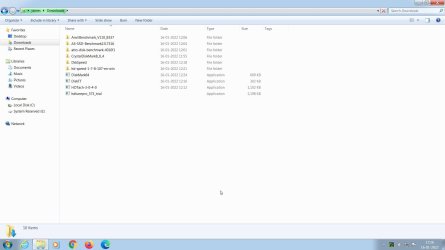
One of my PCs with Win 7 Home Basic 64 bit OS has an old 500GB Seagate HDD. I am also going to use a new 1 TB Seagate HDD and 240GB Crucial SSD next week. I have never done any HDD benchmarking myself, but heard a lot of the usefulness of it in deciding the actual speed of a hard drive of any type. I have downloaded a few benchmarking tools as you can see in the screenshot attached. Which of these is the most reliable one in your opinion? And how should I use the parameters i.e. what should be the ideal data chunk I should select and what is more important sequential or random? What parameters/variables are the best to test a hard drive if I use a popular tool called CrystalDiskMark? Please guide me. Thanks.
 

Attachments
  • 2022-01-16 17_16_39-Greenshot.jpg
    2022-01-16 17_16_39-Greenshot.jpg
    119.2 KB · Views: 2
Last edited:

My Computer

Computer type
PC/Desktop
OS
Windows 7 Home Basic 64 bit
They have different evaluation test so if you use one on a drive, use the same on the other drives.
I use CrystalDiskMark but AS-SSD is also good.
 

My Computers

System One System Two

  • Computer type
    PC/Desktop
    Computer Manufacturer/Model Number
    custom build
    OS
    Windows 7 HP 64
    CPU
    i5 6600K - 800MHz to 4200MHz
    Motherboard
    GA-Z170-HD3P
    Memory
    4+4G GSkill DDR4 3000
    Graphics Card(s)
    IG - Intel 530
    Monitor(s) Displays
    Samsung 226BW
    Screen Resolution
    1680x1050
    Hard Drives
    (1) -1 SM951 – 128GB M.2 AHCI PCIe SSD drive for Windows 7 and Lubuntu
    (2) -1 WD SATA 3 - 1T for Data
    (3) -1 WD SATA 3 - 1T for backup
    PSU
    Thermaltake 450W TR2 gold
    Keyboard
    Old and good Chicony mechanical keyboard
    Mouse
    Logitech mX performance - 9 buttons (had to disable some)
    Internet Speed
    500Mb/s
    Browser
    Firefox 64
    Other Info
    TinyWall firewall
  • Computer type
    Laptop
    System Manufacturer/Model Number
    Asus Q550LF
    OS
    Windows 7 Pro
    CPU
    i7-4500U 800MHz to 3.0GHz
    Motherboard
    Asus Q550LF
    Memory
    (4+4)G DDR3 1600
    Graphics Card(s)
    IG intel 4400 + NVIDIA GeForce GT 745M
    Sound Card
    Realtek
    Monitor(s) Displays
    LG Display LP156WF4-SPH1
    Screen Resolution
    1920 x 1080
    Hard Drives
    BX500 120G SSD for Windows and programs +
    1T HDD for data
    Internet Speed
    500 Mb/s
    Browser
    Firefox
    Other Info
    TinyWall firewall
I have a lot of those HDD speed testing tools, but out of all of them I like ATTO the best. Simply because of your ability to chose the parameters to get more of a better idea on real drive speed.

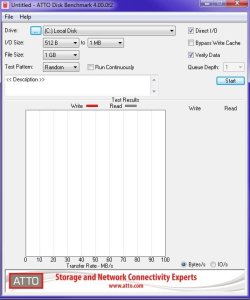
My copy might be very old, but here are my settings. If you go above 1 MB for the I/O it'll take forever, and 1 MB should be good enough. Beyond that you'll probably start to see comparable results for 2 MB, 4 MB, 8 MB, and so on down the result list. I chose not to bypass the write cache since by default, all hard drives in Windows will use it anyway and that'll most likely be your default configuration. Disabling it should give you a poorer speed result. But it will give you a more exact result. It's just that you more than likely won't use a hard drive with the write cache off anyway. So bypassing the cache in ATTO and reading the result is superfluous.


7i6y.jpg


I recently tested two Adata USB 3.x thumb drives with ATTO. One was 3.2 and the other 3.0. I get better speed results with the 3.0 for some reason. I'm thinking it's due to the motherboard's chipset. My front panel USB header is USB 3.1 Gen 1. Both USB sticks are models UV128. The yellow thumb drive is 3.2, while the blue thumb drive is 3.0. It actually says that on the blue thumb drive, but not on the yellow drive. Only on its packaging so I wrote that on the back of the drive with a magic marker. My blue 3.0 drive is older. Adata apparently has a lifetime warranty on their USB drives.
 

My Computer

Computer type
PC/Desktop
OS
Windows 7 Ultimate x64
They have different evaluation test so if you use one on a drive, use the same on the other drives.
I use CrystalDiskMark but AS-SSD is also good.

Thanks a lot.

- - - Updated - - -

I have a lot of those HDD speed testing tools, but out of all of them I like ATTO the best. Simply because of your ability to chose the parameters to get more of a better idea on real drive speed.

My copy might be very old, but here are my settings. If you go above 1 MB for the I/O it'll take forever, and 1 MB should be good enough. Beyond that you'll probably start to see comparable results for 2 MB, 4 MB, 8 MB, and so on down the result list. I chose not to bypass the write cache since by default, all hard drives in Windows will use it anyway and that'll most likely be your default configuration. Disabling it should give you a poorer speed result. But it will give you a more exact result. It's just that you more than likely won't use a hard drive with the write cache off anyway. So bypassing the cache in ATTO and reading the result is superfluous.

I will try to use ATTO. I am glad that you have share your settings, which makes me clear in my mind as to how one should use this tool. Thanks.

- - - Updated - - -

I just used CrystalDiskMark. I am attaching screenshots. I did change the parameters to my liking. But the last set of parameters did not work. Screenshot is named "2022-01-18 19_35_28-Greenshot". I am not sure as to why. Please help. Thanks.

Album — Postimages
 

My Computer

Computer type
PC/Desktop
OS
Windows 7 Home Basic 64 bit
Probably because you set it at a massive 64 GB and 9. Use these settings instead.


fdhghr.jpg

And according to that screen shot, you only have 64 GB of space left on that drive. If this is a SSD drive, that pretty much means no space since that should be a spare area for garbage collection. Read here about doing this.

SSD Over-Provisioning And Its Benefits | Seagate US

SSD Over-provisioning (OP) - Kingston Technology

Even if you don't have a Crucial drive, you should still be able to use Crucial Storage Executive for over-provisioning and other options.
 

My Computer

Computer type
PC/Desktop
OS
Windows 7 Ultimate x64
I recently tested two Adata USB 3.x thumb drives with ATTO. One was 3.2 and the other 3.0. I get better speed results with the 3.0 for some reason. I'm thinking it's due to the motherboard's chipset. My front panel USB header is USB 3.1 Gen 1. Both USB sticks are models UV128. The yellow thumb drive is 3.2, while the blue thumb drive is 3.0. It actually says that on the blue thumb drive, but not on the yellow drive. Only on its packaging so I wrote that on the back of the drive with a magic marker. My blue 3.0 drive is older. Adata apparently has a lifetime warranty on their USB drives.
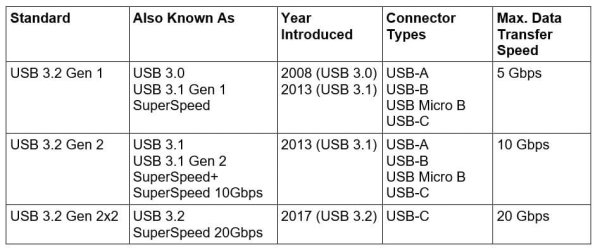
They have confused things by redefining USB specifications as new ones were released. For example, USB 3.0, USB 3.1 Gen 1, and USB 3.2 Gen 1 are just different names for the same thing.
USB 3 Speeds.jpg

USB: Port Types and Speeds Compared
USB: Port Types and Speeds Compared | Tripp Lite- -
 

My Computers

System One System Two

  • Computer type
    PC/Desktop
    Computer Manufacturer/Model Number
    Custom build
    OS
    Windows 7 Home Premium 64-bits
    CPU
    AMD FX-8350
    Motherboard
    Gigabyte GA-990FXA-UD3 (AM3+)
    Memory
    GSKILL Ripjaw-X PC3 12800 8GB (2x4GB)
    Graphics Card(s)
    ASUS ROG STRIX GTX 1060 6GB
    Sound Card
    Integrated
    Monitor(s) Displays
    Asus VE228H (21.5-in)
    Screen Resolution
    1920x1080 60Hz
    Hard Drives
    SAMSUNG 870 EVO 2.5 Inch SATA SSD (1TB)
    SAMSUNG 870 EVO 2.5 Inch SATA SSD (1TB)
    SAMSUNG 870 EVO 2.5 Inch SATA SSD (1TB)
    PSU
    Corsair RM750x (750 watts)
    Case
    Corsair Carbide Series 200R
    Cooling
    Corsair Hydro Series H60 (CWCH60)
    Keyboard
    Logitech Elite
    Mouse
    Logitech M510 Wireless Mouse
    Internet Speed
    Comcast Gigabit Extra (1200Mbps down / 35Mbps up)
    Antivirus
    Malwarebytes
    Browser
    Firefox, Edge, Chrome
    Other Info
    ASUS DRW-24B1ST DVD-RW (24X) optical drive
    Seagate Expansion Desk (5TB) external SATA/USB HDD
    Comcast XB8 Internet Gateway
  • Computer type
    PC/Desktop
    System Manufacturer/Model Number
    Custom
    OS
    Windows 7 Pro (64-bit)
    CPU
    AMD Phenom II 960T X4
    Motherboard
    ASUS M4N82 Deluxe
    Memory
    Corsair XMS2 DDR2-800 8GB (4x2GB)
    Graphics Card(s)
    ASUS ENGTX560 DCII OC/2DI/1GD5 1GB
    Monitor(s) Displays
    Samsung 930B 19-inch LCD
    Screen Resolution
    1280x1024
    Hard Drives
    Samsung SSD 870 EVO 1000 GB (Windows 10)
    Seagate ST1000DM003 1000 GB (Windows 7)
    PSU
    Antec TruePower (new) TP-650
    Case
    Antec Three Hundred
    Cooling
    AMD stock cooler from FX8350
    Mouse
    Logitech M100
    Internet Speed
    Xfinity Gigabit Extra 1200/35 Mbps
Yeah, I remember watching a video on YouTube some months ago about the different specs. I just shook my head. It reminds me of how I wanted to know what the plot of Star Wars was all about so checked out a video on YouTube. Boy, that was a mistake, let me tell you. The sith this and that and all this crap and the video went on for some 20 minutes and I was like screw this. As you might have guessed, I'm not a Star Wars fan. Great theater entertainment I guess, and all the youngins think they are some kind of Jedi or what ever which fosters imaginative development and what not, but I'm more of a Matrix and Terminator fan. The Matrix is an absolute fantastic plot in every sense of the word. I say this because we, in the real world will have a Matrix very much like the movie. It sounds like fanciful BS, but it's true, very true. Elon Musk will spur this on. And of course the Terminator also shares in the matrix plot of AI and robotics taking over. I consider the Matrix to be a hybrid of the Terminator. And I especially like these two franchises because more times than not art has this uncanny ability to imitate reality.

Anyway... LOL Yeah, They have specs for all kinds of electronic stuff out there. I have a note here on DIN which I find interesting because I used DIN connectors for years and years being a radio communications hobbyist. Just never knew what it truly was until I Wikipediad (am I a word adjective?) the term DIN. It's also a spec used for my dual DIN car stereo cage. I actually have to buy a dual cage to install my mobile scanner in the front dash. Something I've put on the back burner. There's also ISO spec and car stereo cages can be ISO spec installed.

I have a felling there is so much butt kissing in terms of marketing and capital with this forum it's like lobbying some congressional representative. LOL USB Implementers Forum - Wikipedia

EVERYTHING has risk, reward, and the metrics from telemetry and thus the marketing potential. Nothing is ever massed produced unless it has its profit potential. Thus in my opinion why the USB spec is whacked... like the tax code, like the government on all matters of business. Want to create a business? HA! Good luck. Permit for this and that, IRS this and that, you freaking name it. That's a real problem.


Anyway, adu and farewell you fair Spanish ladies...
 

My Computer

Computer type
PC/Desktop
OS
Windows 7 Ultimate x64

My Computer

Computer type
PC/Desktop
OS
Windows 7 Home Basic 64 bit
Back
Top