Hard Drive - Turn Off Hard Disk After Idle or Never

How to Turn Off Hard Disk After so many Minutes of being Idle or Never


   Information
This will show you how to have your hard disks to be either turned off after however many minutes you set of being idle, or to never be turned off in Vista, Windows 7, and Windows 8.

This setting will only affect internal HDDs and not for SSDs (solid state drives).

When set to turn off hard disks after idle, you will notice a brief delay of a few seconds when you try to access a turned off hard disk as it spins back up and is turned back on automatically as needed. Having your hard disks to be turned off after being idle can help save energy and extend a laptop's battery life.

   Note
Hard disks do not turn off after your computer has been idle

If you have the hard disks set to be turned off after X amount of minutes of being inactive, then this behavior can be caused if any disk activity occurs, whether it is caused by user input or system tasks. Disk activity of any type resets the hard disk idle timer, and this can increase the amount of time it takes for your hard disk to turn off.

Windows is designed to automatically perform maintenance tasks to improve performance and reliability. When your computer is on AC power and is idle, system maintenance tasks may be able to run for a few minutes. These system maintenance tasks include disk-layout optimization to improve performance and preparing automatic system restoration points to increase reliability. Typically, these tasks occur the first time you leave your computer idle after you start it. These tasks ensure that the system maintains its performance and reliability even after long use. Because these tasks involve reading and writing to the hard disk, the hard disk idle time is reset regularly during this maintenance period.

There are other items that can reset the hard disk idle timer. These items can include:
  • Paging operations.
  • Windows Update checking the system state.
  • Event logging.
  • Network detection such as DHCP or Autonet.
  • Third-party services such as quota software or an antivirus program.
  • Scheduled tasks.
  • The loading of services or drivers.
When these items either read from or write to the hard disk, the hard disk idle timer is reset.


Here's How:
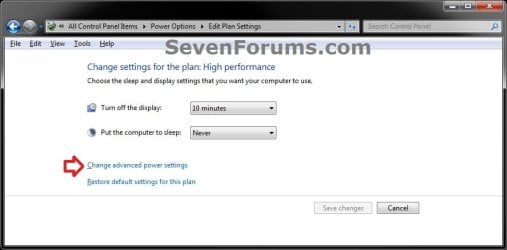
1. Open the advanced power settings in Windows 7 or Windows 8 for your selected power plan, and do step 2 or 3 below for what you would like to do. (see screenshot below)
Advanced.jpg
2. To Turn Off Hard Disks After Idle
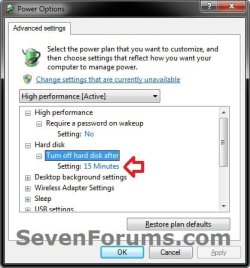
A) Expand Hard disk and Turn off hard disk after, set how many minutes you want the hard disks to be idle for before being turned off, click/tap on OK, and go to step 4. (see screenshot below)
NOTE: The default setting is with 20 minutes.
Power_Options.jpg
3. To Never Turn Off Hard Disks
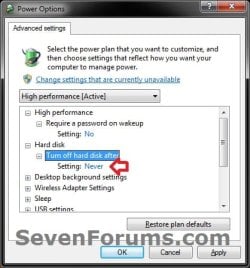
A) Expand Hard disk and Turn off hard disk after, set it to Never ( 0 minutes), click/tap on OK, and go to step 4. (see screenshot below)
Never.jpg
4. Close the Edit Plan Settings window. (see screenshot below step 1)
That's it,
Shawn


Last edited:
Hey Brink:

I used to have a 1GB HDD connected when I originally installed the SSD, but just long enough to get my data off of it. Now the only hard drives I have are the internal Samsung 850 EVO 500GB 2.5-Inch SATA III Internal SSD and an external Seagate 500 GB backup drive.

The problem is that if left unattended, the computer completely powers down after ~ 20 - 30 minutes and must be restarted by hitting the power button. Prior to this, all we had to do was shake the mouse and it would wake up to the logon screen.
 

My Computer My Computer

At a glance

Windows 10 64 bitIntel Core I3(2) Crucial "Ballistix" 4GB DDR3 sticks (8GB)MSI Radeon R7 240, 2GB GDDR5, PCI-E 3.0, Dire...
Computer type
PC/Desktop
Computer Manufacturer/Model Number
Dell Inspiron 660
OS
Windows 10 64 bit
CPU
Intel Core I3
Motherboard
Dell Vostro 270 084J0R Rev. A00
Memory
(2) Crucial "Ballistix" 4GB DDR3 sticks (8GB)
Graphics Card(s)
MSI Radeon R7 240, 2GB GDDR5, PCI-E 3.0, DirectX 12
Monitor(s) Displays
HP Pavillion 27XW HD Monitor
Screen Resolution
1920 x 1080
Hard Drives
Samsung 850 EVO 500GB 2.5-Inch SATA III Internal SSD
PSU
Cooler Master 500W
Keyboard
Logitech Y-RBN90 Bluetooth
Mouse
Logitech M350 Bluetooth
Internet Speed
98 Mbps down / 25 Mbps up (avg)
Antivirus
Windows Defender, MalwareBytes Home Premium
Browser
Chrome, Edge, IE 11
The computer powering down would be a different setting than what this tutorial is for. This tutorial is only for the HDD itself and not the computer.

Check using the tutorial below to see if you have set your power plan to put the computer to "sleep" or "hibernate" after being idle for that time.

Power Plan Settings - Change

Next, check to see if you mouse is still allowed to wake up the computer.

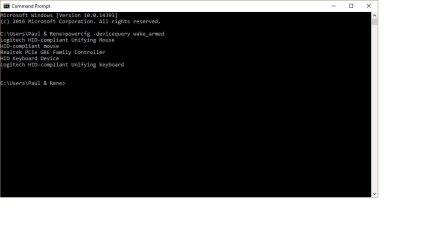
Devices - See Devices that are able to Wake Up the Computer

Devices - Allow or Prevent to Wake Up Computer
 

My Computer My Computer

At a glance

64-bit Windows 11 Pro for WorkstationsIntel i7-8700K OC'd to 5 GHz64 GB (4x16GB) G.SKILL TridentZ RGB DDR4 3600...ASUS ROG-STRIX-GTX1080TI-O11G-GAMING
Computer type
PC/Desktop
Computer Manufacturer/Model Number
Self built custom
OS
64-bit Windows 11 Pro for Workstations
CPU
Intel i7-8700K OC'd to 5 GHz
Motherboard
ASUS ROG Maximus XI Formula Z390
Memory
64 GB (4x16GB) G.SKILL TridentZ RGB DDR4 3600 MHz
Graphics Card(s)
ASUS ROG-STRIX-GTX1080TI-O11G-GAMING
Sound Card
Integrated
Monitor(s) Displays
2 x Samsung Odyssey G7 27"
Screen Resolution
2560x1440
Hard Drives
1TB Samsung 990 PRO M.2,
4TB Samsung 990 PRO PRO M.2,
TerraMaster F8 SSD Plus NAS
PSU
Seasonic Prime Titanium 850W
Case
Thermaltake Core P3
Cooling
Corsair Hydro H115i
Keyboard
Logitech wireless K800
Mouse
Logitech MX Master 4
Internet Speed
2 Gb/s Download and 100 Mb/s Upload
Antivirus
Malwarebyte Anti-Malware Premium
Browser
Google Chrome
Other Info
Logitech Z625 speaker system,
Logitech BRIO 4K Pro webcam,
HP Color LaserJet Pro MFP M477fdn,
APC SMART-UPS RT 1000 XL - SURT1000XLI,
Galaxy S23 Plus phone
All my power plan settings are configured as indicated, and both the mouse and keyboard are allowed to wake up the computer. Oddly, when I pull up Advanced Power settings I don't have the "Change settings that are currently unavailable" even though I ran powercfg.cpl as an administrator?

Lastly, for some reason I don't have the battery options as described, despite having a Cyberpower UPS installed and (apparently incorrectly) configured?

Power options screenshot.jpg

Wake_computer_screenshot.jpg
 

My Computer My Computer

At a glance

Windows 10 64 bitIntel Core I3(2) Crucial "Ballistix" 4GB DDR3 sticks (8GB)MSI Radeon R7 240, 2GB GDDR5, PCI-E 3.0, Dire...
Computer type
PC/Desktop
Computer Manufacturer/Model Number
Dell Inspiron 660
OS
Windows 10 64 bit
CPU
Intel Core I3
Motherboard
Dell Vostro 270 084J0R Rev. A00
Memory
(2) Crucial "Ballistix" 4GB DDR3 sticks (8GB)
Graphics Card(s)
MSI Radeon R7 240, 2GB GDDR5, PCI-E 3.0, DirectX 12
Monitor(s) Displays
HP Pavillion 27XW HD Monitor
Screen Resolution
1920 x 1080
Hard Drives
Samsung 850 EVO 500GB 2.5-Inch SATA III Internal SSD
PSU
Cooler Master 500W
Keyboard
Logitech Y-RBN90 Bluetooth
Mouse
Logitech M350 Bluetooth
Internet Speed
98 Mbps down / 25 Mbps up (avg)
Antivirus
Windows Defender, MalwareBytes Home Premium
Browser
Chrome, Edge, IE 11
Paul,

It appears that the "Turn off hard drive" setting is not your issue.

I see that you have "Hybrid sleep" turned on. Do you have "Sleep" or "Hibernate" set to let the computer sleep or hibernate after being idle for x amount of minutes?

It does show that your mouse should be able to wake the computer from sleep or hibernate.
 

My Computer My Computer

At a glance

64-bit Windows 11 Pro for WorkstationsIntel i7-8700K OC'd to 5 GHz64 GB (4x16GB) G.SKILL TridentZ RGB DDR4 3600...ASUS ROG-STRIX-GTX1080TI-O11G-GAMING
Computer type
PC/Desktop
Computer Manufacturer/Model Number
Self built custom
OS
64-bit Windows 11 Pro for Workstations
CPU
Intel i7-8700K OC'd to 5 GHz
Motherboard
ASUS ROG Maximus XI Formula Z390
Memory
64 GB (4x16GB) G.SKILL TridentZ RGB DDR4 3600 MHz
Graphics Card(s)
ASUS ROG-STRIX-GTX1080TI-O11G-GAMING
Sound Card
Integrated
Monitor(s) Displays
2 x Samsung Odyssey G7 27"
Screen Resolution
2560x1440
Hard Drives
1TB Samsung 990 PRO M.2,
4TB Samsung 990 PRO PRO M.2,
TerraMaster F8 SSD Plus NAS
PSU
Seasonic Prime Titanium 850W
Case
Thermaltake Core P3
Cooling
Corsair Hydro H115i
Keyboard
Logitech wireless K800
Mouse
Logitech MX Master 4
Internet Speed
2 Gb/s Download and 100 Mb/s Upload
Antivirus
Malwarebyte Anti-Malware Premium
Browser
Google Chrome
Other Info
Logitech Z625 speaker system,
Logitech BRIO 4K Pro webcam,
HP Color LaserJet Pro MFP M477fdn,
APC SMART-UPS RT 1000 XL - SURT1000XLI,
Galaxy S23 Plus phone
Brink:

Yes, the computer is set to go to sleep (hybrid) after 30 minutes. Hibernate is set to never. The display is set to turn off after 15 minutes (not that this setting has anything to do with what you and I are looking for).

When the sleep function was working properly, i.e. putting the computer to sleep after 30 min., a simple shake of the mouse or tap on the space bar would awaken it. Now - not so much... :(

I appreciate your persistence.

Sleep_Settings.jpg
 

My Computer My Computer

At a glance

Windows 10 64 bitIntel Core I3(2) Crucial "Ballistix" 4GB DDR3 sticks (8GB)MSI Radeon R7 240, 2GB GDDR5, PCI-E 3.0, Dire...
Computer type
PC/Desktop
Computer Manufacturer/Model Number
Dell Inspiron 660
OS
Windows 10 64 bit
CPU
Intel Core I3
Motherboard
Dell Vostro 270 084J0R Rev. A00
Memory
(2) Crucial "Ballistix" 4GB DDR3 sticks (8GB)
Graphics Card(s)
MSI Radeon R7 240, 2GB GDDR5, PCI-E 3.0, DirectX 12
Monitor(s) Displays
HP Pavillion 27XW HD Monitor
Screen Resolution
1920 x 1080
Hard Drives
Samsung 850 EVO 500GB 2.5-Inch SATA III Internal SSD
PSU
Cooler Master 500W
Keyboard
Logitech Y-RBN90 Bluetooth
Mouse
Logitech M350 Bluetooth
Internet Speed
98 Mbps down / 25 Mbps up (avg)
Antivirus
Windows Defender, MalwareBytes Home Premium
Browser
Chrome, Edge, IE 11
It appears everything is set properly so far for what you are wanting.

One more thing to check is to see if you have a wake by USB type setting that may no longer be enabled in your BIOS settings.
 

My Computer My Computer

At a glance

64-bit Windows 11 Pro for WorkstationsIntel i7-8700K OC'd to 5 GHz64 GB (4x16GB) G.SKILL TridentZ RGB DDR4 3600...ASUS ROG-STRIX-GTX1080TI-O11G-GAMING
Computer type
PC/Desktop
Computer Manufacturer/Model Number
Self built custom
OS
64-bit Windows 11 Pro for Workstations
CPU
Intel i7-8700K OC'd to 5 GHz
Motherboard
ASUS ROG Maximus XI Formula Z390
Memory
64 GB (4x16GB) G.SKILL TridentZ RGB DDR4 3600 MHz
Graphics Card(s)
ASUS ROG-STRIX-GTX1080TI-O11G-GAMING
Sound Card
Integrated
Monitor(s) Displays
2 x Samsung Odyssey G7 27"
Screen Resolution
2560x1440
Hard Drives
1TB Samsung 990 PRO M.2,
4TB Samsung 990 PRO PRO M.2,
TerraMaster F8 SSD Plus NAS
PSU
Seasonic Prime Titanium 850W
Case
Thermaltake Core P3
Cooling
Corsair Hydro H115i
Keyboard
Logitech wireless K800
Mouse
Logitech MX Master 4
Internet Speed
2 Gb/s Download and 100 Mb/s Upload
Antivirus
Malwarebyte Anti-Malware Premium
Browser
Google Chrome
Other Info
Logitech Z625 speaker system,
Logitech BRIO 4K Pro webcam,
HP Color LaserJet Pro MFP M477fdn,
APC SMART-UPS RT 1000 XL - SURT1000XLI,
Galaxy S23 Plus phone
Brink:

Sorry it took me so long to reply. Too many hours at work.

I checked the BIOS settings and all ar as originally configured.

Given that we've checked everything is it safe to assume my Windows installation has been corrupted? (Unless you have other suggestions...)

Would "Reset this PC" to reinstall the OS be too drastic a move? If not, how can I do so with minimal needed reconfiguration afterwards? I've never done this since I've only had Windows 10 for a few months.

Thanks - Paul
 

My Computer My Computer

At a glance

Windows 10 64 bitIntel Core I3(2) Crucial "Ballistix" 4GB DDR3 sticks (8GB)MSI Radeon R7 240, 2GB GDDR5, PCI-E 3.0, Dire...
Computer type
PC/Desktop
Computer Manufacturer/Model Number
Dell Inspiron 660
OS
Windows 10 64 bit
CPU
Intel Core I3
Motherboard
Dell Vostro 270 084J0R Rev. A00
Memory
(2) Crucial "Ballistix" 4GB DDR3 sticks (8GB)
Graphics Card(s)
MSI Radeon R7 240, 2GB GDDR5, PCI-E 3.0, DirectX 12
Monitor(s) Displays
HP Pavillion 27XW HD Monitor
Screen Resolution
1920 x 1080
Hard Drives
Samsung 850 EVO 500GB 2.5-Inch SATA III Internal SSD
PSU
Cooler Master 500W
Keyboard
Logitech Y-RBN90 Bluetooth
Mouse
Logitech M350 Bluetooth
Internet Speed
98 Mbps down / 25 Mbps up (avg)
Antivirus
Windows Defender, MalwareBytes Home Premium
Browser
Chrome, Edge, IE 11

My Computer My Computer

At a glance

64-bit Windows 11 Pro for WorkstationsIntel i7-8700K OC'd to 5 GHz64 GB (4x16GB) G.SKILL TridentZ RGB DDR4 3600...ASUS ROG-STRIX-GTX1080TI-O11G-GAMING
Computer type
PC/Desktop
Computer Manufacturer/Model Number
Self built custom
OS
64-bit Windows 11 Pro for Workstations
CPU
Intel i7-8700K OC'd to 5 GHz
Motherboard
ASUS ROG Maximus XI Formula Z390
Memory
64 GB (4x16GB) G.SKILL TridentZ RGB DDR4 3600 MHz
Graphics Card(s)
ASUS ROG-STRIX-GTX1080TI-O11G-GAMING
Sound Card
Integrated
Monitor(s) Displays
2 x Samsung Odyssey G7 27"
Screen Resolution
2560x1440
Hard Drives
1TB Samsung 990 PRO M.2,
4TB Samsung 990 PRO PRO M.2,
TerraMaster F8 SSD Plus NAS
PSU
Seasonic Prime Titanium 850W
Case
Thermaltake Core P3
Cooling
Corsair Hydro H115i
Keyboard
Logitech wireless K800
Mouse
Logitech MX Master 4
Internet Speed
2 Gb/s Download and 100 Mb/s Upload
Antivirus
Malwarebyte Anti-Malware Premium
Browser
Google Chrome
Other Info
Logitech Z625 speaker system,
Logitech BRIO 4K Pro webcam,
HP Color LaserJet Pro MFP M477fdn,
APC SMART-UPS RT 1000 XL - SURT1000XLI,
Galaxy S23 Plus phone
I assume it has to do with the fact that SSDs have no moving parts and therefore can't "spin down" to save power. They are either in use or not in use---on or off.

:ditto:

Yep, that would be why. :)

Alright, 10x guys! :) I was under the impression that 'Turn Off Hard Disk' affects SSDs as well, but I see you're suggesting the opposite.

This here (SSD W7 Power options? - The Corsair User Forums) suggests that 'in windows 7 under power settings the "turn off hard disk after _ minutes of inactivity" only applies to your primary drive. ALL other drives will spin down at some point regardless of what you change this setting to'.

This here (Power Settings Adjustment - Can You Get More Space Or Speed From Your SSD?) suggests that setting it to 0 i.e. never 'allows the SSD's idle garbage collection to operate, even when you're not in front of your computer'.

A few other sources I have that also back this claim. Where's the truth then?

If indeed the 'Turn Off Hard Disk' doesn't affect SSDs then what do I do on my laptop that has 2 slots with 1 being my OS SSD and the other being my storage HDD? What 'Turn Off Hard Disk' setting would make most sense for my HDD, being used only for storage?
 

My Computer My Computer

At a glance

Win 7 x64
Computer type
Laptop
Computer Manufacturer/Model Number
HP
OS
Win 7 x64
Hello soewhaty, :)

From my understanding and what I've seen, this has never affected SSDs, and has only affected any connected HDD. This doesn't always affect HDD's in a connected external enclosure though.
 

My Computer My Computer

At a glance

64-bit Windows 11 Pro for WorkstationsIntel i7-8700K OC'd to 5 GHz64 GB (4x16GB) G.SKILL TridentZ RGB DDR4 3600...ASUS ROG-STRIX-GTX1080TI-O11G-GAMING
Computer type
PC/Desktop
Computer Manufacturer/Model Number
Self built custom
OS
64-bit Windows 11 Pro for Workstations
CPU
Intel i7-8700K OC'd to 5 GHz
Motherboard
ASUS ROG Maximus XI Formula Z390
Memory
64 GB (4x16GB) G.SKILL TridentZ RGB DDR4 3600 MHz
Graphics Card(s)
ASUS ROG-STRIX-GTX1080TI-O11G-GAMING
Sound Card
Integrated
Monitor(s) Displays
2 x Samsung Odyssey G7 27"
Screen Resolution
2560x1440
Hard Drives
1TB Samsung 990 PRO M.2,
4TB Samsung 990 PRO PRO M.2,
TerraMaster F8 SSD Plus NAS
PSU
Seasonic Prime Titanium 850W
Case
Thermaltake Core P3
Cooling
Corsair Hydro H115i
Keyboard
Logitech wireless K800
Mouse
Logitech MX Master 4
Internet Speed
2 Gb/s Download and 100 Mb/s Upload
Antivirus
Malwarebyte Anti-Malware Premium
Browser
Google Chrome
Other Info
Logitech Z625 speaker system,
Logitech BRIO 4K Pro webcam,
HP Color LaserJet Pro MFP M477fdn,
APC SMART-UPS RT 1000 XL - SURT1000XLI,
Galaxy S23 Plus phone
Hello soewhaty, :)

From my understanding and what I've seen, this has never affected SSDs, and has only affected any connected HDD. This doesn't always affect HDD's in a connected external enclosure though.

10x, Brink! :) Not sure what you're referring to when saying 'HDD's in a connected external enclosure'. My laptop has 2 internal bays (slots) for drives. In the primary bay I have my OS SSD, in the secondary bay the storage HDD. Both bays, and thereby both drives, are internal. The SSD is SataIII-6gbps connected and the HDD is SataII-3gbps connected.

So, again, what would be my preferred option in case we indeed assume that 'Turn Off Hard Disk' doesn't affects SSDs (as you suggest)? What would be best for the HDD? I know that letting it turn off would result in delay when it needs to be accessed again. So is there even any need to turn it off at all? I read a lot on it and most sources say that staying ON does not really do any harm to the HDD.
 

My Computer My Computer

At a glance

Win 7 x64
Computer type
Laptop
Computer Manufacturer/Model Number
HP
OS
Win 7 x64
'HDD's in a connected external enclosure' is just an external HDD in its own case.

It really depends on your usage and needs for if you want to turn this setting on or off.

If you leave the computer running all the time, then you could save energy and heat by turning this setting on to let and HDDs turn off while idle.
 

My Computer My Computer

At a glance

64-bit Windows 11 Pro for WorkstationsIntel i7-8700K OC'd to 5 GHz64 GB (4x16GB) G.SKILL TridentZ RGB DDR4 3600...ASUS ROG-STRIX-GTX1080TI-O11G-GAMING
Computer type
PC/Desktop
Computer Manufacturer/Model Number
Self built custom
OS
64-bit Windows 11 Pro for Workstations
CPU
Intel i7-8700K OC'd to 5 GHz
Motherboard
ASUS ROG Maximus XI Formula Z390
Memory
64 GB (4x16GB) G.SKILL TridentZ RGB DDR4 3600 MHz
Graphics Card(s)
ASUS ROG-STRIX-GTX1080TI-O11G-GAMING
Sound Card
Integrated
Monitor(s) Displays
2 x Samsung Odyssey G7 27"
Screen Resolution
2560x1440
Hard Drives
1TB Samsung 990 PRO M.2,
4TB Samsung 990 PRO PRO M.2,
TerraMaster F8 SSD Plus NAS
PSU
Seasonic Prime Titanium 850W
Case
Thermaltake Core P3
Cooling
Corsair Hydro H115i
Keyboard
Logitech wireless K800
Mouse
Logitech MX Master 4
Internet Speed
2 Gb/s Download and 100 Mb/s Upload
Antivirus
Malwarebyte Anti-Malware Premium
Browser
Google Chrome
Other Info
Logitech Z625 speaker system,
Logitech BRIO 4K Pro webcam,
HP Color LaserJet Pro MFP M477fdn,
APC SMART-UPS RT 1000 XL - SURT1000XLI,
Galaxy S23 Plus phone
Back
Top