Harddisc Drive Notebook to Desktop

JoshuaMitchell

New member
Member
Local time
2:53 AM
Messages
33
Hello,

Is it possible to connect a Notebook HDD to my Destop?
Because i've got a Notebook HDD with a lock in it and i need to format it but i cannot access the HDD,
So It's a Toshiba 320 GB HDD SATA.

I hope you can help me.
 

My Computer My Computer

OS
Windows 7 Ultimate x64 Build 7601
CPU
Intel Celeron E3300 Duo Core
Motherboard
Asrock G31M-S
Memory
4GB DDR2
Graphics Card(s)
ATI Radeon HD 5570 1GB DDR5
Sound Card
Realtek HD (On board)
Monitor(s) Displays
IIyama 22'' Full HD
Screen Resolution
1920 x 1080
Hard Drives
3TB 5400RPM (3x Samsung 1TB)
Case
Siemens Fuji Case
Cooling
Stock
Keyboard
Thrust
Mouse
Logitech G300
Internet Speed
Fiberglass Download speed: 65.4MB/s Upload Speed: 68.1MB/s
Other Info
LOL why is DDR3 memory cheaper then DDR2 :/
Hard drives are electronically (and sometimes also physically) the same. You should be able to connect it to your desktop and do whatever you want with the drive.
 

My Computer My Computer

Computer type
PC/Desktop
Computer Manufacturer/Model Number
My Own Build
OS
Windows 10 64 bit
CPU
Intel i7 6700K
Motherboard
ASUS ROG Maximus VIII Hero
Memory
16GB Corsair Dominator
Graphics Card(s)
Intel CPU Graphics
Sound Card
RealTek
Monitor(s) Displays
27" Dell S2719dgf
Screen Resolution
2560X1440
Hard Drives
1 TB Samsung 850 EVO SSD for Win 10 Pro
500GB Samsung 850 EVO SSD for Win 10 Insider
2 TB drive for backup
PSU
EVGA Supernova 750G2
Case
BeQuiet Silent Base 600
Cooling
Deepcool Captain 120EX
Keyboard
Microsoft Wireless 2000
Mouse
Microsoft wireless
Internet Speed
100 MB/sec (Cable)
Antivirus
Microsoft Defender and Malwarebytes
Browser
Edge/Firefox
Other Info
Cakewalk (Sonar) by BandLab and Studio One 4.1 Pro recording studio software. MOTU 896Mk3 Hybrid recording interface, Frontier Tranzport wireless control unit, Behringer X-Touch Control Surface.
Five USB connected optical drives for CD Audio production using Nero BurningROM
Okay i tried to connect my HDD ( notebook ) and enabled into my bios. but i cannot boot up. I see windows is starting but it stays for 10 min... on the HDD of the notebook there is win7 installed but when i choose wich win7 i wanted to choose i see 1 win 7 in stead of 2.
 

My Computer My Computer

OS
Windows 7 Ultimate x64 Build 7601
CPU
Intel Celeron E3300 Duo Core
Motherboard
Asrock G31M-S
Memory
4GB DDR2
Graphics Card(s)
ATI Radeon HD 5570 1GB DDR5
Sound Card
Realtek HD (On board)
Monitor(s) Displays
IIyama 22'' Full HD
Screen Resolution
1920 x 1080
Hard Drives
3TB 5400RPM (3x Samsung 1TB)
Case
Siemens Fuji Case
Cooling
Stock
Keyboard
Thrust
Mouse
Logitech G300
Internet Speed
Fiberglass Download speed: 65.4MB/s Upload Speed: 68.1MB/s
Other Info
LOL why is DDR3 memory cheaper then DDR2 :/
Hi there
Easier way

1) Remove HDD from notebook -- really simple
2) Boot up desktop -- don't connect the PC disk yet.
3) use SATA ==>USB2 adapter (really cheap) and connect to a USB2 slot.
4) now format the external disk drive. - If it doesn't assign a letter to the drive go into computer management --administrative tools - disk management. You should see the drive even if no letter is assigned.

Right mouse click and format it.

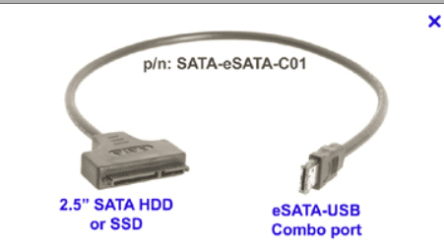
Here's a picture of a laptop SATA==>USB connector. You don't need any enclosures etc for the HDD - the adapter is just fine by itself - the power comes from the USB slot.

No need to open the desktop and fiddle with MOBO.

(After you've formatted the drive you'll need to install an OS on it if you want to re-use it in the laptop again. just put the disk back into the laptop and install Windows).

If you really want to keep the HDD in your desktop then ensure the BIOS boot sequence doesn't point to the HDD you've connected to the MOBO -- quite frankly I'd use it as an external USB drive. These drives aren't terribly fast so the idea of a desktop booting from one of these is NOT a good idea, These are great though as external HDD's for backups / archives / video files etc.

If money allows - put an SSD as a boot device in all your computers - especially the laptop if you use it a lot.

Cheers
jimbo
 

Attachments

  • satausb.png
    satausb.png
    13.9 KB · Views: 1

My Computer My Computer

Computer type
PC/Desktop
Computer Manufacturer/Model Number
Custom built, several laptops HP/ASUS
OS
Linux CENTOS 7 / various Windows OS'es and servers
CPU
Intel i7 Intel i5
Memory
8GB, 16GB
Graphics Card(s)
On Motherboard
Sound Card
Realtek HD audio
Monitor(s) Displays
Apple Cinema display, Samsung LCD
Screen Resolution
1920 X 1080
Hard Drives
4 X 1TB SATA
Mouse
Toshiba wireless laser
Internet Speed
> 20MB up
Hi there
Easier way

1) Remove HDD from notebook -- really simple
2) Boot up desktop -- don't connect the PC disk yet.
3) use SATA ==>USB2 adapter (really cheap) and connect to a USB2 slot.
4) now format the external disk drive. - If it doesn't assign a letter to the drive go into computer management --administrative tools - disk management. You should see the drive even if no letter is assigned.

Right mouse click and format it.

Here's a picture of a laptop SATA==>USB connector. You don't need any enclosures etc for the HDD - the adapter is just fine by itself - the power comes from the USB slot.

No need to open the desktop and fiddle with MOBO.

(After you've formatted the drive you'll need to install an OS on it if you want to re-use it in the laptop again. just put the disk back into the laptop and install Windows).

If you really want to keep the HDD in your desktop then ensure the BIOS boot sequence doesn't point to the HDD you've connected to the MOBO -- quite frankly I'd use it as an external USB drive. These drives aren't terribly fast so the idea of a desktop booting from one of these is NOT a good idea, These are great though as external HDD's for backups / archives / video files etc.

If money allows - put an SSD as a boot device in all your computers - especially the laptop if you use it a lot.

Cheers
jimbo


So you sure about it, i really need a SATA HDD > USB because i don't wanted to spend unnecessary money ^^
BTW the HDD of the Notebook has a lock so my question is, can i format it ( does windows has the premision to access the HDD )
 

My Computer My Computer

OS
Windows 7 Ultimate x64 Build 7601
CPU
Intel Celeron E3300 Duo Core
Motherboard
Asrock G31M-S
Memory
4GB DDR2
Graphics Card(s)
ATI Radeon HD 5570 1GB DDR5
Sound Card
Realtek HD (On board)
Monitor(s) Displays
IIyama 22'' Full HD
Screen Resolution
1920 x 1080
Hard Drives
3TB 5400RPM (3x Samsung 1TB)
Case
Siemens Fuji Case
Cooling
Stock
Keyboard
Thrust
Mouse
Logitech G300
Internet Speed
Fiberglass Download speed: 65.4MB/s Upload Speed: 68.1MB/s
Other Info
LOL why is DDR3 memory cheaper then DDR2 :/
What is the problem with booting the HD in the notebook it came out of? Let's start there. Everything possible is here for Troubleshooting Windows 7 Failure to Start including tools to copy out your files and clean reinstall or run Factory Recovery.

To move HD to another PC, it cannot be expected to boot due to the difference in hardware, HID and SID. But you can adjust this by booting free Paragon Adaptive Restore CD. Boot the CD, point it at the OS on the new HD and run PNP Restore, providing via CD or flash stick any drivers it requests for the HD from the laptop's Support Downloads webpage chipset download.
 
What is the problem with booting the HD in the notebook it came out of? Let's start there. Everything possible is here for Troubleshooting Windows 7 Failure to Start including tools to copy out your files and clean reinstall or run Factory Recovery.

To move HD to another PC, it cannot be expected to boot due to the difference in hardware, HID and SID. But you can adjust this by booting free Paragon Adaptive Restore CD. Boot the CD, point it at the OS on the new HD and run PNP Restore, providing via CD or flash stick any drivers it requests for the HD from the laptop's Support Downloads webpage chipset download.
First i need to connect the HDD with connector from SATA to USB to my Destop to format the disc <- IF thats possible because of the HDD lock. After that i need to install Win7 64x plus i need a bios reset because the bios is protected with a password..
 

My Computer My Computer

OS
Windows 7 Ultimate x64 Build 7601
CPU
Intel Celeron E3300 Duo Core
Motherboard
Asrock G31M-S
Memory
4GB DDR2
Graphics Card(s)
ATI Radeon HD 5570 1GB DDR5
Sound Card
Realtek HD (On board)
Monitor(s) Displays
IIyama 22'' Full HD
Screen Resolution
1920 x 1080
Hard Drives
3TB 5400RPM (3x Samsung 1TB)
Case
Siemens Fuji Case
Cooling
Stock
Keyboard
Thrust
Mouse
Logitech G300
Internet Speed
Fiberglass Download speed: 65.4MB/s Upload Speed: 68.1MB/s
Other Info
LOL why is DDR3 memory cheaper then DDR2 :/
Hi there
a SATA==>USB is only around 5 USD.

Another solution -- if you have access to another computer download a bootable copy of something like Partition Manager(FREE) . It should boot from a USB stick or a CD / DVD (you'll have to burn an ISO).

(These stand alone partition managers are usually LINUX based -- don't get scared --the GUI is really simple on these -- so as far as the HDD is concerned it's just a DATA disk --any Windows data can be erased etc etc).

Boot the partition manager software and now format the HDD -- this should work fine from an independent stand alone OS like Partition Manager.

Now install Windows -- if you need to create a bootable Windows install disc or USB there's plenty of advice / tutorials on the Forum.

Here's some info over FREE partition managers.

Best Free Partition Manager

If the BIOS is protected with a password - you'll have to enter that -- even the stand alone Partition manager won't boot unless you enable the DVD or USB drive as a bootable drive or it's in the boot sequence.

To reset the BIOS password you'll have to do some research yourself

Here are some places to get you started -- BUT TAKE CARE otherwise your laptop will end up just being a Doorstop --I think when applied to Mobile phones it's called "Bricked".

http://www.tech-faq.com/reset-bios-password.html

Cheers
jimbo
 

My Computer My Computer

Computer type
PC/Desktop
Computer Manufacturer/Model Number
Custom built, several laptops HP/ASUS
OS
Linux CENTOS 7 / various Windows OS'es and servers
CPU
Intel i7 Intel i5
Memory
8GB, 16GB
Graphics Card(s)
On Motherboard
Sound Card
Realtek HD audio
Monitor(s) Displays
Apple Cinema display, Samsung LCD
Screen Resolution
1920 X 1080
Hard Drives
4 X 1TB SATA
Mouse
Toshiba wireless laser
Internet Speed
> 20MB up
What is the problem with booting the HD in the notebook it came out of? Let's start there. Everything possible is here for Troubleshooting Windows 7 Failure to Start including tools to copy out your files and clean reinstall or run Factory Recovery.

To move HD to another PC, it cannot be expected to boot due to the difference in hardware, HID and SID. But you can adjust this by booting free Paragon Adaptive Restore CD. Boot the CD, point it at the OS on the new HD and run PNP Restore, providing via CD or flash stick any drivers it requests for the HD from the laptop's Support Downloads webpage chipset download.

Hello i tried to use the Bootrec.exe tool but after running the tool i cannot access my C: and he only found a X: ( the boot disc ) so i cannot access the C: drive. i tried to open the laptop cover and check if everything is ok and it seems its well connected like it should. when i tried to install WIN 7 it saids,

Windows cannot be installed to the disk. This computer's hardware may not support booting to the disk. Ensure that the disk's controller is enables in the computer's BIOS menu. ( i cannot access the bios because its PASSWORD protected, but why the NOTEBOOK startsup with this disk? The disk i use is a BOOTABLE DISK. )

If i tried to create a NEW partition it saids,

Failed to create a new partition on the selected unused space. [Error: 0x8007045d].

I hope you guys can help me.

EDIT: Even downloading Testdisk @ http://www.cgsecurity.org/wiki/TestDisk
Iam not able to Delete the partition ( it saids Write error: Can't clear partition table. )
I tried to analyse the disk and it saids, Partition: Read error.

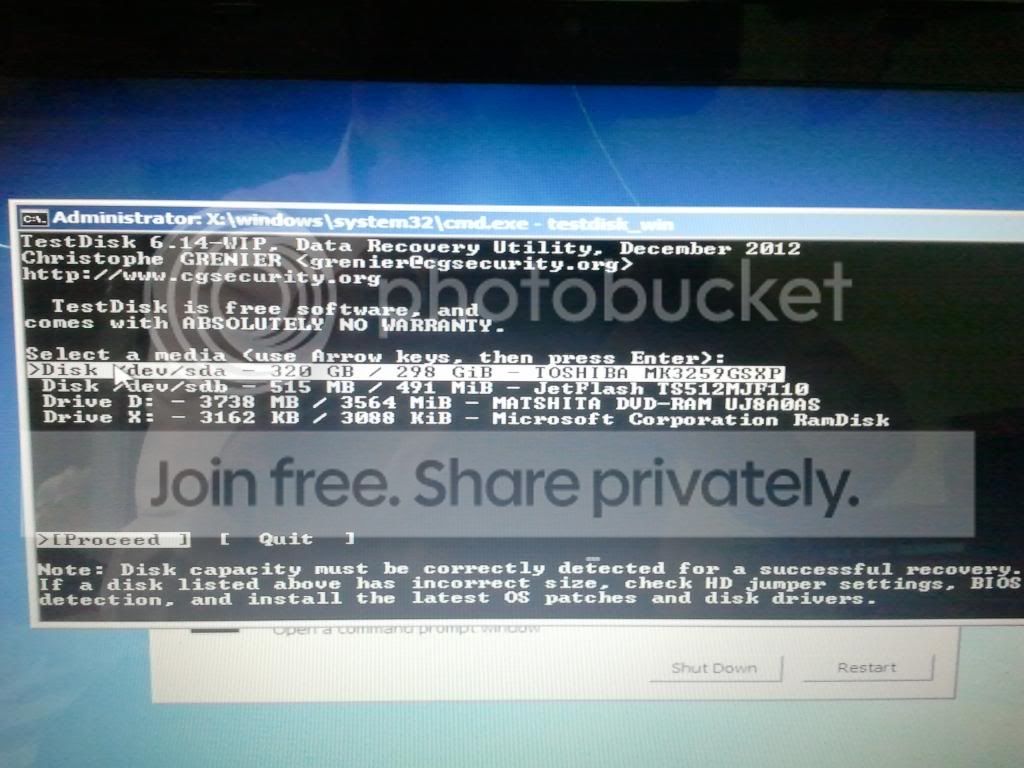
There is the command prop images,
2013-02-05131448_zps6f6a7352.jpg


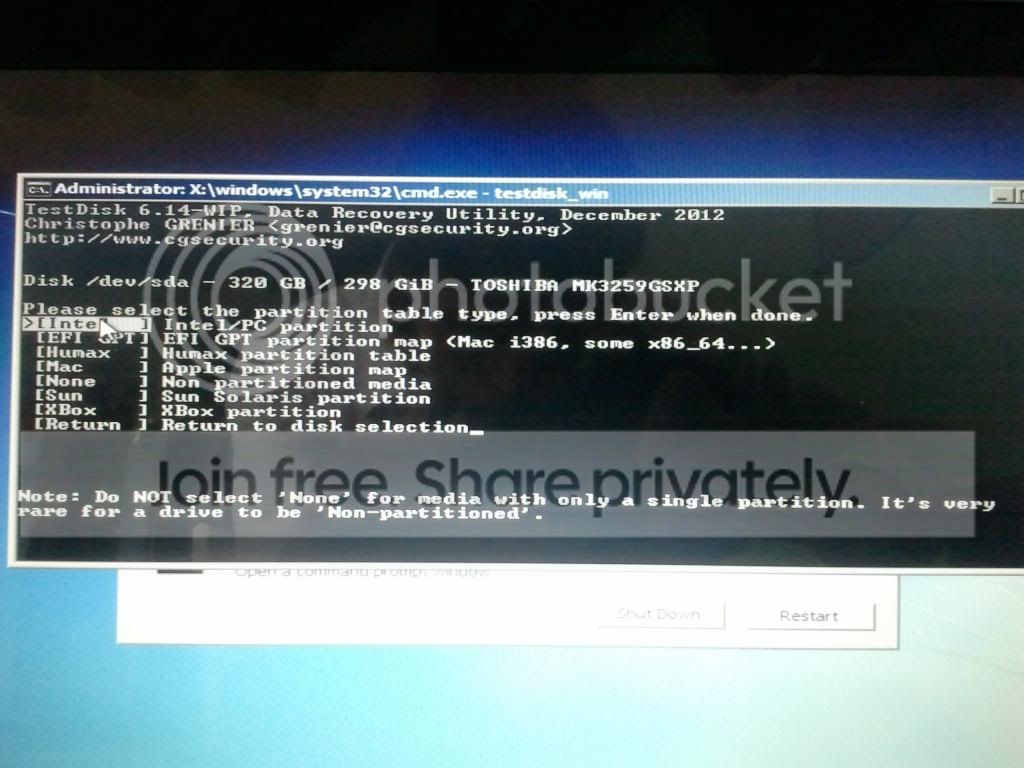
after that i see this list but what should i do?

2013-02-05131627_zpse38025e8.jpg
Note
Code:
C:
is my USB :D

I clicked [Intel] but all the options doesnt work for me. Every time i get the same error, Partition: Read error. OR cant find partition.

Okay I istalled the Minitool Partition Wizard Home Edidtion v7.7 on my USB and i can run the program. HE FOUND THE TOSHIBA DISK but it saids ( BAD DISK ) iam currently running a Partition Recovery Wizard so i hope it will find some errors.

 
Last edited:

My Computer My Computer

OS
Windows 7 Ultimate x64 Build 7601
CPU
Intel Celeron E3300 Duo Core
Motherboard
Asrock G31M-S
Memory
4GB DDR2
Graphics Card(s)
ATI Radeon HD 5570 1GB DDR5
Sound Card
Realtek HD (On board)
Monitor(s) Displays
IIyama 22'' Full HD
Screen Resolution
1920 x 1080
Hard Drives
3TB 5400RPM (3x Samsung 1TB)
Case
Siemens Fuji Case
Cooling
Stock
Keyboard
Thrust
Mouse
Logitech G300
Internet Speed
Fiberglass Download speed: 65.4MB/s Upload Speed: 68.1MB/s
Other Info
LOL why is DDR3 memory cheaper then DDR2 :/
Run the Partition Wizard Partition surface test and Partition Wizard Check File System to confirm the condition of your HD. You can check also if your HD maker has its own HD Diagnostic extended CD scan.

If necessary replace your HD then follow these same steps to get a perfect Clean Reinstall - Factory OEM Windows 7

I dont have a dell notebook ( its a intel inside aspire *acer ) or is it all the same? iam downloading the ISO now btw.

EDIT: all the Diagnostic Tools doesnt work for me he cant open it with cmd ).
the Windows Diagnostic Tool Ver. 1.12 (For IDE/ATA/SATA Hard Drives)

saids an error = ( The program can't start because oledlg.dll is missing from your computer.
and iam 100% sure its a Toshiba HDD.

BTW: i cannot run the Partition Wizard Partition surface test and Partition Wizard Check File System because all the settings shows grey ( cant click the options because he shows me that the HDD is a bad disk. )

Okay i downloaded the ISO and placed on my USB with Windows 7 USB/DVD download tool.
Still i dont have the access to install a new windows on that disc.
 
Last edited:

My Computer My Computer

OS
Windows 7 Ultimate x64 Build 7601
CPU
Intel Celeron E3300 Duo Core
Motherboard
Asrock G31M-S
Memory
4GB DDR2
Graphics Card(s)
ATI Radeon HD 5570 1GB DDR5
Sound Card
Realtek HD (On board)
Monitor(s) Displays
IIyama 22'' Full HD
Screen Resolution
1920 x 1080
Hard Drives
3TB 5400RPM (3x Samsung 1TB)
Case
Siemens Fuji Case
Cooling
Stock
Keyboard
Thrust
Mouse
Logitech G300
Internet Speed
Fiberglass Download speed: 65.4MB/s Upload Speed: 68.1MB/s
Other Info
LOL why is DDR3 memory cheaper then DDR2 :/
Those are the official Win7 installers, only hosted by Dell.

If you're booting the Partition Wizard boot CD and it shows your HD is bad then replace it.

You can run PW from Hiren’s BootCD 15.1
or Hiren's BootCD From USB Flash Drive (Pen Drive) » www.hiren.info

YES i finally found something on the web to unlock my HDD the link for ONLY acer to unlock the HDD ( you need a key is )

Code:
http://www.allservice.ro/acer/

After all now i need to reset my password of the bios. i still dont have access to windows itself ( he startup now without asking a password ) i tried to insert a bootable win7 disk but he doesnt bootup anymore on the disk ( i need to access the bios to setup ) but i still can't because i need to reset my bios. i tried to disamble the battery and wait 30 sec but still no luck. i tried several files to apply a bios reset but it still doesnt work.

i'll try to apply the original disk of Dell you gave me if that doesnt work ill let the notebook swim :D
 

My Computer My Computer

OS
Windows 7 Ultimate x64 Build 7601
CPU
Intel Celeron E3300 Duo Core
Motherboard
Asrock G31M-S
Memory
4GB DDR2
Graphics Card(s)
ATI Radeon HD 5570 1GB DDR5
Sound Card
Realtek HD (On board)
Monitor(s) Displays
IIyama 22'' Full HD
Screen Resolution
1920 x 1080
Hard Drives
3TB 5400RPM (3x Samsung 1TB)
Case
Siemens Fuji Case
Cooling
Stock
Keyboard
Thrust
Mouse
Logitech G300
Internet Speed
Fiberglass Download speed: 65.4MB/s Upload Speed: 68.1MB/s
Other Info
LOL why is DDR3 memory cheaper then DDR2 :/
If the BIOS has no password then there shouldn't be any other lock. Have you tried booting into BIOS setup via F2 key at boot? What happens?

Try tapping the Acer F12 key to boot disk. Are you prompted to "Press any key to boot disk?"

What is it you want to do right now?
 
If the BIOS has no password then there shouldn't be any other lock. Have you tried booting into BIOS setup via F2 key at boot? What happens?

Try tapping the Acer F12 key to boot disk. Are you prompted to "Press any key to boot disk?"

What is it you want to do right now?

I removed the HDD password not the bios password ( before the HDD had a lock i could access the boot of WIN 7 on a CD ) Now i deleted the HDD LOCK i cannot boot on the CD and iam 100% sure its a bootable CD ( i tried also the INTEL iso and created on a USB <- bootable ) but now i need to bootup at the CD but i cant because now i need to reset the BIOS password.

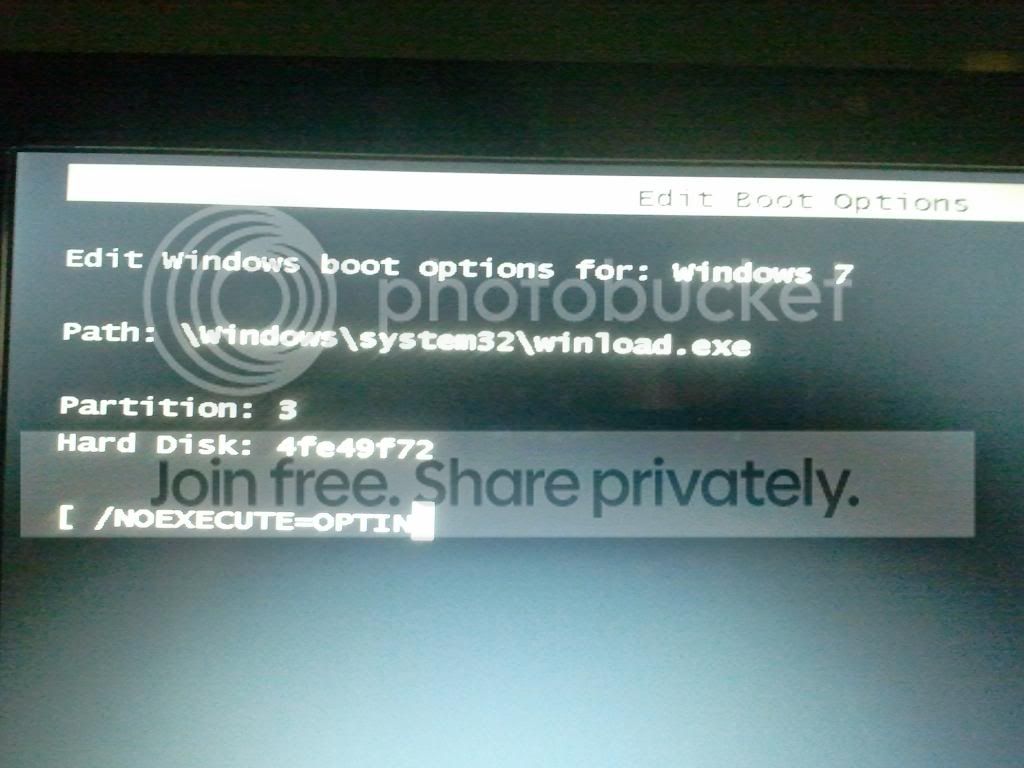
EDIT: iam not sure wich button i clicked but now i got this menu,

2013-02-05230229_zpsfc4ba60d.jpg
 

My Computer My Computer

OS
Windows 7 Ultimate x64 Build 7601
CPU
Intel Celeron E3300 Duo Core
Motherboard
Asrock G31M-S
Memory
4GB DDR2
Graphics Card(s)
ATI Radeon HD 5570 1GB DDR5
Sound Card
Realtek HD (On board)
Monitor(s) Displays
IIyama 22'' Full HD
Screen Resolution
1920 x 1080
Hard Drives
3TB 5400RPM (3x Samsung 1TB)
Case
Siemens Fuji Case
Cooling
Stock
Keyboard
Thrust
Mouse
Logitech G300
Internet Speed
Fiberglass Download speed: 65.4MB/s Upload Speed: 68.1MB/s
Other Info
LOL why is DDR3 memory cheaper then DDR2 :/
Wipe the HD to overcome the error. I'd use Hiren’s BootCD 15.1 or Hiren's BootCD From USB Flash Drive (Pen Drive) » www.hiren.info which will boot itself to rescue files via XP, then wipe the HD using DBAN or Partition Wizard Disk Quick Wipe.

This will force the Win7 installer to boot itself to Clean Reinstall - Factory OEM Windows 7

Okay i did download Hiren’s BootCD 15.2 it was a rar file so i extracted it.
in that .rar are several files in it:
BurnCDCC (App)
BurnToCD (script)
changes (Text)
DefaultKeyboardPatch (rar)
HBCD (text)
HBCDCustomizer (App)
Hiren'sBootCD.15.2 (ISO)

i opened the ISO and it contain those files.
HBCS (File folder + files and submaps)
autorun (Setup Information)
changes (text)
HBCD (text)
HBCDMenu (script)

Do i need copy those files (from the iso) to my USB and after that extract all the files of WIN7, or?
 

My Computer My Computer

OS
Windows 7 Ultimate x64 Build 7601
CPU
Intel Celeron E3300 Duo Core
Motherboard
Asrock G31M-S
Memory
4GB DDR2
Graphics Card(s)
ATI Radeon HD 5570 1GB DDR5
Sound Card
Realtek HD (On board)
Monitor(s) Displays
IIyama 22'' Full HD
Screen Resolution
1920 x 1080
Hard Drives
3TB 5400RPM (3x Samsung 1TB)
Case
Siemens Fuji Case
Cooling
Stock
Keyboard
Thrust
Mouse
Logitech G300
Internet Speed
Fiberglass Download speed: 65.4MB/s Upload Speed: 68.1MB/s
Other Info
LOL why is DDR3 memory cheaper then DDR2 :/
Download and Run Universal USB Installer, choose Hiren's Boot Disk from drop down menu, browse to the Hiren's ISO, choose the USB flash stick drive, Create stick.

BTW after that i can copy all the files of windows 7 right? or did i missed something? because after the installer i put the USB on my notebook and still he doesn't bootup on a different menu ( he tried to startup but he cannot startup. )
 

My Computer My Computer

OS
Windows 7 Ultimate x64 Build 7601
CPU
Intel Celeron E3300 Duo Core
Motherboard
Asrock G31M-S
Memory
4GB DDR2
Graphics Card(s)
ATI Radeon HD 5570 1GB DDR5
Sound Card
Realtek HD (On board)
Monitor(s) Displays
IIyama 22'' Full HD
Screen Resolution
1920 x 1080
Hard Drives
3TB 5400RPM (3x Samsung 1TB)
Case
Siemens Fuji Case
Cooling
Stock
Keyboard
Thrust
Mouse
Logitech G300
Internet Speed
Fiberglass Download speed: 65.4MB/s Upload Speed: 68.1MB/s
Other Info
LOL why is DDR3 memory cheaper then DDR2 :/
The tool will copy the files for you. Just run it as instructed.

Afterwards the stick should boot when you tap the Toshiba F12 key at boot, select USB, Removable or HD's. Under one of those categories you should find the stick by name, highlight it and click to select it.
 
Back
Top