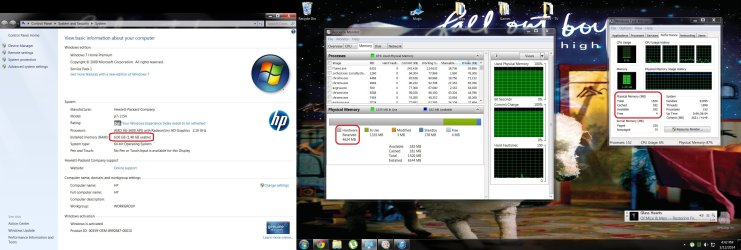
My computer has been pretty slow lately, so I when I went to the task manager, I see less than 2gb of RAM(as you can see in the attached screenshot) . I have no idea how to fix this. Any sugestions?
Attachments
Screen Shot.jpg
353.6 KB
· Views: 23
My Computer
Computer type
PC/Desktop
Computer Manufacturer/Model Number
HP
OS
Windows 7 Home Premium 64bit
CPU
AMD A6-3600 APU with Radeon(tm) HD Graphics 2.10GHz
I recently installed a second opperating system and I think that is when I began to notice the problem. But other than that, I haven't made any changes to my computer at all, it seems very random to me
My Computer
Computer type
PC/Desktop
Computer Manufacturer/Model Number
HP
OS
Windows 7 Home Premium 64bit
CPU
AMD A6-3600 APU with Radeon(tm) HD Graphics 2.10GHz
No, not at all. It is only a problem with windows, and over the past couple days i've tried contless times to reinstall the ram/restart the computer/checked through all the bois... Everything else on the computer runs perfectly normal except for the RAM issues
My Computer
Computer type
PC/Desktop
Computer Manufacturer/Model Number
HP
OS
Windows 7 Home Premium 64bit
CPU
AMD A6-3600 APU with Radeon(tm) HD Graphics 2.10GHz
If you go into Device Manager and right click on the Video and click Properties, somewhere in there it should list the memory ranges it is using. If it's excessive it should be noticeable in there would be my guess. I don't know what to do other than to try to isolate which device is hogging the ram. If it is one device, that is.
My Computer
Computer Manufacturer/Model Number
HP Media Center
OS
Windows 7 32 bit
CPU
AMD 5200+ dual core
Memory
2 GB
Graphics Card(s)
NVidia GeForce 6150SE 128 MB
Monitor(s) Displays
CRT
Screen Resolution
1280x1024
Hard Drives
500 GB Sata internal :
SIIG USB 3.0 docking stations w/WD Caviar Black 6 Gb/s drives

 . I have no idea how to fix this. Any sugestions?