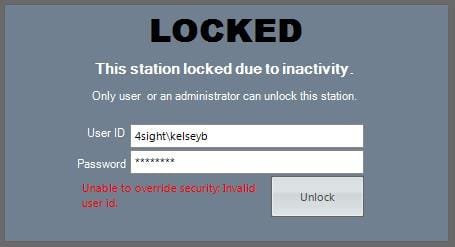
Has anyone seen this Locked Workstation Message?

Ricko

New member
Local time
5:01 AM
Messages
2
I got this message one time on one W-7 workstation. It would not accept the user's credentials. I've never seen it before or since rebooting the pc. Password protect is on, but sleep is set to never, it randomly appeared.
 

Attachments

  • Locked Workstation.jpg
    Locked Workstation.jpg
    10.9 KB · Views: 11

My Computer My Computer

Computer type
PC/Desktop
Computer Manufacturer/Model Number
HP
OS
Windows 7 x86
Did you try disabling the screen saver? Maybe it's an exotic one with a password gimmick.

If it isn't running one, try a malwarebytes antimalware scan.
 

My Computer My Computer

Computer Manufacturer/Model Number
HP Media Center
OS
Windows 7 32 bit
CPU
AMD 5200+ dual core
Memory
2 GB
Graphics Card(s)
NVidia GeForce 6150SE 128 MB
Monitor(s) Displays
CRT
Screen Resolution
1280x1024
Hard Drives
500 GB Sata internal :

SIIG USB 3.0 docking stations w/WD Caviar Black 6 Gb/s drives
Keyboard
PS/2
Mouse
PS/2 Wheel Mouse
Other Info
SIIG USB 3.0 PCIexpress card.
Screensaver is off and proxy info is generally removed from LAN settings to prevent internet (malware) access. My first thought was malware because I've never seen a locked workstation message in this form. I was hoping someone else had experienced it. Thanks for the reply, I'm off to start a scan.

Symantec and MalwareBytes scans found nothing. Does anyone have any other suggestions?
 
Last edited:

My Computer My Computer

Computer type
PC/Desktop
Computer Manufacturer/Model Number
HP
OS
Windows 7 x86
That is not a windows 7 standard lock screen, make sure you are not connected to the internet, try to boot in safe mode to see if the same result appears, use system restore point if available, looks like someone is trying to get the workstations password and user name. Hope these methods help you.

 

My Computer My Computer

Computer type
Laptop
Computer Manufacturer/Model Number
Dell inspiron 1525
OS
Windows 8 Pro with Media 64 bit
CPU
Pentium dual core
Memory
4gb
Internet Speed
10.5 mbs
Home Folder is a free utility I wrote to open the install folder of programs that own the active window. The idea being you could click on a window to make it active, then hit the hotkey to open the folder where the exe file lives. It may help you to find the location of the program that owns this window. It doesn't work on everything. But it's worth a try.

See the enclosed Readme for usage

edit: I can't find strike out code so I used italics to indicate the above is not correct. Unfortunately Softpedia has no internal link for this app. My site is gone. I am in the process of getting a mirror set up. In the mean time if you notify Softpedia of the dead link they may be able to provide a link from their servers.

Sorry for the inconvenience.

edit2: I have found a copy of Home Folder on a USB. I've attached it here so you may try it if you like.

View attachment HomeFolder.zip

View attachment NewFolder.zip
edit3: I believe I did a later implementation in the New Folder program. It should work on 64 bit systems also. Sorry, I've been away from my code for a time. I forget a lot.
 
Last edited:

My Computer My Computer

Computer Manufacturer/Model Number
HP Media Center
OS
Windows 7 32 bit
CPU
AMD 5200+ dual core
Memory
2 GB
Graphics Card(s)
NVidia GeForce 6150SE 128 MB
Monitor(s) Displays
CRT
Screen Resolution
1280x1024
Hard Drives
500 GB Sata internal :

SIIG USB 3.0 docking stations w/WD Caviar Black 6 Gb/s drives
Keyboard
PS/2
Mouse
PS/2 Wheel Mouse
Other Info
SIIG USB 3.0 PCIexpress card.
Back
Top