

MS Office announced on 25 Feb that Office 2013 Service Pack 1 was available & would be installed over the next month. I was alerted to this from a "News" item by Brink on this Forum, so I have been checking on whether mine had updated. Apparently it had not & it is not really easy to check whether the update has occurred so here is how you can check.
Firstly, open one of your Office programs & select "File", then select "Account" then refer to this screen shot.
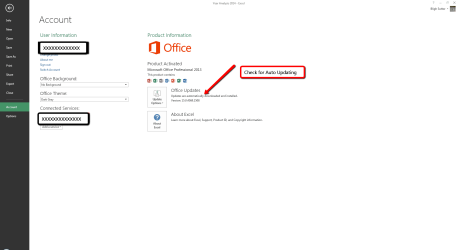
If you have been using Auto updating, Close this Office program & then open "Control Panel" select "Programs & Features" & scroll down to Microsoft Office 2013 & check the Installed date & the version. Write down this version number & then refer to this MS website. If the installed date is after the 25 Feb 2014 it may already have the SP1 installed, but use the website to check.
Description of Microsoft Office 2013 Service Pack 1 (SP1)
Read through it to see if you have SP1 installed & if not how to download & install it, if you want to.
If you decide to download the SP1 update make sure you select the right version for your Office installation, that is the 32 or 64 bit. Note that this applies the version of Office & not what version of Windows you are using.
To check whether you have the 32 bit or 64 bit version of Office installed, see the above screen shot & just below the Office Updates & in this example see About Excel. Click on that & it will open a window which will have the version listed up the top.
Scrolling right the bottom of the MS website lists all the Office 2013 versions this SP1 applies to.
Firstly, open one of your Office programs & select "File", then select "Account" then refer to this screen shot.
If you have been using Auto updating, Close this Office program & then open "Control Panel" select "Programs & Features" & scroll down to Microsoft Office 2013 & check the Installed date & the version. Write down this version number & then refer to this MS website. If the installed date is after the 25 Feb 2014 it may already have the SP1 installed, but use the website to check.
Description of Microsoft Office 2013 Service Pack 1 (SP1)
Read through it to see if you have SP1 installed & if not how to download & install it, if you want to.
If you decide to download the SP1 update make sure you select the right version for your Office installation, that is the 32 or 64 bit. Note that this applies the version of Office & not what version of Windows you are using.
To check whether you have the 32 bit or 64 bit version of Office installed, see the above screen shot & just below the Office Updates & in this example see About Excel. Click on that & it will open a window which will have the version listed up the top.
Scrolling right the bottom of the MS website lists all the Office 2013 versions this SP1 applies to.
Last edited:
My Computer
At a glance
Windows 7 Home Premium 64 bit sp1Intel i5 3570 3.4Ghz Ivy Bridge SKT 1155 quad...G-Skill Rip Jaws 16Gb (8x2) DDR3 -1600 PC3 12...Gigabyte NVIDIA GT610 1Gb DDR3 810/1200 PCI-E...
- Computer type
- PC/Desktop
- Computer Manufacturer/Model Number
- Self built using existing case
- OS
- Windows 7 Home Premium 64 bit sp1
- CPU
- Intel i5 3570 3.4Ghz Ivy Bridge SKT 1155 quad core
- Motherboard
- Gigabyte Z77-HD3 SKT 1155 2xSata 3, 4x USB 3.0
- Memory
- G-Skill Rip Jaws 16Gb (8x2) DDR3 -1600 PC3 12800 CL 10 red
- Graphics Card(s)
- Gigabyte NVIDIA GT610 1Gb DDR3 810/1200 PCI-E 2.0 Silent
- Sound Card
- NVIDIA High Definition & Realtech High Definition Audio
- Monitor(s) Displays
- 2 x Philips 226V4L 16:9 aspect ratio
- Screen Resolution
- 1920 x 1080 HD
- Hard Drives
- Samsung 840 Pro 256gb SSD, SATA 3.
Hitachi Touro Portable 1tb, USB 3.0 HDD used for image b/ups.
- PSU
- Corsair VS450
- Case
- Codeng
- Cooling
- PSU fan & CPU fan
- Keyboard
- Logitech
- Mouse
- Logitech Wireless trackball M570
- Internet Speed
- Wireless 3G. 3mg down & 550kb up.
- Antivirus
- Bitdefender Internet Security 2020
- Browser
- Opera (Current Version) & Firefox
- Other Info
- MS Office 2013 Pro. Davis weather station software. MGE Nova 600 avr UPS.


