Have network access but Win 7 says no network connection available

mvanneman

New member
Local time
8:10 PM
Messages
8
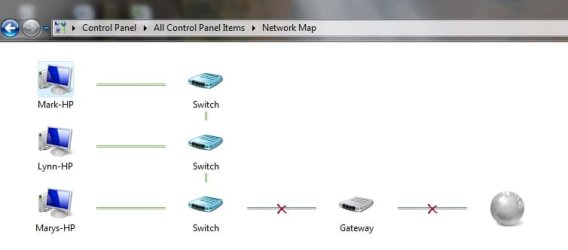
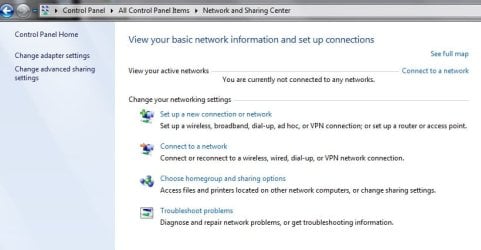
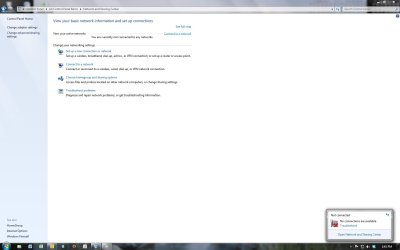
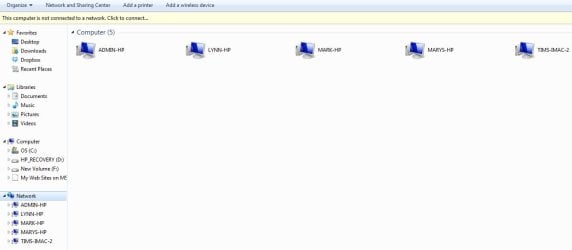
Windows 7 says no network connection is available but I can access the public folders of all computers on the network and I have internet. Below are 4 screenshots of what I see. Could someone please tell me why I can access the network but Windows 7 says I can't? I know that this problem usually presents itself in reverse which is why I am so confused. thanks in advance
 

Attachments
  • connect to network.jpg
    connect to network.jpg
    31.2 KB · Views: 0
  • network Map.jpg
    network Map.jpg
    15 KB · Views: 0
  • network and sharing center.jpg
    network and sharing center.jpg
    37.9 KB · Views: 0
  • network and sharing center after attempting to connect.jpg
    network and sharing center after attempting to connect.jpg
    66.1 KB · Views: 1

My Computer My Computer

At a glance

Windows 7 pro 64-bitI5-357067 GB DDR3
Computer type
PC/Desktop
Computer Manufacturer/Model Number
HP
OS
Windows 7 pro 64-bit
CPU
I5-3570
Memory
67 GB DDR3
Antivirus
Norton
Browser
Mozilla
Usually just reinstalling the driver or resetting the router will fix this issue but it might be something else.

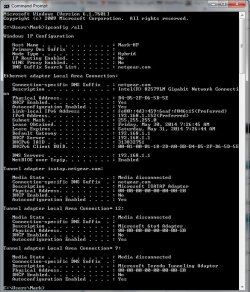
Can you post a screen shot of the ipconfig/all from this machine? Just paste into elevated command prompt.

Code:
ipconfig/all
 

My Computer My Computer

At a glance

Windows 7 Ult, Windows 8.1 Pro,Q9650-4.275GHz, E8600 4.5GHz, E6750-3.8GHzG.Skill PC2 9600 1200Mhz 5 5 5 15 2TGTX480
Computer type
PC/Desktop
Computer Manufacturer/Model Number
Home built
OS
Windows 7 Ult, Windows 8.1 Pro,
CPU
Q9650-4.275GHz, E8600 4.5GHz, E6750-3.8GHz
Motherboard
Evga 780i FTW
Memory
G.Skill PC2 9600 1200Mhz 5 5 5 15 2T
Graphics Card(s)
GTX480
Sound Card
Asus Xonar D2
Monitor(s) Displays
HannsG
Screen Resolution
1680X1050
Hard Drives
GSkill Phoenix Pro 120GB SSD
PSU
ThermalTake Toughpower 1000Watt modular
Case
ThermalTake XaserV
Cooling
Xigmatek S1283
Keyboard
Logitech G15
Mouse
Logitech G9
Internet Speed
T1
Here u go
 

My Computer My Computer

At a glance

Windows 7 pro 64-bitI5-357067 GB DDR3
Computer type
PC/Desktop
Computer Manufacturer/Model Number
HP
OS
Windows 7 pro 64-bit
CPU
I5-3570
Memory
67 GB DDR3
Antivirus
Norton
Browser
Mozilla
Sorry, here it is
 

Attachments

  • ipconfig.jpg
    ipconfig.jpg
    88.7 KB · Views: 0

My Computer My Computer

At a glance

Windows 7 pro 64-bitI5-357067 GB DDR3
Computer type
PC/Desktop
Computer Manufacturer/Model Number
HP
OS
Windows 7 pro 64-bit
CPU
I5-3570
Memory
67 GB DDR3
Antivirus
Norton
Browser
Mozilla
Everything looks good with the ipconfig.

Have you tried reinstalling the driver for the Intel 82579LM adaptor yet? Just uninstall then use the "scan for changes" button to reinstall the driver. If this doesn't work we can try resetting the network stack in case it's messed up.
 

My Computer My Computer

At a glance

Windows 7 Ult, Windows 8.1 Pro,Q9650-4.275GHz, E8600 4.5GHz, E6750-3.8GHzG.Skill PC2 9600 1200Mhz 5 5 5 15 2TGTX480
Computer type
PC/Desktop
Computer Manufacturer/Model Number
Home built
OS
Windows 7 Ult, Windows 8.1 Pro,
CPU
Q9650-4.275GHz, E8600 4.5GHz, E6750-3.8GHz
Motherboard
Evga 780i FTW
Memory
G.Skill PC2 9600 1200Mhz 5 5 5 15 2T
Graphics Card(s)
GTX480
Sound Card
Asus Xonar D2
Monitor(s) Displays
HannsG
Screen Resolution
1680X1050
Hard Drives
GSkill Phoenix Pro 120GB SSD
PSU
ThermalTake Toughpower 1000Watt modular
Case
ThermalTake XaserV
Cooling
Xigmatek S1283
Keyboard
Logitech G15
Mouse
Logitech G9
Internet Speed
T1
Yes, one of the first things I did was uninstall the network adapter and then let the system reinstall on reboot and it didn't change anything.
 

My Computer My Computer

At a glance

Windows 7 pro 64-bitI5-357067 GB DDR3
Computer type
PC/Desktop
Computer Manufacturer/Model Number
HP
OS
Windows 7 pro 64-bit
CPU
I5-3570
Memory
67 GB DDR3
Antivirus
Norton
Browser
Mozilla
Back
Top