Have unallocated space on F: Need to convert to one NTFS drive help.

GARoss

New member
Power User
VIP
Local time
4:08 PM
Messages
359
Location
Michigan - USA
SOLVED-Have unallocated space on F: Need to convert to one NTFS drive.

I have 3 hard Drives, ( C: ) Win 7 installed, ( E: ) NTFS extra storage & ( F: ) NTFS extra storage & two unallocated spaces.

Currently F: has a total capacity of 280Gb of which 200Gb is formatted NTFS & the remaining is unallocated. Currently no data is on this hard drive. I'd like to reallocate & make F: 100% NTFS.

Is there an simple way to do this?
 
Last edited:

My Computer My Computer

At a glance

Windows 7 64-bitIntel Core i5-2500K 3300 Mhz16Gb Patriot PC3-12800 1600 MhzEVGA GeForce GTX 560 Ti (Fermi)
Computer type
PC/Desktop
Computer Manufacturer/Model Number
Custom built 2011
OS
Windows 7 64-bit
CPU
Intel Core i5-2500K 3300 Mhz
Motherboard
Gigabyte P67A-UD3-B3
Memory
16Gb Patriot PC3-12800 1600 Mhz
Graphics Card(s)
EVGA GeForce GTX 560 Ti (Fermi)
Sound Card
On Motherboard
Monitor(s) Displays
Dell U2412M & NEC EA232WMi
Screen Resolution
DELL 1920x1200 - NEC 1920x1080
Hard Drives
Crucial 128 Gb SSD
Hitachi Deskstar 2Tb 7200 RPM 32MB Cache
Seagate Barracuda 500Gb 7200 RPM
Hitachi GST Deskstar 1.5TB 7200 RPM 64MB Cache
PSU
Seasonic M1211-620 Bronze
Case
Antec Solo
Cooling
Tuniq Tower 120 Extreme Rev 1
Keyboard
Apple
Mouse
Microsoft
Internet Speed
5mbs
Other Info
Sunbeam PL-RS-3 Rheosmart 3 Fan Controller 3.5" Bay 3 Channel 30W Fan Controller Panel
Hello GARoss,take a look this Partition Manager. It should helps you to manage your partitions.
Partition Manager
 

My Computer My Computer

At a glance

Windows 10 Pro x64Intel Core i5 4440 @Stock4 x 4GB HyperX Fury DDR3Gigabyte GTX 1050Ti O4G
Computer type
PC/Desktop
Computer Manufacturer/Model Number
Custom Build
OS
Windows 10 Pro x64
CPU
Intel Core i5 4440 @Stock
Motherboard
Gigabyte Z97 D3H
Memory
4 x 4GB HyperX Fury DDR3
Graphics Card(s)
Gigabyte GTX 1050Ti O4G
Sound Card
Integrated
Monitor(s) Displays
Dell P2417H
Screen Resolution
1920 x 1080
Hard Drives
Samsung EVO 850 120GB / Toshiba DT01ACA050 1TB 7200prm 32MB
PSU
Riotoro Onyx 750W
Case
NZXT H500 Black-Red
Cooling
Stock CPU + NZXT 120mm + 2x120mm red fans
Keyboard
Modecom Volcano Lanparty
Mouse
Asus ROG Gladius / DeepCool E-Pad Plus
Internet Speed
DOCSIS 50/3 Mbit
Browser
Google Chrome
Other Info
Asus K55VJ(i5 3210M, GT635M / 2GB, 8GB DDR3, 500GB HDD)
Could you also use any GNU/Linux live distro, and run G-Parted? Just saying!
 

My Computer My Computer

At a glance

Windows 7 Home Premium 64bitCore 2 Duo [email protected]OCZ PC-6400 2GBx2GeForce 7600
Computer Manufacturer/Model Number
Home Built
OS
Windows 7 Home Premium 64bit
CPU
Core 2 Duo [email protected]
Memory
OCZ PC-6400 2GBx2
Graphics Card(s)
GeForce 7600
Monitor(s) Displays
Acer AL2423
Screen Resolution
1900x1200
Hard Drives
Western Digital 1TB/Seagate 500GB
PSU
Shuttle 300 Watt
Case
SG31G2
Mouse
Logitech G5
Thanks everyone.
I've made some progress but have hit a wall. On F: , 1st partition & 3rd partitions are unallocated with NTFS in the middle. I was able to "extend" the 3rd partition because it was on the right (following METHOD TWO of this tutorial, http://www.sevenforums.com/tutorials/2670-partition-volume-extend.html
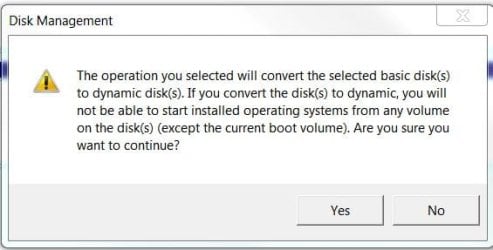
but this doesn't work for the larger 1st partition. Following METHOD ONE using Disk Management I get a warning that I'm not sure about (See attachment) :zip:. Basic disk to dynamic disk. Is dynamic disk a bad thing? I just want to use this as 100% NTFS.
 

Attachments

  • Capture.JPG
    Capture.JPG
    27 KB · Views: 11

My Computer My Computer

At a glance

Windows 7 64-bitIntel Core i5-2500K 3300 Mhz16Gb Patriot PC3-12800 1600 MhzEVGA GeForce GTX 560 Ti (Fermi)
Computer type
PC/Desktop
Computer Manufacturer/Model Number
Custom built 2011
OS
Windows 7 64-bit
CPU
Intel Core i5-2500K 3300 Mhz
Motherboard
Gigabyte P67A-UD3-B3
Memory
16Gb Patriot PC3-12800 1600 Mhz
Graphics Card(s)
EVGA GeForce GTX 560 Ti (Fermi)
Sound Card
On Motherboard
Monitor(s) Displays
Dell U2412M & NEC EA232WMi
Screen Resolution
DELL 1920x1200 - NEC 1920x1080
Hard Drives
Crucial 128 Gb SSD
Hitachi Deskstar 2Tb 7200 RPM 32MB Cache
Seagate Barracuda 500Gb 7200 RPM
Hitachi GST Deskstar 1.5TB 7200 RPM 64MB Cache
PSU
Seasonic M1211-620 Bronze
Case
Antec Solo
Cooling
Tuniq Tower 120 Extreme Rev 1
Keyboard
Apple
Mouse
Microsoft
Internet Speed
5mbs
Other Info
Sunbeam PL-RS-3 Rheosmart 3 Fan Controller 3.5" Bay 3 Channel 30W Fan Controller Panel
Could you also use any GNU/Linux live distro, and run G-Parted? Just saying!

I have deleted Ubuntu from this computer (this was one of the unallocated spaces on F: ) but still have the Ubuntu install disc. Can this be used in LiveCD mode? GParted isn't installed on the LiveCD or can it be temporarily installed? Is this your meaning?
Thanks
 

My Computer My Computer

At a glance

Windows 7 64-bitIntel Core i5-2500K 3300 Mhz16Gb Patriot PC3-12800 1600 MhzEVGA GeForce GTX 560 Ti (Fermi)
Computer type
PC/Desktop
Computer Manufacturer/Model Number
Custom built 2011
OS
Windows 7 64-bit
CPU
Intel Core i5-2500K 3300 Mhz
Motherboard
Gigabyte P67A-UD3-B3
Memory
16Gb Patriot PC3-12800 1600 Mhz
Graphics Card(s)
EVGA GeForce GTX 560 Ti (Fermi)
Sound Card
On Motherboard
Monitor(s) Displays
Dell U2412M & NEC EA232WMi
Screen Resolution
DELL 1920x1200 - NEC 1920x1080
Hard Drives
Crucial 128 Gb SSD
Hitachi Deskstar 2Tb 7200 RPM 32MB Cache
Seagate Barracuda 500Gb 7200 RPM
Hitachi GST Deskstar 1.5TB 7200 RPM 64MB Cache
PSU
Seasonic M1211-620 Bronze
Case
Antec Solo
Cooling
Tuniq Tower 120 Extreme Rev 1
Keyboard
Apple
Mouse
Microsoft
Internet Speed
5mbs
Other Info
Sunbeam PL-RS-3 Rheosmart 3 Fan Controller 3.5" Bay 3 Channel 30W Fan Controller Panel

My Computer My Computer

At a glance

Vista, Windows7, Mint Mate, Zorin, Windows 8from 1.6GHz Duo to i7
Computer Manufacturer/Model Number
HP, Dell, Gateway, Toshiba - 4 laptops and 2 desktops
OS
Vista, Windows7, Mint Mate, Zorin, Windows 8
CPU
from 1.6GHz Duo to i7
Monitor(s) Displays
2x HP w2207
Hard Drives
5x HDD, 7x SSD, 12x Externals
Keyboard
with trackball - no mices
Mouse
Trackball mice
Internet Speed
DSL 6000
I wouldn't convert to a dynamic disk.
Please post a screen shot of your disk management screen.
 

My Computer My Computer

At a glance

Windows 10 Pro x64, Windows 8.1 Pro x64, Wind...INTEL i9-7920X LGA 206664 GB (4 X 16 GB) G-Skill V Series DDR4 3200 ...EVGA GTX 1060 SC 3 GB
Computer type
PC/Desktop
Computer Manufacturer/Model Number
Custom Built
OS
Windows 10 Pro x64, Windows 8.1 Pro x64, Windows 7 Ultimate x64 SP1,
CPU
INTEL i9-7920X LGA 2066
Motherboard
Gigabyte X299-WU8 F3
Memory
64 GB (4 X 16 GB) G-Skill V Series DDR4 3200 Quad Channel
Graphics Card(s)
EVGA GTX 1060 SC 3 GB
Sound Card
Realtek Onboard ALC1220
Monitor(s) Displays
2 x Samsung S27E310
Screen Resolution
1920x1080
Hard Drives
Samsung 2 x 970 EVO Plus 500 GB NVMe
1 x 6TB WD 6003FZBX SATA
1 x 6TB WD 60EFRX SATA
12 x 3TB WD 30EFRX SATA
PSU
Seasonic X-1050
Case
Thermaltake Armor+
Cooling
Corsair H80i V2 Liquid AOI Cooler
Keyboard
Logitech G510s
Mouse
Logitech MX Master 2S
Internet Speed
200 Mb/s
Antivirus
ESET NOD32 13.1
Browser
EDGE (Dev, Canary, Beta), Chrome
Other Info
ASUS RT-AC68U router
Malwarebytes 4.0.4
Waiting for the screenshot to help you further.

You'll want to use free Partition Wizard bootable CD which has now been linked twice in the thread. Use Win7 tools with Win7, not Linux which you just got rid of.

You need to do a partition-specific wipe of the old Ubuntu partition by rightclicking it from PW CD, since GRUB can corrupt Win7 until it is wiped from the HD.
 
Dynamic disk is a VERY bad thing. That means you already have 4 primary partitions on the drive. You have to convert one or more of the existing partitions to Logical partitions which is OK for data partitions ( use this program: BEST FREE Partition Manager Software for Windows supports all 32-bit & 64 bit Windows No-server OS. ) Then you can define more extended/logical partitions on the drive.

Thanks! That did it. And, yes, I've used this HD several times for dual boot which apparently caused the issue.

Thanks to all who offered suggestions.
smile.gif
 

My Computer My Computer

At a glance

Windows 7 64-bitIntel Core i5-2500K 3300 Mhz16Gb Patriot PC3-12800 1600 MhzEVGA GeForce GTX 560 Ti (Fermi)
Computer type
PC/Desktop
Computer Manufacturer/Model Number
Custom built 2011
OS
Windows 7 64-bit
CPU
Intel Core i5-2500K 3300 Mhz
Motherboard
Gigabyte P67A-UD3-B3
Memory
16Gb Patriot PC3-12800 1600 Mhz
Graphics Card(s)
EVGA GeForce GTX 560 Ti (Fermi)
Sound Card
On Motherboard
Monitor(s) Displays
Dell U2412M & NEC EA232WMi
Screen Resolution
DELL 1920x1200 - NEC 1920x1080
Hard Drives
Crucial 128 Gb SSD
Hitachi Deskstar 2Tb 7200 RPM 32MB Cache
Seagate Barracuda 500Gb 7200 RPM
Hitachi GST Deskstar 1.5TB 7200 RPM 64MB Cache
PSU
Seasonic M1211-620 Bronze
Case
Antec Solo
Cooling
Tuniq Tower 120 Extreme Rev 1
Keyboard
Apple
Mouse
Microsoft
Internet Speed
5mbs
Other Info
Sunbeam PL-RS-3 Rheosmart 3 Fan Controller 3.5" Bay 3 Channel 30W Fan Controller Panel
You are welcome.
 

My Computer My Computer

At a glance

Vista, Windows7, Mint Mate, Zorin, Windows 8from 1.6GHz Duo to i7
Computer Manufacturer/Model Number
HP, Dell, Gateway, Toshiba - 4 laptops and 2 desktops
OS
Vista, Windows7, Mint Mate, Zorin, Windows 8
CPU
from 1.6GHz Duo to i7
Monitor(s) Displays
2x HP w2207
Hard Drives
5x HDD, 7x SSD, 12x Externals
Keyboard
with trackball - no mices
Mouse
Trackball mice
Internet Speed
DSL 6000
Waiting for the screenshot to help you further.

You'll want to use free Partition Wizard bootable CD which has now been linked twice in the thread. Use Win7 tools with Win7, not Linux which you just got rid of.

You need to do a partition-specific wipe of the old Ubuntu partition by rightclicking it from PW CD, since GRUB can corrupt Win7 until it is wiped from the HD.

gregrocker,

Sorry, it wasn't my intention to offend you. I did try the tutorial you suggested & that did help. I wasn't ignoring your other suggestion but held out for, in my mind, a simpler solution as I'm not sharp with computers. Bootable CD made me a little nervous, thinking one wrong click & I'd mess-up my whole system. Whs suggested MiniTool Partition Wizard which worked from the desktop & fixed things.
 

My Computer My Computer

At a glance

Windows 7 64-bitIntel Core i5-2500K 3300 Mhz16Gb Patriot PC3-12800 1600 MhzEVGA GeForce GTX 560 Ti (Fermi)
Computer type
PC/Desktop
Computer Manufacturer/Model Number
Custom built 2011
OS
Windows 7 64-bit
CPU
Intel Core i5-2500K 3300 Mhz
Motherboard
Gigabyte P67A-UD3-B3
Memory
16Gb Patriot PC3-12800 1600 Mhz
Graphics Card(s)
EVGA GeForce GTX 560 Ti (Fermi)
Sound Card
On Motherboard
Monitor(s) Displays
Dell U2412M & NEC EA232WMi
Screen Resolution
DELL 1920x1200 - NEC 1920x1080
Hard Drives
Crucial 128 Gb SSD
Hitachi Deskstar 2Tb 7200 RPM 32MB Cache
Seagate Barracuda 500Gb 7200 RPM
Hitachi GST Deskstar 1.5TB 7200 RPM 64MB Cache
PSU
Seasonic M1211-620 Bronze
Case
Antec Solo
Cooling
Tuniq Tower 120 Extreme Rev 1
Keyboard
Apple
Mouse
Microsoft
Internet Speed
5mbs
Other Info
Sunbeam PL-RS-3 Rheosmart 3 Fan Controller 3.5" Bay 3 Channel 30W Fan Controller Panel
Not offended at all.

We need to see the Disk Management screenshot because often there are unknowns revealed with unintended consequences if not taken into account.

The PW bootable CD is the same program but more stable and offers rescue capability if needed in the middle of critical partitioning operations.

If you had GRUB you also need to wipe your former Linux partition of all code which is done from the CD version.

It's also an important Win7 tool to have around, after the Repair CD.

http://www.sevenforums.com/tutorials/93322-partition-wizard-use-bootable-cd.html
 
OK. I'll make one & see what's what & report back later.

As I have used MiniTool Partition Wizard to reclaim the unallocated space, the hard drive shows a bar graph that is a solid 280Gb NTFS. I think you wanted the screen grap before using the mini tool.

But, prior to 1st using DiskPart the graph showed 3 sections with the 1st being 69Gb of unallocated space, the 2nd as 198Gb of NTFS & 3rd as 11Gb of unallocated space. Using DiskPart reclaimed the 3rd partition but couldn't do anything with the 69Gb, 1st partition. This was a METHOD TWO contition according to the tutorial but still wouldn't work, probably because of the linux partitions (?). Just a guess. Disk Management said a Dynamic Disk would be created using that funtion & that appearently isn't good.

MiniTool Partition Wizard seems to have fixed at least part of the issue but I will make the CD as you suggested to see what else is going on.:)

Thanks again.
 

My Computer My Computer

At a glance

Windows 7 64-bitIntel Core i5-2500K 3300 Mhz16Gb Patriot PC3-12800 1600 MhzEVGA GeForce GTX 560 Ti (Fermi)
Computer type
PC/Desktop
Computer Manufacturer/Model Number
Custom built 2011
OS
Windows 7 64-bit
CPU
Intel Core i5-2500K 3300 Mhz
Motherboard
Gigabyte P67A-UD3-B3
Memory
16Gb Patriot PC3-12800 1600 Mhz
Graphics Card(s)
EVGA GeForce GTX 560 Ti (Fermi)
Sound Card
On Motherboard
Monitor(s) Displays
Dell U2412M & NEC EA232WMi
Screen Resolution
DELL 1920x1200 - NEC 1920x1080
Hard Drives
Crucial 128 Gb SSD
Hitachi Deskstar 2Tb 7200 RPM 32MB Cache
Seagate Barracuda 500Gb 7200 RPM
Hitachi GST Deskstar 1.5TB 7200 RPM 64MB Cache
PSU
Seasonic M1211-620 Bronze
Case
Antec Solo
Cooling
Tuniq Tower 120 Extreme Rev 1
Keyboard
Apple
Mouse
Microsoft
Internet Speed
5mbs
Other Info
Sunbeam PL-RS-3 Rheosmart 3 Fan Controller 3.5" Bay 3 Channel 30W Fan Controller Panel
If there's no data on the drive, I'm not sure what the confusion was about. You could have just gone into Disk Management, deleted the existing partition, and then recreated a partition the entire size of the drive. By not having any data on the drive, you made the process extremely simple.
 

My Computer My Computer

At a glance

Windows 7 Ultimate x64 SP1Intel Core i7-260012 GB Patriot Extreme DDR3-1333Nvidia GTX 470
OS
Windows 7 Ultimate x64 SP1
CPU
Intel Core i7-2600
Motherboard
Gigabyte GA-P67A-UD3P-B3
Memory
12 GB Patriot Extreme DDR3-1333
Graphics Card(s)
Nvidia GTX 470
Monitor(s) Displays
Dell UltraSharp 2209WA
Hard Drives
OCZ Agility3 240 GB, WD5001AALS, WD7501AALS
PSU
OCZ ModStream 700W
Case
CoolerMaster HAF 912 Advanced
Cooling
CoolerMaster Hyper 212 Plus
If the HD had GRUB on it then either that partiton or the entire HD needs to be wiped of all code, as GRUB can corrupt even if deleted or formatted.

The screenshot is needed to see if there are any Active or System flags incorrectly set on the non-OS HD as frequently happens. If so, making changes may make Win7 unbootable.
 
Grub will hardly corrupt anything. If the grub-code in mbr is left intact, you just lose the ability to boot into your linux.
 

My Computer My Computer

At a glance

Windows
OS
Windows
This is a large HDD & Ubuntu didn't need a lot of space. But, I tried several versions of Linux which probably caused multi partitions & put NTFS sandwiched between them. Long after installing Ubuntu on F: , Windows 7 was a clean installed over XP Home on C: (74Gb). With F: now reading a full 280Gb @ NTFS could there still be issues? Everything boots perfectly into Windows 7 with no signs of GRUB @ startup.

gregrocker - what screenshots are you're asking for? Disk Management, DiskPart or with the Partition Wizard bootable CD? Currently Disk Management & DiskPart are indicating the HDD as 100% NTFS. -Thanks-
 

My Computer My Computer

At a glance

Windows 7 64-bitIntel Core i5-2500K 3300 Mhz16Gb Patriot PC3-12800 1600 MhzEVGA GeForce GTX 560 Ti (Fermi)
Computer type
PC/Desktop
Computer Manufacturer/Model Number
Custom built 2011
OS
Windows 7 64-bit
CPU
Intel Core i5-2500K 3300 Mhz
Motherboard
Gigabyte P67A-UD3-B3
Memory
16Gb Patriot PC3-12800 1600 Mhz
Graphics Card(s)
EVGA GeForce GTX 560 Ti (Fermi)
Sound Card
On Motherboard
Monitor(s) Displays
Dell U2412M & NEC EA232WMi
Screen Resolution
DELL 1920x1200 - NEC 1920x1080
Hard Drives
Crucial 128 Gb SSD
Hitachi Deskstar 2Tb 7200 RPM 32MB Cache
Seagate Barracuda 500Gb 7200 RPM
Hitachi GST Deskstar 1.5TB 7200 RPM 64MB Cache
PSU
Seasonic M1211-620 Bronze
Case
Antec Solo
Cooling
Tuniq Tower 120 Extreme Rev 1
Keyboard
Apple
Mouse
Microsoft
Internet Speed
5mbs
Other Info
Sunbeam PL-RS-3 Rheosmart 3 Fan Controller 3.5" Bay 3 Channel 30W Fan Controller Panel
Grub will hardly corrupt anything. If the grub-code in mbr is left intact, you just lose the ability to boot into your linux.

All Linux code must be deleted.

Type in command line
DISKPART
LIST DISK
SELECT DISK # (win HD)
CLEAN ALL
CREATE PARTITION PRIMARY
SELECT PARTITION 1
ACTIVE
FORMAT fs=NTFS
ASSIGN
EXIT
EXIT


How to Remove Linux and Install Windows XP
 

My Computer My Computer

At a glance

ME/XP/Vista/Win7
OS
ME/XP/Vista/Win7
You don't need to wipe a harddrive after you have had a Linux on it. You just need to overwrite the parts you want to use for your new Windows-installation.

Linux is not some ghost that will reactivate itself and come to life from some unreferenced sectors.
 

My Computer My Computer

At a glance

Windows
OS
Windows
Back
Top