Solved Having issues with a microsd card

snipy67

New member
Local time
12:10 PM
Messages
4
My micro sd card stopped working tried everything I could think of. it was working fine then it stopped working. Think it might be corrupted. when you plop it in it won't mount and will ask you to format and when I format windows says it can't


ran a block check and it seems fine I think it can't write because I opened the partion table and won't let me delete it.

The little switch is in the unlock position of the SD card adapter. I have tried both with the SD card adapter and a micro SD to USB adapter as well as in my tablet (Windows 8.1) :rolleyes:

Don't have that much experience with sd cards any suggestions
 

My Computer

Computer type
Laptop
Computer Manufacturer/Model Number
HP
OS
Windows 7
CPU
AMD Turion II Dual-Core Mobile M520
Memory
4GB
Graphics Card(s)
AMD Mobility Radeon HD 4200 Series
Browser
Chrome
What is that block check and how did you do it?

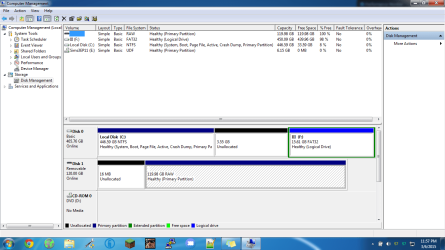
Can you post a screenshot of Windows Disk management to see how the microSD card looks in it?
 

My Computer

OS
Windows 7 Home Premium 32 bit
The Program I used was mini tools partition wizard also here is the screenshot also It's worth noting that some times the drive does not mount a letter
 

Attachments

  • disk_screen_1.png
    disk_screen_1.png
    50.9 KB · Views: 7

My Computer

Computer type
Laptop
Computer Manufacturer/Model Number
HP
OS
Windows 7
CPU
AMD Turion II Dual-Core Mobile M520
Memory
4GB
Graphics Card(s)
AMD Mobility Radeon HD 4200 Series
Browser
Chrome
What brand MicroSD card is it?

Did you partition it anytime?

If you want to format it try HP USB Disk Storage Format Tool v2.2.3. ( You will lose all data on it.)HP USB Disk Storage Format Tool Download - Softpedia
Plug-in your MicroSD card ( Please remove all other USB HDD drives/pen drives/ memory cards so that you do not accidentally format any other device), right click on HPUSBDisk.exe and run as administrator. Check the correct card is shown and format it.
 

My Computer

OS
Windows 7 Home Premium 32 bit
I did try deleting the partition after the card got corrupted to see if I could fix it that way and it could not delete the partition. The Card is not branded
 

My Computer

Computer type
Laptop
Computer Manufacturer/Model Number
HP
OS
Windows 7
CPU
AMD Turion II Dual-Core Mobile M520
Memory
4GB
Graphics Card(s)
AMD Mobility Radeon HD 4200 Series
Browser
Chrome
Chances are that your MicroSD card is a fake.

Why do you buy any unbranded card? For how long have you been using it? Did you buy it because for 128GB it came so cheap?

Try to return it to the vendor and get whatever money you put into it.

Anyway, try to format it with the HP tool mentioned earlier and if it fails, try to do a low level format with HDD LLF Low Level Format Tool - Windows executable that doesn't require installation . HDDGURU: HDD LLF Low Level Format Tool
After a low level format you have to do a regular format.

However I am skeptical that any of this will work if it is indeed a fake card.
 

My Computer

OS
Windows 7 Home Premium 32 bit
contacted vendor, It was cheap and had good feed back. Should have seen this coming. It work for a while
 

My Computer

Computer type
Laptop
Computer Manufacturer/Model Number
HP
OS
Windows 7
CPU
AMD Turion II Dual-Core Mobile M520
Memory
4GB
Graphics Card(s)
AMD Mobility Radeon HD 4200 Series
Browser
Chrome
Back
Top