
Since, yesterday I'm not sure what exactly transpired but some how FF is not shown as default browser for certain of my applications. I had set FF as default browser from Control Panel -> Set Default programs
But when I try to set the default browser through my FF, I've been asked for login, just like this:
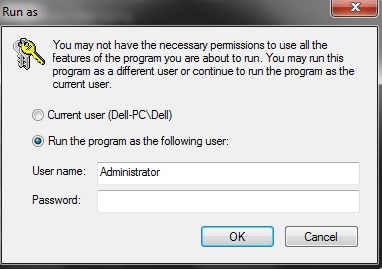
The problem is I have never set a password for the Admin account, so when I just press enter it doesn't accept it. I have just 1 user account & its not password protected, other than me, no one uses my lappy so I never needed to set one either.
Since, one of my application is a work related one, its opening in IE by default at the moment. That particular application doesn't have any setting to change default browser & the support for the "application" have asked me to set FF as default browser, that should solve the problem but it ain't solving it up, as FF is asking me to logon to the Admin account :shock:
I would really appreciate, if I could get rid of this problem. I hate IE.
But when I try to set the default browser through my FF, I've been asked for login, just like this:
The problem is I have never set a password for the Admin account, so when I just press enter it doesn't accept it. I have just 1 user account & its not password protected, other than me, no one uses my lappy so I never needed to set one either.
Since, one of my application is a work related one, its opening in IE by default at the moment. That particular application doesn't have any setting to change default browser & the support for the "application" have asked me to set FF as default browser, that should solve the problem but it ain't solving it up, as FF is asking me to logon to the Admin account :shock:
I would really appreciate, if I could get rid of this problem. I hate IE.
My Computer
- Computer type
- Laptop
- Computer Manufacturer/Model Number
- DELL
- OS
- windows 7 ultimate x32
- CPU
- T6670,
- Motherboard
- INTEL CORE 2 DUO, 0TFXK9
- Memory
- 8GB DDR3
- Screen Resolution
- 1366*768
- Hard Drives
- 512GB SSD
- Mouse
- Logitech M165 w/sidebuttons
- Internet Speed
- 30-150 mb/s
- Antivirus
- Bitdefender
- Browser
- FF, Opera GX


