Having problems with hdmi audio

Finleif

New member
Local time
9:17 PM
Messages
5
I am having a bit of problems when connecting my computer to the tv with hdmi.

I have a Acer Aspire TimelineX 5820 TG notebook laptop with hdmi, and its connected to a piooner vsx-lx53 receiver which is connected to a sony bravia 52 kdl-52nx800 led tv.

The problem is that i get picture but no sound. Cant find any hdmi out in playback devices. My laptop is almost brand new (bought in june 2010). It has a ati mobility radeon hd 5650 graphic card. Sometimes i can use the sound with hdmi but that is very rare. Have tried installing newest video driver for my graphic card and audio drivers from realtec with no luck.

Have tested hdmi with other computers to my home theater system with both audio and video. My home theater system is set up by professional from the shop that i bought i in, and they say the problem is within the computer.

I hope somebody can help me with my problem.
 

My Computer

Computer Manufacturer/Model Number
Acer Aspire TimelineX 5820TG
OS
Windows 7 home premium
CPU
Intel Core i5 460M / 2.53 GHz
Motherboard
Mobile Intel HM55 Express
Memory
4gb DDR3 SDRAM - 1066 MHz
Graphics Card(s)
ATI Mobility Radeon HD 5650
Hard Drives
640 GB - 5400 opm
Go to the Sound Panel/Playback and RIGHT click in an emptly area in the Panel and then LEFT click Show Disabled Devices and Show Disconnected Devices and see if the HDMI audio shows up.

I saw the same question about the HDMI audio on a review forum for this model. I couldn't find anything that confirms whether it has HDMI audio and if it does how to get it.
 

My Computer

Computer type
PC/Desktop
Computer Manufacturer/Model Number
My Own Build
OS
Windows 10 64 bit
CPU
Intel i7 6700K
Motherboard
ASUS ROG Maximus VIII Hero
Memory
16GB Corsair Dominator
Graphics Card(s)
Intel CPU Graphics
Sound Card
RealTek
Monitor(s) Displays
27" Dell S2719dgf
Screen Resolution
2560X1440
Hard Drives
1 TB Samsung 850 EVO SSD for Win 10 Pro
500GB Samsung 850 EVO SSD for Win 10 Insider
2 TB drive for backup
PSU
EVGA Supernova 750G2
Case
BeQuiet Silent Base 600
Cooling
Deepcool Captain 120EX
Keyboard
Microsoft Wireless 2000
Mouse
Microsoft wireless
Internet Speed
100 MB/sec (Cable)
Antivirus
Microsoft Defender and Malwarebytes
Browser
Edge/Firefox
Other Info
Cakewalk (Sonar) by BandLab and Studio One 4.1 Pro recording studio software. MOTU 896Mk3 Hybrid recording interface, Frontier Tranzport wireless control unit, Behringer X-Touch Control Surface.
Five USB connected optical drives for CD Audio production using Nero BurningROM
hi and thanks for the answer

I have tried and it shows only speakers and spdif output.

But what i do not understand is that sometimes audio works fine. And i get great connection with hdmi audio. But that is very random.
 

My Computer

Computer Manufacturer/Model Number
Acer Aspire TimelineX 5820TG
OS
Windows 7 home premium
CPU
Intel Core i5 460M / 2.53 GHz
Motherboard
Mobile Intel HM55 Express
Memory
4gb DDR3 SDRAM - 1066 MHz
Graphics Card(s)
ATI Mobility Radeon HD 5650
Hard Drives
640 GB - 5400 opm
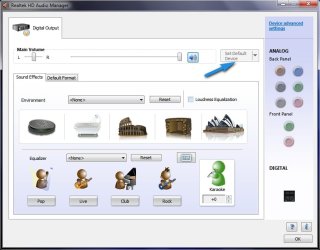
Finleaf- Unlike Vista and XP Win 7 will only allow 1 audio output at a time. Many times I must start the Realtek HD Audio Manager and manually unplug the source I was using before I can use a different Audio source. Have you made HDMI your default audio source?

~Maxx~
.
Win7_50.png
 

My Computer

Computer Manufacturer/Model Number
HP HPE 270f
OS
Windows 7 x64 Home Premium
CPU
Intel Core i7 930 @ 2.8 Ghz Socket 1366 LGA
Motherboard
Pegatron Truckee v1.04E41
Memory
8 GB 1366 Mhz DDR3 (PC3-10700) RAM
Graphics Card(s)
ATI Radeon 5770 1 GB DDR5 RAM
Sound Card
Realtech High Definition
Monitor(s) Displays
32" Sony Bravia
Screen Resolution
1366 X 768
Hard Drives
Intel 25nm 120 GB Series 320 SSD HD Tune- 265 MBps Read/ 130 MBps Write

LaCie 1TB + 1TB RAID 0 eSATA Drive HD Tune- 160 MBps Read/ 90 MBps Write
Keyboard
Logitech Illuminated
Mouse
Logitech MX Revolution
Internet Speed
36.4 Mbps Maximum on a 37 Mbps Motorola SB501 Modem
Hdmi arent listed in my Realtec HD Audio Manager as a playback device. Is there any way to force it to chose HDMI?
 

My Computer

Computer Manufacturer/Model Number
Acer Aspire TimelineX 5820TG
OS
Windows 7 home premium
CPU
Intel Core i5 460M / 2.53 GHz
Motherboard
Mobile Intel HM55 Express
Memory
4gb DDR3 SDRAM - 1066 MHz
Graphics Card(s)
ATI Mobility Radeon HD 5650
Hard Drives
640 GB - 5400 opm
HERE is the download for this video card, which includes the Catalyst Control Center. Install the latest drivers and see if that restores the HDMI audio.
 

My Computer

Computer type
PC/Desktop
Computer Manufacturer/Model Number
My Own Build
OS
Windows 10 64 bit
CPU
Intel i7 6700K
Motherboard
ASUS ROG Maximus VIII Hero
Memory
16GB Corsair Dominator
Graphics Card(s)
Intel CPU Graphics
Sound Card
RealTek
Monitor(s) Displays
27" Dell S2719dgf
Screen Resolution
2560X1440
Hard Drives
1 TB Samsung 850 EVO SSD for Win 10 Pro
500GB Samsung 850 EVO SSD for Win 10 Insider
2 TB drive for backup
PSU
EVGA Supernova 750G2
Case
BeQuiet Silent Base 600
Cooling
Deepcool Captain 120EX
Keyboard
Microsoft Wireless 2000
Mouse
Microsoft wireless
Internet Speed
100 MB/sec (Cable)
Antivirus
Microsoft Defender and Malwarebytes
Browser
Edge/Firefox
Other Info
Cakewalk (Sonar) by BandLab and Studio One 4.1 Pro recording studio software. MOTU 896Mk3 Hybrid recording interface, Frontier Tranzport wireless control unit, Behringer X-Touch Control Surface.
Five USB connected optical drives for CD Audio production using Nero BurningROM
I have installed the driver you suggested with no success. I dont know what to do. Im thinking of selling the computer and buy a new one. This is so frustrating. But if anyone can help me with my problem i would be so greatfull.
 
Last edited:

My Computer

Computer Manufacturer/Model Number
Acer Aspire TimelineX 5820TG
OS
Windows 7 home premium
CPU
Intel Core i5 460M / 2.53 GHz
Motherboard
Mobile Intel HM55 Express
Memory
4gb DDR3 SDRAM - 1066 MHz
Graphics Card(s)
ATI Mobility Radeon HD 5650
Hard Drives
640 GB - 5400 opm
Hdmi arent listed in my Realtec HD Audio Manager as a playback device. Is there any way to force it to chose HDMI?

Have you tried unplugging all other analog and digital outputs from the computer and then plugging in HDMI only which should set it as the default audio source? There is also a Set Default Device option should you have more than one digital audio output.

~Maxx~
.
Win7_50.png
 

Attachments

  • Realtek HD Audio.jpg
    Realtek HD Audio.jpg
    51 KB · Views: 691

My Computer

Computer Manufacturer/Model Number
HP HPE 270f
OS
Windows 7 x64 Home Premium
CPU
Intel Core i7 930 @ 2.8 Ghz Socket 1366 LGA
Motherboard
Pegatron Truckee v1.04E41
Memory
8 GB 1366 Mhz DDR3 (PC3-10700) RAM
Graphics Card(s)
ATI Radeon 5770 1 GB DDR5 RAM
Sound Card
Realtech High Definition
Monitor(s) Displays
32" Sony Bravia
Screen Resolution
1366 X 768
Hard Drives
Intel 25nm 120 GB Series 320 SSD HD Tune- 265 MBps Read/ 130 MBps Write

LaCie 1TB + 1TB RAID 0 eSATA Drive HD Tune- 160 MBps Read/ 90 MBps Write
Keyboard
Logitech Illuminated
Mouse
Logitech MX Revolution
Internet Speed
36.4 Mbps Maximum on a 37 Mbps Motorola SB501 Modem
What happens when you plug the HDMI output directly into the TV, instead of going through the receiver?
 

My Computer

Computer type
PC/Desktop
Computer Manufacturer/Model Number
Custom Build
OS
Windows 7 Home Premium 64 bit
CPU
Intel Core i7-4790
Motherboard
GA-Z87X-D3H
Memory
G.SKILL 8GB (2 x 4GB) DDR3 F3-10666CL9D-8GBNT
Graphics Card(s)
AMD Radeon R7 250
Sound Card
Realtek ALC892
Monitor(s) Displays
Samsung UN32EH5000, Dell 1703FPT
Screen Resolution
1920 x 1080, 1280 x 1024
Hard Drives
WD5003AZEX
WD10EZEX
Samsung HD103SJ
Samsung 128 GB 840 PRO
PSU
SeaSonic M12II SS-500GM
Case
Fractal Design Define R4
Cooling
Zalman CNPS9900ALED
Keyboard
Logitech K800
Mouse
Logitech M705
Internet Speed
16 Mbps
Antivirus
Avast
Browser
Firefox
Other Info
Bose Companion 2 Multimedia Speakers
The same thing happens. No audio but the picture is there.
 

My Computer

Computer Manufacturer/Model Number
Acer Aspire TimelineX 5820TG
OS
Windows 7 home premium
CPU
Intel Core i5 460M / 2.53 GHz
Motherboard
Mobile Intel HM55 Express
Memory
4gb DDR3 SDRAM - 1066 MHz
Graphics Card(s)
ATI Mobility Radeon HD 5650
Hard Drives
640 GB - 5400 opm
Hi..

I've been having similar issues over the last few days with getting HDMI output to appear. Here's what I did which worked today, hope this helps:

- Go to Control Panel
- Choose 'System'
- Click 'Device Manager' near the top left
- Right click on "Sound, video and game controllers"
- Choose 'Scan for hardware changes'.

And it appeared...

I did this right after I'd installed the latest ATI drivers for my laptop.

Anyway good luck.

Edit: Oh, and when it appears in the playback devices, click on that and select as default
 

My Computer

Computer Manufacturer/Model Number
Toshiba
OS
Windows 7 Home Edition

My Computer

Computer type
PC/Desktop
Computer Manufacturer/Model Number
Dell OP7010
OS
Windows 7 Enterprise (x64); Windows Server 2008 R2 (x64)
Memory
16GB
Monitor(s) Displays
4 Dell 24" LCD
Screen Resolution
1280x1024
Keyboard
Dell
Mouse
Dell Optical
Internet Speed
40meg
Any solution?

Hi,
I have the same problem with a simular notebook and same graphic card. Have tried installing different drivers as well with no luck. I would be very interested to hear any solution you might have found for this problem
 

My Computer

OS
windows 7 home premium 64 bit
Solution

The only solution i have found working is turning the graphic to descret in the BIOS. Have you found any other solution?
 

My Computer

OS
windows 7 home premium 64 bit
Fixed - use the Vista 32 bit driver 06-02-2009

I had the same problem you're describing, EXACTLY, no HDMI audio output for my Acer Timeline 5810TZ but video output worked great.

Running Windows 7 Home 32 bit upgrade from Vista. Same thing, I could see the HDMI in the BIOS but it didn't show up in the Playback properties, even with "show hidden devices" selected.

So I went to the Acer website for downloads and selected Windows Vista 32-bit for the Operating System. Scrolled down to the Realtek audio driver, selected the 06-02-2009 version for Vista, and downloaded it.

I then went into the Control Panel and uninstalled BOTH the HDMI audio driver AND the regular audio driver, checking the box to uninstall the software. I did NOT reboot.

I then opened the new Realtek Vista driver and ran it, let it finish installing, then rebooted my computer. It booted back up, and Voila! Speaker sound, SPDIF digital output, AND... wait for it... HDMI output, all show up under playback devices.

Plugged in my HDMI cable, put it in sleep mode, brought it back out and put a video on, outputs both video AND audio, no problem, works great!

Best of luck to you... :D
 

My Computer

OS
Windows 7 Home Premium 32bit
Back
Top