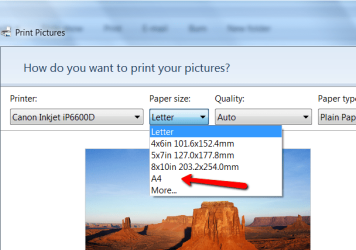
Having problems with the printing options? help please

Loop Marine

New member
Local time
5:42 PM
Messages
2
I right click the photos i want to print, then click 'print' the wizard that appears is completely useless. It lets me select the printer but there are two MASSIVE PROBLEMS that I can't possibly see how Microsoft has overseen!

1. There is NO option for an A4 size print. Just arbitrary sizes like 10 x 15 cm.

2. The ONLY option is Full Page Photo. I want wallet size- this all works fine on XP!

3. There is no option for normal paper. The only options are specialised EPSON photo papers

Could someone please tell me just how to print a few pictures in wallet size, on normal A4 paper with no hassle... this is driving me insane...

PS: These options are only in effect when my EPSON Stylus SX125 printer is selected. Why are the options different for this printer, I just want to print normally!!!!
Thanks
 

My Computer My Computer

At a glance

Windows 7
OS
Windows 7
There is A4 on my system. Did you try that?
 

Attachments

  • 2011-04-11_0950.png
    2011-04-11_0950.png
    39.6 KB · Views: 16

My Computer My Computer

At a glance

Vista, Windows7, Mint Mate, Zorin, Windows 8from 1.6GHz Duo to i7
Computer Manufacturer/Model Number
HP, Dell, Gateway, Toshiba - 4 laptops and 2 desktops
OS
Vista, Windows7, Mint Mate, Zorin, Windows 8
CPU
from 1.6GHz Duo to i7
Monitor(s) Displays
2x HP w2207
Hard Drives
5x HDD, 7x SSD, 12x Externals
Keyboard
with trackball - no mices
Mouse
Trackball mice
Internet Speed
DSL 6000
That may be your Epson printer that rules here. Did that print A4 on XP? It is definitely not a Windows7 problem because it works on all my Win7 systems, and I print in A4 frequently.

Try the following: right click on the picture and "Open with" Paint. Then try to print from there.
 

My Computer My Computer

At a glance

Vista, Windows7, Mint Mate, Zorin, Windows 8from 1.6GHz Duo to i7
Computer Manufacturer/Model Number
HP, Dell, Gateway, Toshiba - 4 laptops and 2 desktops
OS
Vista, Windows7, Mint Mate, Zorin, Windows 8
CPU
from 1.6GHz Duo to i7
Monitor(s) Displays
2x HP w2207
Hard Drives
5x HDD, 7x SSD, 12x Externals
Keyboard
with trackball - no mices
Mouse
Trackball mice
Internet Speed
DSL 6000
It may depend on what app you are using to print your pics. For example, if you have Office 2003 or 2007 you have Microsoft Office Picture Manager on your system, which is a FABULOUS photo imaging/editing/printing app! I think it will solve all of your problems because there are a huge number of size options for the photo size (including 'wallet size'), and a list of about 40 - 50 different kinds of paper, including "plain paper."

There is also an interesting option that you can check - or not -- that says: "Only show options that are compatible with my printer."
 

My Computer My Computer

At a glance

Vista 64 bit and 32 bit (SP2)Intel(R) Core(TM)2 Duo Processor T9400 (2.53 GHz4GB DDR2 System Memory (2 Dimm)512 MB NVIDIA GeForce 9600M GT
Computer Manufacturer/Model Number
HP Pavillion dv5t (generation 1)
OS
Vista 64 bit and 32 bit (SP2)
CPU
Intel(R) Core(TM)2 Duo Processor T9400 (2.53 GHz
Memory
4GB DDR2 System Memory (2 Dimm)
Graphics Card(s)
512 MB NVIDIA GeForce 9600M GT
Monitor(s) Displays
15.4" diagonal WSXGA+ High-Definition HP BrightView Widescre
Screen Resolution
1680 x 1050
Hard Drives
320GB 5400RPM SATA Hard Drive with HP ProtectSmart Hard Drive Protection
Keyboard
Built-in HP
Mouse
Built in - Synaptics TouchPad V6.5 on PS/2 Port
Internet Speed
Max
Other Info
~ Intel Next-Gen Wireless-N Mini-card w/Bluetooth ~ Blu-Ray ROM DVD+/-R/RW ~ Integ. HDTV Hybrid Tuner ~ 12 Cell Battery ~ MS Office (Home Premium) 2007 ~
Fixed

Go to "File"
Click on "Print"
In the print box there should be an "Options" button to click in the lower right hand corner.
Click "Options"
Click the last option "Printer Properties"
Click "Advanced"
Under "image color management"
Next to ICM Method there is a drop down menu
Within this menu you need to select: "ICM Handled By Printer"

This should take care of the problem. Even though the "Full Page Photo" remains the only option....the printer will now print on the selected photo paper.
I got this information from calling HP and getting technical support because, I was having the same problem.

I hope this helps someone. Have a great day.
 

My Computer My Computer

At a glance

Michigan
Computer type
PC/Desktop
Computer Manufacturer/Model Number
custom build
OS
Michigan
Back
Top