Having trouble finding a new Windows 7 system!

Compumind

New member
Local time
4:36 AM
Messages
10
Hi all,

It's frustrating!

I have been looking for a new Windows 7 system for some time now. Problem is that Dell, HP, others have configurations that use low-end components and could barely be customized. I thought about building one myself, but I just don't have the time. Of course, vendors like Falcon Northwest can provide me with the system I need at more than double the price.

Are there any *quality* vendors out there that I should look at, since I do not want Windows 8.x?

It's very interesting how Dell and HP sell systems that have everything almost everything I want, if I buy a Windows 8 configuration (pure marketing games) and that's not going to happen.

Kind of making me depressed. :mad:

Any viable ideas, comments appreciated!

TIA,

Compumind :)
 

My Computer My Computer

Computer type
PC/Desktop
OS
Windows 7 Professional x64
Internet Speed
Fast!
Among the vendors HP has made itvery clear that they will continue to build systems with Windows 7 for a period of time. You can check their offerings out on the homepage. Dell As I understand it has some available as well. It is still possible to buy everything you need to build a system including Windows 7 itself, from the regular sources that many here use.
Remember that I am suggesting that you go direct with HP or Dell as most "box stores" will not have anything or a super small selection.
 

My Computer My Computer

Computer type
PC/Desktop
Computer Manufacturer/Model Number
Custom Desktop (2 alike) Dell inspiron 13" W10 Laptop Dell Inspiron 17 5759
OS
Windows 7 Enterprise 64bit Desktops; Windows 7 Professional 64Bit 17"Laptop
CPU
AMD Athlon 2 X3; I5-6200 6th gen (Dell)
Motherboard
Gigabyte GA 78LMT-USB3 (2 Desktops)
Memory
8 Gig Desktop, 8Gig Laptop, 16Gig Laptop
Graphics Card(s)
Radeon R5450 1Gig
Sound Card
Creative SB X-Fi Titanium Extreme Audio Desktop 1
Monitor(s) Displays
Dell 2419
Screen Resolution
1920x1080
Hard Drives
Crucial M500 500GB SSD Desktop 1 and Laptops
Samsung 850EVO 250GB - Desktop 2
PSU
Thermaltake 600watt
Case
Rosewill
Cooling
Scythe Typhoon 120mm
Keyboard
Kensington
Mouse
Logitech M310
Internet Speed
50/50
Antivirus
Avast
Browser
Firefox 68
Take a look at Puget Systems:

Puget Custom Computers, America's Custom Computer Leader

They are a quality online builder, with several different lines. They do Windows 7.

Another possibility is using word of mouth to find a local builder within say a 25 mile radius of you. That's a lot tougher to do today than it was 10 or 15 years ago as "computer shops" are not nearly as common. The advantage is that you may be able to find a quality builder that will give you a lot of leeway in choosing the components, rather than relying on generic low and mid-level stuff.

Word of mouth can be tough to find though. You might try to find a local "computer club" or perhaps pick some brains at local colleges or junior colleges with significant "Computer Science" departments. Go there and ask the lab techs, instructors, or more advanced students what they do other than build their own or buy HP/Lenovo/Dell, etc.
 

My Computer My Computer

Computer type
PC/Desktop
Computer Manufacturer/Model Number
Ignatz Special; 4 speed manual gearbox; factory air conditioning; one of one
OS
Windows 7 Home Premium SP1, 64-bit
CPU
Intel Skylake i5-6600K, not overclocked
Motherboard
AsRock Z170M Extreme 4, micro ATX
Memory
8 GB HyperX DDR4-2666 (2 x 4 GB)
Graphics Card(s)
none; graphics are integrated on CPU
Sound Card
onboard: Realtek ALC1150; external: USB Behringer UF0-202
Monitor(s) Displays
Dell S2340M 23 inch IPS
Screen Resolution
1600 x 900
Hard Drives
System: Crucial MX100 series SSD, 128 GB;
Data: Samsung Spinpoint 103SJ, 1 TB;
Backup: WD Caviar Green WD30EZRX-00D8PB0, 3 TB
PSU
Rosewill SilentNight 500 watt fanless, semi-modular
Case
Antec Solo II
Cooling
Noctua NH-U12S; Noctua F12 intake, Noctua S12A exhaust
Keyboard
Microsoft 200 6JH-00001 USB
Mouse
Dell or Microsoft optical wired; USB
Antivirus
Microsoft Security Essentials and Malwarebytes Premium
Browser
Pale Moon
Other Info
All fans PWM; speeds at idle: CPU circa 500 rpm; intake circa 600 rpm; exhaust circa 600 rpm; CPU temps 27 idle and 47 C load in a warm room (27 C/81 F) when running Intel Extreme Tuning Utility stress test.
The simplest way to resolve this is to go with Windows 8.1
Install Classic Shell or Stardock's Start8.
Set it up so it boot's to the Desktop.
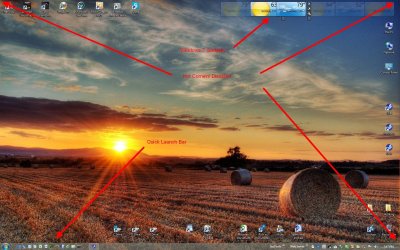
Disable all hot corners and you basically can not tell the difference between Windows 7 and Windows 8.

Take it one step further and completely disable UAC then you can' use any of the Metro/Modern Apps, including the Store.

This is what I've done and the only way I can get to the Metro Desktop is via Windows key + C. I never see it. Windows 8 runs great and is rock solid.

I've even switched back to the Quick Launch bar and use Windows 7 Gadgets.

This is my Windows 8.1 Update 1 Desktop now:

W8.1.1 Desktop.jpg

I got Windows 8 when I ordered a new Lenoveo IdeaCenter K450. I wanted a good, fast system

Got a Intel 4th Gen 3.4Ghz Quad Core I7.
16GB ram
2 TB 7200RPM hard drive
Installed a 250GB Samsung SSD
It's a EFI/GPT system

System is very fast.
 

My Computer My Computer

Computer type
PC/Desktop
Computer Manufacturer/Model Number
Lenovo IdeaCenter 450
OS
Windows 10 Pro X64
CPU
Intel Quad Core i7-4770 @ 3.4Ghz
Memory
16.0GB PC3-12800 DDR3 SDRAM 1600 MHz
Graphics Card(s)
Intel Integrated HD Graphics
Sound Card
Realtek HD Audio
Monitor(s) Displays
HP 22" LCD
Screen Resolution
1680 x 1050
Hard Drives
250GB Samsung EVO SATA-3 SSD
2TB Seagate ST2000DM001 SATA-2
1.5TB Seagate ST3150041AS SATA
Keyboard
Dell USB
Mouse
Lenovo USB
Internet Speed
Cable via Road Runner 3MB Upload, 30MB Download
Antivirus
Windows Defender, MBAM Pro, MBAE
Browser
Seamonkey
Other Info
UEFI/GPT
PLDS DVD-RW DH16AERSH
Back
Top