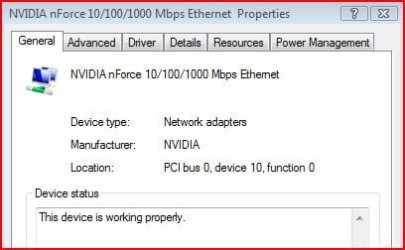
This is directly from your manual. See if it helps...
1. The PCI Adapter does not work properly.
Reinsert PCI Adapter into your PC’s PCI slot. Right click on My Computer and select Properties. Select the device manager and click on the Network Adapter. You will find PCI Adapter if it is installed successfully. If you see the yellow exclamation mark, the resources are conflicting. You will see the status of PCI Adapter. If there is a yellow question mark, please check the following:
Make sure that your PC has a free IRQ (Interrupt ReQuest, a hardware interrupt on a PC.) Make sure that you have inserted the right adapter and installed the proper driver. If PCI Adapter does not function after attempting the above steps, remove it and do the following: Uninstall the driver software from your PC. Restart your PC and repeat the hardware and software installation as specified in this User Guide.
2. I cannot communicate with the other computers linked via Ethernet in the Infrastructure configuration.
Make sure that the PC to which PCI Adapter is associated is powered on. Make sure that PCI Adapter is configured on the same channel and with the same security options as with the other computers in the Infrastructure configuration.
3. What should I do when the computer with PCI Adapter installed is unable to connect to the wireless network and/or the Internet?
Check that the LED indicators for the broadband modem are indicating normal activity. If not, there may be a problem with the broadband connection. Check that the LED indicators on the wireless router are functioning properly. If not, check that the AC power and Ethernet cables are firmly connected. Check that the IP address, subnet mask, gateway, and DNS settings are correctly entered for the network. In Infrastructure mode, make sure the same Service Set Identifier (SSID) is specified on the settings for the wireless clients and access points. In Ad-Hoc mode, both wireless clients will need to have the same SSID. Please note that it might be necessary to set up one client to establish a BSS (Basic Service Set) and wait briefly before setting up other clients. This prevents several clients from trying to establish a BSS at the same time, which Wireless N Adapter can result in multiple singular BSSs being established, rather than a single BSS with multiple clients associated to it. Check that the Network Connection for the wireless client is configured properly. If Security is enabled, make sure that the correct encryption keys are entered on both PCI Adapter and the access point.