HDD are not turned off after installing graphic card

hutorny

New member
Local time
12:32 PM
Messages
7
Dear Community,

I've got pretty old HW setup, which used to work fine until I put some more hardware in.
Particularly, none of power saving options are working now:
- HDDs are not turned off as they used to do
- Displays are not are not turned off
- Screen saver is not activated

These problems started after I've installed
- a new graphic card and its drivers (MSI/NVIDIA),
- software for the display (DELL)
- video camera driver (Microsoft)
I've read all advices from this thread and found no solution.
I'd appreciate any advise on further troubleshooting.
Most important for me is powering off HDDs 'cause, unlike displays, they've got no power off button
 

My Computer My Computer

At a glance

Windows 7 UltimateIntel Core i5-3570K16GMSI Geoforce GTX 1050 Ti
Computer type
PC/Desktop
Computer Manufacturer/Model Number
Asus
OS
Windows 7 Ultimate
CPU
Intel Core i5-3570K
Motherboard
ASUS P8Z77
Memory
16G
Graphics Card(s)
MSI Geoforce GTX 1050 Ti
Hard Drives
SAMSUNG SDD 830 128G
SAMSUNG HD103SJ 1T
TOSHIBA DT01ACA100 1T
Hello and welcome hutorny now this is almost identical to my Ivy Bridge setup and I have no real issues with it when installing new hardware.

Now just where did you get the driver for the new graphics card? Is it the same as this one from Nvidia? Drivers | GeForce

Have you got an AV installed? if so it might be an idea to disable it when installing the GPU driver.

I did say I had no issues with my machine except for one an it involved the Samsung Magician software and the issue was solved by uninstalling it so do that if you are running it.

As that new card is a fair size just what are you using for a PSU? it could possibly be under powered.

Edit: I should have also added that it might be an idea too to only have the OS drive installed while you do the driver.
 

My Computer My Computer

At a glance

Desk1 7 Home Prem / Desk2 10 Pro / Main lap A...Desk1 i5 3750K / Laptop i7 GTX 860M / Desk2 i...Desk1 8GB (1866) / Desk2 16GB (1333) / Laptop...Desk 1& 2NVidia GTX 650 & Laptops on board Intel
Computer type
PC/Desktop
Computer Manufacturer/Model Number
Own build (new) Desk1 / Asus ROG Win 7 / Desk2 1st build
OS
Desk1 7 Home Prem / Desk2 10 Pro / Main lap Asus ROG 10 Pro 2 laptop Toshiba 7 Pro Asus P2520 7 & 10
CPU
Desk1 i5 3750K / Laptop i7 GTX 860M / Desk2 i5 2500
Motherboard
Desk1 Asus P877-V / Desk2 Gigabyte H67 UD3H / Laptop ?
Memory
Desk1 8GB (1866) / Desk2 16GB (1333) / Laptop 8Gb DDR3
Graphics Card(s)
Desk 1& 2NVidia GTX 650 & Laptops on board Intel
Sound Card
Desk 1 & 2 -XONAR DG Realtek High Def audio Laptop
Monitor(s) Displays
Desk 1 Benq HD 2450 / Desk2 Philips 24" / Laptop 17.5"
Screen Resolution
1920x1080 D1 & D2 & Laptop 1
Hard Drives
Desk1 Samsung 120GB 830 SSD
Asus ROG 256GB 850 Pro SSD
Desk2 Samsung 840 256 SSD
Toshiba 120GB EVO
PSU
Desk 1 Corsair HX 1050/ Laptop ? / Desk 2 Corsair HX 650
Case
Desk 1 Cooler HAF XM ? Toshiba laptop / Desk2 Coolermaster
Cooling
Fans on all Desk1 -2 Desk2 - all Coolermasters 5 Laptop ?
Keyboard
Desk 1 MS Sidewinder X6 Desk 2 MS Sidewinder X 4
Mouse
Desk 1&2 - Gigabyte MS 900 gamer - laptop - Logitec wireless
Internet Speed
ADSL2+
Other Info
One other Desktop (tester) and spare Toshba laptop both with SSD's
Running Kaspersky 2016 ISS on all machines config'd identically
Logitec audio stereo systems on each machine (x3)
Canon MG5250MFC
Router/modem TP-Link running WPA2SK
Hi John, Thank you for interest to my issues. Graphic card driver came on a DVD with the card. Perhaps it was updated by autoupdater. I have no AV and did not have it before the upgrade. Neither I have Samsung Magician software. Regarding the PSU - how can I determine whether it is underpowered?
 

My Computer My Computer

At a glance

Windows 7 UltimateIntel Core i5-3570K16GMSI Geoforce GTX 1050 Ti
Computer type
PC/Desktop
Computer Manufacturer/Model Number
Asus
OS
Windows 7 Ultimate
CPU
Intel Core i5-3570K
Motherboard
ASUS P8Z77
Memory
16G
Graphics Card(s)
MSI Geoforce GTX 1050 Ti
Hard Drives
SAMSUNG SDD 830 128G
SAMSUNG HD103SJ 1T
TOSHIBA DT01ACA100 1T
it sounds like your machine is not entering sleep mode the way it used to. This is common when you have a driver problem. Check in device manager to see if you have a mark next to any devices, which indicates a driver issue. Also google phrases like "computer won't enter sleep mode". Make sure your video card is properly installed as some of them require their own power to be plugged in.
 

My Computer My Computer

At a glance

Win7 pro x64stock i7 7700kCorsair Vengeance LPX 16GB (2x8GB) DDR4 @ 320...integrated Intel HD 630
Computer type
PC/Desktop
Computer Manufacturer/Model Number
diy
OS
Win7 pro x64
CPU
stock i7 7700k
Motherboard
Gigabyte Z270N-WIFI mini-ITX
Memory
Corsair Vengeance LPX 16GB (2x8GB) DDR4 @ 3200MHz
Graphics Card(s)
integrated Intel HD 630
Sound Card
onboard Realtek ALC1220
Monitor(s) Displays
two vertically mounted samsung 55" 4k un55mu8000
Screen Resolution
1920x1280
Hard Drives
256GB Samsung EVO 960 M.2 pci-e NVMe SSD
PSU
SilverStone Nightjar ST45NF 450Watt Fanless
Case
No case. Motherboard is mounted directly onto power supply
Cooling
Evercool low profile 815EP with Panaflow 12L fan at 7v
Keyboard
Ortek MCK-86 mini
Mouse
Belkin 5-button USB
Internet Speed
spectrum 400mbps
Ok mate well see the suggestions that johnhoh has posted first and in reality you really need to update the GPU from the manufacturers site because a lot of software disks that come with cards and motherboards for example are more often than not out of date by the time you buy them. That's why I posted that link for that very purpose.

Now unless I am terribly mistaken that GPU does not need the power supply cable to it and the specs refer to it requiring 75W and a PSU of 300W is recommended by the MSI site.

So what you can do is two things first you can find the specs on the PSU using this
Using HW Info
PART A:
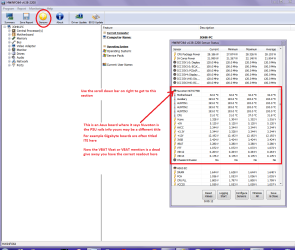
You can test the volts on the PSU with HW Info HWiNFO, HWiNFO32/64 - Download < download the right bit version and close the right hand window select Sensors and scroll down to the power section where you will see what the volts are doing see my pic. In my pic the section (Nuvoton) with VBATT as a dead give away you are in the section for the rail voltages. There are other section titles and one that pops up often is ITE (sometimes the usual one for Gigabyte boards)
Now the voltage on the different rails have to be within 5% =+/- of what is required or the machine will not work properly if at all.
Limits +/- (minimum - correct - maximum)
12v1 = 11.4 - 12 - 12.6v
12v2 = 11.4 - 12- 12.6v
5v = 4.75 – 5 - 5.25v
3.3v = 3.135 – 3 – 3.465v
-12v = -10.80 - -12 - -13.20v
+5VSB = 4.75 – 5 - 5.25v
The Power good signal voltage at pin 8 on the 24 pin plug (grey cable) should be the same as the 5v rail reading/s
See this for the rail voltage info
PSUs 101: A Detailed Look Into Power Supplies (Section 2.)
The original right hand window shows the machine running and is handy for that but for looking at the components in some detail close it and use the main left hand side panel
FOR OTHER COMPONENTS
PART B:
Open each small square with + in it on the section the components are in and then click on the individual component/s (it will highlight in blue) - in the right hand side will appear all sorts of details including brands speeds and other essential info that particular device. See pic for example.

Use PART A: - see mu pic for what you are looking for.

Second you can find out roughly what size PSU you need with what you have in the machine using this
OuterVision Power Supply Calculator < this will give you a suggested output wattage for the PSU and allow for some leeway just fill in the specs as best you can;)
 

Attachments

  • HW INFO DESKTOP PSU.PNG
    HW INFO DESKTOP PSU.PNG
    51.3 KB · Views: 1

My Computer My Computer

At a glance

Desk1 7 Home Prem / Desk2 10 Pro / Main lap A...Desk1 i5 3750K / Laptop i7 GTX 860M / Desk2 i...Desk1 8GB (1866) / Desk2 16GB (1333) / Laptop...Desk 1& 2NVidia GTX 650 & Laptops on board Intel
Computer type
PC/Desktop
Computer Manufacturer/Model Number
Own build (new) Desk1 / Asus ROG Win 7 / Desk2 1st build
OS
Desk1 7 Home Prem / Desk2 10 Pro / Main lap Asus ROG 10 Pro 2 laptop Toshiba 7 Pro Asus P2520 7 & 10
CPU
Desk1 i5 3750K / Laptop i7 GTX 860M / Desk2 i5 2500
Motherboard
Desk1 Asus P877-V / Desk2 Gigabyte H67 UD3H / Laptop ?
Memory
Desk1 8GB (1866) / Desk2 16GB (1333) / Laptop 8Gb DDR3
Graphics Card(s)
Desk 1& 2NVidia GTX 650 & Laptops on board Intel
Sound Card
Desk 1 & 2 -XONAR DG Realtek High Def audio Laptop
Monitor(s) Displays
Desk 1 Benq HD 2450 / Desk2 Philips 24" / Laptop 17.5"
Screen Resolution
1920x1080 D1 & D2 & Laptop 1
Hard Drives
Desk1 Samsung 120GB 830 SSD
Asus ROG 256GB 850 Pro SSD
Desk2 Samsung 840 256 SSD
Toshiba 120GB EVO
PSU
Desk 1 Corsair HX 1050/ Laptop ? / Desk 2 Corsair HX 650
Case
Desk 1 Cooler HAF XM ? Toshiba laptop / Desk2 Coolermaster
Cooling
Fans on all Desk1 -2 Desk2 - all Coolermasters 5 Laptop ?
Keyboard
Desk 1 MS Sidewinder X6 Desk 2 MS Sidewinder X 4
Mouse
Desk 1&2 - Gigabyte MS 900 gamer - laptop - Logitec wireless
Internet Speed
ADSL2+
Other Info
One other Desktop (tester) and spare Toshba laptop both with SSD's
Running Kaspersky 2016 ISS on all machines config'd identically
Logitec audio stereo systems on each machine (x3)
Canon MG5250MFC
Router/modem TP-Link running WPA2SK
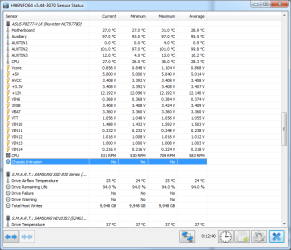
Hi John, Thank you for your advices. I've calculated power load and got: Recommended PSU Wattage: 357 W. Mine is Great Wall ATX-450PN rated as 450W. BIOS shows all voltages as normal, however HWiNFO shows Vcore 0.869 average (see the screenshot attached). Is it too low? Other voltages seems to be OK. In the device manager I've got a new unknown device ACPI\INT33A0 - an Intel Smart Connect device. Also I have another one which is there for years - it is a video capture board not supported by vendor anymore. Last supported OS was Windows XP. In the past this board did not affect sleepability. Following your and johnhoh recommendations, I have downloaded the drivers and applying update.
 

Attachments

  • hwinfo-voltages.png
    hwinfo-voltages.png
    25.5 KB · Views: 0

My Computer My Computer

At a glance

Windows 7 UltimateIntel Core i5-3570K16GMSI Geoforce GTX 1050 Ti
Computer type
PC/Desktop
Computer Manufacturer/Model Number
Asus
OS
Windows 7 Ultimate
CPU
Intel Core i5-3570K
Motherboard
ASUS P8Z77
Memory
16G
Graphics Card(s)
MSI Geoforce GTX 1050 Ti
Hard Drives
SAMSUNG SDD 830 128G
SAMSUNG HD103SJ 1T
TOSHIBA DT01ACA100 1T
Ok now the PU has enough obviously though I am not familiar with the brand and quality of build is all important with that device because if it does not provide the power in a stable and adequate manner then it follows that other components will be affected also.

For example a small difference in the CPU operating voltage (say 0.1v) alters the clock speed accordingly so any fluctuations in that will affect the performance of it. Now the main voltage rails are ok that is the 3.3v, 5v and +12v rails. The vcore readings I think if you were to watch them will fluctuate with use. So for the moment the main voltage rails are the ones that should be within that 5% +/- of the required standard voltage as per that ditty of mine.

The next thing is to see if that GPU update has any effect on how the machine behaves.
 

My Computer My Computer

At a glance

Desk1 7 Home Prem / Desk2 10 Pro / Main lap A...Desk1 i5 3750K / Laptop i7 GTX 860M / Desk2 i...Desk1 8GB (1866) / Desk2 16GB (1333) / Laptop...Desk 1& 2NVidia GTX 650 & Laptops on board Intel
Computer type
PC/Desktop
Computer Manufacturer/Model Number
Own build (new) Desk1 / Asus ROG Win 7 / Desk2 1st build
OS
Desk1 7 Home Prem / Desk2 10 Pro / Main lap Asus ROG 10 Pro 2 laptop Toshiba 7 Pro Asus P2520 7 & 10
CPU
Desk1 i5 3750K / Laptop i7 GTX 860M / Desk2 i5 2500
Motherboard
Desk1 Asus P877-V / Desk2 Gigabyte H67 UD3H / Laptop ?
Memory
Desk1 8GB (1866) / Desk2 16GB (1333) / Laptop 8Gb DDR3
Graphics Card(s)
Desk 1& 2NVidia GTX 650 & Laptops on board Intel
Sound Card
Desk 1 & 2 -XONAR DG Realtek High Def audio Laptop
Monitor(s) Displays
Desk 1 Benq HD 2450 / Desk2 Philips 24" / Laptop 17.5"
Screen Resolution
1920x1080 D1 & D2 & Laptop 1
Hard Drives
Desk1 Samsung 120GB 830 SSD
Asus ROG 256GB 850 Pro SSD
Desk2 Samsung 840 256 SSD
Toshiba 120GB EVO
PSU
Desk 1 Corsair HX 1050/ Laptop ? / Desk 2 Corsair HX 650
Case
Desk 1 Cooler HAF XM ? Toshiba laptop / Desk2 Coolermaster
Cooling
Fans on all Desk1 -2 Desk2 - all Coolermasters 5 Laptop ?
Keyboard
Desk 1 MS Sidewinder X6 Desk 2 MS Sidewinder X 4
Mouse
Desk 1&2 - Gigabyte MS 900 gamer - laptop - Logitec wireless
Internet Speed
ADSL2+
Other Info
One other Desktop (tester) and spare Toshba laptop both with SSD's
Running Kaspersky 2016 ISS on all machines config'd identically
Logitec audio stereo systems on each machine (x3)
Canon MG5250MFC
Router/modem TP-Link running WPA2SK
Intel Smart Connect has to do with waking the computer from sleep. Here is the driver if you do not have it
Download Intel(R) Smart Connect Technology

If after applying it you still cannot wake from sleep, try uninstalling that video capture card just to see if it makes a difference. You mentioned it did not used to affect sleep, but maybe now there is a conflict. Something to check. If you want to post the specific model of the video capture card, that might be useful
 
Last edited:

My Computer My Computer

At a glance

Win7 pro x64stock i7 7700kCorsair Vengeance LPX 16GB (2x8GB) DDR4 @ 320...integrated Intel HD 630
Computer type
PC/Desktop
Computer Manufacturer/Model Number
diy
OS
Win7 pro x64
CPU
stock i7 7700k
Motherboard
Gigabyte Z270N-WIFI mini-ITX
Memory
Corsair Vengeance LPX 16GB (2x8GB) DDR4 @ 3200MHz
Graphics Card(s)
integrated Intel HD 630
Sound Card
onboard Realtek ALC1220
Monitor(s) Displays
two vertically mounted samsung 55" 4k un55mu8000
Screen Resolution
1920x1280
Hard Drives
256GB Samsung EVO 960 M.2 pci-e NVMe SSD
PSU
SilverStone Nightjar ST45NF 450Watt Fanless
Case
No case. Motherboard is mounted directly onto power supply
Cooling
Evercool low profile 815EP with Panaflow 12L fan at 7v
Keyboard
Ortek MCK-86 mini
Mouse
Belkin 5-button USB
Internet Speed
spectrum 400mbps
Dear Colleagues,

I appreciate your help. Here is status update, and I think, with your help, the problem is identified.

I've updated the graphic card drivers and it had no effect on sleep.
Then I've installed Intel(R) Smart Connect Technology and when it runs, it complains:

Intel Smart Connect Technology Agent is not running

I've looked at the event log for records of this particular service and found a bunch of errors like this:
Code:
ISCT - isctAgentUnhandledExceptionHandler   [TID: 0x12b0] Exception - address (0x000007FEFD929E5D) - code (0xe06d7363) -parameters(19930520, 2d6f860, d8d81838, d8d10000)
The 0xe06d7363 error code is described on ms support site although I am not sure if I can get any use of that information.
 

My Computer My Computer

At a glance

Windows 7 UltimateIntel Core i5-3570K16GMSI Geoforce GTX 1050 Ti
Computer type
PC/Desktop
Computer Manufacturer/Model Number
Asus
OS
Windows 7 Ultimate
CPU
Intel Core i5-3570K
Motherboard
ASUS P8Z77
Memory
16G
Graphics Card(s)
MSI Geoforce GTX 1050 Ti
Hard Drives
SAMSUNG SDD 830 128G
SAMSUNG HD103SJ 1T
TOSHIBA DT01ACA100 1T
My Computer My Computer

At a glance

Win7 pro x64stock i7 7700kCorsair Vengeance LPX 16GB (2x8GB) DDR4 @ 320...integrated Intel HD 630
Computer type
PC/Desktop
Computer Manufacturer/Model Number
diy
OS
Win7 pro x64
CPU
stock i7 7700k
Motherboard
Gigabyte Z270N-WIFI mini-ITX
Memory
Corsair Vengeance LPX 16GB (2x8GB) DDR4 @ 3200MHz
Graphics Card(s)
integrated Intel HD 630
Sound Card
onboard Realtek ALC1220
Monitor(s) Displays
two vertically mounted samsung 55" 4k un55mu8000
Screen Resolution
1920x1280
Hard Drives
256GB Samsung EVO 960 M.2 pci-e NVMe SSD
PSU
SilverStone Nightjar ST45NF 450Watt Fanless
Case
No case. Motherboard is mounted directly onto power supply
Cooling
Evercool low profile 815EP with Panaflow 12L fan at 7v
Keyboard
Ortek MCK-86 mini
Mouse
Belkin 5-button USB
Internet Speed
spectrum 400mbps
Ok mate now I have that very same board as I think I mentioned before and as I can only just navigate the BIOS I think I will leave this to johnhoh hope it goes well.:)
 

My Computer My Computer

At a glance

Desk1 7 Home Prem / Desk2 10 Pro / Main lap A...Desk1 i5 3750K / Laptop i7 GTX 860M / Desk2 i...Desk1 8GB (1866) / Desk2 16GB (1333) / Laptop...Desk 1& 2NVidia GTX 650 & Laptops on board Intel
Computer type
PC/Desktop
Computer Manufacturer/Model Number
Own build (new) Desk1 / Asus ROG Win 7 / Desk2 1st build
OS
Desk1 7 Home Prem / Desk2 10 Pro / Main lap Asus ROG 10 Pro 2 laptop Toshiba 7 Pro Asus P2520 7 & 10
CPU
Desk1 i5 3750K / Laptop i7 GTX 860M / Desk2 i5 2500
Motherboard
Desk1 Asus P877-V / Desk2 Gigabyte H67 UD3H / Laptop ?
Memory
Desk1 8GB (1866) / Desk2 16GB (1333) / Laptop 8Gb DDR3
Graphics Card(s)
Desk 1& 2NVidia GTX 650 & Laptops on board Intel
Sound Card
Desk 1 & 2 -XONAR DG Realtek High Def audio Laptop
Monitor(s) Displays
Desk 1 Benq HD 2450 / Desk2 Philips 24" / Laptop 17.5"
Screen Resolution
1920x1080 D1 & D2 & Laptop 1
Hard Drives
Desk1 Samsung 120GB 830 SSD
Asus ROG 256GB 850 Pro SSD
Desk2 Samsung 840 256 SSD
Toshiba 120GB EVO
PSU
Desk 1 Corsair HX 1050/ Laptop ? / Desk 2 Corsair HX 650
Case
Desk 1 Cooler HAF XM ? Toshiba laptop / Desk2 Coolermaster
Cooling
Fans on all Desk1 -2 Desk2 - all Coolermasters 5 Laptop ?
Keyboard
Desk 1 MS Sidewinder X6 Desk 2 MS Sidewinder X 4
Mouse
Desk 1&2 - Gigabyte MS 900 gamer - laptop - Logitec wireless
Internet Speed
ADSL2+
Other Info
One other Desktop (tester) and spare Toshba laptop both with SSD's
Running Kaspersky 2016 ISS on all machines config'd identically
Logitec audio stereo systems on each machine (x3)
Canon MG5250MFC
Router/modem TP-Link running WPA2SK
ISCT was indeed enabled in BIOS.
Also I've noticed ISCT warnings in the event log:
Code:
ISCT - CAgentService::AgentServiceInit   iSCT 3.0 BIOS implementation was not detected - fall back to support 2.x functionality

So I've upgraded BIOS to the most recent version but this did not help.

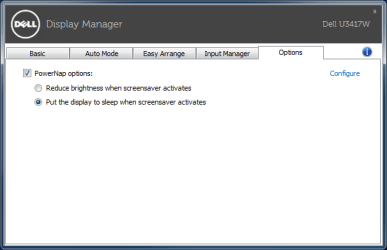
Now I am wondering if Dell software interfered with the power saving feature, because it has Power Nap option which has no effect too.
 

Attachments

  • dell-dm-powernap.png
    dell-dm-powernap.png
    6.8 KB · Views: 19

My Computer My Computer

At a glance

Windows 7 UltimateIntel Core i5-3570K16GMSI Geoforce GTX 1050 Ti
Computer type
PC/Desktop
Computer Manufacturer/Model Number
Asus
OS
Windows 7 Ultimate
CPU
Intel Core i5-3570K
Motherboard
ASUS P8Z77
Memory
16G
Graphics Card(s)
MSI Geoforce GTX 1050 Ti
Hard Drives
SAMSUNG SDD 830 128G
SAMSUNG HD103SJ 1T
TOSHIBA DT01ACA100 1T
here's what i'd do next to try and pinpoint problem..

disable isct in bios

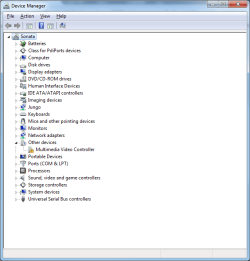
reboot, check device manager (start>run>devmgmt.msc) and post a screenshot of it here

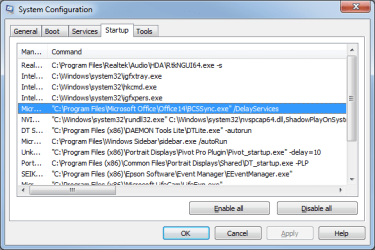
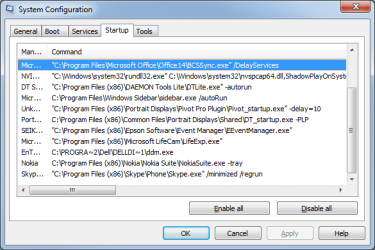
also post a screenshot of your startup programs, start>run>msconfig>startup.
You will need to change the width of the column headers to make the screenshot useful here - do not need the Startup Item column, do need maybe 8 characters of Manufacturer column, need the entire width of the Command column, do not need Location column.

The combination of these screenshots will tell us the changes made to your system by your new hardware

also, to make sure sleep is working, try this. Your computer should immediately power off into standby mode when you run it.

http://www.gammadyne.com/sleep.exe

Probably should have mentioned this earlier, but check control panel > power > to make sure you are still set to go to sleep automatically. I assumed this was true since you said it used to work, but it would be good to check...
 
Last edited:

My Computer My Computer

At a glance

Win7 pro x64stock i7 7700kCorsair Vengeance LPX 16GB (2x8GB) DDR4 @ 320...integrated Intel HD 630
Computer type
PC/Desktop
Computer Manufacturer/Model Number
diy
OS
Win7 pro x64
CPU
stock i7 7700k
Motherboard
Gigabyte Z270N-WIFI mini-ITX
Memory
Corsair Vengeance LPX 16GB (2x8GB) DDR4 @ 3200MHz
Graphics Card(s)
integrated Intel HD 630
Sound Card
onboard Realtek ALC1220
Monitor(s) Displays
two vertically mounted samsung 55" 4k un55mu8000
Screen Resolution
1920x1280
Hard Drives
256GB Samsung EVO 960 M.2 pci-e NVMe SSD
PSU
SilverStone Nightjar ST45NF 450Watt Fanless
Case
No case. Motherboard is mounted directly onto power supply
Cooling
Evercool low profile 815EP with Panaflow 12L fan at 7v
Keyboard
Ortek MCK-86 mini
Mouse
Belkin 5-button USB
Internet Speed
spectrum 400mbps
Hi John,

Please find screenshots attached.
Sleep works, I use this command to make it sleep:
Code:
C:\Windows\System32\rundll32.exe powrprof.dll,SetSuspendState 0,0,0
 

Attachments

  • startup1.png
    startup1.png
    16.1 KB · Views: 12
  • startup2.png
    startup2.png
    16.6 KB · Views: 12
  • device-manager.png
    device-manager.png
    19.6 KB · Views: 12

My Computer My Computer

At a glance

Windows 7 UltimateIntel Core i5-3570K16GMSI Geoforce GTX 1050 Ti
Computer type
PC/Desktop
Computer Manufacturer/Model Number
Asus
OS
Windows 7 Ultimate
CPU
Intel Core i5-3570K
Motherboard
ASUS P8Z77
Memory
16G
Graphics Card(s)
MSI Geoforce GTX 1050 Ti
Hard Drives
SAMSUNG SDD 830 128G
SAMSUNG HD103SJ 1T
TOSHIBA DT01ACA100 1T
a few things to try next ....

device manager shows an error on "multimedia video controller". We need that to not have a yellow checkmark. If that's your new video camera driver, it needs a different driver. Hopefully that's the problem here.

msconfig does not show anything that stands out to me, but does anything there look new to you?

If you use a wireless mouse, make sure it has fresh batteries. Better yet, try a non-wireless mouse for a bit.

Do a google on your new graphic card. "graphic card xyz is causing screen saver to not activate"

Do a google of "most stable driver for graphic card xyz"

Shutdown, unplug all USB devices except keyboard and mouse, restart. If the problem is not the multimedia video controller or the graphic card driver, its probably one of the USB devices.
 

My Computer My Computer

At a glance

Win7 pro x64stock i7 7700kCorsair Vengeance LPX 16GB (2x8GB) DDR4 @ 320...integrated Intel HD 630
Computer type
PC/Desktop
Computer Manufacturer/Model Number
diy
OS
Win7 pro x64
CPU
stock i7 7700k
Motherboard
Gigabyte Z270N-WIFI mini-ITX
Memory
Corsair Vengeance LPX 16GB (2x8GB) DDR4 @ 3200MHz
Graphics Card(s)
integrated Intel HD 630
Sound Card
onboard Realtek ALC1220
Monitor(s) Displays
two vertically mounted samsung 55" 4k un55mu8000
Screen Resolution
1920x1280
Hard Drives
256GB Samsung EVO 960 M.2 pci-e NVMe SSD
PSU
SilverStone Nightjar ST45NF 450Watt Fanless
Case
No case. Motherboard is mounted directly onto power supply
Cooling
Evercool low profile 815EP with Panaflow 12L fan at 7v
Keyboard
Ortek MCK-86 mini
Mouse
Belkin 5-button USB
Internet Speed
spectrum 400mbps
Hello Colleagues,

I've found the problem and for my big embarrassing it was the mouse.
It is an old and worn out USB wired Glaser. I've cleaned its optic before I posted a here, and after I identified the problem by pulling it out, as you advised. The cleaning has not helped, so I replaced the old mouse and the problem is gone.

Thank you for your help
 

My Computer My Computer

At a glance

Windows 7 UltimateIntel Core i5-3570K16GMSI Geoforce GTX 1050 Ti
Computer type
PC/Desktop
Computer Manufacturer/Model Number
Asus
OS
Windows 7 Ultimate
CPU
Intel Core i5-3570K
Motherboard
ASUS P8Z77
Memory
16G
Graphics Card(s)
MSI Geoforce GTX 1050 Ti
Hard Drives
SAMSUNG SDD 830 128G
SAMSUNG HD103SJ 1T
TOSHIBA DT01ACA100 1T
Hmm stranger things happen at sea they say anyway alls well then.
 

My Computer My Computer

At a glance

Desk1 7 Home Prem / Desk2 10 Pro / Main lap A...Desk1 i5 3750K / Laptop i7 GTX 860M / Desk2 i...Desk1 8GB (1866) / Desk2 16GB (1333) / Laptop...Desk 1& 2NVidia GTX 650 & Laptops on board Intel
Computer type
PC/Desktop
Computer Manufacturer/Model Number
Own build (new) Desk1 / Asus ROG Win 7 / Desk2 1st build
OS
Desk1 7 Home Prem / Desk2 10 Pro / Main lap Asus ROG 10 Pro 2 laptop Toshiba 7 Pro Asus P2520 7 & 10
CPU
Desk1 i5 3750K / Laptop i7 GTX 860M / Desk2 i5 2500
Motherboard
Desk1 Asus P877-V / Desk2 Gigabyte H67 UD3H / Laptop ?
Memory
Desk1 8GB (1866) / Desk2 16GB (1333) / Laptop 8Gb DDR3
Graphics Card(s)
Desk 1& 2NVidia GTX 650 & Laptops on board Intel
Sound Card
Desk 1 & 2 -XONAR DG Realtek High Def audio Laptop
Monitor(s) Displays
Desk 1 Benq HD 2450 / Desk2 Philips 24" / Laptop 17.5"
Screen Resolution
1920x1080 D1 & D2 & Laptop 1
Hard Drives
Desk1 Samsung 120GB 830 SSD
Asus ROG 256GB 850 Pro SSD
Desk2 Samsung 840 256 SSD
Toshiba 120GB EVO
PSU
Desk 1 Corsair HX 1050/ Laptop ? / Desk 2 Corsair HX 650
Case
Desk 1 Cooler HAF XM ? Toshiba laptop / Desk2 Coolermaster
Cooling
Fans on all Desk1 -2 Desk2 - all Coolermasters 5 Laptop ?
Keyboard
Desk 1 MS Sidewinder X6 Desk 2 MS Sidewinder X 4
Mouse
Desk 1&2 - Gigabyte MS 900 gamer - laptop - Logitec wireless
Internet Speed
ADSL2+
Other Info
One other Desktop (tester) and spare Toshba laptop both with SSD's
Running Kaspersky 2016 ISS on all machines config'd identically
Logitec audio stereo systems on each machine (x3)
Canon MG5250MFC
Router/modem TP-Link running WPA2SK
Back
Top