Solved HDD bad health? No errors + '91 unstable sectors' = ?

stuckstuck

New member
Member
VIP
Local time
5:45 PM
Messages
168
My suspicions on one of my hard drives became more so when I heard an odd noise coming from my computer whilst I was transferring some files from one drive to another.
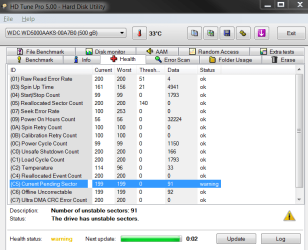
As I got closer to the my tower I went up-close and realised that the noise was coming from where my hard drives were, so I instantly got back onto the computer and started up HD tune pro to check up on things softwarelly.
It turns out that my suspicions came true and something was wrong with my hard drive.
*See Health Status*

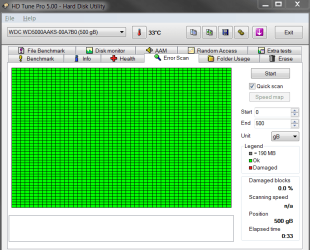
So I did a quick error scan afterwards and to my surprise there was nothing wrong.
*See Error Scan*

So I went to my computer and decided to error check the drive that way (with both disk options checked)
and figured this will definitely just get rid of the problem.
There wasn't anything wrong.
So now I'm concerned like a mother with a child.
 

Attachments
  • error scan.png
    error scan.png
    19.5 KB · Views: 1
  • Health Status.png
    Health Status.png
    27.9 KB · Views: 1

My Computer My Computer

At a glance

Microsoft Windows 7 Professional 64-bit5960X @ 4.4GHz16.0 GBNVIDIA GeForce GTX 980 Ti
Computer type
PC/Desktop
Computer Manufacturer/Model Number
Custom
OS
Microsoft Windows 7 Professional 64-bit
CPU
5960X @ 4.4GHz
Motherboard
X99 SABERTOOTH
Memory
16.0 GB
Graphics Card(s)
NVIDIA GeForce GTX 980 Ti
Hard Drives
(1) OCZ-VERT EX460 SCSI Disk Device
(2) WDC WD1002FAEX-00Z3A SCSI Disk Device
(3) WDC WD1003FZEX-00MK2 SCSI Disk Device
Internet Speed
God Speed.
Antivirus
Glock 9
???
 

My Computer My Computer

At a glance

Microsoft Windows 7 Professional 64-bit5960X @ 4.4GHz16.0 GBNVIDIA GeForce GTX 980 Ti
Computer type
PC/Desktop
Computer Manufacturer/Model Number
Custom
OS
Microsoft Windows 7 Professional 64-bit
CPU
5960X @ 4.4GHz
Motherboard
X99 SABERTOOTH
Memory
16.0 GB
Graphics Card(s)
NVIDIA GeForce GTX 980 Ti
Hard Drives
(1) OCZ-VERT EX460 SCSI Disk Device
(2) WDC WD1002FAEX-00Z3A SCSI Disk Device
(3) WDC WD1003FZEX-00MK2 SCSI Disk Device
Internet Speed
God Speed.
Antivirus
Glock 9

Attachments

  • PW SURFACE 2.PNG
    PW SURFACE 2.PNG
    39.1 KB · Views: 8

My Computer My Computer

At a glance

Desk1 7 Home Prem / Desk2 10 Pro / Main lap A...Desk1 i5 3750K / Laptop i7 GTX 860M / Desk2 i...Desk1 8GB (1866) / Desk2 16GB (1333) / Laptop...Desk 1& 2NVidia GTX 650 & Laptops on board Intel
Computer type
PC/Desktop
Computer Manufacturer/Model Number
Own build (new) Desk1 / Asus ROG Win 7 / Desk2 1st build
OS
Desk1 7 Home Prem / Desk2 10 Pro / Main lap Asus ROG 10 Pro 2 laptop Toshiba 7 Pro Asus P2520 7 & 10
CPU
Desk1 i5 3750K / Laptop i7 GTX 860M / Desk2 i5 2500
Motherboard
Desk1 Asus P877-V / Desk2 Gigabyte H67 UD3H / Laptop ?
Memory
Desk1 8GB (1866) / Desk2 16GB (1333) / Laptop 8Gb DDR3
Graphics Card(s)
Desk 1& 2NVidia GTX 650 & Laptops on board Intel
Sound Card
Desk 1 & 2 -XONAR DG Realtek High Def audio Laptop
Monitor(s) Displays
Desk 1 Benq HD 2450 / Desk2 Philips 24" / Laptop 17.5"
Screen Resolution
1920x1080 D1 & D2 & Laptop 1
Hard Drives
Desk1 Samsung 120GB 830 SSD
Asus ROG 256GB 850 Pro SSD
Desk2 Samsung 840 256 SSD
Toshiba 120GB EVO
PSU
Desk 1 Corsair HX 1050/ Laptop ? / Desk 2 Corsair HX 650
Case
Desk 1 Cooler HAF XM ? Toshiba laptop / Desk2 Coolermaster
Cooling
Fans on all Desk1 -2 Desk2 - all Coolermasters 5 Laptop ?
Keyboard
Desk 1 MS Sidewinder X6 Desk 2 MS Sidewinder X 4
Mouse
Desk 1&2 - Gigabyte MS 900 gamer - laptop - Logitec wireless
Internet Speed
ADSL2+
Other Info
One other Desktop (tester) and spare Toshba laptop both with SSD's
Running Kaspersky 2016 ISS on all machines config'd identically
Logitec audio stereo systems on each machine (x3)
Canon MG5250MFC
Router/modem TP-Link running WPA2SK
Hi thanks for getting back to me.
I didn't realise HD tune pro was such a taboo program,
apologies if I've offended you in any way.

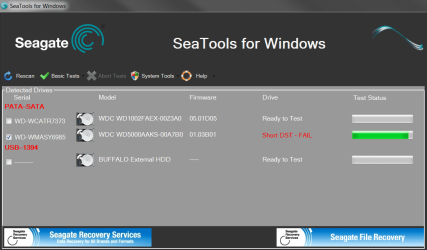
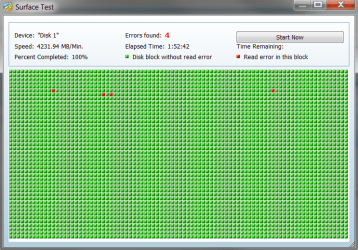
I've done the scans etc, these were the results..
 

Attachments

  • Short DST Test.png
    Short DST Test.png
    37.5 KB · Views: 0
  • Short Generic Test.png
    Short Generic Test.png
    38.6 KB · Views: 0
  • Surface Test.png
    Surface Test.png
    16.4 KB · Views: 4

My Computer My Computer

At a glance

Microsoft Windows 7 Professional 64-bit5960X @ 4.4GHz16.0 GBNVIDIA GeForce GTX 980 Ti
Computer type
PC/Desktop
Computer Manufacturer/Model Number
Custom
OS
Microsoft Windows 7 Professional 64-bit
CPU
5960X @ 4.4GHz
Motherboard
X99 SABERTOOTH
Memory
16.0 GB
Graphics Card(s)
NVIDIA GeForce GTX 980 Ti
Hard Drives
(1) OCZ-VERT EX460 SCSI Disk Device
(2) WDC WD1002FAEX-00Z3A SCSI Disk Device
(3) WDC WD1003FZEX-00MK2 SCSI Disk Device
Internet Speed
God Speed.
Antivirus
Glock 9
No need to apologise mate it isn't a taboo program perhaps I should rephrase that and say it is a program I am not personally thrilled about or would use like a lot of those PC fix it programs that promise he world yet deliver not a lot.
What has me wondering is why there are two results both different in the result.

However the fact you have one showing a fail does not look good. Is the drive with the fail one you use for the OS or just for data? Personally I would be replacing the drive after recovering any data you need.
I shall be offline for a while so be patient - others may answer anyway.
 

My Computer My Computer

At a glance

Desk1 7 Home Prem / Desk2 10 Pro / Main lap A...Desk1 i5 3750K / Laptop i7 GTX 860M / Desk2 i...Desk1 8GB (1866) / Desk2 16GB (1333) / Laptop...Desk 1& 2NVidia GTX 650 & Laptops on board Intel
Computer type
PC/Desktop
Computer Manufacturer/Model Number
Own build (new) Desk1 / Asus ROG Win 7 / Desk2 1st build
OS
Desk1 7 Home Prem / Desk2 10 Pro / Main lap Asus ROG 10 Pro 2 laptop Toshiba 7 Pro Asus P2520 7 & 10
CPU
Desk1 i5 3750K / Laptop i7 GTX 860M / Desk2 i5 2500
Motherboard
Desk1 Asus P877-V / Desk2 Gigabyte H67 UD3H / Laptop ?
Memory
Desk1 8GB (1866) / Desk2 16GB (1333) / Laptop 8Gb DDR3
Graphics Card(s)
Desk 1& 2NVidia GTX 650 & Laptops on board Intel
Sound Card
Desk 1 & 2 -XONAR DG Realtek High Def audio Laptop
Monitor(s) Displays
Desk 1 Benq HD 2450 / Desk2 Philips 24" / Laptop 17.5"
Screen Resolution
1920x1080 D1 & D2 & Laptop 1
Hard Drives
Desk1 Samsung 120GB 830 SSD
Asus ROG 256GB 850 Pro SSD
Desk2 Samsung 840 256 SSD
Toshiba 120GB EVO
PSU
Desk 1 Corsair HX 1050/ Laptop ? / Desk 2 Corsair HX 650
Case
Desk 1 Cooler HAF XM ? Toshiba laptop / Desk2 Coolermaster
Cooling
Fans on all Desk1 -2 Desk2 - all Coolermasters 5 Laptop ?
Keyboard
Desk 1 MS Sidewinder X6 Desk 2 MS Sidewinder X 4
Mouse
Desk 1&2 - Gigabyte MS 900 gamer - laptop - Logitec wireless
Internet Speed
ADSL2+
Other Info
One other Desktop (tester) and spare Toshba laptop both with SSD's
Running Kaspersky 2016 ISS on all machines config'd identically
Logitec audio stereo systems on each machine (x3)
Canon MG5250MFC
Router/modem TP-Link running WPA2SK
I'm still not too sure what to think of this, clearly this isn't good
but I'm still having difficulties assessing the situation with this HDD.
I have no problem replacing the hard drive,
quite frankly it was due anyways, that hard drive's been through some years.
But what I'm still wondering is seeing as there are some 'errors' found on that hard drive,
does that mean that there are files on that hard drive that are corrupt now?
That's what's concerning me most of all, is corrupt files, I have some things on there that are quite important.
In fact that hard drive is the place where I backup the majority of my important files.
 

My Computer My Computer

At a glance

Microsoft Windows 7 Professional 64-bit5960X @ 4.4GHz16.0 GBNVIDIA GeForce GTX 980 Ti
Computer type
PC/Desktop
Computer Manufacturer/Model Number
Custom
OS
Microsoft Windows 7 Professional 64-bit
CPU
5960X @ 4.4GHz
Motherboard
X99 SABERTOOTH
Memory
16.0 GB
Graphics Card(s)
NVIDIA GeForce GTX 980 Ti
Hard Drives
(1) OCZ-VERT EX460 SCSI Disk Device
(2) WDC WD1002FAEX-00Z3A SCSI Disk Device
(3) WDC WD1003FZEX-00MK2 SCSI Disk Device
Internet Speed
God Speed.
Antivirus
Glock 9
I'm no expert, but it looks like you've got 91 shaky sectors and the controller has not remapped them yet, and probably won't until some write operations are attempted on the bad sectors. When that happens, the reallocated count will go up and the pending count will go down.

I'd at least keep looking at SMART values regularly to see if that 91 is moving up. It's common for a failing drive to begin like that, with a few sectors going bad.

Disks have a certain amount of spare unused sectors from the factory that are designed to replace bad sectors.

I assume you have multiple copies of this data. If so, I'd probably just keep watching for further developments. But if you are antsy and the drive is long in the tooth, you might go ahead and get rid of it now rather than wait.
 

My Computer My Computer

At a glance

Windows 7 Home Premium SP1, 64-bitIntel Skylake i5-6600K, not overclocked8 GB HyperX DDR4-2666 (2 x 4 GB)none; graphics are integrated on CPU
Computer type
PC/Desktop
Computer Manufacturer/Model Number
Ignatz Special; 4 speed manual gearbox; factory air conditioning; one of one
OS
Windows 7 Home Premium SP1, 64-bit
CPU
Intel Skylake i5-6600K, not overclocked
Motherboard
AsRock Z170M Extreme 4, micro ATX
Memory
8 GB HyperX DDR4-2666 (2 x 4 GB)
Graphics Card(s)
none; graphics are integrated on CPU
Sound Card
onboard: Realtek ALC1150; external: USB Behringer UF0-202
Monitor(s) Displays
Dell S2340M 23 inch IPS
Screen Resolution
1600 x 900
Hard Drives
System: Crucial MX100 series SSD, 128 GB;
Data: Samsung Spinpoint 103SJ, 1 TB;
Backup: WD Caviar Green WD30EZRX-00D8PB0, 3 TB
PSU
Rosewill SilentNight 500 watt fanless, semi-modular
Case
Antec Solo II
Cooling
Noctua NH-U12S; Noctua F12 intake, Noctua S12A exhaust
Keyboard
Microsoft 200 6JH-00001 USB
Mouse
Dell or Microsoft optical wired; USB
Antivirus
Microsoft Security Essentials and Malwarebytes Premium
Browser
Pale Moon
Other Info
All fans PWM; speeds at idle: CPU circa 500 rpm; intake circa 600 rpm; exhaust circa 600 rpm; CPU temps 27 idle and 47 C load in a warm room (27 C/81 F) when running Intel Extreme Tuning Utility stress test.
Sector remapping is supposed to be a transparent process to the user/OS. Usually the drive controller will scan the surface during idle time and remap bad sectors it founds. The process is called "Background Media Scan" and it's part of ATA/SCSI standard.

Refer page 43 of http://www.seagate.com/staticfiles/...rprise/savvio/Savvio 15K.1/SAS/100407739c.pdf for more info.

If the found sectors remained to be pending, it probably means the sector reserve pool is running out of space and the drive's condition is bad (almost all spare sectors are already used ). I have repaired quiet a large number of hard drives with bad sectors using manufacturer's diagnostic tools and third party utilities like MHDD,THDD etc. In my experience usually the repaired drives are more prone to failure than others. Of course there are exceptions and some drives last longed for years but the general rule is to not trust a repaired disk for data storage. Since the disk is not new and you are already considering to get a new replacement, i would highly recommend to do so.
 
Last edited:

My Computer My Computer

At a glance

Windows 7 Ultimate x64
Computer type
PC/Desktop
OS
Windows 7 Ultimate x64
Thanks for the input guys, but for the sake of receiving a straight answer and coming to a quick conclusion.
Do I officially have some corrupt files now?
 

My Computer My Computer

At a glance

Microsoft Windows 7 Professional 64-bit5960X @ 4.4GHz16.0 GBNVIDIA GeForce GTX 980 Ti
Computer type
PC/Desktop
Computer Manufacturer/Model Number
Custom
OS
Microsoft Windows 7 Professional 64-bit
CPU
5960X @ 4.4GHz
Motherboard
X99 SABERTOOTH
Memory
16.0 GB
Graphics Card(s)
NVIDIA GeForce GTX 980 Ti
Hard Drives
(1) OCZ-VERT EX460 SCSI Disk Device
(2) WDC WD1002FAEX-00Z3A SCSI Disk Device
(3) WDC WD1003FZEX-00MK2 SCSI Disk Device
Internet Speed
God Speed.
Antivirus
Glock 9
It is difficult to determine this for certain but the fact that the sectors were reported at all is a good indicator that they do effect files. A "Current Pending Sector" is a sector in which read errors were reported. The drive would like to remap such a sector but is unable to do so because the correct contents is unknown. Remapping is deferred until the sector is successfully read or it is written to. Of course it is impossible to tell when or if that will ever happen.

The correct course of action here would be to assume the worst but hope for the best.
 

My Computer My Computer

At a glance

Windows 7 Pro 64 bitXeon W35208 GBNvidia Geforce 210
Computer type
PC/Desktop
Computer Manufacturer/Model Number
HP
OS
Windows 7 Pro 64 bit
CPU
Xeon W3520
Memory
8 GB
Graphics Card(s)
Nvidia Geforce 210
I have had success with using HDD regenerator. It is a darn good programme and has saved a few HDD's I have had over the last 4 or 5 years. You can find it here: Dmitriy Primochenko Online The programme does cost $99.00, I have had it for a couple of years but I think it will only check your drive and not repair unless payment is made.
Hope that helps.
 

My Computer My Computer

At a glance

Win7 SP1 + Ultimate 64 bitIntel G325832gb GskillGTX 660Ti EVGA x 2
Computer type
PC/Desktop
Computer Manufacturer/Model Number
Hybrid
OS
Win7 SP1 + Ultimate 64 bit
CPU
Intel G3258
Motherboard
GA Z97X Gaming 3
Memory
32gb Gskill
Graphics Card(s)
GTX 660Ti EVGA x 2
Monitor(s) Displays
Asus 23" LCD Widescreen
Screen Resolution
1920/1080
Hard Drives
1 x Samsung EVO840 250gb SSD
1 X 1 TB Velociraptor
1 x 1 Seagate 7200rpm
PSU
750W Thermaltake
Case
Thermaltake A60
Cooling
Xigmatek Dark Knight CPU and stock case fans
Keyboard
Alienware
Mouse
Microsoft USB
Internet Speed
Optusnet Cable
Antivirus
MS, Malwarebytes
Browser
Palemoon 64Bit
Just bought a new hard drive. I guess my problem's been resolved? :S
 

My Computer My Computer

At a glance

Microsoft Windows 7 Professional 64-bit5960X @ 4.4GHz16.0 GBNVIDIA GeForce GTX 980 Ti
Computer type
PC/Desktop
Computer Manufacturer/Model Number
Custom
OS
Microsoft Windows 7 Professional 64-bit
CPU
5960X @ 4.4GHz
Motherboard
X99 SABERTOOTH
Memory
16.0 GB
Graphics Card(s)
NVIDIA GeForce GTX 980 Ti
Hard Drives
(1) OCZ-VERT EX460 SCSI Disk Device
(2) WDC WD1002FAEX-00Z3A SCSI Disk Device
(3) WDC WD1003FZEX-00MK2 SCSI Disk Device
Internet Speed
God Speed.
Antivirus
Glock 9
Back
Top