Solved HDD divided into 2 simple volumes with same drive letter F

magruseR

New member
Local time
8:35 AM
Messages
8
Hi!
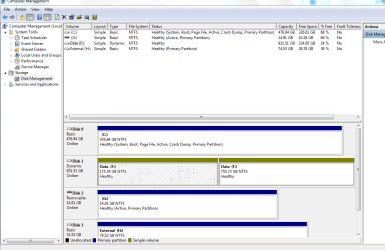
So I have a 1TB HDD that had an old back up partition of 175GB on it and a storage partition of 755GB. I used disk manegement to clear/delete the smaller volume so I could create a new back up for my recently installed OS. Somehow, (never tinker whilst looking after a screaming baby) I now have 2 simple volumes, both labelled as drive F.
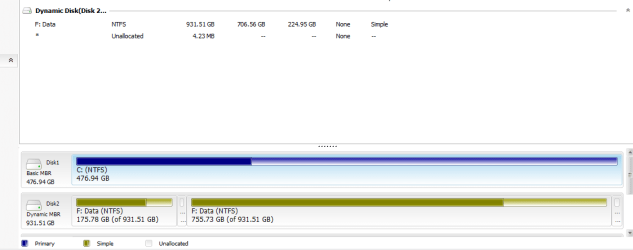
I have about 700GB of stuff on the original larger partition and not to keen on having to buy another HDD to back that up. I also tried EaseUS Partition Master but the option to "convert to basic disk" is not there maybe because there are 2 very small (..MBs) unallocated partitions that seemingly only EaseUS can detect?

I would like to return the drive to a basic disk and create a backup partition on it without losing all my data, is this at all possible?
Thanks in advance
 

My Computer My Computer

At a glance

Windows 7 Ultimate x64amd X2 550 BE4GHD 4850
Computer type
PC/Desktop
Computer Manufacturer/Model Number
custom build
OS
Windows 7 Ultimate x64
CPU
amd X2 550 BE
Motherboard
Asus m4a785td-m evo
Memory
4G
Graphics Card(s)
HD 4850
Hard Drives
500GB ssd system
1TB storage
80GB ext
Antivirus
avast
Browser
firefox
Someone else will have to help you with the two volumes having the same drive letter (weird, that).

However, it's not a very good idea to have a backup installed inside your computer, let alone on the same drive. If the computer or the drive should ever fail, there goes your backup with it. Backups should be on an external drive (or an internal type drive in a dock) and connected to the computer only when updating the backup (which should be frequently). It's also a good idea to have at least two backup drives since even a backup drive can fail unexpectedly (ideally one would be kept onsite and the other offsite). An easy way to have and maintain an offsite backup would be to use a food good cloud backup storage, such as Carbonite.
 
Last edited:

My Computer My Computer

At a glance

Win 7 Ultimate 64 bitIntel i7-3930KKingston HyperX Genesis 32GB Kit (8x4GB Modul...MSI R7850 Twin Frozr 2GD5/OC Radeon HD 7850 2...
Computer type
PC/Desktop
Computer Manufacturer/Model Number
Custom Build
OS
Win 7 Ultimate 64 bit
CPU
Intel i7-3930K
Motherboard
ASUS P9X79 WS
Memory
Kingston HyperX Genesis 32GB Kit (8x4GB Modules) 1600MHz DDR
Graphics Card(s)
MSI R7850 Twin Frozr 2GD5/OC Radeon HD 7850 2GB 256-bit GDDR
Sound Card
Asus Xonar Essence STX
Monitor(s) Displays
3x Asus VG248QE 24", Vizio 32" TV
Screen Resolution
1920 x 1080, ?
Hard Drives
Samsung 128GB 840 Pro SSD (1),
Samsung 4TB 850 EVO SSDs (4)
Samsung 4TB 850 EVO SSDs (16) external backup drives used in 2.5" hot swap bays in the computer.
PSU
Corsair HX750w
Case
Antec Two Hundred v2 (modified)
Cooling
Cooler Master GeminII S524 120mm (fan replaced with a 140mm)
Keyboard
Logitech G510s
Mouse
Logitech M525 (two in use)
Internet Speed
=< 32Mbps down, 8Mbps up
Antivirus
AVAST!, MBAM, SAS, Spybot S&D (all but MBAM free) Glary Util
Browser
IE11
Other Info
LSI 9211-8i HBA card (8 SATA III ports), 2.5" & 3.5" Hot Swap Bays, HooToo HT-CR001 PCI-E to USB 3.0 Internal Hub + 6 Slot Card Reader, and LG Model CH12LS28 BD-ROM Optical Drive. Also, ScanSnap S1500 ADF duplexing scanner, Canon 9000F flat bed scanner, Corsair SP2500 2.1 speakers, Samsung CLP 415nw laser color printer, Cyberpower PP2200SW UPS
The drive F is not my OS drive I have an SSD for that, the 1TB HDD is specifically for backing up only. I will take your advice and get an external for an OS backup too thanks. Stil, l would like to get the F;F drive back to basics though :(
 

My Computer My Computer

At a glance

Windows 7 Ultimate x64amd X2 550 BE4GHD 4850
Computer type
PC/Desktop
Computer Manufacturer/Model Number
custom build
OS
Windows 7 Ultimate x64
CPU
amd X2 550 BE
Motherboard
Asus m4a785td-m evo
Memory
4G
Graphics Card(s)
HD 4850
Hard Drives
500GB ssd system
1TB storage
80GB ext
Antivirus
avast
Browser
firefox
I suggest you post a picture of your Disk Management for further analysis.
 

My Computer My Computer

At a glance

Vista, Windows7, Mint Mate, Zorin, Windows 8from 1.6GHz Duo to i7
Computer Manufacturer/Model Number
HP, Dell, Gateway, Toshiba - 4 laptops and 2 desktops
OS
Vista, Windows7, Mint Mate, Zorin, Windows 8
CPU
from 1.6GHz Duo to i7
Monitor(s) Displays
2x HP w2207
Hard Drives
5x HDD, 7x SSD, 12x Externals
Keyboard
with trackball - no mices
Mouse
Trackball mice
Internet Speed
DSL 6000
Thanks whs I hope this helps ...
 

Attachments

  • Capture.PNG
    Capture.PNG
    31.3 KB · Views: 4
  • easeus.PNG
    easeus.PNG
    13.5 KB · Views: 0
  • hdds.PNG
    hdds.PNG
    8.5 KB · Views: 0

My Computer My Computer

At a glance

Windows 7 Ultimate x64amd X2 550 BE4GHD 4850
Computer type
PC/Desktop
Computer Manufacturer/Model Number
custom build
OS
Windows 7 Ultimate x64
CPU
amd X2 550 BE
Motherboard
Asus m4a785td-m evo
Memory
4G
Graphics Card(s)
HD 4850
Hard Drives
500GB ssd system
1TB storage
80GB ext
Antivirus
avast
Browser
firefox
..the second pic is the readout from easeUS ...
 

My Computer My Computer

At a glance

Windows 7 Ultimate x64amd X2 550 BE4GHD 4850
Computer type
PC/Desktop
Computer Manufacturer/Model Number
custom build
OS
Windows 7 Ultimate x64
CPU
amd X2 550 BE
Motherboard
Asus m4a785td-m evo
Memory
4G
Graphics Card(s)
HD 4850
Hard Drives
500GB ssd system
1TB storage
80GB ext
Antivirus
avast
Browser
firefox

My Computer My Computer

At a glance

Vista, Windows7, Mint Mate, Zorin, Windows 8from 1.6GHz Duo to i7
Computer Manufacturer/Model Number
HP, Dell, Gateway, Toshiba - 4 laptops and 2 desktops
OS
Vista, Windows7, Mint Mate, Zorin, Windows 8
CPU
from 1.6GHz Duo to i7
Monitor(s) Displays
2x HP w2207
Hard Drives
5x HDD, 7x SSD, 12x Externals
Keyboard
with trackball - no mices
Mouse
Trackball mice
Internet Speed
DSL 6000
The spanned volume(dynamic) isn't allowed to convert basic disk. You could try to resize two F: volume (including the unallocated space) into one volume on EaseUS Partition, then convert to basic disk.

Click right F: (175.78GB) -> resize/move partition -> drag partition to fill full the unallocated space, as long as there is no unallocated space, two F: partitions would be one F volume.
 
Last edited:

My Computer My Computer

At a glance

Windows7*64
Computer type
PC/Desktop
Computer Manufacturer/Model Number
Dell
OS
Windows7*64
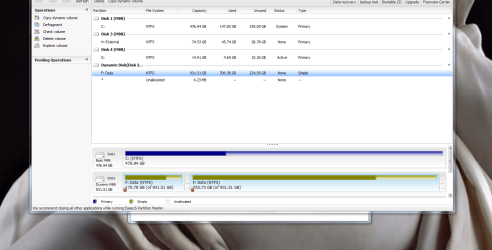
here's a screenshot of easeUS, it only has the 4 operations listed in the left panel available to me for F... the unallocated partitions have no operations available
 

Attachments

  • ease.PNG
    ease.PNG
    115.6 KB · Views: 1

My Computer My Computer

At a glance

Windows 7 Ultimate x64amd X2 550 BE4GHD 4850
Computer type
PC/Desktop
Computer Manufacturer/Model Number
custom build
OS
Windows 7 Ultimate x64
CPU
amd X2 550 BE
Motherboard
Asus m4a785td-m evo
Memory
4G
Graphics Card(s)
HD 4850
Hard Drives
500GB ssd system
1TB storage
80GB ext
Antivirus
avast
Browser
firefox
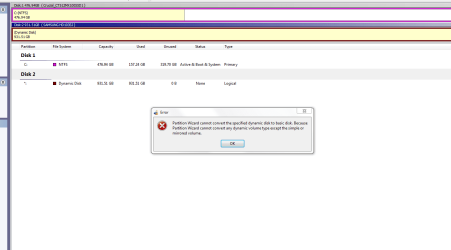
I have tried to use partition wizard as instructed and this is th result I got; apparently it will only convert simple or mirrored dynamic volumes back to basic however it doesn't specify what I have ... please can anyone help there must be a simple solution to this all I did was try to resize a partiyion in disk management and all this dynamic nonsense happenned.
 

My Computer My Computer

At a glance

Windows 7 Ultimate x64amd X2 550 BE4GHD 4850
Computer type
PC/Desktop
Computer Manufacturer/Model Number
custom build
OS
Windows 7 Ultimate x64
CPU
amd X2 550 BE
Motherboard
Asus m4a785td-m evo
Memory
4G
Graphics Card(s)
HD 4850
Hard Drives
500GB ssd system
1TB storage
80GB ext
Antivirus
avast
Browser
firefox
pic of part wiz result
 

Attachments

  • partwiz.PNG
    partwiz.PNG
    18.8 KB · Views: 1

My Computer My Computer

At a glance

Windows 7 Ultimate x64amd X2 550 BE4GHD 4850
Computer type
PC/Desktop
Computer Manufacturer/Model Number
custom build
OS
Windows 7 Ultimate x64
CPU
amd X2 550 BE
Motherboard
Asus m4a785td-m evo
Memory
4G
Graphics Card(s)
HD 4850
Hard Drives
500GB ssd system
1TB storage
80GB ext
Antivirus
avast
Browser
firefox
Hi magruseR,

I had never put my thoughts on dynamic disks and so I usually stay away when I see dynamic disk :D.(gregrocker knows. I had roped him in another thread where I saw a dynamic disk with two separate partitions with the same drive letter with an intermediate partition.:))

But my indulgence in GPT disks gave me atleast some insight into it.

In GPT disks Microsoft creates a 128 MB MSR partition specifically intended to store any reversible data that any software may keep for the reversal process.. For example when you convert a basic GPT disk into a dynamic disk, the data necessary to convert it back to a basic disk will be stored in the 128MB Microsoft System Reserved Partition.This 128MB MSR partition will not be visible to the user in Windows Disk Management and therefore cannot be meddled with by the user and all such data is safely held.

In the case of MBR disk this reverse process data is kept in hidden sectors 1 to 2047.

What I believe has happened in your case is that when you did the clear/delete and whatever else you did to get rid of the first partition, has also cleared the sectors 1 to 2047( Doing a diskpart clean also will clear off these sectors) and therefore you have lost the ability to reverse it from dynamic to basic with that reversal data lost.

Your only option in such a case will be, to backup all data to another drive, delete both the partitions and create a new basic disk. If you cannot do that in Windows Disk Management you can do it with any third party partition/format software.

Also do a drive cleanup as in my post http://www.sevenforums.com/hardware...but-does-not-appear-explorer.html#post3010096 to get rid of old drive data in Windows Registry. ( Do this after disconnecting your 1TB drive. You can reconnect after a reboot on completion of the drive cleanup.)
 
Last edited:

My Computer My Computer

At a glance

Windows 7 Home Premium 32 bit
OS
Windows 7 Home Premium 32 bit
Hiya Jumanji,
You are correct some of the sectors between 1 and 2047 were indeed deleted during my attempt to resize F ... I have now borrowed an ext hdd off a friend to do as you instructed (with easeUS)
Thankyou for your time
 

My Computer My Computer

At a glance

Windows 7 Ultimate x64amd X2 550 BE4GHD 4850
Computer type
PC/Desktop
Computer Manufacturer/Model Number
custom build
OS
Windows 7 Ultimate x64
CPU
amd X2 550 BE
Motherboard
Asus m4a785td-m evo
Memory
4G
Graphics Card(s)
HD 4850
Hard Drives
500GB ssd system
1TB storage
80GB ext
Antivirus
avast
Browser
firefox
Back
Top