HDD Help needed

brightstar

New member
Member
Local time
6:53 PM
Messages
28
Hi everyone
So, I just formatted my computer and installed windows 7 home premium x64 on it, i had windows 8 before that, my HDD is 250GB , but like it suddenly gets less and less and less till it reaches 2 MB and all I installed is google chrome :confused: so if someone can PLEASE help me :( :cry:
any help would be much appreciated,
thanks alot,
bright.
(Note: I can install windows 8 again , i dont care what system I have, i just need something that works properly)
 

My Computer

Computer type
PC/Desktop
Computer Manufacturer/Model Number
Dell Inspiron 530
OS
Windows 7 Home Premium 64 bit
CPU
Intel(R) Core(TM)2 CPU 4400 @ 2.00GHz
Motherboard
Intel(R) Centrino(TM) 2
Memory
4.50 GB RAM
Graphics Card(s)
Radeon X1300/X1550 Series
Sound Card
Realtek HD Audio
Monitor(s) Displays
Philips 170B
Screen Resolution
1280x1024
Keyboard
Intex Keyboard
Mouse
Imation mouse

My Computer

Computer type
Laptop
Computer Manufacturer/Model Number
MSI GE72VR Apache Pro-416
OS
Windows 10x64 Build 1709
CPU
Intel i7 7700HQ Kaby Lake
Motherboard
Micro-Star Intl. MS-179B (U3C1)
Memory
16 GB DDR4 @2400
Graphics Card(s)
Nvidia Geforce GTX 1060
Screen Resolution
1920x1080 120Hz
Hard Drives
256 GB Nvme M.2 SSD

1TB HDD@7200
Cooling
Cooler Blast 4
Keyboard
Steel Series
Antivirus
Bit Defender Free
Browser
Edge
My harddisk size is 250 GB, and i followed everything in that tutorial.
but like, the free space of harddisk storage is decreasing by itself, thats what i need help with, not to let it decrease without doing anything
D:
someone help meeeee
 

My Computer

Computer type
PC/Desktop
Computer Manufacturer/Model Number
Dell Inspiron 530
OS
Windows 7 Home Premium 64 bit
CPU
Intel(R) Core(TM)2 CPU 4400 @ 2.00GHz
Motherboard
Intel(R) Centrino(TM) 2
Memory
4.50 GB RAM
Graphics Card(s)
Radeon X1300/X1550 Series
Sound Card
Realtek HD Audio
Monitor(s) Displays
Philips 170B
Screen Resolution
1280x1024
Keyboard
Intex Keyboard
Mouse
Imation mouse
Is this a new PC with Windows 8 Pre-installed?
 

My Computer

OS
ME/XP/Vista/Win7
no no
i installed windows 8 on it, but then i wanted to format it and i installed windows 7. and this happened
the PC originally came with Windows vista, but that was years ago, and it was all fine till i formatted it yesterday and that happened
also, i formatted it many times before and nothing went wrong, i have had windows 7 before, i have no idea why this is happening now :(
 
Last edited:

My Computer

Computer type
PC/Desktop
Computer Manufacturer/Model Number
Dell Inspiron 530
OS
Windows 7 Home Premium 64 bit
CPU
Intel(R) Core(TM)2 CPU 4400 @ 2.00GHz
Motherboard
Intel(R) Centrino(TM) 2
Memory
4.50 GB RAM
Graphics Card(s)
Radeon X1300/X1550 Series
Sound Card
Realtek HD Audio
Monitor(s) Displays
Philips 170B
Screen Resolution
1280x1024
Keyboard
Intex Keyboard
Mouse
Imation mouse

My Computer

Computer type
Laptop
Computer Manufacturer/Model Number
MSI GE72VR Apache Pro-416
OS
Windows 10x64 Build 1709
CPU
Intel i7 7700HQ Kaby Lake
Motherboard
Micro-Star Intl. MS-179B (U3C1)
Memory
16 GB DDR4 @2400
Graphics Card(s)
Nvidia Geforce GTX 1060
Screen Resolution
1920x1080 120Hz
Hard Drives
256 GB Nvme M.2 SSD

1TB HDD@7200
Cooling
Cooler Blast 4
Keyboard
Steel Series
Antivirus
Bit Defender Free
Browser
Edge

My Computer

Computer type
PC/Desktop
Computer Manufacturer/Model Number
Dell Inspiron 530
OS
Windows 7 Home Premium 64 bit
CPU
Intel(R) Core(TM)2 CPU 4400 @ 2.00GHz
Motherboard
Intel(R) Centrino(TM) 2
Memory
4.50 GB RAM
Graphics Card(s)
Radeon X1300/X1550 Series
Sound Card
Realtek HD Audio
Monitor(s) Displays
Philips 170B
Screen Resolution
1280x1024
Keyboard
Intex Keyboard
Mouse
Imation mouse
There is no image. Can you upload it here ?
 

My Computer

Computer Manufacturer/Model Number
DIY
OS
Windows 7 home premium x64
CPU
AMD FX-4100 AM3+ 3.6GHz 12MB Black Edition
Motherboard
Asus M5A97 Pro
Memory
Crsair vengeance 12Gb DDR3 1600MHz CL9
Graphics Card(s)
Asus GTX 560 1GB
Sound Card
Realtek onboard
Monitor(s) Displays
Hanns G 1680x1050 native
Hard Drives
OCZ 128Gb Petrol ssd
2x500 Gb Samsung
PSU
OCZ StealthXstream II 500W
Internet Speed
8Mb or better
I would Check your Users folders.

you have 50GB of .avi Video clips.
 

My Computer

OS
ME/XP/Vista/Win7
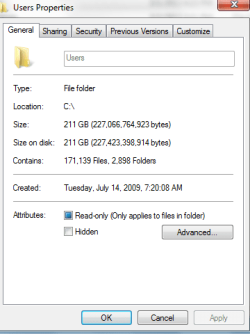
Dang. Look, the Users folder is taking up all my space,
but really, its emp-ty.
EMPTY.
Doesn't make sense
 

Attachments

  • Untitled.png
    Untitled.png
    9.9 KB · Views: 6

My Computer

Computer type
PC/Desktop
Computer Manufacturer/Model Number
Dell Inspiron 530
OS
Windows 7 Home Premium 64 bit
CPU
Intel(R) Core(TM)2 CPU 4400 @ 2.00GHz
Motherboard
Intel(R) Centrino(TM) 2
Memory
4.50 GB RAM
Graphics Card(s)
Radeon X1300/X1550 Series
Sound Card
Realtek HD Audio
Monitor(s) Displays
Philips 170B
Screen Resolution
1280x1024
Keyboard
Intex Keyboard
Mouse
Imation mouse
Hello? Can anyone help me? :'(
 

My Computer

Computer type
PC/Desktop
Computer Manufacturer/Model Number
Dell Inspiron 530
OS
Windows 7 Home Premium 64 bit
CPU
Intel(R) Core(TM)2 CPU 4400 @ 2.00GHz
Motherboard
Intel(R) Centrino(TM) 2
Memory
4.50 GB RAM
Graphics Card(s)
Radeon X1300/X1550 Series
Sound Card
Realtek HD Audio
Monitor(s) Displays
Philips 170B
Screen Resolution
1280x1024
Keyboard
Intex Keyboard
Mouse
Imation mouse
Where did you get the Windows 7 installation disk and what version do you have?
 

My Computers

System One System Two

  • Computer type
    PC/Desktop
    Computer Manufacturer/Model Number
    ALWAYS UNDER CONSTRUCTION
    OS
    Windows 11 Pro
    CPU
    Ryzen 9 5900X
    Motherboard
    Asus X570 Crosshair Viii Hero
    Memory
    32GB G Skill DDR4-3600
    Graphics Card(s)
    EVGA RTX 3080 FTW 3 Ultra
    Sound Card
    On Board/Sennheiser PC37X Headset
    Monitor(s) Displays
    3 X Asus 27"
    Screen Resolution
    2560x1440
    Hard Drives
    2 X 1 TB NVME drives
    PSU
    EVGA 850
    Case
    Phanteks Eclipse P400A
    Cooling
    EVGA 280 AIO
    Keyboard
    Logitech G510s/ Logitech G13
    Mouse
    Logitech G502
    Internet Speed
    24/1
    Antivirus
    ESET/MBAM Pro/SAS Pro
    Browser
    Chrome/ Firefox/ Edge
  • Computer type
    Laptop
    System Manufacturer/Model Number
    Dell 16 Plus
    OS
    Windows 11 Pro
    CPU
    Intel Ultra 9 288V
    Memory
    32 GB LPDDR5X 8533
    Monitor(s) Displays
    16" Mini-LED HDR600 Touch 90 Hz
    Screen Resolution
    2560X1600
    Hard Drives
    1 TB NVME
It's an original version I bought from the electronic store near me, and its Windows 7 Home Premium x64.
 

My Computer

Computer type
PC/Desktop
Computer Manufacturer/Model Number
Dell Inspiron 530
OS
Windows 7 Home Premium 64 bit
CPU
Intel(R) Core(TM)2 CPU 4400 @ 2.00GHz
Motherboard
Intel(R) Centrino(TM) 2
Memory
4.50 GB RAM
Graphics Card(s)
Radeon X1300/X1550 Series
Sound Card
Realtek HD Audio
Monitor(s) Displays
Philips 170B
Screen Resolution
1280x1024
Keyboard
Intex Keyboard
Mouse
Imation mouse

My Computer

Computer type
PC/Desktop
Computer Manufacturer/Model Number
Home Built Desktop By DataTech
OS
Windows 7 Ultimate X64 SP1
CPU
Intel i5-2550K, Differing ~4.4-4.8GHz No built in GPU
Motherboard
ASUS P8Z68-V PRO/GEN3
Memory
16GB G.Skill Sniper 1866MHz @ 2133MHz 2x8GB
Graphics Card(s)
ASUS GTX650TIB-DC2OC-2GD5, (650TI Boost)
Sound Card
Onboard Realtek 5-1
Monitor(s) Displays
Samsung P2570HD
Screen Resolution
1920x1080
Hard Drives
Samsung 840 Pro 256GB SSD for OS, 500GB Seagate Constellation (Enterprise drive) for Data
PSU
Corsair HX650W
Case
Inwin Dragon Rider
Cooling
Hyper 212 EVO w/two Noctua fans, push-pull, @1300 RPM
Keyboard
E-Z Eyes, bright yellow keys with large characters
Mouse
steelseries SENSEI Laser Pro Gaming
Internet Speed
48-51Mbs Mbs down, 11 Mbs up Xfinity Cable
Antivirus
Norton Internet Security 2013
Browser
IE 10, Opera, Pale Moon if needed
Other Info
4 case fans, LG BluRay-RE, ASUS DVD-RW, Mr. Fusion power supply, 1.21 gigawatts.
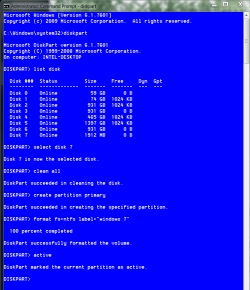
I know what I'm saying when I said "format" , i followed the complete tutorial of how to do a clean install, and heres the screen capture:
 

Attachments

  • Capture.PNG
    Capture.PNG
    25.7 KB · Views: 20

My Computer

Computer type
PC/Desktop
Computer Manufacturer/Model Number
Dell Inspiron 530
OS
Windows 7 Home Premium 64 bit
CPU
Intel(R) Core(TM)2 CPU 4400 @ 2.00GHz
Motherboard
Intel(R) Centrino(TM) 2
Memory
4.50 GB RAM
Graphics Card(s)
Radeon X1300/X1550 Series
Sound Card
Realtek HD Audio
Monitor(s) Displays
Philips 170B
Screen Resolution
1280x1024
Keyboard
Intex Keyboard
Mouse
Imation mouse
Brightstar, do you have copies of your user files on a separate hard drive or other media? Would you like to reinstall and fix this problem? If so, I assume you have only the one hard drive installed, it being a laptop. If you would like to try this, WE will guide you. Pleas let us know when you are ready.
 

My Computers

System One System Two

  • Computer type
    PC/Desktop
    Computer Manufacturer/Model Number
    ALWAYS UNDER CONSTRUCTION
    OS
    Windows 11 Pro
    CPU
    Ryzen 9 5900X
    Motherboard
    Asus X570 Crosshair Viii Hero
    Memory
    32GB G Skill DDR4-3600
    Graphics Card(s)
    EVGA RTX 3080 FTW 3 Ultra
    Sound Card
    On Board/Sennheiser PC37X Headset
    Monitor(s) Displays
    3 X Asus 27"
    Screen Resolution
    2560x1440
    Hard Drives
    2 X 1 TB NVME drives
    PSU
    EVGA 850
    Case
    Phanteks Eclipse P400A
    Cooling
    EVGA 280 AIO
    Keyboard
    Logitech G510s/ Logitech G13
    Mouse
    Logitech G502
    Internet Speed
    24/1
    Antivirus
    ESET/MBAM Pro/SAS Pro
    Browser
    Chrome/ Firefox/ Edge
  • Computer type
    Laptop
    System Manufacturer/Model Number
    Dell 16 Plus
    OS
    Windows 11 Pro
    CPU
    Intel Ultra 9 288V
    Memory
    32 GB LPDDR5X 8533
    Monitor(s) Displays
    16" Mini-LED HDR600 Touch 90 Hz
    Screen Resolution
    2560X1600
    Hard Drives
    1 TB NVME
1. I have everything I need backed up on an external hard drive.
2. My computer is a desktop computer not a laptop. Inspiron 530.
3. I'm ready to format/reinstall anytime.
 

My Computer

Computer type
PC/Desktop
Computer Manufacturer/Model Number
Dell Inspiron 530
OS
Windows 7 Home Premium 64 bit
CPU
Intel(R) Core(TM)2 CPU 4400 @ 2.00GHz
Motherboard
Intel(R) Centrino(TM) 2
Memory
4.50 GB RAM
Graphics Card(s)
Radeon X1300/X1550 Series
Sound Card
Realtek HD Audio
Monitor(s) Displays
Philips 170B
Screen Resolution
1280x1024
Keyboard
Intex Keyboard
Mouse
Imation mouse

My Computer

Computer type
Laptop
Computer Manufacturer/Model Number
MSI GE72VR Apache Pro-416
OS
Windows 10x64 Build 1709
CPU
Intel i7 7700HQ Kaby Lake
Motherboard
Micro-Star Intl. MS-179B (U3C1)
Memory
16 GB DDR4 @2400
Graphics Card(s)
Nvidia Geforce GTX 1060
Screen Resolution
1920x1080 120Hz
Hard Drives
256 GB Nvme M.2 SSD

1TB HDD@7200
Cooling
Cooler Blast 4
Keyboard
Steel Series
Antivirus
Bit Defender Free
Browser
Edge
Dude, I told you I didn't download/install anything except for Google Chrome LOL.
I have no videos. No documents. Nothing.
It's empty. Literally.
And I followed every single step in that tutorial.
 

My Computer

Computer type
PC/Desktop
Computer Manufacturer/Model Number
Dell Inspiron 530
OS
Windows 7 Home Premium 64 bit
CPU
Intel(R) Core(TM)2 CPU 4400 @ 2.00GHz
Motherboard
Intel(R) Centrino(TM) 2
Memory
4.50 GB RAM
Graphics Card(s)
Radeon X1300/X1550 Series
Sound Card
Realtek HD Audio
Monitor(s) Displays
Philips 170B
Screen Resolution
1280x1024
Keyboard
Intex Keyboard
Mouse
Imation mouse
Ok, disconnect all hard drives except the one you want Windows installed on, change your bios, if necessary to boot from the DVD, insert the Installation DVD, save and exit. On startup you should get a message to boot from DVD press any key, do so, you only have about 5 seconds. Then you should see windows loading files. At the first screen, do not select your language, hold down the shift key and press F10. That should bring up a command prompt. You are going to erase everything on that hard drive, there will be nothing left. After you press shift + F10 you will get a command prompt window. I will tell you what to type, press enter after each command do not type what is in parenthesis, it is just for your info. Type these commands:
diskpart (press enter and wait for the screen to reply diskpart)
List disk ( enter, you should have only 1 disk numbered 0)
select disk 0 ( the window should reply disk 0 is the selected disk)
clean all (press enter, go have lunch. It will take several hours and will seem to be doing nothing, but it is. It will tell you when it is finished, wait until it is finished, it is wiping you hard drive clean)
create partition primary(press enter, it will only take a couple of seconds and will say completed)
select partition 1 (enter. You are selecting the partition you just created it will respond partition 1 is the selected partition)
format fs=ntfs quick (enter,you are formatting the partition. It will tell you when it is finished)
atctive ( you are marking the partition as active for Windows to boot from)
exit (press enter,this will exit from diskpart, but you will still be in the console under X:sources)
exit (enter, this will exit the command prompt and you will be back at the select your language window.)
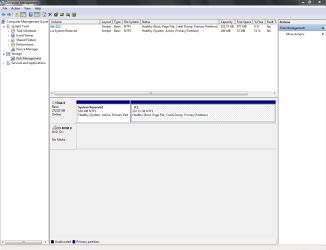
continue as usual with the install. do not format the disk, when you get to 'where do you want to install windows, select the drive and begin the install. If you have any problems, let us know. It should go smoothly. When you are finished, and installed your drivers and all windows updates, please post a screenshot of disk management. If you have any questions, let us know. It will look like this, except you will have only 1 drive showing and will select drive 0, and you will put format fs=ntfs quick, and you do not have to put the label tag unless you want to, but if you do wrap the name in quotation marks.

format hard drive clean all.PNG
 
Last edited:

My Computers

System One System Two

  • Computer type
    PC/Desktop
    Computer Manufacturer/Model Number
    ALWAYS UNDER CONSTRUCTION
    OS
    Windows 11 Pro
    CPU
    Ryzen 9 5900X
    Motherboard
    Asus X570 Crosshair Viii Hero
    Memory
    32GB G Skill DDR4-3600
    Graphics Card(s)
    EVGA RTX 3080 FTW 3 Ultra
    Sound Card
    On Board/Sennheiser PC37X Headset
    Monitor(s) Displays
    3 X Asus 27"
    Screen Resolution
    2560x1440
    Hard Drives
    2 X 1 TB NVME drives
    PSU
    EVGA 850
    Case
    Phanteks Eclipse P400A
    Cooling
    EVGA 280 AIO
    Keyboard
    Logitech G510s/ Logitech G13
    Mouse
    Logitech G502
    Internet Speed
    24/1
    Antivirus
    ESET/MBAM Pro/SAS Pro
    Browser
    Chrome/ Firefox/ Edge
  • Computer type
    Laptop
    System Manufacturer/Model Number
    Dell 16 Plus
    OS
    Windows 11 Pro
    CPU
    Intel Ultra 9 288V
    Memory
    32 GB LPDDR5X 8533
    Monitor(s) Displays
    16" Mini-LED HDR600 Touch 90 Hz
    Screen Resolution
    2560X1600
    Hard Drives
    1 TB NVME
Back
Top