HDD is incredibly slow after reinstalling Windows on SSD

EpicKnarvik97

New member
Local time
3:10 AM
Messages
3
I had to reinstall Windows 7 Home Premium x64 on my SSD, because it didn't boot properly. I decided to make a clean install. When I chose to install Windows onto the SSD, it told me it couldn't install to the specified location. When I plugged out my HDD, it worked.

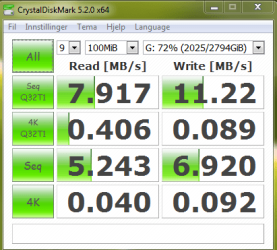
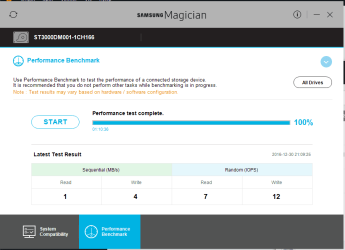
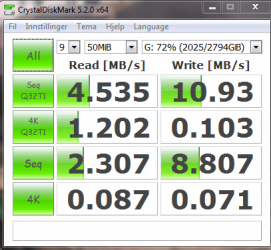
When the Windows installation finished, I tried plugging the HDD in again. It seemed that Windows was unable to start. I tried waiting, and instead, the Windows loading time had increased from 2-3 seconds to 2-3 minutes. The HDD is running incredibly slow. Here is some benchmarks:
HDD1.PNG

HDD2.PNG

HDD3.PNG

HDD4.PNG

Here is the information Samsung Magician gives about the HDD:
Code:
PHYSICALDRIVE4:
            Model Name    ST3000DM001-1CH166
            Manufacturer    ST
            Firmware Version    CC26
            Size    2795GB
            Max LBA    5860533168
            ATA Standard    ATA8-ACS
            Word Wide Name    5000C50050932F09
            Multiple Sector    16

            Partition1:
                Partition Type    MS Reserved Partition
                Start Offset (MB)    0
                Partition Length (MB)    128

            Partition2:
                Partition Type    Primary Partition
                Start Offset (MB)    129
                Partition Length (MB)    2861458

            Volume G:
                Volume Type    Games and Storage
                File System    NTFS
                Total Size (MB)    2861457
                Used Space (MB)    2086015
                Free Space (MB)    775442
                Free Percentage    27.10
I have no idea what the problem is. It has never been as slow as this. Copying files to and from the HDD takes forever, and playing games stored on it doesn't work well.

While trying to defragment the HDD, it stops when it reaches 83% on analysis. I tried to control the volume for errors (including looking for damaged sectors), but that also got stuck at one point.

Edit: I have had a lot of power outages lately, which probably has something to do with why the SSD wouldn't boot.
 
Last edited:

My Computer My Computer

At a glance

Windows 7 Home Premium x64Intel(R) Core(TM) i5-3570 CPU @ 3.40GHzCorsair Dominator DDR3 1600MHz 8GB x 4Sapphire Radeon R9 380X 4GB GDDR5 NITRO
Computer type
PC/Desktop
Computer Manufacturer/Model Number
custom build
OS
Windows 7 Home Premium x64
CPU
Intel(R) Core(TM) i5-3570 CPU @ 3.40GHz
Motherboard
MSI Z77MA-G45 (MS-7759)
Memory
Corsair Dominator DDR3 1600MHz 8GB x 4
Graphics Card(s)
Sapphire Radeon R9 380X 4GB GDDR5 NITRO
Sound Card
Built in
Monitor(s) Displays
3xG246HLBbid
Screen Resolution
1920x1080
Hard Drives
Samsung SSD 840 Series 238472MB
ST3000DM001-1CH166 2861457MB
ST31000524AS 953866MB
WDC WD5000AAKS-00UU3A0 476937MB
PSU
Corsair HX 1050W PSU
Case
Antec Lanboy air Blue Black
Cooling
3x ANTEC TWO COOL 140 BLUE LED FAN
Keyboard
Logitech G19
Mouse
R.A.T 9
Antivirus
None
Browser
Firefox, Google Chrome
First thought, do you have the SSD connected to a SATA III port on the motherboard and using a SATA III certified data cable?

Second, I would do another clean install, after "first thought" items, without the other drive connected. Sounds like a possible corrupt install.
 

My Computer My Computer

At a glance

Windows 10 64 bitIntel i7 6700K16GB Corsair DominatorIntel CPU Graphics
Computer type
PC/Desktop
Computer Manufacturer/Model Number
My Own Build
OS
Windows 10 64 bit
CPU
Intel i7 6700K
Motherboard
ASUS ROG Maximus VIII Hero
Memory
16GB Corsair Dominator
Graphics Card(s)
Intel CPU Graphics
Sound Card
RealTek
Monitor(s) Displays
27" Dell S2719dgf
Screen Resolution
2560X1440
Hard Drives
1 TB Samsung 850 EVO SSD for Win 10 Pro
500GB Samsung 850 EVO SSD for Win 10 Insider
2 TB drive for backup
PSU
EVGA Supernova 750G2
Case
BeQuiet Silent Base 600
Cooling
Deepcool Captain 120EX
Keyboard
Microsoft Wireless 2000
Mouse
Microsoft wireless
Internet Speed
100 MB/sec (Cable)
Antivirus
Microsoft Defender and Malwarebytes
Browser
Edge/Firefox
Other Info
Cakewalk (Sonar) by BandLab and Studio One 4.1 Pro recording studio software. MOTU 896Mk3 Hybrid recording interface, Frontier Tranzport wireless control unit, Behringer X-Touch Control Surface.
Five USB connected optical drives for CD Audio production using Nero BurningROM
First thought, do you have the SSD connected to a SATA III port on the motherboard and using a SATA III certified data cable?

Second, I would do another clean install, after "first thought" items, without the other drive connected. Sounds like a possible corrupt install.

Both the SSD and HDD are connected to the motherboard through a SATA III cable and in a SATA III port.

Which drive do you mean? The SSD is the disk that works fine(550MB/s Read), and has Windows installed. The HDD has only a bunch of files and is the slow one. Another disk that should be slower than the HDD in question, has 108MB/s Read speed, versus the HDD's 1MB/s.

The HDD has went from functioning normal, to being unreasonably slow, during a process it was excluded from.
 

My Computer My Computer

At a glance

Windows 7 Home Premium x64Intel(R) Core(TM) i5-3570 CPU @ 3.40GHzCorsair Dominator DDR3 1600MHz 8GB x 4Sapphire Radeon R9 380X 4GB GDDR5 NITRO
Computer type
PC/Desktop
Computer Manufacturer/Model Number
custom build
OS
Windows 7 Home Premium x64
CPU
Intel(R) Core(TM) i5-3570 CPU @ 3.40GHz
Motherboard
MSI Z77MA-G45 (MS-7759)
Memory
Corsair Dominator DDR3 1600MHz 8GB x 4
Graphics Card(s)
Sapphire Radeon R9 380X 4GB GDDR5 NITRO
Sound Card
Built in
Monitor(s) Displays
3xG246HLBbid
Screen Resolution
1920x1080
Hard Drives
Samsung SSD 840 Series 238472MB
ST3000DM001-1CH166 2861457MB
ST31000524AS 953866MB
WDC WD5000AAKS-00UU3A0 476937MB
PSU
Corsair HX 1050W PSU
Case
Antec Lanboy air Blue Black
Cooling
3x ANTEC TWO COOL 140 BLUE LED FAN
Keyboard
Logitech G19
Mouse
R.A.T 9
Antivirus
None
Browser
Firefox, Google Chrome
There is something "funny" going on between the hard drive and the SSD and possibly the SATA controller on the motherboard.
You stated you couldn't install Windows on the SSD until the hard drive was connected. That suggests something going on with the SATA controller on ports on the motherboard. Did you try resetting the BIOS to its defaults (even if it was at default)?
Did you try moving the SSD to a different SATA III port?

Now that you have Windows installed, you say the hard drive(s) are causing long Windows boot up. That too could be related to the motherboard/BIOS.
 

My Computer My Computer

At a glance

Windows 10 64 bitIntel i7 6700K16GB Corsair DominatorIntel CPU Graphics
Computer type
PC/Desktop
Computer Manufacturer/Model Number
My Own Build
OS
Windows 10 64 bit
CPU
Intel i7 6700K
Motherboard
ASUS ROG Maximus VIII Hero
Memory
16GB Corsair Dominator
Graphics Card(s)
Intel CPU Graphics
Sound Card
RealTek
Monitor(s) Displays
27" Dell S2719dgf
Screen Resolution
2560X1440
Hard Drives
1 TB Samsung 850 EVO SSD for Win 10 Pro
500GB Samsung 850 EVO SSD for Win 10 Insider
2 TB drive for backup
PSU
EVGA Supernova 750G2
Case
BeQuiet Silent Base 600
Cooling
Deepcool Captain 120EX
Keyboard
Microsoft Wireless 2000
Mouse
Microsoft wireless
Internet Speed
100 MB/sec (Cable)
Antivirus
Microsoft Defender and Malwarebytes
Browser
Edge/Firefox
Other Info
Cakewalk (Sonar) by BandLab and Studio One 4.1 Pro recording studio software. MOTU 896Mk3 Hybrid recording interface, Frontier Tranzport wireless control unit, Behringer X-Touch Control Surface.
Five USB connected optical drives for CD Audio production using Nero BurningROM
Thread starter mentions power outages; not having an UPS in place can lead to hardware problems due to power off, then power on, then power off, then power on -- can cause both hardware damage and damage to Windows operations.
 

My Computer My Computer

At a glance

Windows 7 Professional 64-bitDesktop i5; Acers i5 & i7desktop 16GB; 1 Acer 8GB & 1 Acer 16GB
Computer type
PC/Desktop
Computer Manufacturer/Model Number
Antec desktop; Acer Aspire laptops
OS
Windows 7 Professional 64-bit
CPU
Desktop i5; Acers i5 & i7
Memory
desktop 16GB; 1 Acer 8GB & 1 Acer 16GB
Hard Drives
1TB split into 2 equal partitions [OS and data] usable by RJS
Internet Speed
AT&T DSL
Browser
FF, GChrome, msIE
Other Info
Windows 7 Firewall, Emsisoft AM/AV, MSE [scan-only], SpywareBlaster, Ruiware/BillP combine
There is something "funny" going on between the hard drive and the SSD and possibly the SATA controller on the motherboard.
You stated you couldn't install Windows on the SSD until the hard drive was connected. That suggests something going on with the SATA controller on ports on the motherboard. Did you try resetting the BIOS to its defaults (even if it was at default)?
Did you try moving the SSD to a different SATA III port?

Now that you have Windows installed, you say the hard drive(s) are causing long Windows boot up. That too could be related to the motherboard/BIOS.

You misread my post. It says I had to remove the HDD to install Windows.
I can try resetting the bios.
The HDD and SSD are using the only SATA III ports I have, and I could try to swap them, but it's kind of cramped in my case because I actually have 1 cd-rom, 4x HDDs and 1x SSD.

Edit: I reset my BIOS. It said BOOTMGR is missing when I restarted my computer. I inserted my Windows 7 installation DVD, and chose to replace the windows version already installed. I did not get an error about my HDD this time. I'll make another edit when the installation is finished.
 
Last edited:

My Computer My Computer

At a glance

Windows 7 Home Premium x64Intel(R) Core(TM) i5-3570 CPU @ 3.40GHzCorsair Dominator DDR3 1600MHz 8GB x 4Sapphire Radeon R9 380X 4GB GDDR5 NITRO
Computer type
PC/Desktop
Computer Manufacturer/Model Number
custom build
OS
Windows 7 Home Premium x64
CPU
Intel(R) Core(TM) i5-3570 CPU @ 3.40GHz
Motherboard
MSI Z77MA-G45 (MS-7759)
Memory
Corsair Dominator DDR3 1600MHz 8GB x 4
Graphics Card(s)
Sapphire Radeon R9 380X 4GB GDDR5 NITRO
Sound Card
Built in
Monitor(s) Displays
3xG246HLBbid
Screen Resolution
1920x1080
Hard Drives
Samsung SSD 840 Series 238472MB
ST3000DM001-1CH166 2861457MB
ST31000524AS 953866MB
WDC WD5000AAKS-00UU3A0 476937MB
PSU
Corsair HX 1050W PSU
Case
Antec Lanboy air Blue Black
Cooling
3x ANTEC TWO COOL 140 BLUE LED FAN
Keyboard
Logitech G19
Mouse
R.A.T 9
Antivirus
None
Browser
Firefox, Google Chrome
ALWAYS disconnect ALL other drives when installing Windows or you may finish having the boot loader on another disk.
 

My Computers My Computers

  • At a glance

    Windows 7 HP 64i5 6600K - 800MHz to 4200MHz4+4G GSkill DDR4 3000IG - Intel 530
    Computer type
    PC/Desktop
    Computer Manufacturer/Model Number
    custom build
    OS
    Windows 7 HP 64
    CPU
    i5 6600K - 800MHz to 4200MHz
    Motherboard
    GA-Z170-HD3P
    Memory
    4+4G GSkill DDR4 3000
    Graphics Card(s)
    IG - Intel 530
    Monitor(s) Displays
    Samsung 226BW
    Screen Resolution
    1680x1050
    Hard Drives
    (1) -1 SM951 – 128GB M.2 AHCI PCIe SSD drive for Windows 7 and Lubuntu
    (2) -1 WD SATA 3 - 1T for Data
    (3) -1 WD SATA 3 - 1T for backup
    PSU
    Thermaltake 450W TR2 gold
    Keyboard
    Old and good Chicony mechanical keyboard
    Mouse
    Logitech mX performance - 9 buttons (had to disable some)
    Internet Speed
    500Mb/s
    Browser
    Firefox 64
    Other Info
    TinyWall firewall
  • At a glance

    Windows 7 Proi7-4500U 800MHz to 3.0GHz(4+4)G DDR3 1600IG intel 4400 + NVIDIA GeForce GT 745M
    Computer type
    Laptop
    System Manufacturer/Model Number
    Asus Q550LF
    OS
    Windows 7 Pro
    CPU
    i7-4500U 800MHz to 3.0GHz
    Motherboard
    Asus Q550LF
    Memory
    (4+4)G DDR3 1600
    Graphics Card(s)
    IG intel 4400 + NVIDIA GeForce GT 745M
    Sound Card
    Realtek
    Monitor(s) Displays
    LG Display LP156WF4-SPH1
    Screen Resolution
    1920 x 1080
    Hard Drives
    BX500 120G SSD for Windows and programs +
    1T HDD for data
    Internet Speed
    500 Mb/s
    Browser
    Firefox
    Other Info
    TinyWall firewall
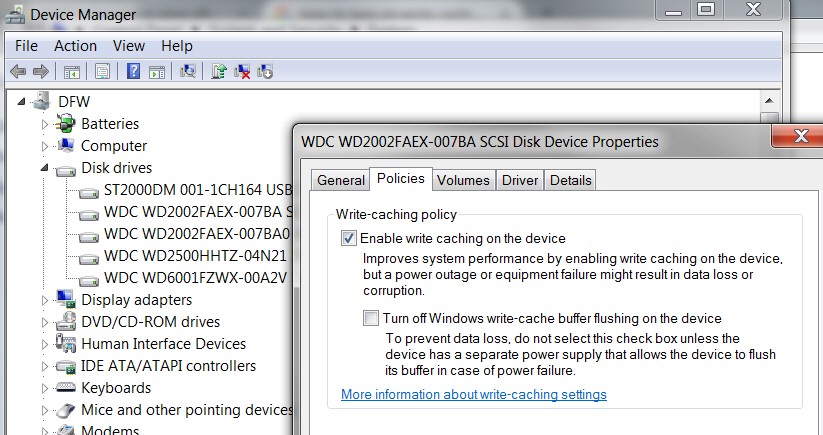
Just in passing, I'd check to ensure that somehow the HDD hasn't had its "write cache" policy disabled. It should be ENABLED (i.e. "checked").

dIY9ip.jpg


Turn Disk Write Caching On or Off


  1. Right-click My Computer, and then click Properties.
  2. Click the Hardware tab, and then click Device Manager.
  3. Expand Disk Drives.
  4. Right-click the drive on which you want to turn disk write caching on or off, and then click Properties.
  5. Click the Policies tab.
  6. Click to select or clear the Enable write caching on the disk check box as appropriate.
  7. Click OK.
Same is true for your SSD.
 

My Computer My Computer

At a glance

Windows 7 Pro x64 (1), Win7 Pro X64 (2)i5-3350p 3.1Ghz/6MB-cache (1); E8400 3.0Ghz/6...8GB PC3-12800 DDR3 (1); 4GB PC3-10600 DDR3 (2)ATI HD7750 (1), (see TV cards); ATI R7 250 (2)
Computer type
PC/Desktop
Computer Manufacturer/Model Number
Home-built, two systems (1) and (2)
OS
Windows 7 Pro x64 (1), Win7 Pro X64 (2)
CPU
i5-3350p 3.1Ghz/6MB-cache (1); E8400 3.0Ghz/6MB-cache (2)
Motherboard
ASUS P8Z77-V Pro (1); ASUS P5Q3 (2)
Memory
8GB PC3-12800 DDR3 (1); 4GB PC3-10600 DDR3 (2)
Graphics Card(s)
ATI HD7750 (1), (see TV cards); ATI R7 250 (2)
Sound Card
Realtek ALC892 HD Audio (1); Realtek ALC1200 HD Audio (2)
Monitor(s) Displays
Eizo HD2441W LCD, Eizo S2433W (1); Eizo 24" S2433W (2)
Screen Resolution
1920x1200, 1920x1200 (1); 1920x1200 (2)
Hard Drives
(1) 1TB SATA-II (7200RPM), 2x2TB SATA-III (7200RPM), 250GB SATA-III (10000RPM) for OS; 2x2TB external USB 3.0

(2) 320GB SATA-II (7200RPM), 750GB SATA-II (7200RPM), 150GB SATA-II (10000RPM) for OS; 2TB external USB 3.0
PSU
Nesteq ECS-6001 600W (1); Nesteq ECS-5001 500W (2)
Case
Acousti-Case 360 (1) and (2)
Cooling
Noctua NH-U12P SE2 for CPU, 2x120mm case fans (1) and (2)
Keyboard
IBM PS/2 (1) and (2)
Mouse
Logitech MX Revolution wireless (1); Microsoft wired (2)
Internet Speed
100mbps down / 10mbps up
Antivirus
Microsoft Security Essentials; Malwarebyte Anti-Malware Pro
Browser
Firefox
Other Info
Ceton InfiniTV 4-tuner cablecard-enabled TV card as well as Hauppauge HVR-2250 OTA/ATSC 2-tuner TV card in (1), running under Win7 WMC
Back
Top