Incredibly slow start of Windows 7 Ultimate , 64 bit- 5 minutes!

kurka84

New member
Local time
8:50 AM
Messages
4
Hi
I have following problem:
It takes 5 minutes from turning Pc on to the appearance of the icons on the desktop -I know that this not normal and I find very frustrating.
I have this problem for a while so I cannot specifically pinpoint when did it started.
After " starting windows" screen ,there is blank black screen with a cursor that is also flashing few times.
I have looked on other forum which suggested driver issues. I have dowloaded progam called Slim Drivers to check any missing drivers but everything seems to be in place.
I dont have any viruses -I have Bitdefender Total security installed.
I have also program called System Mechanic to optimize the system- so I scanned and removed registry errors, done defragemntation and reduced startup programs to minium.
Apart from this starting issue , Windows works fine.

Can you please help me with this?
I can post a log of my Windows as I have seen that is helpful, however I dont know how to do it as Im not so advanced.
Thanks


PS- Maybe that will be important. Once I have tried to do system repait from the Cd but it didnt show my system - Cd didnt see that system on the disk C so i could do that repair. I have just one hard drive- disk C - no partitions. Maybe something is messed up there.
 

My Computer My Computer

At a glance

Windows 7 Ultimate 64bit
Computer type
PC/Desktop
OS
Windows 7 Ultimate 64bit
Hello,

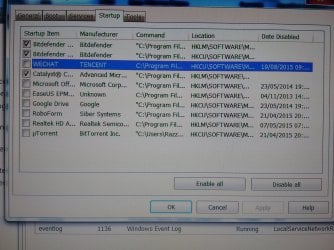
It would be really helpful if you can provide a screenshot of your startup programs.
To do that, go to your start menu --> type " msconfig " --> press enter --> startup tab

Once you've done that please post your screenshot here.

Please also note that many of those softwares which promise users to make someone's PC much faster actually often end up making it much slower, so I would not recommend you to play around with them. You dont even need them, you have Windows features you can use and if you dont like using them you can use Priform's CCleaner / Defraggler

When you need to remove your junk files you can use your Window's feature " Disk Cleanup ", or just use CCleaner which is safe to use and has been around for a while, one of the most recommended PC optimization software.
About cleaning your registry files, you dont have to do that often, because it's kinda risky to do it even with the safest software which I would say is CCleaner.

Defragmentation can be done either by Window's built-in feature or again another software by Priform ( the same company which owns CCleaner ) - Defraggler.
From now on, bear in mind to use one of those two options.

As for your partitions problem, you can fix that by shrinking the volume of your disk C ( example would be if you have 465 GB you can take 233 GB from your disk C and create a new disk D, so you would have disk C with 232 GB and new disk D with 233 GB ).
Please let me know if you're interested into doing that.

Looking forward to your reply.
 

My Computer My Computer

At a glance

Windows 7 Professional 64bitIntel Xeon E5645 6 cores 2,4 GHz 50% Overcloc...Kingston 3x4GB DDR3 1600 MHzMSI Nvidia GTX 560 Ti Twin Frozr ii OC
Computer type
PC/Desktop
OS
Windows 7 Professional 64bit
CPU
Intel Xeon E5645 6 cores 2,4 GHz 50% Overclocked to 3,6 GHz
Motherboard
MSI X58 Pro-E
Memory
Kingston 3x4GB DDR3 1600 MHz
Graphics Card(s)
MSI Nvidia GTX 560 Ti Twin Frozr ii OC
Screen Resolution
19'
Hard Drives
1X Western Digital Blue 1TB
1x Western Digital Blue 500GB
PSU
Cooler Master B500 V2 500W
Internet Speed
30 MB/s download speed, 15 mb/s upload speed
Antivirus
Avast Free
Browser
Mozilla
Thank you for quick reply

I really dont think my fault is related to the software optimizing the Pc. Please note that I had a CC cleaner in the past and the same was happening -so thats why I actually downloaded System Mechanic to remove this problem. Therefore, to uninstall this program and install CC cleaner again will be my last resource. I think problem is somewhere else.

Do you think this can be related to the fact I have one partition on my drive? - I dont have C and D with data ,but just C ( I have 297 Gb hard drive including 137 gb free space) .Do you think I should devide it ? Is it safe?What are advantages of doing it? Sorry for too many questions but I looked for answers online and its very time consuming as there are many opinions because everyone case is diffrent.

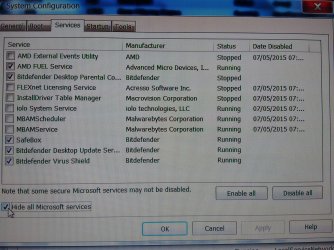
I did few screenshots for you to see of the start up and processes.

Thank you for your help.
 

Attachments

  • IMG_20150819_095905038.jpg
    IMG_20150819_095905038.jpg
    1.1 MB · Views: 3
  • IMG_20150819_095856969.jpg
    IMG_20150819_095856969.jpg
    1.9 MB · Views: 2

My Computer My Computer

At a glance

Windows 7 Ultimate 64bit
Computer type
PC/Desktop
OS
Windows 7 Ultimate 64bit
Dividing your disk C is safe, it just divides the free space and I have already done the same.
By the way, is your disk C perhaps full ? Please do note that at least 10% free space in the disk where your windows is installed is recommended to avoid performance problems.

Can you try a clean boot to see if that helps ?
Once you've done it see the time it took your PC to start.

https://support.microsoft.com/en-us/kb/929135
 

My Computer My Computer

At a glance

Windows 7 Professional 64bitIntel Xeon E5645 6 cores 2,4 GHz 50% Overcloc...Kingston 3x4GB DDR3 1600 MHzMSI Nvidia GTX 560 Ti Twin Frozr ii OC
Computer type
PC/Desktop
OS
Windows 7 Professional 64bit
CPU
Intel Xeon E5645 6 cores 2,4 GHz 50% Overclocked to 3,6 GHz
Motherboard
MSI X58 Pro-E
Memory
Kingston 3x4GB DDR3 1600 MHz
Graphics Card(s)
MSI Nvidia GTX 560 Ti Twin Frozr ii OC
Screen Resolution
19'
Hard Drives
1X Western Digital Blue 1TB
1x Western Digital Blue 500GB
PSU
Cooler Master B500 V2 500W
Internet Speed
30 MB/s download speed, 15 mb/s upload speed
Antivirus
Avast Free
Browser
Mozilla
I have done everything that was in the link you gave me -selective startup with all startup items disabled apart from Microsoft services and the startup time was exactly the same as usual- long, 4-5 minutes. I have 137 GB of 297 free so space is not an issue.
Any other ideas ?Thanks
 

My Computer My Computer

At a glance

Windows 7 Ultimate 64bit
Computer type
PC/Desktop
OS
Windows 7 Ultimate 64bit
Perhaps it's your antivirus' " early scanner " causing this, can you try disabling it to see if that helps ?
To disable the boot scanner:
GUI>Antivirus>Check the "Custom" box>Miscellaneous tab>uncheck the "Early boot scan"

That should reduce the time your PC takes to boot, though I cant tell you how much exactly.

You should also check your devices drivers, in case there is any outdated drivers you shall update them.
Go to your start menu --> type Device Manager --> hit enter
You'll see a list of your devices, double left click on each one of those and then right click, update driver software ( let windows search automatically for newer drivers version ).

If it doesnt reduce it by a lot, you might have a virus/ infection present in your system which is causing the slow boot, I would recommend you to run a full scan with your antivirus as well as with Malwarebytes.

https://www.malwarebytes.org/mwb-download/
 

My Computer My Computer

At a glance

Windows 7 Professional 64bitIntel Xeon E5645 6 cores 2,4 GHz 50% Overcloc...Kingston 3x4GB DDR3 1600 MHzMSI Nvidia GTX 560 Ti Twin Frozr ii OC
Computer type
PC/Desktop
OS
Windows 7 Professional 64bit
CPU
Intel Xeon E5645 6 cores 2,4 GHz 50% Overclocked to 3,6 GHz
Motherboard
MSI X58 Pro-E
Memory
Kingston 3x4GB DDR3 1600 MHz
Graphics Card(s)
MSI Nvidia GTX 560 Ti Twin Frozr ii OC
Screen Resolution
19'
Hard Drives
1X Western Digital Blue 1TB
1x Western Digital Blue 500GB
PSU
Cooler Master B500 V2 500W
Internet Speed
30 MB/s download speed, 15 mb/s upload speed
Antivirus
Avast Free
Browser
Mozilla
Sorry for late reply -I was away.

I have unchecked "early boot scan" from BD and but there was no change in booting time.
All drivers are up to date.
Scanned with Malwarebytes and Bitdefender- no viruses found.

Any other ideas how to resolve this long booting time ?Thanks
 

My Computer My Computer

At a glance

Windows 7 Ultimate 64bit
Computer type
PC/Desktop
OS
Windows 7 Ultimate 64bit
I really cant think of what else might be causing your PC slow boot.

Hmmm, can you once again try to defragment your disk ? Use either Defraggler by Priform or the Windows built feature to do this.
Also, use CCleaner / Windows built feature to remove your junk files
 

My Computer My Computer

At a glance

Windows 7 Professional 64bitIntel Xeon E5645 6 cores 2,4 GHz 50% Overcloc...Kingston 3x4GB DDR3 1600 MHzMSI Nvidia GTX 560 Ti Twin Frozr ii OC
Computer type
PC/Desktop
OS
Windows 7 Professional 64bit
CPU
Intel Xeon E5645 6 cores 2,4 GHz 50% Overclocked to 3,6 GHz
Motherboard
MSI X58 Pro-E
Memory
Kingston 3x4GB DDR3 1600 MHz
Graphics Card(s)
MSI Nvidia GTX 560 Ti Twin Frozr ii OC
Screen Resolution
19'
Hard Drives
1X Western Digital Blue 1TB
1x Western Digital Blue 500GB
PSU
Cooler Master B500 V2 500W
Internet Speed
30 MB/s download speed, 15 mb/s upload speed
Antivirus
Avast Free
Browser
Mozilla
Back
Top