HDD isnt being recognised

Bobsyouruncle12

New member
Local time
1:03 PM
Messages
3
Hello,

Hope its the right forum.

My HDD isnt being recognised by my computer or anyone elses.

Pretty sure its a simple solution but I dont know how to go about fixing it.

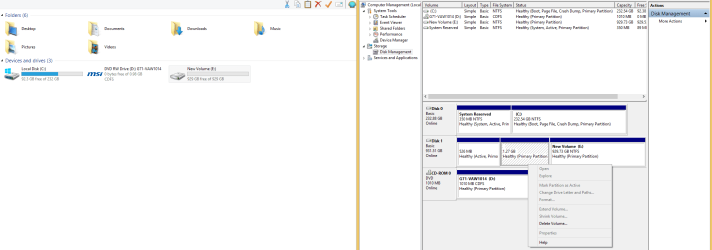
Here is what shows up in Disk Management. When I right click it its all greyed out.

Appreciate any help.

EDIT: It used to work on this computer without a problem. Suddenly it stopped.
 

Attachments

  • Harddisk.png
    Harddisk.png
    41.1 KB · Views: 6

My Computer

Computer type
PC/Desktop
Computer Manufacturer/Model Number
Unknown
OS
Windows 8
CPU
Unknown
Motherboard
Unknown
Memory
16GB ram
Graphics Card(s)
Unknown
Hard Drives
Unknown
Antivirus
Unknown
Browser
Unkown
If it wasn`t being recognized it wouldn`t show up in Disk Management, it shows up fine.

It doesn`t show up in Explorer because there are no drive letters assigned to it.

Right click on the unallocated space with the black bar above it, Choose New Simple volume to format the space and give it a letter.

It will then show up in your computer and any other pc as well.

Those 2 small partitions must be there for a reason, so I wouldn`t mess with them. Although, if this is an internal drive, there`s no reason for them to be there, especially the partition marked active.

If you had data on it, it`s most likely gone now.
 
Last edited:

My Computer

Computer type
PC/Desktop
Computer Manufacturer/Model Number
Skylake Special #666
OS
Windows 10 Pro x64
CPU
Intel Core i7 6700K
Motherboard
Asus Sabertooth Z170 Mark 1
Memory
GSkill TridentZ RGB 16GB 3600 16-16-16-36
Graphics Card(s)
EVGA GTX 980 Ti SC x2
Sound Card
Realtek High Definition
Monitor(s) Displays
AOC G2460PG
Screen Resolution
1920 x 1080 144Hz
Hard Drives
Samsung 860 Pro 256GB, Seagate Barracuda 4TB x2
PSU
EVGA 1000 P2, EVGA White Custom Braided Cables
Case
Corsair Vengeance C70 Gunmetal Black
Cooling
Corsair H100i v2, Corsair ML120 x2, Thermal Grizzly Kryonaut
Keyboard
Logitech G910 Orion Spectrum
Mouse
Logitech G700s
Internet Speed
Verizon Fios Quantum Gateway 75/75
Antivirus
Windows Defender, Malwarebytes Free 3.8.3
Browser
Chrome
Other Info
Corsair SP120 x4, LG Blu-ray Drive, Durabrand HT-395 100 Watt Dolby Digital Amp, Corsair H2100 Wireless 7.1 Headset
Thanks. It worked in the fact I can see the HDD in my computer however its showing as 929GB free of 929GB in my computer. How would I be able to access the other part?

The partition was there because this HDD was in my laptop, so maybe that was a possible cause of it.

Will it make a difference to the drive?
 

My Computer

Computer type
PC/Desktop
Computer Manufacturer/Model Number
Unknown
OS
Windows 8
CPU
Unknown
Motherboard
Unknown
Memory
16GB ram
Graphics Card(s)
Unknown
Hard Drives
Unknown
Antivirus
Unknown
Browser
Unkown
This is what its showing now.

How can I access the 1.27GB I already have?

Please help
 

Attachments

  • Disk.png
    Disk.png
    42.4 KB · Views: 3

My Computer

Computer type
PC/Desktop
Computer Manufacturer/Model Number
Unknown
OS
Windows 8
CPU
Unknown
Motherboard
Unknown
Memory
16GB ram
Graphics Card(s)
Unknown
Hard Drives
Unknown
Antivirus
Unknown
Browser
Unkown
Hi,

Those are OEM partitions, wherein the OEM has deliberately changed the Partition ID so that users cannot access it and meddle with it .:)

As I see, you have no data whatsoever on this drive. Right?

In that case you can delete all the volumes and then you should see all space as unallocated. Then create new volume/s and format the drive. You will have the whole drive accessible. If you cannot delete the volumes in Windows Disk Management then install Minitools Partition Wizard Home Edition 8.1.1 and do it . Free download Magic Partition Manager Software, partition magic alternative, free partition magic, partition magic Windows 7 and server partition software - Partition Wizard Online

(If you are curious to see what is inside those partitions, then you must change the partition ID to the one that windows will recognise.You can then assign a drive letter with partition Wizard to access the partitions. See this post http://www.sevenforums.com/hardware...gn-drive-letter-hd-partition.html#post2856016 and the following posts therein)
 
Last edited:

My Computer

OS
Windows 7 Home Premium 32 bit
Back
Top