HDD missing 50gb help

XGamer

New member
Local time
5:43 PM
Messages
14
Can some 1 plz help
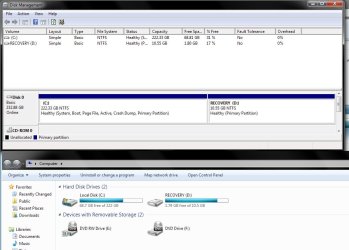
i have a 250gb hdd and 28gb is for recovery (visable in my computer) then windows is 10gb and my acount is 86gb and there is 76gb free
so all to gether im missing about 50gb


plz help me
 

My Computer

Computer Manufacturer/Model Number
compaq presario cq71 125sa
OS
windows 7 home prem 32 bit
CPU
T4200
Memory
4 gb
Graphics Card(s)
Mobile intel 4 series express chipset family
Monitor(s) Displays
17'' 1080p
Hard Drives
250gb
Welcome!

Could you please post a screenshot of your Disk Management window please?

I suspect it is just missing a letter, that's all. Right-click on the 50GB partition in disk management and click Assign drive letter.

~JK
 

My Computer

Computer Manufacturer/Model Number
Custom
OS
Windows 7 Professional x64
CPU
Intel i7 2600K OC'd @ 4620 MHz
Motherboard
Asus P8Z68-V Pro
Memory
16GB GSkill Sniper 2133 Mhz (4x4GB)
Graphics Card(s)
EVGA GeForce GTX 480 SuperClocked+
Sound Card
Realtek High Definition Audio
Monitor(s) Displays
2x Acer S273HLbmii 27"
Screen Resolution
2 x 1920x1080
Hard Drives
64GB Crucial M4 SSD

Storage: Hitachi 1TB 5400RPM, Samsung 1.5TB 5400RPM
PSU
Corsair HW Series 750w (modular)
Case
Cooler Master HAF 932 Advanced Blue Edition
Cooling
CM Hyper 212+ CPU cooler, 3x 230mm + 1x 140mm case fans
Keyboard
Logitech MK320 (wireless)
Mouse
Logitech MK320 (wireless)
Internet Speed
30 Mb/s : 2 Mb/s
Open an elevated cmd and type vssadmin list shadowstorage. That will show you the amount thy system has grabbed for restore points. Look for the number after allocated. This is the only way to make that part of the disk visible - you see that no place else. Here is how to deal with elevated cmd:

How to run Command Prompt (cmd)

Cmd needs to be run in elevated mode (as administrator). We want to avoid the need to set it to elevated mode every time we use it. Therefore we will make a permanent setting. These are the steps:

· Go to Start > All Programs > Accessories
· Right click on Command Prompt and go to Properties
· Click on Advanced and check the box that says Run as Administrator
· OK> Apply>OK (do not forget the Apply-else it will not be set)

From now on, cmd will always run in elevated mode. I also suggest to make a shortcut of cmd. In Accessories, right click again and either Send to Desktop or Pin to Start Menu or Pin to Taskbar.
 

My Computer

Computer Manufacturer/Model Number
HP, Dell, Gateway, Toshiba - 4 laptops and 2 desktops
OS
Vista, Windows7, Mint Mate, Zorin, Windows 8
CPU
from 1.6GHz Duo to i7
Monitor(s) Displays
2x HP w2207
Hard Drives
5x HDD, 7x SSD, 12x Externals
Keyboard
with trackball - no mices
Mouse
Trackball mice
Internet Speed
DSL 6000
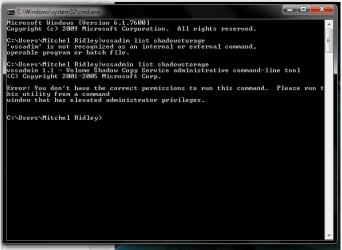
hey thanks for the reply but i was not allowed acess to the thing in cmd so i posted a screenshot hope the help


btw i can't see the 50gb anywhere so i cant assign a drive letter
 

Attachments

  • screenshot.png
    screenshot.png
    13.5 KB · Views: 81

My Computer

Computer Manufacturer/Model Number
compaq presario cq71 125sa
OS
windows 7 home prem 32 bit
CPU
T4200
Memory
4 gb
Graphics Card(s)
Mobile intel 4 series express chipset family
Monitor(s) Displays
17'' 1080p
Hard Drives
250gb
this is for jk disk management and my computer
 

Attachments

  • Untitled.jpg
    Untitled.jpg
    75.5 KB · Views: 92

My Computer

Computer Manufacturer/Model Number
compaq presario cq71 125sa
OS
windows 7 home prem 32 bit
CPU
T4200
Memory
4 gb
Graphics Card(s)
Mobile intel 4 series express chipset family
Monitor(s) Displays
17'' 1080p
Hard Drives
250gb
thanks that helped but its quite unfair that we pay for more and get less but i suppose thats life
 

My Computer

Computer Manufacturer/Model Number
compaq presario cq71 125sa
OS
windows 7 home prem 32 bit
CPU
T4200
Memory
4 gb
Graphics Card(s)
Mobile intel 4 series express chipset family
Monitor(s) Displays
17'' 1080p
Hard Drives
250gb
hey thanks for the reply but i was not allowed acess to the thing in cmd so i posted a screenshot hope the help


btw i can't see the 50gb anywhere so i cant assign a drive letter


1. You did not run cmd in elevated mode. You apparently did not follow my instructions. If you do, it will work.
2. There is no drive letter to be assigned. The 50GB (if it is the assigned shadowstorage) are part of C.
3. Plus have a look of what Theog posted. The 50GB missing is probably only 40GB because of the binary versus decimal counting.
 

My Computer

Computer Manufacturer/Model Number
HP, Dell, Gateway, Toshiba - 4 laptops and 2 desktops
OS
Vista, Windows7, Mint Mate, Zorin, Windows 8
CPU
from 1.6GHz Duo to i7
Monitor(s) Displays
2x HP w2207
Hard Drives
5x HDD, 7x SSD, 12x Externals
Keyboard
with trackball - no mices
Mouse
Trackball mice
Internet Speed
DSL 6000
but this still means there still 30gb missing

any more suggestion will great
 

My Computer

Computer Manufacturer/Model Number
compaq presario cq71 125sa
OS
windows 7 home prem 32 bit
CPU
T4200
Memory
4 gb
Graphics Card(s)
Mobile intel 4 series express chipset family
Monitor(s) Displays
17'' 1080p
Hard Drives
250gb
thanks that helped but its quite unfair that we pay for more and get less but i suppose thats life


Not so - 100GB in decimal and 93GB in binary are the same thing. They are both 100 billion bytes. It is just another currency because 1KB is 1000 bytes in decimal and 1024 bytes in binary.
 

My Computer

Computer Manufacturer/Model Number
HP, Dell, Gateway, Toshiba - 4 laptops and 2 desktops
OS
Vista, Windows7, Mint Mate, Zorin, Windows 8
CPU
from 1.6GHz Duo to i7
Monitor(s) Displays
2x HP w2207
Hard Drives
5x HDD, 7x SSD, 12x Externals
Keyboard
with trackball - no mices
Mouse
Trackball mice
Internet Speed
DSL 6000
but this still means there still 30gb missing

any more suggestion will great


I give up. You are not following me.
 

My Computer

Computer Manufacturer/Model Number
HP, Dell, Gateway, Toshiba - 4 laptops and 2 desktops
OS
Vista, Windows7, Mint Mate, Zorin, Windows 8
CPU
from 1.6GHz Duo to i7
Monitor(s) Displays
2x HP w2207
Hard Drives
5x HDD, 7x SSD, 12x Externals
Keyboard
with trackball - no mices
Mouse
Trackball mice
Internet Speed
DSL 6000
right sorry i will try that now


btw way i thought it would be ok cos im the adim
 

My Computer

Computer Manufacturer/Model Number
compaq presario cq71 125sa
OS
windows 7 home prem 32 bit
CPU
T4200
Memory
4 gb
Graphics Card(s)
Mobile intel 4 series express chipset family
Monitor(s) Displays
17'' 1080p
Hard Drives
250gb
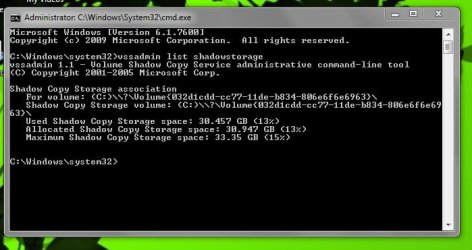
right sorry again i did what you said


so heres a screenshot
 

Attachments

  • cmd.jpg
    cmd.jpg
    37.7 KB · Views: 30

My Computer

Computer Manufacturer/Model Number
compaq presario cq71 125sa
OS
windows 7 home prem 32 bit
CPU
T4200
Memory
4 gb
Graphics Card(s)
Mobile intel 4 series express chipset family
Monitor(s) Displays
17'' 1080p
Hard Drives
250gb
so what shall i do now plz

or will i have to stick with the 30gb for the system restore
or can i change it to 10gb or 15gb
also is it possible to change the directory of the location to my removable hdd
 
Last edited:

My Computer

Computer Manufacturer/Model Number
compaq presario cq71 125sa
OS
windows 7 home prem 32 bit
CPU
T4200
Memory
4 gb
Graphics Card(s)
Mobile intel 4 series express chipset family
Monitor(s) Displays
17'' 1080p
Hard Drives
250gb
thanks that helped but its quite unfair that we pay for more and get less but i suppose thats life


Not so - 100GB in decimal and 93GB in binary are the same thing. They are both 100 billion bytes. It is just another currency because 1KB is 1000 bytes in decimal and 1024 bytes in binary.


Yeah he is right.

My HD is the same way. It says I got 250 Gigs but I only got like 232.8 gigs.
 

My Computer

Computer Manufacturer/Model Number
acer 5720z
OS
Xp, Vista, 7
CPU
intel Pentium Dual Core
Motherboard
Acer
Memory
2 gig
Graphics Card(s)
Intel 965 chipset
Sound Card
integrated
Monitor(s) Displays
Laptop Display
Screen Resolution
1280 x 800
Hard Drives
Western Digital 250 Gig
Case
Laptop
Cooling
fan
Keyboard
Laptop
Mouse
HP wireless
Internet Speed
depends
so what shall i do now plz

or will i have to stick with the 30gb for the system restore
or can i change it to 10gb or 15gb
also is it possible to change the directory of the location to my removable hdd


You can change it with third party software, I recommend not doing it though. It holds information so it can repair windows if it messes up.
 

My Computer

Computer Manufacturer/Model Number
acer 5720z
OS
Xp, Vista, 7
CPU
intel Pentium Dual Core
Motherboard
Acer
Memory
2 gig
Graphics Card(s)
Intel 965 chipset
Sound Card
integrated
Monitor(s) Displays
Laptop Display
Screen Resolution
1280 x 800
Hard Drives
Western Digital 250 Gig
Case
Laptop
Cooling
fan
Keyboard
Laptop
Mouse
HP wireless
Internet Speed
depends
so what shall i do now plz

or will i have to stick with the 30gb for the system restore
or can i change it to 10gb or 15gb
also is it possible to change the directory of the location to my removable hdd


OK now that you know how to operate cmd correctly (always follow guidance), let me tell you what you can do. If you want 10GBs of shadowstorage (that's where the restore points are being kept), paste the following command into the cmd window and hit Enter.

vssadmin Resize ShadowStorage /For=C: /On=C: /MaxSize=10GB


You will lose your current restore points in the process though. But you will soon have new ones. I personally would not reduce the shadowstorage until you reall need the space. It is always good to have as many restore points as possible - and figure up to 1GB per restore point.
Besides, there is no way to move the shadowstorage to another volume. It always belongs on the volume for which the shadows (restore points) are being taken.
 

My Computer

Computer Manufacturer/Model Number
HP, Dell, Gateway, Toshiba - 4 laptops and 2 desktops
OS
Vista, Windows7, Mint Mate, Zorin, Windows 8
CPU
from 1.6GHz Duo to i7
Monitor(s) Displays
2x HP w2207
Hard Drives
5x HDD, 7x SSD, 12x Externals
Keyboard
with trackball - no mices
Mouse
Trackball mice
Internet Speed
DSL 6000
xxx
 
Last edited:

My Computer

OS
Windows 7
Use partition magic or similar program to get the drive space back.

I wish you would stop those unqualified posts that do not contribute to the solution of the OP's problem.
 

My Computer

Computer Manufacturer/Model Number
HP, Dell, Gateway, Toshiba - 4 laptops and 2 desktops
OS
Vista, Windows7, Mint Mate, Zorin, Windows 8
CPU
from 1.6GHz Duo to i7
Monitor(s) Displays
2x HP w2207
Hard Drives
5x HDD, 7x SSD, 12x Externals
Keyboard
with trackball - no mices
Mouse
Trackball mice
Internet Speed
DSL 6000
Back
Top