
Solved HDD order has changed after system restore....

Katanyavich

Banned
Local time
10:23 AM
Messages
100
Location
Canberra, Australia
My machine is an Acer AS8951 (see my System specs).

I inadvertently used the wrong system image while restoring (from my AS5735) and now my HDD order seems to be scrambled.

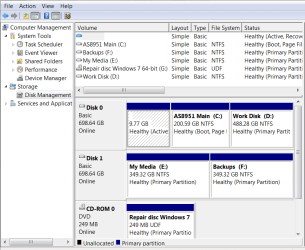
They show up correctly in Disk Management, and in Easeus Partition Manager, but System Restore no longer works, and, when doing a System Restore, Windows insists that it is on the D:/ partition, but S/R still works.

The OEM partition and recovery partition are on the same physical disk as Windows
(OEM; Rec Partition; C:/ and D:/ on Disk 0, and E:/ and F:/ on disk 1, according to Disk Management.

Apart from that, the machine boots and runs just fine.

Obviously the bad restore was to blame, and I really would like to fix this ASAP.

Any suggestions?

Thanks....


Kat.


EDIT: - Deleting and rebuilding the partitions doesn't help, nor does a clean re-install of Windows.

I do NOT have the Acer recovery disks, so that solution is out.
 
Last edited:

My Computer

Computer Manufacturer/Model Number
Acer Aspire Ethos 8951G
OS
Windows 7 Home Premium 64-bit
CPU
i7-2670QM @ 2.2/3.2 Ghz
Motherboard
Acer
Memory
8 Gb DDR3
Graphics Card(s)
Ge-Force GT555M 2 Gb
Sound Card
Onboard w/Dolby 5/1
Hard Drives
2x750GB onboard. 640GB pocket drive, 1x2TB Seagate external, 1x500GB Seagate external.
Deleting and rebuilding the partitions doesn't help, nor does a clean re-install of Windows.

Can you provide more details on this point.

I am surprised that a "clean re-install of Windows" did not help.

What type of disk did you use for the reinstall and did you delete all partitions when given the opportunity?

Did you have only 1 drive connected during the reinstall?

You might try the "clean" command on the disc from Diskpart during the install.
 

My Computer

Computer type
PC/Desktop
Computer Manufacturer/Model Number
Ignatz Special; 4 speed manual gearbox; factory air conditioning; one of one
OS
Windows 7 Home Premium SP1, 64-bit
CPU
Intel Skylake i5-6600K, not overclocked
Motherboard
AsRock Z170M Extreme 4, micro ATX
Memory
8 GB HyperX DDR4-2666 (2 x 4 GB)
Graphics Card(s)
none; graphics are integrated on CPU
Sound Card
onboard: Realtek ALC1150; external: USB Behringer UF0-202
Monitor(s) Displays
Dell S2340M 23 inch IPS
Screen Resolution
1600 x 900
Hard Drives
System: Crucial MX100 series SSD, 128 GB;
Data: Samsung Spinpoint 103SJ, 1 TB;
Backup: WD Caviar Green WD30EZRX-00D8PB0, 3 TB
PSU
Rosewill SilentNight 500 watt fanless, semi-modular
Case
Antec Solo II
Cooling
Noctua NH-U12S; Noctua F12 intake, Noctua S12A exhaust
Keyboard
Microsoft 200 6JH-00001 USB
Mouse
Dell or Microsoft optical wired; USB
Antivirus
Microsoft Security Essentials and Malwarebytes Premium
Browser
Pale Moon
Other Info
All fans PWM; speeds at idle: CPU circa 500 rpm; intake circa 600 rpm; exhaust circa 600 rpm; CPU temps 27 idle and 47 C load in a warm room (27 C/81 F) when running Intel Extreme Tuning Utility stress test.
Deleting and rebuilding the partitions doesn't help, nor does a clean re-install of Windows.

Can you provide more details on this point.

I am surprised that a "clean re-install of Windows" did not help.

What type of disk did you use for the reinstall and did you delete all partitions when given the opportunity?

Did you have only 1 drive connected during the reinstall?

You might try the "clean" command on the disc from Diskpart during the install.


The re-install was from a legit Win 7 64-bit disk.

I deleted and reset the partitions to their default (2x750GB Toshiba SATA disks
with one partition each) on installation. No other (external) disks were present.

I have also reset the BIOS to its default state, also with no success. Neither MSE nor MalwareBytes indicate any issues.

It SEEMS as if disk 0 has become disk 1, and vice-versa, altho the recovery partition appears to still be on disk 0 with windows. I cannot access it even with a startup disk, altho the option is there everything is greyed-out. So I presume the recovery partition is 'toast'.
 

My Computer

Computer Manufacturer/Model Number
Acer Aspire Ethos 8951G
OS
Windows 7 Home Premium 64-bit
CPU
i7-2670QM @ 2.2/3.2 Ghz
Motherboard
Acer
Memory
8 Gb DDR3
Graphics Card(s)
Ge-Force GT555M 2 Gb
Sound Card
Onboard w/Dolby 5/1
Hard Drives
2x750GB onboard. 640GB pocket drive, 1x2TB Seagate external, 1x500GB Seagate external.
I'm confused.

You say "2 x 750 Toshiba SATA disks with one partition each".

If I was installing Windows, I would have ONLY ONE disk connected. I assume you had 2 connected if I understand you correctly?

I'd try again, with just the disk that will receive Windows connected. Wipe all partitions from it by choosing "drive options, advanced" when you come to the "where do you want to install Windows" screen.

Don't reconnect drive 2 until all is well.

If all is not well after that attempt, I might then use "clean" in Diskpart.

Ideally, you would want the Windows drive to show up as "Disk 0" in Windows Disk Management. You should be able to control that by choosing the right SATA port on the motherboard for the drive cable connection.
 

My Computer

Computer type
PC/Desktop
Computer Manufacturer/Model Number
Ignatz Special; 4 speed manual gearbox; factory air conditioning; one of one
OS
Windows 7 Home Premium SP1, 64-bit
CPU
Intel Skylake i5-6600K, not overclocked
Motherboard
AsRock Z170M Extreme 4, micro ATX
Memory
8 GB HyperX DDR4-2666 (2 x 4 GB)
Graphics Card(s)
none; graphics are integrated on CPU
Sound Card
onboard: Realtek ALC1150; external: USB Behringer UF0-202
Monitor(s) Displays
Dell S2340M 23 inch IPS
Screen Resolution
1600 x 900
Hard Drives
System: Crucial MX100 series SSD, 128 GB;
Data: Samsung Spinpoint 103SJ, 1 TB;
Backup: WD Caviar Green WD30EZRX-00D8PB0, 3 TB
PSU
Rosewill SilentNight 500 watt fanless, semi-modular
Case
Antec Solo II
Cooling
Noctua NH-U12S; Noctua F12 intake, Noctua S12A exhaust
Keyboard
Microsoft 200 6JH-00001 USB
Mouse
Dell or Microsoft optical wired; USB
Antivirus
Microsoft Security Essentials and Malwarebytes Premium
Browser
Pale Moon
Other Info
All fans PWM; speeds at idle: CPU circa 500 rpm; intake circa 600 rpm; exhaust circa 600 rpm; CPU temps 27 idle and 47 C load in a warm room (27 C/81 F) when running Intel Extreme Tuning Utility stress test.
It's a laptop.

The drives are internal, not attached external drives.

It's definitely booting from disk 0, ascertained by changing the boot order in the BIOS.

The OEM partition no longer exists, the bad sys-restore killed it. The recovery partition is still there. Would ditching the Recovery partition help, do you reckon?

See below....

Capture 1.PNG

Capture2.PNG
 

My Computer

Computer Manufacturer/Model Number
Acer Aspire Ethos 8951G
OS
Windows 7 Home Premium 64-bit
CPU
i7-2670QM @ 2.2/3.2 Ghz
Motherboard
Acer
Memory
8 Gb DDR3
Graphics Card(s)
Ge-Force GT555M 2 Gb
Sound Card
Onboard w/Dolby 5/1
Hard Drives
2x750GB onboard. 640GB pocket drive, 1x2TB Seagate external, 1x500GB Seagate external.
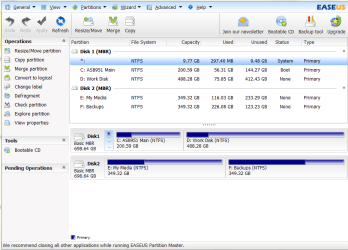
I assume the "recovery partition" is the 9.77 GB partition?

I'd doubt it is the problem, but if you don't want it, delete it.

I'd start over as I said in previous post.

Connect only one drive to port 0.

Disconnect other drive completely.

Reinstall, deleting ALL partitions (assuming you don't care about the recovery partition).

Make a partition structure of your own choosing. I'd probably use 80 or 100 GB for C and all the remainder for data (D or whatever).
 

My Computer

Computer type
PC/Desktop
Computer Manufacturer/Model Number
Ignatz Special; 4 speed manual gearbox; factory air conditioning; one of one
OS
Windows 7 Home Premium SP1, 64-bit
CPU
Intel Skylake i5-6600K, not overclocked
Motherboard
AsRock Z170M Extreme 4, micro ATX
Memory
8 GB HyperX DDR4-2666 (2 x 4 GB)
Graphics Card(s)
none; graphics are integrated on CPU
Sound Card
onboard: Realtek ALC1150; external: USB Behringer UF0-202
Monitor(s) Displays
Dell S2340M 23 inch IPS
Screen Resolution
1600 x 900
Hard Drives
System: Crucial MX100 series SSD, 128 GB;
Data: Samsung Spinpoint 103SJ, 1 TB;
Backup: WD Caviar Green WD30EZRX-00D8PB0, 3 TB
PSU
Rosewill SilentNight 500 watt fanless, semi-modular
Case
Antec Solo II
Cooling
Noctua NH-U12S; Noctua F12 intake, Noctua S12A exhaust
Keyboard
Microsoft 200 6JH-00001 USB
Mouse
Dell or Microsoft optical wired; USB
Antivirus
Microsoft Security Essentials and Malwarebytes Premium
Browser
Pale Moon
Other Info
All fans PWM; speeds at idle: CPU circa 500 rpm; intake circa 600 rpm; exhaust circa 600 rpm; CPU temps 27 idle and 47 C load in a warm room (27 C/81 F) when running Intel Extreme Tuning Utility stress test.
Thanks, I'll give that a shot and let you know how I go.
 

My Computer

Computer Manufacturer/Model Number
Acer Aspire Ethos 8951G
OS
Windows 7 Home Premium 64-bit
CPU
i7-2670QM @ 2.2/3.2 Ghz
Motherboard
Acer
Memory
8 Gb DDR3
Graphics Card(s)
Ge-Force GT555M 2 Gb
Sound Card
Onboard w/Dolby 5/1
Hard Drives
2x750GB onboard. 640GB pocket drive, 1x2TB Seagate external, 1x500GB Seagate external.
Have disconnected disk 1, and am currently installing on disk 0.

All partitions were deleted, and am installing on a single partition.

So far, so good.

I'll keep you informed.

Thanks again.

Kat.
 

My Computer

Computer Manufacturer/Model Number
Acer Aspire Ethos 8951G
OS
Windows 7 Home Premium 64-bit
CPU
i7-2670QM @ 2.2/3.2 Ghz
Motherboard
Acer
Memory
8 Gb DDR3
Graphics Card(s)
Ge-Force GT555M 2 Gb
Sound Card
Onboard w/Dolby 5/1
Hard Drives
2x750GB onboard. 640GB pocket drive, 1x2TB Seagate external, 1x500GB Seagate external.

My Computer

Computer type
PC/Desktop
Computer Manufacturer/Model Number
Own build
OS
Windows 7x64 Home Premium SP1
CPU
Intel i7 2600k
Motherboard
ASUS P8Z68 Deluxe
Memory
G.Skill Ripjaws (DDR3-1600) 2x4GB
Graphics Card(s)
Nvidia GeForce GTS 450; Intel HD Graphics 3000(GT2+)
Monitor(s) Displays
Dell Ultrasharp IPS panel U2311H, Samsung SyncMaster P2350
Screen Resolution
1920x1080
Hard Drives
Samsung 850 Pro SSD 256GB, Samsung SSD 840 120GB, Seagates 1TB Barracuda ST31000528AS x2
PSU
Seasonic M12II 520W
Case
Lian Li Lancool PC-K60
Cooling
Case: 1x120mm, 3x140mm CPU: Hyper 212+
Keyboard
Logitech MK520 (wireless)
Mouse
Logitech MK520
Internet Speed
6-7 Mbps
Antivirus
Norton Security Premium, Malwarebytes on 2 (MSE on 3rd PC)
Browser
FireFox
Other Info
Audio: Logitech Z523 2.1
That did the trick!

Re-connected drive 1 after the reinstall, re-partitioned both drives and restored backups of my files.

All is good (touch wood!) and both System Restore and Image Restore are working again.

Thanks again!
 

My Computer

Computer Manufacturer/Model Number
Acer Aspire Ethos 8951G
OS
Windows 7 Home Premium 64-bit
CPU
i7-2670QM @ 2.2/3.2 Ghz
Motherboard
Acer
Memory
8 Gb DDR3
Graphics Card(s)
Ge-Force GT555M 2 Gb
Sound Card
Onboard w/Dolby 5/1
Hard Drives
2x750GB onboard. 640GB pocket drive, 1x2TB Seagate external, 1x500GB Seagate external.
Back
Top