HDD partition turned RAW!!!

Dreck

New member
Local time
7:13 PM
Messages
26
Hi everyone,

I have one internal HDD with five partitions that I am using it as external HDD using SATA to USB casing. It is from my previous laptop which is dead long ago. Till now the HDD was working fine but last night 2 of the partitions turned RAW. Its asking me to format the partitions but I don't want to because I have some important files in those partitions. I am using win 7 x64. I tried connecting this HDD to another computer with win 7 but same problem persists. Till now I have not tried any software to recover it coz they may damage them further. Below is the screenshot from disk management.

Capture.JPG

In the above screenshot, drive G: and J: are inaccessible now. Is there any chance to restore the partitions or atleast recover the files with original folder structure?
 

My Computer

OS
win 7
Try running the Partition Recovery Wizard in MiniTools Partition Wizard Home Edition Best Free Partition Manager Freeware and free partition magic for Windows 7, Windows 8, Windows Vista and Windows XP 32 bit & 64 bit. MiniTool Free Partition Manager Software Home Edition.

It should be able to rewrite the missing partition info into the first sector and recover the partition.

Help here: Proceed to the topic Recovery with Partition Wizard: SanDisk Cruzer Blade 16GB in http://www.sevenforums.com/software...ive-turned-raw-partition-wizard-testdisk.html (In your case it will be the external HDD)
 

My Computer

OS
Windows 7 Home Premium 32 bit
Try running the Partition Recovery Wizard in MiniTools Partition Wizard Home Edition Best Free Partition Manager Freeware and free partition magic for Windows 7, Windows 8, Windows Vista and Windows XP 32 bit & 64 bit. MiniTool Free Partition Manager Software Home Edition.

It should be able to rewrite the missing partition info into the first sector and recover the partition.

Help here: Proceed to the topic Recovery with Partition Wizard: SanDisk Cruzer Blade 16GB in http://www.sevenforums.com/software...ive-turned-raw-partition-wizard-testdisk.html (In your case it will be the external HDD)

Thanks for replying

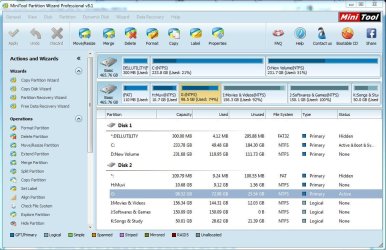
In minitools partition wizard, it didn't detect any problem. It is showing that all the partitions are fine. And the good thing is that I can see all the files in that two partitions and now I am sure that the files are fine and recoverable.

Capture1.JPG

But still in windows disk management, it is showing filesystem as RAW. I ran "partition recovery wizard" in minitools PW but as it is not detecting any error, there is nothing to "apply. What should I do now?

And one more thing, a wierd thing is happening with minitools PW. If I try to do surface test on any partition(even good partitions), as soon as I press the "start now" button, the software crashes without any warning or error.
 

My Computer

OS
win 7
Partition Wizard still sees it as NTFS... all looks fine. Doubleclik the partition G and J in partition wizard. Does it show the files?

G: 25GB free. Is that correct?
J: 0Bytes free. Is that correct?

I think the partition's $MFT and/or NTFS boot sector is corrupt. It's not the partition table itself that is corrupt!! Rebuilding the MBR doesn't fix this.

Try in http://www.sevenforums.com/tutorials/783-elevated-command-prompt.html :
Code:
chkdsk/f  G:
chkdsk/f  J:

There were problems on disk? If so, fixed? Run it again to prove. Why is G disk marked ACTIVE?
 

My Computer

Computer type
Laptop
Computer Manufacturer/Model Number
ACER ASPIRE 5742G
OS
Microsoft Windows 7 Home Premium 64-bits 7601 Multiprocessor Free Service Pack 1
CPU
Intel(R) Core(TM) i3 CPU M 370 @ 2.40GHz
Motherboard
Acer Aspire 5742G
Memory
4,00 GB
Graphics Card(s)
ATI Mobility Radeon HD 5400 Series
Sound Card
(1) AMD High Definition Audio Device (2) Realtek High Defi
Screen Resolution
1366 x 768 x 32 bits (4294967296 colors) @ 60 Hz
Hard Drives
WDC WD5000BEVT-22ZAT0
Partition Wizard still sees it as NTFS... all looks fine. Doubleclik the partition G and J in partition wizard. Does it show the files?

G: 25GB free. Is that correct?
J: 0Bytes free. Is that correct?

I think the partition's $MFT and/or NTFS boot sector is corrupt. It's not the partition table itself that is corrupt!! Rebuilding the MBR doesn't fix this.

Try in http://www.sevenforums.com/tutorials/783-elevated-command-prompt.html :
Code:
chkdsk/f  G:
chkdsk/f  J:
There were problems on disk? If so, fixed? Run it again to prove. Why is G disk marked ACTIVE?

Yes, I can see all my files with correct folder structure.

G: 25GB free. Correct
J: 0bytes free. Incorrect. Atleast 30GB was free.

I am performing chkdsk on g: and I am getting errors like "File record segment 45198 is unreadable." Its been half an hour and only two percent is completed.

As I already told this HDD is from my old laptop and g: was the partition in which os was installed. I didn't formatted it till now so maybe this is the reason for being marked "Active".
 

My Computer

OS
win 7
So G has severe errors. J as well I assume (you test that later).

G: Most likely NTFS boot sector is correct. I think $MFT is corrupt... turns disk to RAW.
J: free space is listed wrong. NTFS boot sector is corrupt(?)... turns disk to RAW.

H, I, K are still healthy. Backup H, I and K asap!!!
 

My Computer

Computer type
Laptop
Computer Manufacturer/Model Number
ACER ASPIRE 5742G
OS
Microsoft Windows 7 Home Premium 64-bits 7601 Multiprocessor Free Service Pack 1
CPU
Intel(R) Core(TM) i3 CPU M 370 @ 2.40GHz
Motherboard
Acer Aspire 5742G
Memory
4,00 GB
Graphics Card(s)
ATI Mobility Radeon HD 5400 Series
Sound Card
(1) AMD High Definition Audio Device (2) Realtek High Defi
Screen Resolution
1366 x 768 x 32 bits (4294967296 colors) @ 60 Hz
Hard Drives
WDC WD5000BEVT-22ZAT0
Watch chkdsk output for lines like:
Code:
Usn Journal verification completed.
Correcting errors in the Master File Table (MFT) mirror.
Correcting errors in the master file table's (MFT) BITMAP attribute.
Correcting errors in the Volume Bitmap.
Windows has made corrections to the file system.
 

My Computer

Computer type
Laptop
Computer Manufacturer/Model Number
ACER ASPIRE 5742G
OS
Microsoft Windows 7 Home Premium 64-bits 7601 Multiprocessor Free Service Pack 1
CPU
Intel(R) Core(TM) i3 CPU M 370 @ 2.40GHz
Motherboard
Acer Aspire 5742G
Memory
4,00 GB
Graphics Card(s)
ATI Mobility Radeon HD 5400 Series
Sound Card
(1) AMD High Definition Audio Device (2) Realtek High Defi
Screen Resolution
1366 x 768 x 32 bits (4294967296 colors) @ 60 Hz
Hard Drives
WDC WD5000BEVT-22ZAT0
So should I wait for chkdsk to complete before taking backup?

I can still see the files in both partitions through minitools partition wizard, can't I backup those files somehow?

I am using a cheap nonbranded HDD casing, is this casing responsible for these problems?
 

My Computer

OS
win 7
So should I wait for chkdsk to complete before taking backup?

I can still see the files in both partitions through minitools partition wizard, can't I backup those files somehow?

I am using a cheap nonbranded HDD casing, is this casing responsible for these problems?

chkdsk/f I: takes hours as well?

cheap casing... should be fine I think.
 

My Computer

Computer type
Laptop
Computer Manufacturer/Model Number
ACER ASPIRE 5742G
OS
Microsoft Windows 7 Home Premium 64-bits 7601 Multiprocessor Free Service Pack 1
CPU
Intel(R) Core(TM) i3 CPU M 370 @ 2.40GHz
Motherboard
Acer Aspire 5742G
Memory
4,00 GB
Graphics Card(s)
ATI Mobility Radeon HD 5400 Series
Sound Card
(1) AMD High Definition Audio Device (2) Realtek High Defi
Screen Resolution
1366 x 768 x 32 bits (4294967296 colors) @ 60 Hz
Hard Drives
WDC WD5000BEVT-22ZAT0
So should I wait for chkdsk to complete before taking backup?

I can still see the files in both partitions through minitools partition wizard, can't I backup those files somehow?

I am using a cheap nonbranded HDD casing, is this casing responsible for these problems?
disk2 has about 300GB in use. I advise you to backup H,I,K by backup software.
Afterwards try to backup G. Try to backup J.

Maybe better to clone G and J sector-by-sector and ignore read errors(?)
For the time being try to remove the "RAW" disk and make it NTFS.
 

My Computer

Computer type
Laptop
Computer Manufacturer/Model Number
ACER ASPIRE 5742G
OS
Microsoft Windows 7 Home Premium 64-bits 7601 Multiprocessor Free Service Pack 1
CPU
Intel(R) Core(TM) i3 CPU M 370 @ 2.40GHz
Motherboard
Acer Aspire 5742G
Memory
4,00 GB
Graphics Card(s)
ATI Mobility Radeon HD 5400 Series
Sound Card
(1) AMD High Definition Audio Device (2) Realtek High Defi
Screen Resolution
1366 x 768 x 32 bits (4294967296 colors) @ 60 Hz
Hard Drives
WDC WD5000BEVT-22ZAT0
Watch chkdsk output for lines like:
Code:
Usn Journal verification completed.
Correcting errors in the Master File Table (MFT) mirror.
Correcting errors in the master file table's (MFT) BITMAP attribute.
Correcting errors in the Volume Bitmap.
Windows has made corrections to the file system.

I am not getting any of these lines. Instead I am getting these at some places
Code:
Deleted corrupt attribute list entry
with type code 128 in file 64892.
 

My Computer

OS
win 7
How many percent is the process now? Let's wait till it's finished
 

My Computer

Computer type
Laptop
Computer Manufacturer/Model Number
ACER ASPIRE 5742G
OS
Microsoft Windows 7 Home Premium 64-bits 7601 Multiprocessor Free Service Pack 1
CPU
Intel(R) Core(TM) i3 CPU M 370 @ 2.40GHz
Motherboard
Acer Aspire 5742G
Memory
4,00 GB
Graphics Card(s)
ATI Mobility Radeon HD 5400 Series
Sound Card
(1) AMD High Definition Audio Device (2) Realtek High Defi
Screen Resolution
1366 x 768 x 32 bits (4294967296 colors) @ 60 Hz
Hard Drives
WDC WD5000BEVT-22ZAT0
Do a "surface check" with partition wizard bootable CD. Of course boot from it. This proves the disk is faulty or not.
You have an external drive with lots of free space? If so backup H, I, K asap.
 

My Computer

Computer type
Laptop
Computer Manufacturer/Model Number
ACER ASPIRE 5742G
OS
Microsoft Windows 7 Home Premium 64-bits 7601 Multiprocessor Free Service Pack 1
CPU
Intel(R) Core(TM) i3 CPU M 370 @ 2.40GHz
Motherboard
Acer Aspire 5742G
Memory
4,00 GB
Graphics Card(s)
ATI Mobility Radeon HD 5400 Series
Sound Card
(1) AMD High Definition Audio Device (2) Realtek High Defi
Screen Resolution
1366 x 768 x 32 bits (4294967296 colors) @ 60 Hz
Hard Drives
WDC WD5000BEVT-22ZAT0
Would rather advise OP to just copy all data in H,I,K to another drive without using any backup software.Can't understand why he should use a backup software for that.
 

My Computer

OS
Windows 7 Home Premium 32 bit
Would rather advise OP to just copy all data in H,I,K to another drive without using any backup software.Can't understand why he should use a backup software for that.
How will that preserve all permissions, file owners and eventually junction points? Don't know if the OP cares about that, but security isn't without reason.
 

My Computer

Computer type
Laptop
Computer Manufacturer/Model Number
ACER ASPIRE 5742G
OS
Microsoft Windows 7 Home Premium 64-bits 7601 Multiprocessor Free Service Pack 1
CPU
Intel(R) Core(TM) i3 CPU M 370 @ 2.40GHz
Motherboard
Acer Aspire 5742G
Memory
4,00 GB
Graphics Card(s)
ATI Mobility Radeon HD 5400 Series
Sound Card
(1) AMD High Definition Audio Device (2) Realtek High Defi
Screen Resolution
1366 x 768 x 32 bits (4294967296 colors) @ 60 Hz
Hard Drives
WDC WD5000BEVT-22ZAT0
Let him just copy one folder/file to another external drive and check whether he can read it. If he is not able to then we can think of the permission problem if it arises.
 

My Computer

OS
Windows 7 Home Premium 32 bit
I was performing chkdsk on g: which was showing many read errors so I gave up and shut down the system for last 3 hours. Just now I checked my HDD again and I dont know what happened but my both partitions are accessible now. :party:

I didn't even performed chkdsk on j: even though it is accessible now. BTW I am getting cyclic redundancy error(read error) while copying some files from g: but j: is working fine.

Thanx everyone for helping, I will let you know if this HDD again creates the problem.
 

My Computer

OS
win 7
Do a surface check! Or use disk manufacturer's diagnostics program. I think disk is dying. CRC errors means hardware errors. Or memory is faulty (quite unlikely if all other disks work without problems).

Make backup/copy all files from faulty drive before you're too late.
 

My Computer

Computer type
Laptop
Computer Manufacturer/Model Number
ACER ASPIRE 5742G
OS
Microsoft Windows 7 Home Premium 64-bits 7601 Multiprocessor Free Service Pack 1
CPU
Intel(R) Core(TM) i3 CPU M 370 @ 2.40GHz
Motherboard
Acer Aspire 5742G
Memory
4,00 GB
Graphics Card(s)
ATI Mobility Radeon HD 5400 Series
Sound Card
(1) AMD High Definition Audio Device (2) Realtek High Defi
Screen Resolution
1366 x 768 x 32 bits (4294967296 colors) @ 60 Hz
Hard Drives
WDC WD5000BEVT-22ZAT0
That is good news really. I was actually wondering how all of a sudden only G which was your active system drive previously and then J a totally unconnected logical drive can turn RAW. When Partition Wizard showed everything fine and you were also able to explore the partitions and see the folders/files, I was about to suggest that you copy all accessible data in all the partitions to another drive before doing any manipulations on the drive by which time Kaktus entered.

As a matter of fact once you removed the HDD from the lappy and put it inside an enclosure, you should have copied all data in it to another drive, completely wiped the disk and repartitioned them as you like doing away with the hidden partition and previous active system partition.

You should do it now. Whatever data you can copy to another drive (leaving aside those that give CRC errors) copy it. ( I don't think you are going to get into any permission problems. However since Kaktus brought it, do a test copy as suggested in my previous post and complete the copy.)

After that, run the disk manufacturer's repair/diagnostic utility. Check if it repairs any bad sectors and gets you out of the CRC errors. I only hope that most of it will only be your old system files even if it persists..

If your HDD passes the long test and you have nothing else to do, wipe that drive clean ( write all zeros using the manufacturer's utility) and reformat it.However use it only as a backup drive but keep checking the drive's health periodically.
 

My Computer

OS
Windows 7 Home Premium 32 bit
Back
Top