
Before going in win 7 to decide if i have to use AHCI or IDE, I did a test for IDE vs AHCI under winXP 32.
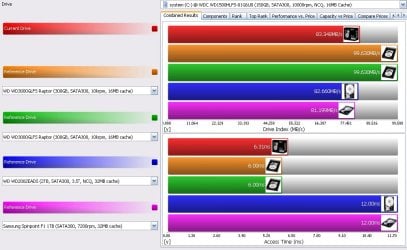
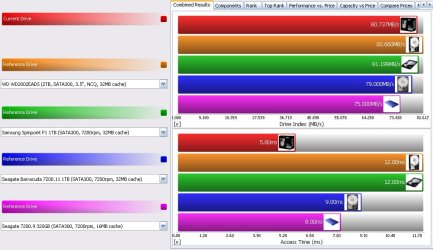
File system benchmark
IDE drive index 83.593 Mb/s
AHCI drive index 80.737 Mb/s
IDE access time 5.93 ms
AHCI access time 5.8 ms
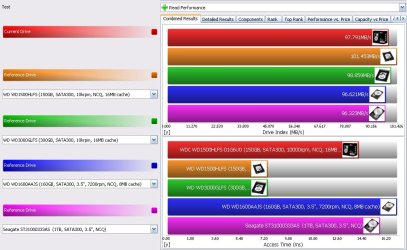
Physical HDD benchmark
IDE drive index 97.791 Mb/s
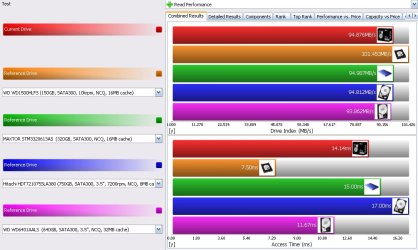
AHCI drive index 94.876 Mb/s
IDE access time 14.20 ms
AHCI access time 14.14 ms
This is the comparision btw IDE & AHCI, but I still have a problem unsolved with the performance of my HDD in comparision to the same time using the sandra sisoft database list. Check the following images:
1-File system benchmark IDE
2-Physical HDD benchmark IDE (read performance)
3-Physical HDD benchmark IDE (write performance)
4-File system benchmark AHCI
5-Physical HDD benchmark AHCI (read performance)
You can see that in both ways, the physical HDD benchmark of my current HDD is always slower than the identical provided by sandra (the orange one in the image 2 & 4), and that the write performance give me always that error (disk is not empty:remove all its partitions and try again), and this error happen on any HDD I have not only the main one.
The same slow benchmarks i got since the day one I assembled my PC, even I did defragmentation and the result stay the same, I tried to put it in AHCI mode and still the same, it's always slower than what it should be, any suggestions here, what did I miss, what should I do to get its best performance.
File system benchmark
IDE drive index 83.593 Mb/s
AHCI drive index 80.737 Mb/s
IDE access time 5.93 ms
AHCI access time 5.8 ms
Physical HDD benchmark
IDE drive index 97.791 Mb/s
AHCI drive index 94.876 Mb/s
IDE access time 14.20 ms
AHCI access time 14.14 ms
This is the comparision btw IDE & AHCI, but I still have a problem unsolved with the performance of my HDD in comparision to the same time using the sandra sisoft database list. Check the following images:
1-File system benchmark IDE
2-Physical HDD benchmark IDE (read performance)
3-Physical HDD benchmark IDE (write performance)
4-File system benchmark AHCI
5-Physical HDD benchmark AHCI (read performance)
You can see that in both ways, the physical HDD benchmark of my current HDD is always slower than the identical provided by sandra (the orange one in the image 2 & 4), and that the write performance give me always that error (disk is not empty:remove all its partitions and try again), and this error happen on any HDD I have not only the main one.
The same slow benchmarks i got since the day one I assembled my PC, even I did defragmentation and the result stay the same, I tried to put it in AHCI mode and still the same, it's always slower than what it should be, any suggestions here, what did I miss, what should I do to get its best performance.
Attachments

My Computer
- OS
- winxp 32

